Merchandising Services
Adobe Commerce as a Cloud Service now supports the composable catalog data model (CCDM) through Merchandising Services. Adobe Commerce Optimizer introduced this data model, and CCDM gives both products a common foundation for serving storefront catalog browsing and merchandising capabilities, while the Commerce Foundation continues to manage products, prices, and transactions.
This topic explains what changes with CCDM, which features continue, and what the change means for merchants, partners, and storefront developers.
What changes does CCDM introduce?
The original catalog model uses Catalog Service to deliver product data to storefronts, with Live Search and Product Recommendations providing search, merchandising, and recommendation capabilities. In this model, Commerce synchronizes using SaaS data export.
With CCDM, these capabilities operate on the same catalog foundation that powers Adobe Commerce Optimizer. Catalog views and policies define the catalog context available to a storefront. Policies determine the product assortment, and merchandising rules can apply across all catalog views or be tailored to a specific view.
This changes how the catalog is configured, accessed, and merchandised. CCDM builds on the original Commerce catalog’s search, recommendations, and merchandising capabilities while introducing controls at the catalog view-level. Additional management and reporting capabilities are described below.
Commerce Foundation remains the canonical source for products and prices. Product and price data synchronize one way to CCDM through a native Adobe Commerce as a Cloud Service integration. Website, store, and store-view configuration remains in Commerce, alongside the existing cart, checkout, and order-management workflows.
Licensing and provisioning
Merchandising Services is included in the existing Adobe Commerce as a Cloud Service SKU. It is not a second product or subscription, and it does not require a separate Adobe Commerce Optimizer purchase, entitlement, or tenant.
Architecture overview
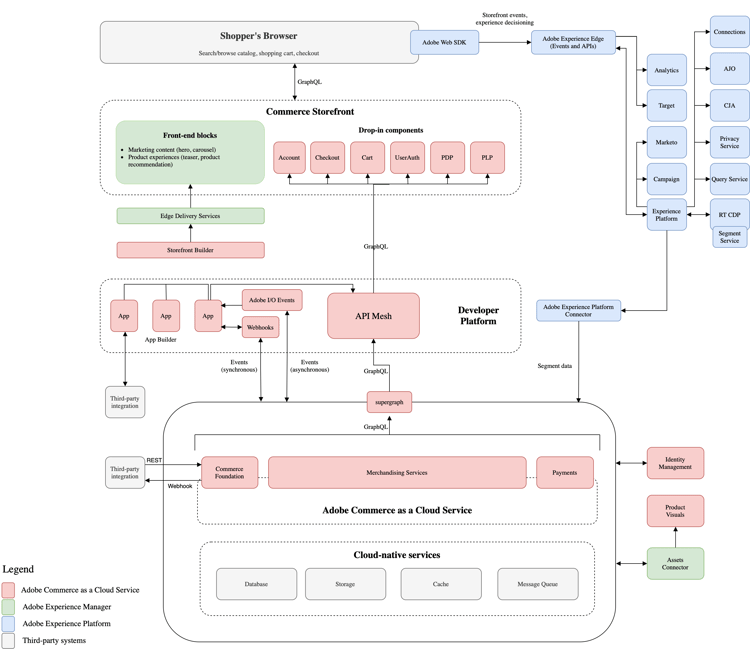
The Commerce Foundation remains the primary record for products and prices and continues to manage transactions. The native integration synchronizes product and price data one way from Commerce to CCDM. You do not install a separate connector or an App Builder app for this synchronization.
Storefronts use CCDM-backed Merchandising Services to retrieve catalog data and context for browsing, search, recommendations, and merchandising. Requests use the catalog context to retrieve products and prices for the intended audience. You continue to manage website, store, and store-view configuration in Commerce.
The following diagram shows the position of Merchandising Services in the broader Adobe Commerce as a Cloud Service architecture.
What’s new for merchants?
The new model lets you scope existing merchandising rules to all catalog views or to a specific view. This lets you apply merchandising to each storefront audience. Learn how to scope a merchandising rule to catalog views.
In the Admin, you can configure catalog context with Catalog Views and Policies. You can also use Success Metrics to review revenue, conversion, engagement, acquisition, and bounce rate. See Success Metrics for details.
Considerations before adoption
Review how the CCDM model affects your licensing, catalog integrations, storefront, and Admin workflows before adopting Merchandising Services.
Catalog management and integrations
Continue managing products and prices in Commerce Foundation. The native integration synchronizes them to CCDM. Do not create a second product catalog for Merchandising Services.
Storefront implementation
How your storefront retrieves catalog data depends on your implementation:
- Adobe Commerce Storefront drop-ins—The drop-ins handle the transition. No code changes are required. See the storefront setup documentation.
- Custom or other storefronts—Update your catalog request headers as described in the header configuration reference.
Review your catalog queries and request headers for the CCDM-based model. Do not assume that existing queries or headers remain unchanged. The Merchandising GraphQL queries differ from queries used in the original catalog-services model. Additional queries support CCDM. Use the Merchandising GraphQL API reference and verify the required catalog context against the storefront header reference.
Third-party apps and extensions
Review third-party apps and extensions that read catalog data or consume catalog events with their provider. Compatibility depends on how each app or extension uses those interfaces.
Admin experience
Adobe Commerce as a Cloud Service with CCDM uses Adobe Unified Experience (Unified Shell). Adobe released Unified Shell separately from CCDM. Existing instances on the original catalog-services model retain access to both Classic and Unified Shell.
Limits
The CCDM model does not change Adobe Commerce as a Cloud Service limits. Sharing a catalog foundation with Optimizer does not mean that Commerce inherits Optimizer capacity or limits.
Availability and migration
Organizations that start with Adobe Commerce as a Cloud Service after this release receive Merchandising Services by default. If your organization requires the original catalog data model, contact your Adobe account team to discuss whether an exception is available.
Organizations that had Adobe Commerce as a Cloud Service before this release can choose either catalog model when provisioning a new instance. By default, the Enable CCDM switcher is disabled. Once CCDM is enabled, you cannot disable it.
Existing instances do not change automatically. At general availability (GA), you cannot migrate an existing original catalog-services instance to Merchandising Services.