Install and access App Management
App Management is available in the Commerce Admin for eligible Commerce instances. Availability depends on your deployment type.
Availability
After meeting the following requirements, select the corresponding tab for your deployment type below, to see whether App Management requires installation or is already available on your instance.
Prerequisites
Before associating an app, ensure you have the following:
-
Adobe Commerce 2.4.8 and later—App Management is included automatically. No installation is required.
-
Adobe Commerce 2.4.5 to 2.4.7—Install the Admin UI SDK (which includes App Management) using Composer:
code language-bash composer require "magento/commerce-backend-sdk": ">=3.3"Then run:
code language-bash composer update bin/magento setup:upgrade bin/magento indexer:reindex bin/magento cache:clean
See Install or update Adobe Commerce Admin UI SDK for more information.
Access App Management
-
Log in to the Commerce Admin.
-
Navigate to Apps > App Management.
The App Management view displays. Here, you can associate, configure, and manage App Builder applications.
Installing App Builder apps
If you need to install an App Builder app from Adobe Exchange (for example, a pre-built integration or marketplace app), see Install App Builder apps from Adobe Exchange for step-by-step instructions.
After an app is installed and deployed, use App Management to associate it with your Commerce instance and configure its settings.
Commerce webhooks and apps
Some App Builder applications use Adobe Commerce webhooks so that Commerce can call your app over HTTP when certain events occur (for example, after a product is saved). Webhook endpoints and subscription logic are defined by the app developer when the application is built and deployed; store administrators do not configure webhooks separately in App Management.
After you associate the app with your Commerce instance and complete any setup instructions from the app, webhook behavior follows the app’s implementation.
If App Management cannot trigger the app’s validation endpoint (for example, the URL is unreachable or the response does not meet requirements), you may see an error similar to the following in the App Management dashboard:
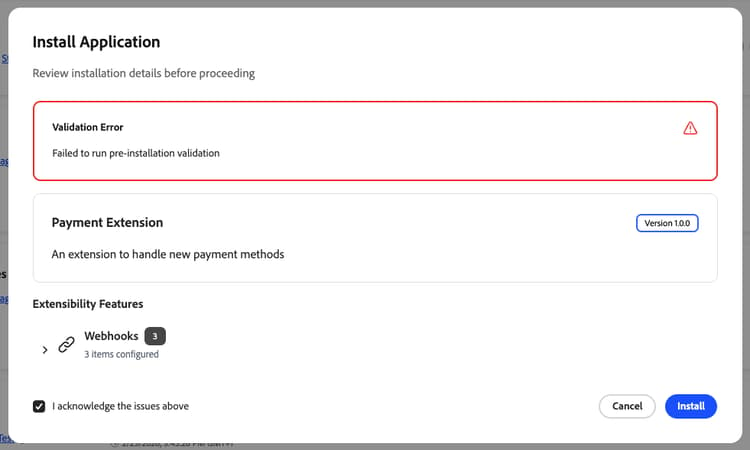
Work with the app developer to correct the webhook configuration or deployment so validation can succeed.
App developers. To implement webhook subscriptions and handler responses from App Builder, see Webhooks in the Commerce Extensibility developer documentation and the @adobe/aio-commerce-lib-webhooks package on GitHub.