Adobe Commerce Optimizer Connector
The Adobe Commerce Optimizer Connector is a native, first-party integration between Adobe Commerce (cloud or on-premises) and Adobe Commerce Optimizer. It synchronizes catalog and pricing data from your Adobe Commerce stores into Commerce Optimizer so you can:
- Power AI-driven product discovery and recommendations
- Run high-performance headless storefronts (including Commerce storefronts powered by Edge Delivery)
- Analyze before and after KPIs and data-sync health in a single place
Commerce remains your system of record for products, prices, and catalog structure. Commerce Optimizer becomes your experience and merchandising layer, serving fast, relevant results to any connected storefront or channel.
Key benefits key-benefits
Connector architecture connector-architecture
The following diagram illustrates the end-to-end architecture for the connector, from Adobe Commerce through Commerce Optimizer and out to storefronts and checkout systems.
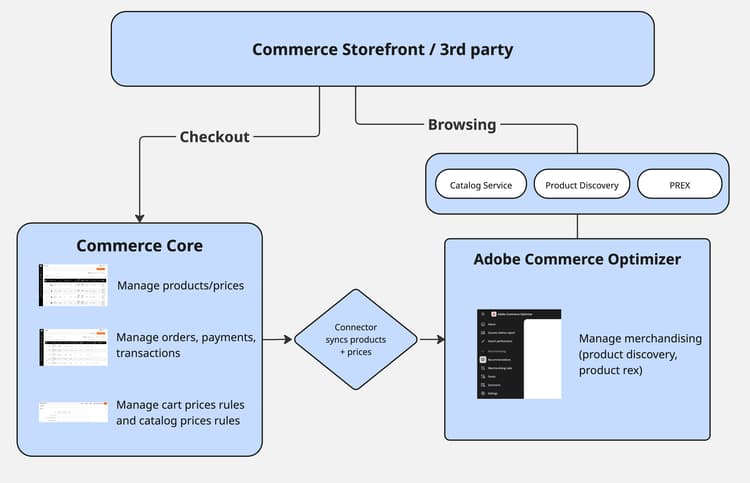
In this architecture:
- Adobe Commerce (on cloud or on-premises) is the system of record and feed producer
- The Connector exports catalog, price, and category feeds
- Commerce Optimizer ingests and normalizes the feed data into Catalog Sources, Price Books, and Catalog Views
- Storefronts (Commerce storefront on Edge Delivery or custom headless builds) call Commerce Optimizer GraphQL APIs for discovery and recommendations and call Commerce or another connected third-party platform for cart and checkout operations
How the connector works with Adobe Commerce how-it-works
-
Commerce Optimizer ingests and normalizes the feed data into Catalog Sources, Price Books, and Catalog Views.
-
Storefronts (Commerce storefront on Edge Delivery or custom headless builds) call Commerce Optimizer GraphQL APIs for discovery and recommendations and call Commerce or another connected third-party platform for cart and checkout operations.
How the connector works with Adobe Commerce
The Adobe Commerce Optimizer Connector operates by using your existing Commerce scopes (websites and store views) and customer segmentation to populate the Commerce Optimizer catalog model:
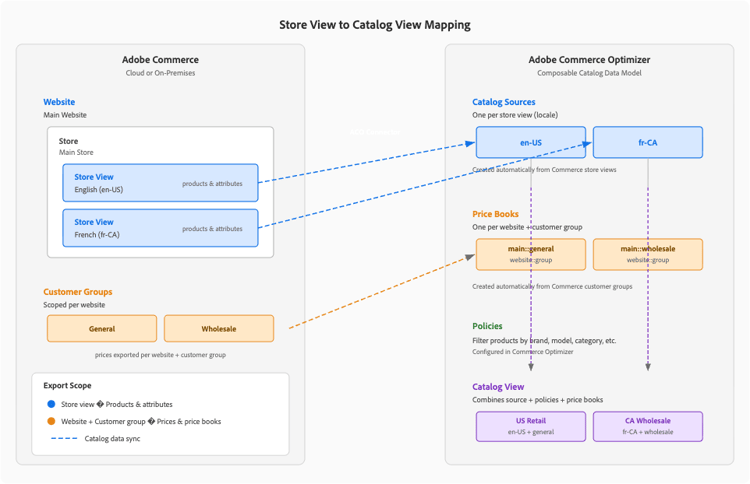
- Store Views → Catalog Sources — Each store view becomes a separate Catalog Source in Commerce Optimizer. That source includes localized product attributes and any store-view-specific data
- Websites → Price Books — Each Commerce website maps to one or more Price Books in Commerce Optimizer. Website pricing and customer group pricing export as price books and price entries
- Customer groups → Price variants — Commerce customer group pricing appears as additional entries in the relevant Price Books
After Commerce Optimizer ingests the data, you can configure:
- Catalog Views and Policies in Commerce Optimizer (for building region, brand, or customer-specific subsets)
- Product Discovery (search, facets, merchandising rules)
- Product Recommendations
When you enable the connector, the Adobe Commerce instance remains the system of record for catalog and price data. When you update data in Commerce, the connector syncs those updates to the Adobe Commerce Optimizer instance.
Typical workflows typical-workflows
These workflows describe how teams set up and use the Adobe Commerce Optimizer Connector. For details on how to set up the integration and enable these workflows, see Get Started.
Initial setup and configuration initial-setup
-
Install the connector package in Adobe Commerce using Composer:
composer require adobe-commerce/commerce-data-export-aco-adapter -
Configure authentication and environment details in Commerce Admin or via CLI:
code language-terminal bin/magento aco:config:init \ --org_id=<your-org> \ --tenant_id=<your-tenant> \ --client_id=<your-client-id> \ --client_secret=<your-secret> \ --region=na1 \ --type=production -
Map Commerce scopes to Commerce Optimizer:
- Confirm which Websites and Store Views must be in scope
- Ensure customer groups and price rules are modeled as expected
-
Verify connectivity:
- Run a test sync and confirm that Catalog Sources, Price Books, and initial products appear in Commerce Optimizer
- Use the Data Feed Sync Status page in Commerce and the Data Sync dashboards in Commerce Optimizer for validation
Ongoing data synchronization ongoing-sync
After the initial configuration, the connector supports:
-
Full catalog sync for initial migration or large structural changes
-
Delta syncs for ongoing updates when products or prices change
-
Resync commands for targeted feeds (including categories as of v1.0.12):
bin/magento saas:resync --feed=productsbin/magento saas:resync --feed=pricesbin/magento saas:resync --feed=categories
Configure merchandising and storefronts merchandising-storefronts
After Commerce data is available in Commerce Optimizer, use Commerce Optimizer Studio to connect merchandising and storefront experiences to your synced catalog.
To configure merchandising and storefronts:
-
Create Catalog Views and Policies in Commerce Optimizer Studio:
- Filter the catalog by brand, region, customer segment, or channel
- Enforce data-access rules per storefront or partner
-
Configure Product Discovery and Recommendations in the Optimizer UI:
- Create merchandising rules, facets, synonyms, and recommendation units
- The connector offloads all search and recommendation configuration to Commerce Optimizer (Live Search rules and Product Recommendations in Commerce Admin no longer apply to these flows)
-
Connect storefronts to Commerce Optimizer:
- For a Commerce Storefront powered by Edge Delivery Services, configure the storefront to use the correct Optimizer tenant and Catalog View, and to call search and recommendation endpoints through the Merchandising API
- For third-party storefronts, use Optimizer public APIs or SDKs for search and recommendation calls
note NOTE For an example third-party integration, see the Salesforce Commerce Connector for Commerce Optimizer. -
Maintain checkout on your existing platform:
- Keep cart, checkout, order management, and customer accounts in Adobe Commerce or a third-party platform
- Use App Builder and API Mesh for cart handoff when you integrate with external checkout systems
Supported scenarios supported-scenarios
The connector is designed for B2C merchants with Adobe Commerce on cloud and on-premises deployments who want to adopt Commerce Optimizer without rebuilding their backend.
Common use cases:
-
Modernizing the storefront only
Keep your existing Commerce backend, move PLP/Search/PDP to Edge Delivery storefronts powered by Commerce Optimizer -
Scaling catalog and search performance
Offload heavy catalog indexing and search to Commerce Optimizer’s SaaS services while maintaining product and price ownership in Commerce -
Incremental SaaS adoption
Use the connector as a stepping stone toward Adobe Commerce as a Cloud Service + Optimizer, with a compatible composable Commerce catalog
Responsibilities and implementation prerequisites responsibilities-prerequisites
Commerce is the source of truth for products, pricing, and customer groups. Make changes in Commerce; the connector syncs them to Commerce Optimizer.
Commerce Optimizer is responsible for:
- Catalog modeling (Catalog Sources, Price Books, Catalog Views, Policies)
- Product discovery and recommendations
- Storefront metrics, data-sync dashboards, and Success Metrics reports
The connector does not:
- Modify Commerce cart, checkout, or order flows
- Automatically provision storefront projects (Commerce Storefront / Edge Delivery tooling handles that)
Before you begin:
- Verify that Commerce meets the minimum version and services connector requirements. See Get Started for details.
- Ensure that you have IMS org access, an Adobe Commerce Optimizer instance, and the necessary credentials and region details.
Related documentation related-documentation
- Set up the integration and enable key workflows: Get Started with the Adobe Commerce Optimizer Connector
- Learn about Commerce Optimizer concepts and architecture: What is Adobe Commerce Optimizer?