Metadata and tagging
This page helps you understand metadata and add the correct values to your markdown articles (or wherever metadata are used). Metadata help readers, search engines, and AI tools find and understand your content. On Experience League, metadata helps readers filter search results by product, role, and content type (and more).
Certain metadata values display on published pages. For example, when you add feature_v2, role_v2, and level_v2 tags, they display in the TOPIC and CREATED FOR areas on Experience League.
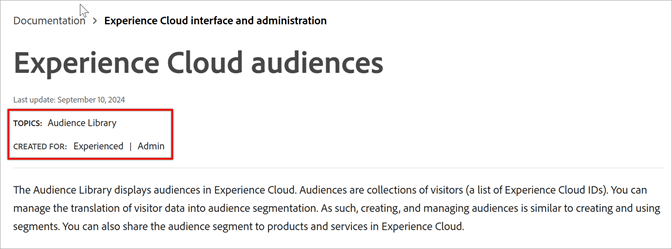
For SEO, title and description metadata are useful to help search engines find your pages and present them to customers. They have unique editorial guidelines to follow.
Understanding V1 and V2 metadata
We are in the process of switching to a different metadata model. Currently, v1 and v2 tags coexist in articles. If the metadata.md file includes usetq: true, the v2 tags are used in the system, and v1 tags are ignored.
Note that there are only four repos that are still using v1 tags: on-demand-events.en, playlists.en, slides.en, and experience-cloud-kcs.en. All other repos are using v2 tags. However, validation is still running against the old v1 tags, not v2. We hope to fix this soon.
Example of v1 (solution and role) and v2 (product_v2 and role_v2) tags coexisting:
---
title: Getting Started with HTL
description: Learn about HTL, the preferred and recommended server-side template system for HTML in AEM, and understand the major concepts of the language and its fundamental constructs.
exl-id: c95eb1b3-3b96-4727-8f4f-d54e7136a8f9
solution: Experience Manager
role: Developer
TQID: https://experienceleague.adobe.com/6IcNpWu2-PLGresZ1H-HM9HAFL-dY5eF0OyIdXJbJ4s
product_v2:
  - id: fd1f54a9-f50c-467d-8956-cebbaf4f3eb8
    internal-label: Experience Manager
role_v2:
  - id: ff6a42d2-313e-452e-93a6-792e4fad9ff8
    internal-label: Developer
---
We strongly recommend that you use the Adobe ExL Authors extension for adding v2 tags to your articles. You can run special jobs to migrate v1 tags to v2 or to validate existing tags to pick up any new changes to the database.
See Review auto-tags.
Frequently asked questions important
| table 0-row-2 1-row-2 2-row-2 3-row-2 4-row-2 5-row-2 6-row-2 7-row-2 | |
|---|---|
| Question | Answer |
| Is metadata required? |
Title and description must be present in an article and follow editorial requirements. However, validation fails only if description is missing or |
| Where do I add metadata? |
Add metadata to the top of the page (see Add metadata in Markdown). The section at the top of the article is referred to as the “front matter” or “yaml section”. You can apply values at the article (page), TOC (guide), and repo levels. Page values override values in the TOC and repository. Important: Be judicious when applying tags for |
| What values do I add first? |
A best practice is to start with title and description, then use the VCS plug-in to add product_v2, feature_v2, and other applicable tags. Technically, the order does not matter. Consider adding all your values after authoring your content, so that you deeply understand what values are best. The more you use metadata, the more you understand it. If you aren’t sure what to do, get advice from Blake, Bob, or Alva. For definitions of metadata, requirements, and examples of each tag, see the tag reference (on this page). |
| Where do I find my product’s values? | Use the Adobe ExL Authors extension for adding tags. |
| How do I create or change values? | Change or create tags by filing a UGP Jira ticket. Use Task and select Content Tagging as the Component. |
| How to I author Title and Description (SEO) metadata? |
Title and description have important editorial guidelines and length and case requirements that differ from an article’s H1 (page name) and first paragraph. Example title (concept): Segmentation in Analytics (title case) Example description (concept): Learn about processing options in Analytics. Get familiar with setting up rules for segmentation. Example title (task/procedure): Create a Segment Example description (task/procedure): Learn how to create a segment in Analysis Workspace. Build segments from scratch or add an existing one. |
| Where does the pipe and application name (in a Google search) come from? |
Generated automatically from metadata. Do not add the pipe and application name in title metadata. However, you can use the application name in the description. The app name is pulled from solution metadata value in the metadata.md file. |
Add metadata in Markdown add-metadata
Add metadata at the top of each page, which is sometimes referred to as the “yaml section” or “front matter”. Order is not critical, but the best practice is to place title and description first.
The following sections describe which values belong in respective file types.
Article metadata required-article
For typical articles (and video tutorials), add the following important metadata:
- title (title case, 60 characters max.)
- description (required, cannot be blank or
null, 150 - 160 characters.)
Begin with Learn how to… (for task pages) or Learn about… (for conceptual pages) (Learn more) - Depending on content, add feature_v2, subfeature_v2 (from the feature yaml), role_v2, level_v2, topic_v2, and so on (see the tag reference section for a complete listing).
Other metadata frequently used in articles:
- If you need to override higher values like mini-toc-levels and solution, you can add them to an article.
- For tutorial-specific metadata, see the Technical Marketing section for recommendations.
- All other values unless explicitly set aside for a TOC or metadata file can exist in articles.
TOC metadata (guide-level) toc-metadata
TOC metadata applies to your entire guide. For example, product_v2 (the parent application of a feature) and role (like Admin) are usually TOC metadata.
Do not add article metadata like feature to the TOC, unless your entire guide applies to one feature (which is rare).
Other values you might use:
- role_v2 - for example, you might add
role: Developerto apply to all articles in the guide. If you want to override that value at the article level, you could addrole: Admin, Developerto an article.
Repo metadata (metadata.md) repo-metadata
Although not required for validation, these metadata values belong in the metadata.md file:
- git-repo - the repo URL
- product_v2 - the application name
- type - the guide type (Documentation, Tutorial)
- cloud - the cloud name, though minimally used
- index or hide - if index=false, excludes the page from external search (
index: falseis the same ashide: true)
Examples of typical repo-level metadata:
- cloud:
- product_v2:
- type:
- role_v2:
Business User, Admin, Developer
| note important |
|---|
| IMPORTANT |
Be careful when applying the same metadata fields in both the metadata.md file and TOC.md file. Values in TOC.md overwrite values in metadata.md. For example, if you set index: no in both places and then change it to index: yes in the metadata.md file, no change occurs because no is the value in the TOC. |
Metadata and tag reference tag-reference
The following is an alphabetical list of metadata tags with examples, requirements, status (current or planned use), and so on.
(If you’re new to metadata, you might want to stop and get familiar with the basics.)
auto-video-transcripts auto-video-transcripts
(Intended for -learn video tutorial repos.) Add auto-video-transcripts: true in the TOC.md or metadata.md file to enable transcripts in all videos in the guide or repo by default. You can still turn off transcripts for any individual video in the guide or repo.
See Adding video transcripts in the syntax guide for more information about adding video transcripts.
badges
See Badges in the syntax guide
breadcrumb-title breadcrumb-title
Deprecated: Use landing-page-name and landing-page-breadcrumb-title instead.
cloud cloud
Where used: Repo
For ExL search and filtering APIs. Cloud values must be title case and use spaces, where applicable. You can add multiple values by using comma separators.
Example: cloud: Document Cloud, Creative Cloud
Requirements: Case sensitive and match values in cloud yaml
Log a UGP JIRA ticket (task) with component Content Tagging if you want to add cloud values.
description description
Where used: article
Used by search engines and recommendations. Displays under the title metadata on a search engine results page. Validation fails if description does not exist (cannot be null).
Example: Learn about configuring segmentation in Analytics. Discover ways to focus on subsets of your data.
Requirements: Required for validation. Max 160 characters. See description for guidance.
If your description text included reserved syntax characters such as a second comma (example: description: Rules: Behavior and more) or a character like [ that appears immediately after the comma, validation will fail. To avoid failure, wrap the description value in quotation marks. Example: description: "Rules: Behavior and more"
exl-id exl-id
Legacy. The exl-id tags are no longer being added to new articles in v2. Contact the SCCM team if you need to use exl-ids.
feature_v2 feature
Where used: article. Displays in Topics at the top of an ExL page. In a future release, users will be able to click the topic to view a list of articles tagged with that same feature. Do not use feature in the TOC file (except in the rare case where an entire guide is dedicated to a single feature).
This value is also used for ExL search, filtering APIs, and recommendations (the More help on this feature heading and bullet list added automatically at the bottom of a page).
Example:
In this example, “Resource management” is a child of “Workfront,” and “Workfront Proof” is a child of “Resource management.”
product_v2:
  - id: c4a86a5d-6562-4fc6-aa00-bfa25833aed9
    internal-label: Workfront
feature_v2:
  - id: e14a7f57-c82c-4874-a495-5d036cbbdc3d
    internal-label: Resource management
subfeature_v2:
  - id: b18b693b-6d59-4359-95fd-a386b7a615fe
    internal-label: Workfront Proof
Requirements: Use the Adobe ExL Authors extension to add the appropriate feature_v2 syntax. The internal-label is for reference only. When the article is published, the ID is used to fetch the internal-label from the database.
Log a UGP JIRA ticket with component Content Tagging if you need to add or edit feature values. Case sensitive.
feature-set feature-set
Deprecated in v2. The feature_v2 values are tied to product_v2 values.
git-repo git-repo
Where used: repo for Detailed feedback options on Experience League.
The git-repo URL lets customers click Edit this page icon (


Example: git-repo: https://github.com/AdobeDocs/analytics.en
Requirements: If the git-repo metadata is not added, the feedback icons are not displayed in the right nav.
Related: If a repo is set to private on GitHub, the feedback options result in a 404.
hide hide
Where used: article
Using ‘hide: true’ excludes the pages from both external and internal search and the recommendations catalog. (When hide = yes, index is set to no automatically in the output file.) The article appears in the TOC unless you set hidefromtoc to yes.
If you add hide: true to the TOC.md file, the entire guide is excluded from external and internal search and available only through a URL.
Example: hide: true
Default is no.
hide: true and index: false: they both exclude articles from internal and external search.See Hiding files for more information.
hide-from-toc hidefromtoc
In V2, the hidefromtoc: true metadata is ignored. For v2, hiding articles from left nav of the published article is controlled in the TOC.md file.
Where used: TOC.md
In GHEC repos, add {hide-from-toc} at the beginning of the article link or section title. Examples:
Example article link:
+ {hide-from-toc} [Widget overview](widget-overview.md)
Example section link:
+ {hide-from-toc} Admin features (beta) {#admin-beta}
The hidefromtoc metadata in the article can be removed or left in place. It has no effect in V2.
Hold hold
Where used: article
The hold metadata in V2 lets you preview changes before publishing. Add hold: true to the article metadata to publish only to preview, not production. Remove the hold: true tag when you want to publish to production.
The Slack notification provides URLs for both production and preview updates.
If you are creating a new article that you don’t want to display in the TOC, use {hide-from-toc} in the article link in the TOC.md file. See the hide-from-toc section above.
index index
Where used: article
Using n or no excludes the page from external search (if available) and from the sitemap. This value is important for pages like Contact us, soft-launches, deprecated articles, or later articles in a tutorial series.
To exclude pages from both external and internal searches, use hide.
Example: index: true
Default is false.
true and false are valid values. Using yes or no is no longer supported.industries industries
Not currently in use.
interests interest
Not currently in use.
keywords keywords
Not used and not recommended. Google ignores them, and might even penalize pages with “stuffed keywords.” Coveo (internal search) also ignores keywords.
label label
Not currently in use.
landing-page-description
Deprecated. See short-description
landing-page-name landing-page-name
Where used: metadata.md or TOC.md
Example: landing-page-name: experience-manager
Requirements: Use landing-page-name to link to the landing page to be used in the breadcrumb. Also specify landing-page-breadcrumb-title to indicate the name of the breadcrumb that appears.
landing-page-breadcrumb-title landing-page-breadcrumb-title
Where used: metadata.md or TOC.md
Example: landing-page-breadcrumb-title: AEM
Requirements: Specify landing-page-breadcrumb-title to indicate the name of the breadcrumb that appears. Also use landing-page-name to link to the landing page to be used in the breadcrumb.
last-update last-update
Used as a manual override to the auto-generated “Last Update” date that appears at the top of the article.
What is the difference between last-substantial-update and last-update? Good question. Possible answer: last-substantial-update is used by the Technical Marketing team for their Target implementation, whereas last-update is used to override the Last Update date at the top of the page. Combine?
Example: last-update: 2026-09-29
level_v2 level
Where used: article
Displays in Created for at the top of ExL pages. To be used for ExL search and filtering APIs. Primarily used for learning videos and courses, but also can apply to any article that has an associated product experience level recommendation.
If level (and role) do not exist, ExL does not display Created for at the top of the page.
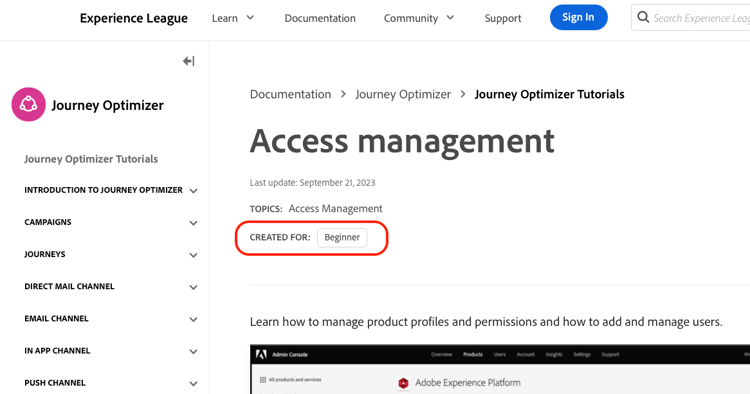
Example:
level_v2:
  - id: e8ccd51f-da0d-4e3b-939b-e30d5ebb1ea5
    internal-label: Beginner
Requirements: Use the Adobe ExL Authors extension to add the appropriate level_v2 syntax.
If level metadata is not specified, the value defaults to level: Beginner
mini-toc-levels mini-toc-levels
Where used: article
This metadata determines the number of heading levels that appear in the mini-TOC in the right navigation. This metadata is usually added to the metadata.md or TOC.md file, but it’s sometimes added to individual articles.
Example: mini-toc-levels: 2
Default is 2. Valid values include 1-6.
product (v1) product-v1
Deprecated. The old product tags used in v1 were for Omega analytics that are no longer in use. The old v1 product tags should be removed.
product_v2 product-v2
The v2 equivalent of solution.
Where used: metadata.md, TOC.md, or article level.
Example:
product_v2:
  - id: c4a86a5d-6562-4fc6-aa00-bfa25833aed9
    internal-label: Workfront
Requirements: Use the Adobe ExL Authors extension to add the appropriate product_v2 syntax.
recommendations (“More help on this feature” widget) recommendations
Where used: article
The recommendations metadata applies to the “More help on this feature” heading and bullet list that is added automatically at the bottom of a page. It is also used to drive the content of the tiles on the “Your Personalized Home” when you sign into Experience League.
You can use noDisplay to prevent content recommendations from displaying on the page or noCatalog to exclude the page from the recommendations catalog (so it won’t be recommended).
Example: recommendations: noDisplay, noCatalog
Requirements:
noDisplayprevents recommendations from displaying on the page (can be overridden withdisplay)noCatalogexcludes the page from the catalog (can be overridden withcatalog)
More examples:
On a multi-page tutorial, you might want to set recommendations: noDisplay, noCatalog in the TOC so that users aren’t distracted while going through the tutorial and so pages in the middle of the tutorial aren’t recommended. However, to drive traffic to the first page of the tutorial, you could override the metadata on the first page with recommendations: noDisplay, catalog.
role_v2 role
Where used: article
Displays as Created for at the top of ExL pages. Used for EXL search and filtering APIs and recommendations. Primarily used for learning courses. Use only a defined enum value.
If role (and level) does not exist, ExL does not display Created for at the top of the page.
Example:
role_v2:
  - id: b69b2659-1057-424e-8fc5-ed9e016dc554
    internal-label: User
Requirements: Use the Adobe ExL Authors extension to add the appropriate role_v2 syntax.
short-description short-description
Where used: article
Optional, deprecated. Previous used for v1 landing pages as a shorter description. In v2, descriptions are added directly to the landing page files.
solution solution
Deprecated for all repos using v2 tags. Use product_v2 instead.
topic_v2 topic
Where used: article
In progress, to be used for EXL search and filtering APIs and recommendations. The topic tag is used for cross-product topics such as Data Collection and Administration.
Example:
topic_v2:
  - id: eddd9b14-83bd-4ff4-9072-54a4a484abb7
    internal-label: Administration
Requirements: Use the Adobe ExL Authors extension to add the appropriate role_v2 syntax.
title title
Where used: article
Title is for internet SEO, particularly for Google. A pipe with the product name is appended automatically.
Requirements: Required in articles. 60 characters. Sentence case. The H1 is used when this value is not present. Title differs from the page’s heading and should be written with search results in mind.
Example: Create Calculated Metrics
(Note the capitalization exception. Title metadata uses title case for capitalization.)
If your title text included reserved syntax characters such as a second comma (example: title: Rules: Behavior and more) or a character like [ that appears immediately after the comma, validation will fail. To avoid failure, wrap the title value in quotation marks. Example: title: "Rules: Behavior and more"
See title and description for important authoring guidelines.
type type
Where used: metadata (repo) typically, and any article
Allows customers to filter by guide type and also used by recommendations.
Example: type: Tutorial
Requirements: One value only. Valid values include Documentation, Tutorial, Troubleshooting, Certification, and Course. Release Notes is not yet available, but should be soon. In progress.
version version
The version tag is currently being added as a v2 tag but is not yet available. For now, continue to use v1 version tags.
Example: version: 6.4
Where used: article
This is now a search filter for AEM and Campaign. Must match values in the version yaml. If a version value is specified, the accompanying solution value must also be specified. For example, you cannot use version: 6.5 if Experience Manager is not also specified as one of the solution values.
Example: version: 6.5
Possible use for EXL search and filtering APIs. Currently, multiple solution values are used for subordination.
Case sensitive. Match values in version yaml. |
user-guide-description user-guide-desc
Deprecated in v2.
Where used: TOC
When Experience League landing pages were generated in v1, the user-guide-description text was pulled from the TOC.md file and displayed as the guide’s description. The description is now specified directly in the landing page.
user-guide-title user-guide-title
Deprecated in v2.
Technical Marketing metadata metadata-desc
The following metadata are specific to the Technical Marketing team.
doc-typeactivitysub-productExample: sub-product: search
You can use sub-product for Adobe Analytics (Omega) data, among other applications. The sub-product values are less restrictive than product values. Work with solution teams to determine enum values for sub-products in your solution.
Example: livefyre could include library, search, instagram-search, apps, media-wall, carousel. Experience Manager could include assets, sites, community and so on.
ktUsed by Technical Marketing team.
Example: kt: <jira-number>
Last Updatedlast-substantial-updateteamteam: TMthumbnailtitle displays in Google, and a pipe with the product name is appended automatically. See title and description for authoring guidelines.Requesting new metadata values create-metadata
If you need changes or additions to the yaml lists, create a UGP JIRA task, and select Content Tagging as the Component.
Metadata not in Use
uuid
Some files include uuid values from migration. If your content has already been migrated and redirects from the preview authoring system are in place, you can delete these uuid values.
audience
Example: audience: administrator
Not in use. Instead, use role (see above).
difficulty
Not in use. Instead, use level_v2 (see above).
author
Example: author: John Doe
Not yet used.
private-beta
Example: private-beta: true
Not yet in use. Default is false.
private-feature-pack
Example: private-feature-pack: true
Not yet in use. For AEM, we might use Private Feature Pack and Admitted Domains from helpx. Default is no. If you select this option, admitted-domains is also required. We should verify admitted-domains is specified if private is enabled. Does not allow publish if not specified.
admitted-domains
Example: admitted-domains: <string>
Not yet in use. Required for AEM private feature packs.
legacypath
For AEM
internal
Example: internal: true
For KB docs. Default is no. Way to publish content for Adobe tech support operators only. Not yet in use.
Previous and Next buttons (deprecated)
The Previous and Next buttons that appear at the bottom of the page are not configured through article metadata. Instead, Previous/Next button functionality is managed via repo configuration. There are three options:
- Full (default) - Previous/Next buttons appear at the bottom of every article.
- Sibling only - Previous/Next buttons appear at the bottom of every article preceded and followed by an article on the same TOC level, but the Previous button is absent if there’s no preceding sibling article, and the Next button is absent if there’s no subsequent sibling article.
- Off - Previous/Next buttons are turned off for all guides and articles in the repo.
To change how Previous/Next buttons work, submit a JIRA ticket assigned to Bob.
original-author
last-author
original-publish
Deprecated Metadata
seo-title
No longer used. The title metadata is used for SEO. The H1 (#) title is used for page display.
seo-description
No longer used. The description metadata is used for SEO. For any page display of description, use different supported metadata such as short-description or user-guide-description.
solution-title
Example: solution-title: Learn & Support
Required for AEM. Not used for EXL. This item is the link text for the first of three links in the header. For standard help guides, use “Learn & Support” unless you need to create a link to different content.
solution-hub-url
Example: solution-hub-url: https://helpx.adobe.com/support/analytics.html
Required for AEM. Not used for EXL. The hub URL determines the link destination when users click the Product name in the user guide header.
solution-icon
Example: solution-icon: assets/logo-24.png
Never used. Intended to be used for solution icon in the header.
getting-started-title
Example: getting-started-title: Getting Started
Required for AEM. Not used for EXL. This item is the link text for the second of three links in the header. Use “Getting Started” unless you need to create a link to different content.
getting-started-url
Example: getting-started-url: https://landing.adobe.com/experience-league/
Required for AEM. Not used for EXL. The getting started URL determines the link destination when users click the middle link in the header.
tutorials-title
Example: tutorials-title: Tutorials
Required for AEM. Not used for EXL. This item is the link text for the third of three links in the header. Use “Tutorials” unless you need to create a link to different content.
tutorials-url
tutorials-url: https://helpx.adobe.com/experience-cloud/tutorials.html
Required for AEM. Not used for EXL. The tutorials URL determines the link destination when users click the third link in the header.
user-guide-url
Example: user-guide-url: /content/help/en/audience-manager/user-guide/aam-home.html
Never used. Ignore or delete.