Classification set settings
You can edit the settings of a classification set, including name, description, who to notify, and the subscriptions.
To edit the settings for a classification set:
-
Select Components from the Adobe Analytics top menu bar, then select Classification sets.
-
In Classification Sets, select the Classification sets tab.
-
In the Classification sets manager, select the classification set for which you want to edit the schema.
-
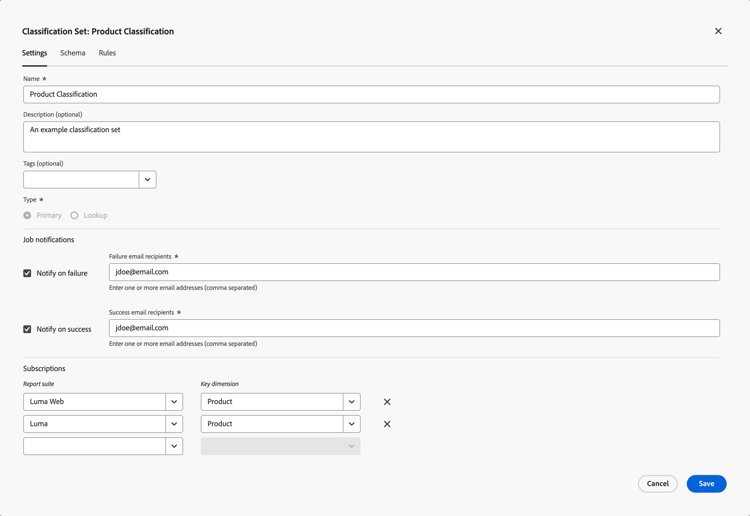
In the Classification Set: classification set dialog, select the Settings tab to edit settings:
-
Edit the Name.
-
Edit a Description (optional).
-
Add one or more Tags (optional) to the classification set. Select an existing tag from the Tags drop-down menu, or enter a new tag. Use

-
In the Job notifications section, select who you want to notify on failure or success of the classification set jobs.
-
To notify users on a failure:
- enable Notify on failure.
- Specify one or more comma separated email addresses in Failure email recipients.
-
To notify users on success:
- Enable Notify on success.
- Specify one or more comma separated email addresses in Success email recipients.
-
-
Edit the Subscriptions.
- You can define multiple Report Suite and Dimension combinations to a classification set.
- Select

See Create a classification set for more details.
-
Select Save to save the settings. Select Cancel to cancel.
-