Import bookmarked reports and dashboard reportlets
- You have until August 12, 2026 to migrate your workbooks from the legacy Report Builder to the new Report Builder. See convert your legacy workbooks for detailed information.
- With the end of life of the Adobe Analytics 1.4 API’s, the legacy Report Builder add-in will no longer be available for download.
- After August 12, 2026, customers with workbooks requiring migration will need to contact customer support to obtain the orignial workbooks. These workbooks will need to be migrated as documented in convert your legacy workbooks.
All bookmarked reports and dashboard reports are now listed as dimensions in the Request Wizard Step 1 and can be imported as Report Builder requests.
When you select a bookmarked report, the Request Wizard populates all the dimensions and metrics that define this bookmarked report. The date range, granularity and selected segment are also updated based on the selected bookmark.
This is how the Request Wizard Step 1 shows a dashboard and its reportlets:
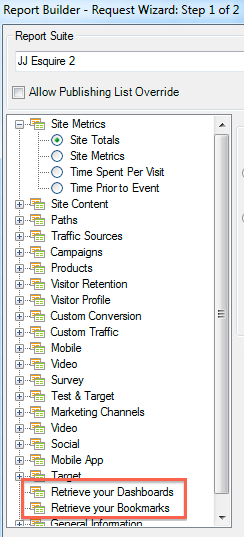
When you click Retrieve your Dashboards or Retrieve your Bookmarks, your existing dashboard and/or bookmark data is retrieved and pasted in the worksheet.
Once you have created a request by importing a dashboard reportlet (or a bookmark), the request will then be associated to the reportlet’s (or bookmark’s) primary dimension. As a result, if you edit the request, the tree view no longer selects the dashboard reportlet tree view node (or bookmark node): it selects its primary dimension instead.