This help page describes how merchandising eVars work as a dimension. For information on how to implement merchandising eVars, see eVar (merchandising variable) in the Implementation user guide.
A merchandising eVar works like a standard eVar, except that each product has its own copy of it. Persistence, allocation, and expiration all work the same way, but separately for each product. A standard eVar holds one persisted value per visitor that receives credit for every success event. A merchandising eVar holds one persisted value per product, and that value receives credit for that product’s success events:
- Product A →
eVar1=value A - Product B →
eVar1=value B
Each product’s value can be set or changed only on hits that include that product. Once set, the value persists until it expires and receives credit only for that product’s success events. Changing product A’s value has no effect on product B.
Merchandising eVars work only with the products variable. A merchandising eVar value that is not bound to a product receives no credit. Success events on hits without products are attributed to "None" for every merchandising eVar.
Why use merchandising eVars
Keeping a separate value for each product matters when a single value shouldn’t receive credit for everything a visitor buys. A standard eVar works well for external campaigns or external search terms, where one value should receive credit for any success events that occur. For example, if a customer clicks a link in an email campaign to visit your website, all purchases made as a result should be credited to that campaign.
Internal search and category browsing are different, because a visitor often uses them to find several products, each in a different way. For example, a customer searches your site for "goggles", then adds a pair to their cart:

Before checkout, the customer searches for "winter coat", then adds a down jacket to their cart:

When the visitor completes this purchase, the internal search term "winter coat" receives credit for the entire order, including the goggles, because it’s the eVar’s most recent value (the default allocation of Most Recent (Last)). The search term "goggles" receives no credit, even though it led to part of the purchase:
How merchandising eVars solve this problem
If merchandising is enabled for the eVar in the previous example, the search term "goggles" is bound to the snow goggles, and the search term "winter coat" is bound to the down jacket. Merchandising eVars allocate revenue at the product level, so each term receives credit for the amount of revenue for the product to which the term is bound:
How binding and allocation work
Merchandising eVars rely on three concepts:
-
Binding: An association between a product and an eVar value. Each product keeps its own binding for each merchandising eVar. Like a standard eVar value, a binding persists on later hits until it expires. For example, a value bound to a product on a product page still receives credit when that product is purchased on a later page, without setting the value again. How a value reaches the product depends on the eVar’s syntax, described below.
-
Allocation: The Allocation setting determines what happens when a new value tries to bind to a product that is already bound. Allocation is evaluated separately for each product, so merchandising eVar values bound to different products never compete with each other.
- Original Value (First): The existing binding is kept. The new value is ignored for that product until the binding expires.
- Most Recent (Last): The product rebinds to the new value.
-
Expiration: The Expire After setting determines when bindings end. Each product’s binding has its own expiration, counted from when that product was bound. For example, with a Week expiration, if product A is bound on Monday and product B is bound on Wednesday, product A’s binding expires the following Monday and product B’s binding expires the following Wednesday. When a binding expires, the product no longer has a value for that eVar, the same way a standard eVar has no value after it expires. Success events for that product are attributed to
"None"until the product is bound again.
Each merchandising eVar uses one of two syntaxes, set in the Merchandising setting in report suite settings. The syntax determines how a value reaches a product:
- Product syntax: The value is set directly on each product in the
productsvariable, and binds to that product on that hit. - Conversion variable syntax: The value is set in the eVar itself and persists like a standard eVar value. It binds to the products on the same or a later hit that contains a binding event.
Both syntaxes use the same binding, allocation, and expiration behavior described above. They differ in the following ways:
products variableeVar itself, the same way as a standard eVarProduct syntax
With product syntax, the eVar value is set on each product in the products variable. In the products string, the value after the last semicolon of a product is its merchandising eVar. See Implement using product syntax for the full syntax.
The value binds directly to that product on that hit. Binding events are not used. Later hits that include the product, such as a cart add or purchase, do not need to repeat the value. Because each product carries its own value, product syntax is the only option when products in the same hit need different values.
| table 0-row-3 1-row-3 2-row-3 3-row-3 | ||
|---|---|---|
| Hit | products |
events |
| 1 | ;12345;;;;eVar1=internal keyword search |
|
| 2 | ;12345;;;;eVar1=internal campaign |
|
| 3 | ;12345;1;50 |
purchase |
- Original Value (First): Hit 2 is ignored for product
12345. The purchase is credited tointernal keyword search. - Most Recent (Last): Hit 2 rebinds product
12345. The purchase is credited tointernal campaign.
| table 0-row-3 1-row-3 2-row-3 3-row-3 | ||
|---|---|---|
| Hit | products |
events |
| 1 | ;productA;;;;eVar1=value A |
|
| 2 | ;productB;;;;eVar1=value B |
|
| 3 | ;productA;1;50,;productB;1;30 |
purchase |
Each product keeps its own binding, so the allocation setting has no effect in this example. value A receives credit for product A’s revenue, and value B receives credit for product B’s revenue. Both values receive one order, because the order contains a product bound to each value.
A visitor buys a medium blue t-shirt and a large red t-shirt, both with the parent product ID tshirt123, and eVar10 captures child SKUs:
| code language-js |
|---|
|
Each child SKU receives credit for its own instance of tshirt123.
The tradeoff is that product syntax requires the complete value string on each product whenever binding should occur. For product finding methods, which typically use several eVars at once, the string looks like this:
s.products = ";sandal123;;;;eVar2=sandals|eVar1=internal keyword search|eVar3=non-internal campaign|eVar4=non-browse|eVar5=non-cross-sell";
A finding method should receive credit only after the visitor interacts with a product, so this string is typically set on the product detail page or on a cart add, not on the search results page. To do so, developers must:
- Carry the finding method details from the finding method page to the product detail page, or have them available when a cart add fires from a results page.
- Assemble the full
productsstring without syntax errors.
Conversion variable syntax avoids both requirements.
Conversion variable syntax
With conversion variable syntax, the value is set in the eVar itself:
s.eVar1 = "internal keyword search";
The eVar acts as a staging area. A value set in the eVar is held there until a binding event binds it to the products on a hit. Binding occurs in two stages:
- Staging: When the eVar is set, its value persists on subsequent hits until it expires. This persisted value is the
post_evarcolumn in data feeds. For merchandising eVars that use conversion variable syntax, the staged value always reflects the most recent value sent, regardless of the Allocation setting. Each new value replaces the previously staged value. - Binding: When a hit contains both products and a configured Merchandising Binding Event, the staged value binds to every product on that hit. If a product is already bound, Allocation determines whether the new value replaces the existing binding. Products that are already bound keep their value with Original Value (First), or rebind with Most Recent (Last).
If the eVar, the products variable, and a binding event are all set on the same hit, staging and binding happen simultaneously. The new value binds immediately to the products on that hit.
Setting the eVar alongside a product without a binding event does not bind the value to that product. A staged value receives no credit until it is bound to a product.
What binding events do
A binding event is the trigger that tells Adobe to bind the staged value to the products on the hit.
- Binding events can be standard or custom success events, the tracking code (Campaign Event), or eVars. Props have no effect on binding.
- You can configure multiple binding events, such as Product View Event, Cart Add Event, and Purchase Event. If any of these events are on a hit with products, the staged value binds to every product on that hit.
- By default (All), binding occurs whenever any other event or eVar is on the same hit as a product. All is used if no binding event is explicitly selected. With All, setting the eVar on a hit that includes products always triggers binding on that hit. A value staged on an earlier hit binds on the next hit that includes products and any other event or eVar.
Consider the following hits:
| code language-js |
|---|
|
If prodView is a binding event for both eVars, hit 2 binds internal keyword search (eVar1) and sandals (eVar2) to sandal123. If an eVar does not list prodView as a binding event, no binding occurs for that eVar.
| table 0-row-4 1-row-4 2-row-4 3-row-4 4-row-4 5-row-4 | |||
|---|---|---|---|
| Hit | eVar1 |
products |
events |
| 1 | value A |
||
| 2 | ;productA,;productB |
Binding event | |
| 3 | value B |
||
| 4 | ;productA |
Binding event | |
| 5 | ;productA;1;50,;productB;1;30 |
purchase |
After hit 3, the staged value (post_evar1) is value B with either allocation setting.
- Original Value (First): Hit 4 is ignored for product A, because product A is already bound. Both products stay bound to
value A, which receives all purchase credit. - Most Recent (Last): Hit 4 rebinds product A to
value B. Product B is not in hit 4, so it stays bound tovalue A. Product A’s purchase credit goes tovalue B, and product B’s purchase credit goes tovalue A.
With only a single binding attempt, such as hits 1, 2, and 5 alone, both settings produce the same result. Allocation matters only when a product that is already bound receives another binding attempt.
Best practice: product finding methods
Most retail sites benefit from tracking the following product finding methods, each as a merchandising eVar:
- Internal search keywords (for example,
eVar2) - Internal campaign tracking codes (for example,
eVar3) - Merchandising or browse categories (for example,
eVar4) - Cross-sell links (for example,
eVar5) - An overall product finding method eVar that compares all methods, including methods such as external links to product pages (for example,
eVar1)
When a visitor uses one method, set the other finding method eVars to a “non-” value. Otherwise, an unused method’s earlier value could receive credit for a product found through another method. For example, on the results page for an internal search for “sandals”:
s.eVar1 = "internal keyword search";
s.eVar2 = "sandals";
s.eVar3 = "non-internal campaign";
s.eVar4 = "non-browse";
s.eVar5 = "non-cross-sell";
With conversion variable syntax, developers can set only simple values, such as a search term in a prop, and logic in your implementation can fill in the merchandising eVars. Nothing needs to be passed between pages or built into the products string. The products variable is still required on the hits where binding occurs.
Adobe recommends the following settings for product finding method eVars:
See Conversion variables in the Admin guide for a description of each setting.
Visitors often re-find a product that they already viewed or added to the cart. For example:
- A visitor searches for “sandals” and adds
sandal123to the cart from the results page. The product binds tointernal keyword search. - Three days later, the visitor browses to Women > Shoes > Sandals (
eVar1=browse), viewssandal123again, and then purchases it.
With Most Recent (Last), the product view in step 2 rebinds sandal123 to browse, which then receives the purchase credit. The method that originally found the product receives none.
With Original Value (First), the binding attempt in step 2 is ignored, and internal keyword search keeps the credit.
If the visitor never purchases the product, expiration removes the binding, so the next finding method the visitor uses can bind to the product. This is why Expire After should match how long a product stays in the cart.
Instances on merchandising eVars
The default Instances metric is not recommended for use on merchandising variables.
-
For merchandising variables using product syntax, instances are not incremented at all.
-
For merchandising variables using conversion variable syntax, instances are counted each time the eVar is set. However, the instance attributes to the dimension item
"None"unless all of the following happen on the same hit:- The merchandising eVar is set with a value.
- The
productsvariable is defined with a value. - A binding event is set.
Since most use cases for conversion variable syntax require the eVar and products variable on different hits, the default Instances metric is not realistic to use.
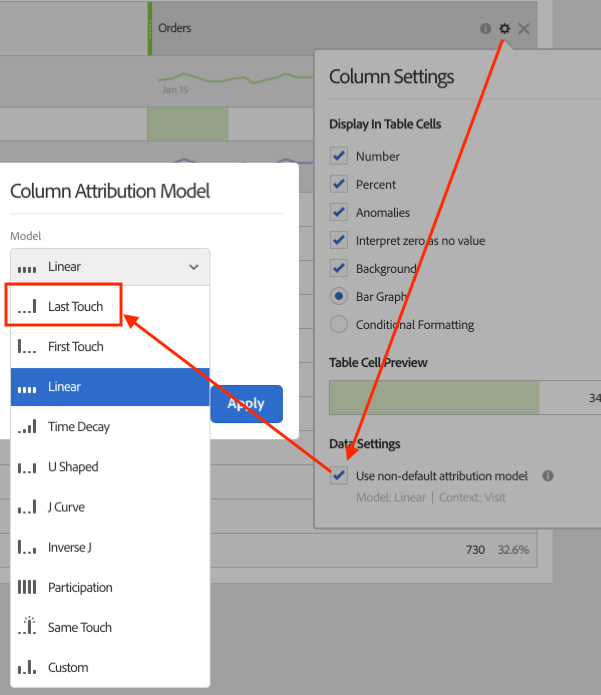
To count instances for each value sent with conversion variable syntax, apply the Last Touch attribution model to the Instances metric. Attribution models use the values sent on each hit, not staged values or product bindings. The lookback window does not matter, because Last Touch credits each value on the hit where it was sent, regardless of the eVar’s allocation setting.