B2B person to account stitching
B2B person to account stitching enriches your event datasets with account identities and enables complete analysis across the full customer journey in Customer Journey Analytics. When events lack an account ID, which Customer Journey Analytics B2B edition requires for ingestion, person to account stitching derives and adds that information automatically using a person to account mapping dataset you provide.
Without person to account stitching, any event that does not contain an account ID is dropped during ingestion. Person to account stitching resolves this limitation by looking up the account associated with the person on each event, adding the account ID both as the event is ingested and retroactively.
Person to account stitching performs the following operations on your datasets:
- Elevate person identity: Similar to the B2C stitching approach, you will configure a field holding persistent person IDs. Using the identity graph, the persistent person ID on each event is elevated to a person ID from the configured person identifier namespace.
- Add missing account identities: After obtaining the person ID information for an event, the person to account mapping is used to derive and add the account identity information. Any account identity available on the event itself is used as a fallback method.
How B2B person to account stitching works
To illustrate how B2B person to account stitching works, the dataset shown below is used as the starting point.
Base event dataset
In Customer Journey Analytics B2B Edition, events with no account ID in this non-stitched example event dataset are ignored and not ingested (


B2B person to account stitching prevents the events from being ignored and not ingested using the following operations:
Elevate person identities
To support B2B person to account stitching, when you configure B2B stitching settings, you provide a main person identifier namespace (for example Email) and a person to account mapping dataset.
The person ID namespace from the person to account dataset can be the same as the main one (Email), or it can differ. In the example below, it is set as CRM ID (which will need to be linked to Email in the identity graph).
| table 0-row-2 1-row-2 2-row-2 3-row-2 4-row-2 5-row-2 6-row-2 | |
|---|---|
| CRM ID | Account ID |
| 12hsd123 | Adobe |
| kr7812pq | Adobe |
| f82jsd32 | Sky |
| hg2023m2 | Sky |
| b978bbw9 | Ubiquity |
| fs453ghi | Adobe |
That person to account mapping dataset is elevated using graph-based stitching. Please note that this happens in the back-end and not reflected in the actual dataset’s data.
In our example, using identity graph links between CRM ID and Email namespaces, the result is an updated person to account mapping dataset with elevated person IDs.
| table 0-row-3 1-row-3 2-row-3 3-row-3 4-row-3 5-row-3 6-row-3 | ||
|---|---|---|
| CRM ID | Elevated Person ID | Account ID |
| 12hsd123 | matt@adobe.com | Adobe |
| kr7812pq | emily@adobe.com | Adobe |
| f82jsd32 | emily@sky.com | Sky |
| hg2023m2 | cory@sky.com | Sky |
| b978bbw9 | cassidy@ubiquity.com | Ubiquity |
| fs453ghi | carmen@adobe.com | Adobe |
Graph-based stitching is also used to elevate the person IDs in the experience event dataset. For example, you configure the persistent ID (ECID) field to be used as persistent person ID when you enable stitching on the dataset. Assuming 5678 (persistent ID) is linked to emily@adobe.com (person ID) in the identity graph, emily@adobe.com is set as elevated person ID on the related event.
| table 0-row-5 1-row-5 2-row-5 3-row-5 4-row-5 5-row-5 6-row-5 7-row-5 | ||||
|---|---|---|---|---|
| Timestamp | Persistent ID | Original Account ID | Original Person ID | Elevated Person ID |
| 1/3/25 | 1234 | Adobe | matt@adobe.com | matt@adobe.com |
| 1/3/25 | 5678 | emily@adobe.com | ||
| 3/4/25 | 9012 | Ubiquity | cory@sky.com | cory@sky.com |
| 3/7/25 | 4321 | Sky | emily@sky.com | emily@sky.com |
| 5/5/25 | 6106 | carmen@adobe.com | carmen@adobe.com | |
| 6/1/25 | 8989 | Ubiquity | cassidy@ubiquity.com | cassidy@ubiquity.com |
| 6/2/25 | 1111 | 111 | 111 |
Add missing account identitiers
The person to account dataset is used to elevate the account IDs in the experience event dataset. For example, see the added value Adobe for carmen@adobe.com and emily@adobe.com. And the updated value Sky (from Ubiquity) for cory@sky.com.
| table 0-row-6 1-row-6 2-row-6 3-row-6 4-row-6 5-row-6 6-row-6 7-row-6 | |||||
|---|---|---|---|---|---|
| Timestamp | Persistent ID | Original Account ID | Original Person ID | Elevated Account ID | Elevated Person ID |
| 1/3/25 | 1234 | Adobe | matt@adobe.com | Adobe | matt@adobe.com |
| 1/3/25 | 5678 | Adobe | emily@adobe.com | ||
| 3/4/25 | 9012 | Ubiquity | cory@sky.com | Sky | cory@sky.com |
| 3/7/25 | 4321 | Sky | emily@sky.com | Sky | emily@sky.com |
| 5/5/25 | 6106 | carmen@adobe.com | Adobe | carmen@adobe.com | |
| 6/1/25 | 8989 | Ubiquity | cassidy@ubiquity.com | Ubiquity | cassidy@ubiquity.com |
| 6/2/25 | 1111 | 1111 | 1111 |
Result
This example shows how B2B person to account stitching updates your experience event data with missing person identifiers and missing or incorrect account identifiers, based on identity graph data and the person to account mapping dataset you have provided as input.
Prerequisites
Before you enable B2B person to account stitching, prepare the following datasets in Adobe Experience Platform:
Enable person to account stitching enable-account-stitching
You first enable and configure B2B stitching at the connection level. When B2B stitching is configured for a connection, you can then activate person to account stitching on individual event datasets within that connection.
Configure B2B person to account stitching settings configure-b2b-stitching-settings
-
In Customer Journey Analytics, navigate to Connections and create a new connection.
-
In Connection settings, set the Primary ID to

-
Ensure you select the Optional containers you want to use in your B2B connection. You cannot modify the selection of these containers once you have saved a B2B person to account stitching configuration.
-
Select Open B2B stitching configuration.

note NOTE A previously configured B2B person to account stitching configuration for an unsaved connection is indicated with Unsaved changes. You cannot modify Optional containers for a previously configured B2B person to account stitching configuration. -
In the B2B stitching configuration dialog:

-
Configure the Person section:
- Select the most relevant person identity namespace for your reporting, such as Email. Any event datasets with Person to Account stitching enabled have the persistent person ID elevated to this person identifier namespace. This field is required.
-
Configure the Account section underneath Person to Account.
table 0-row-3 1-row-3 2-row-3 3-row-3 4-row-3 5-row-3 6-row-3 7-row-3 2-align-center 6-align-center 10-align-center 14-align-center 18-align-center Field Required Description Person to Account dataset 
Select the lookup (record or non-time series dataset) that maps persons to accounts. Person ID
Select the field in the dataset that contains person IDs. This field’s namespace can either differ from or be the same as the selected person identifier namespace. If they differ, the two namespaces need to be linked in the identity graph. That field must be marked as an identity and cannot be the same as the Account ID field or Mapping creation time field. The full path of the field is shown below the field. Account ID
Select the field in the dataset that contains the unique account identifier values. The account ID info will be made available on the rows of any event datasets with Person to Account stitching enabled. That field cannot be the same as the Person ID field or Mapping creation time field. The full path of the field is shown below the field. Mapping creation time Optionally, select the field that represents the date and time when person to account mapping got created. Useful for scenarios when a person switches multiple accounts over time.
Example (when update_date field is selected):table 0-row-3 1-row-3 2-row-3 update_date person account 20260401 a@b.com Apple 20260501 a@b.com Adobe - For all events with a timestamp in the update_date field before May 1st, 2026: a@b.com is mapped to Apple.
- For all events with a timestamp in the update_date field on or after May 1st, 2026: a@b.com is mapped to Adobe.
When no mapping time is specified, the lexicographic first account is used. This same algorithm is also used when two different account names have the exact same update_date value and a mapping creation time is specified.
note NOTE If an error occurs while loading the field options, the drop-down menus will appear empty and an error indicator appears underneath each affected field. Verify your dataset schema and try again. -
Select Save to close the B2B stitching configuration dialog and return to the connection settings.
-
The Unsaved changes indicator appears next to the Open B2B stitching configuration button until you save the connection.
-
Enable B2B person to account stitching on event datasets
After configuring B2B stitching at the connection level, you must enable B2B person to account stitching individually for each event dataset that you want stitched.
-
In Connection settings, select Add datasets or open the settings for an existing event dataset.
See Add datasets or Edit a dataset for more information. -
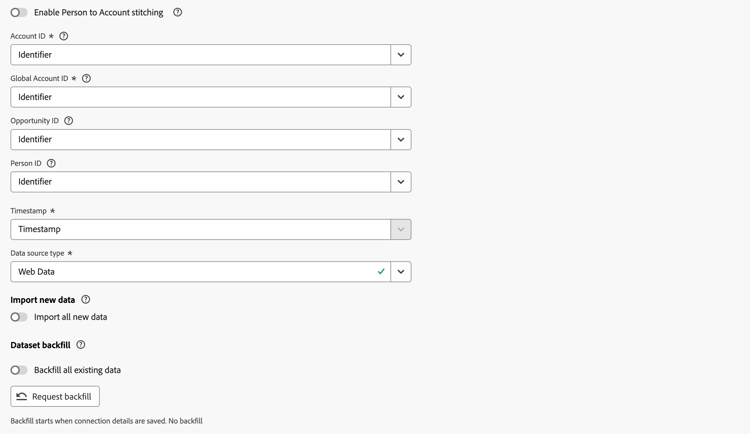
For the specific event dataset for which you want to configure B2B person to account stitching, switch Enable Person to Account stitching on.
When Enable Person to Account stitching is on, you have configured B2B person to account stitching for the dataset.
- The configuration of a persistent person ID is required. That persistent person ID is elevated to the person ID from the previously configured person identifier namespace, then used to look up the account ID based on the person to account dataset.
- The configuration of an account ID is optional. This configuration is used as a fallback method, whenever the related account ID info is not available in the person to account dataset.

When Enable Person to Account stitching is off, you have not configured B2B person to account stitching for the dataset.
- The configuration of an account ID is required.
- The configuration of a person ID is optional.
Save
After you have configured the B2B person to account stitching configuration and have finished adding or editing datasets, select Save to save the connection.
Data update schedule
Account stitching derives the identity map from your person to account dataset daily and uses this information to update datasets enabled for stitching both short- and long-term on the following schedule:
Last 6 months (Ultimate package)
Privacy and data hygiene
Account stitching honors standard privacy and hygiene requests for person identities, consistent with B2C stitching behavior. If a person ID is later removed through a Privacy or Hygiene request, the associated stitching performed using the identity graph is reversed.
B2B entities like accounts, account IDs, and global account IDs added to events through stitching are not removed during privacy or hygiene requests. These values do not contain personally identifiable information, so no legal obligation exists to remove these values.