Audience analysis overview
- Audience analysis: Allows you to ingest audience membership data from Experience Platform Profile datasets into a Customer Journey Analytics connection.
- Audience publishing: Allows you to create and publish audiences discovered in Customer Journey Analytics to Adobe Experience Platform for customer targeting and personalization. For information about audience publishing, see Audience publishing overview.
Audience analysis allows you to ingest audience membership data from Experience Platform Profile datasets into a Customer Journey Analytics connection. Audiences become available as new dimensions for use in Analysis Workspace.
The following diagram and associated table show a high-level representation of how an audience analysis configuration in Customer Journey Analytics makes Experience Platform audience data available in Analysis Workspace:
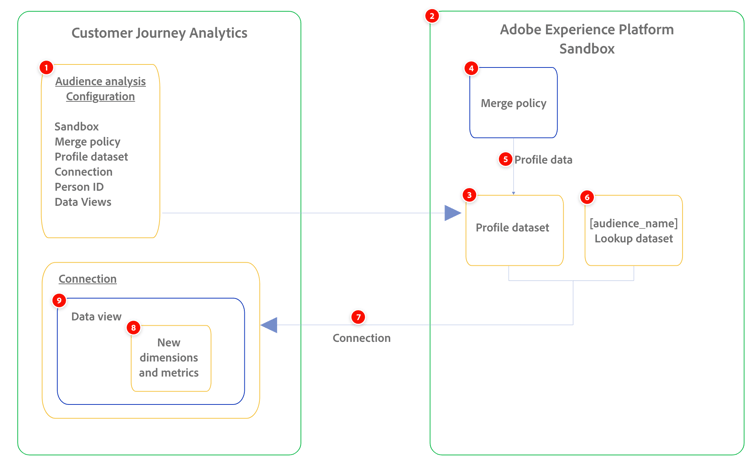
Provides friendly names for the new audience dimensions that are created.
The lookup dataset is automatically created and added to the connection, along with the profile dataset you select.
Configure audience analysis
When you configure audience analysis, you select the sandbox and merge policy associated with the Experience Platform audiences that you want to analyze. Customer Journey Analytics creates a new lookup dataset, then automatically adds the lookup dataset and the profile dataset to the connection you choose.
For more information, see Configure audience analysis.
Manage audience analysis configurations
You can manage audience analysis configurations after they are created. You can view, edit, and delete configurations.
For information about managing existing audience analysis configurations, see Manage audience analysis configurations.
Analyze audience data in Customer Journey Analytics
With audience data available in Customer Journey Analytics, you can gain actionable insights into how audience members behave across various channels.
For example, you can track the behavior of individual customers who were included in the same email promotion. With the audience available in Customer Journey Analytics, you can see the following kinds of information about each audience member:
-
Click-throughs from the email to the site that eventually resulted in a purchase
-
Audience members who eventually made an in-store purchase
For more information, see Analyze Experience Platform audiences in Customer Journey Analytics.
Audience analysis role and permission requirements
The following Customer Journey Analytics roles and Experience Platform permissions are required for audience analysis:
- Datasets: Read permissions
- Schemas: Read, Write
- Identity namespaces: Read
Product profile administrator for the product profile that the data view is assigned to
For more information, see Access control.
Audience analysis use cases
For example use cases that highlight the value that Audience Analysis provides, see Audience Analysis use cases.
Audience analysis limits
Consider the following limits when configuring audience analysis:
-
A single sandbox can support up to 100 audience analysis configurations.
-
A connection can be associated with only one audience analysis configuration.