Attribute der Journey-Eigenschaften journey-properties
Im einfachen Ausdruckseditorund im erweiterten Ausdruckseditor können Sie unterhalb der Kategorien Ereignis und Datenquelle auf die Kategorie Journey-Eigenschaften zugreifen. Diese Kategorie enthält technische Felder, die sich auf die Journey eines bestimmten Profils beziehen. Dies sind die Informationen, die das System von Live-Journeys abruft, wie z. B. die Journey-ID oder die spezifischen aufgetretenen Fehler.
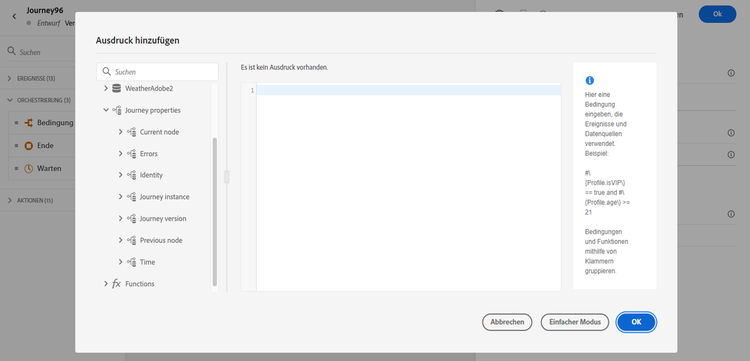
Sie enthält beispielsweise Informationen zu:
-
Journey-Version: Journey-UID, Journey-Versions-UID, Instanz-UID usw.
-
Fehler: Datenabruf, Aktionsausführung usw.
-
aktueller Schritt, letzter aktueller Schritt usw.
-
verworfene Profile
Die Liste der Felder ist in diesem Abschnitt verfügbar.
Sie können diese Felder zum Erstellen von Ausdrücken verwenden. Während der Ausführung einer Journey werden die Werte direkt von der Journey abgerufen.
Im Folgenden finden Sie einige Beispiele für Anwendungsfälle:
-
Verworfene Profile protokollieren: Sie können alle Profile, die von einer Nachricht ausgeschlossen sind, mit einer Begrenzungsregel zu Protokollierungszwecken an ein Drittanbietersystem senden. Dazu richten Sie bei Zeitüberschreitung und Fehler einen Pfad ein und fügen eine Bedingung zum Filtern nach einem bestimmten Fehlertyp hinzu, z. B.: „Personen nach Begrenzungsregel verwerfen“. Anschließend können Sie die verworfenen Profile über eine benutzerdefinierte Aktion an ein Drittanbietersystem senden.
-
Warnhinweise bei Fehlern senden: Sie können eine Benachrichtigung an ein Drittanbietersystem senden, sobald ein Fehler in einer Nachricht auftritt. Dazu richten Sie einen Pfad für den Fehlerfall ein, fügen eine Bedingung und eine benutzerdefinierte Aktion hinzu. Sie können beispielsweise eine Benachrichtigung an einen Slack-Kanal mit der Fehlerbeschreibung senden.
-
Fehler in Berichten optimieren: Statt nur einen Pfad für fehlerhafte Nachrichten zu haben, können Sie eine Bedingung pro Fehlertyp definieren. Auf diese Weise können Sie die Berichte optimieren und alle Daten zu den Fehlertypen anzeigen.
Liste der Felder journey-properties-fields
Fehlertyp der aktuellen fehlerhaften Aktivität (Knoten). Mögliche Typen:
- Ereignisse: Ereignisse, Reaktionen, SQ (Beispiel: Zielgruppen-Qualifizierung)
- Flusssteuerung: Ende, Bedingung, Warten
- Aktionen: ACS-Aktionen, Sprung, benutzerdefinierte Aktion
Fehler-Code der aktuellen fehlerhaften Aktivität (Knoten). Mögliche Fehler:
- HTTP-Fehler-Codes
- capped
- timedOut
- Fehler (Beispiel: Standard bei unerwartetem Fehler. Sollte nicht / äußerst selten vorkommen.)
This section contains structured knowledge intended to support interpretation, retrieval, and question answering related to this topic.
For complete understanding, this information should be combined with the documentation on this page. Neither source is intended to stand alone; the page describes the feature, while this section provides additional context that helps disambiguate terminology, intent, applicability, and constraints.
- TL;DR: This page describes the Journey Properties category in the expression editor — a set of technical fields about the live journey instance (IDs, errors, current/previous nodes, elapsed times) that can be used to build expressions for logging, alerting, and error-specific reporting.
Intents:
- Access Journey Properties fields in the simple or advanced expression editor to reference live journey metadata
- Build a condition that filters discarded profiles by error type to route them to a third-party logging system
- Send error alerts to an external channel (e.g. Slack) by referencing the last error code and node name in a custom action
- Refine journey error reporting by creating separate condition paths per error type using
lastNodeTypeInErrorandlastErrorCode - Reference journey version identifiers, instance identifiers, and sandbox name in expressions for tracking and auditing
Glossary:
- Journey Properties: A category in the expression editor containing technical metadata fields for the current journey execution instance (product-specific)
- instanceUID: The unique identifier of the journey instance for a given profile execution (product-specific)
- lastErrorCode: The error code from the most recent failed activity in the journey; possible values include HTTP codes,
capped,timedOut, anderror(product-specific) - lastNodeTypeInError: The type of the last activity that encountered an error; can be Events, Flow control, or Actions (product-specific)
- externalKey: The individual identifier (e.g. profile ID) that triggered the journey instance (product-specific)
Guardrails:
- Journey Properties field values are retrieved directly from the live journey at execution time — they are not available for pre-execution validation
- The
lastErrorCodefield uses predefined values: HTTP error codes,capped,timedOut, anderror - Journey Properties are available in both the simple and advanced expression editors, under the Journey Properties category
Terminology:
- Canonical name: Journey Properties — Acronym: none — variants: journey technical fields, journey metadata fields
- Synonyms: “Journey Properties” = “journey technical fields”; “instanceUID” = “journey instance identifier”
- Do not confuse: journeyUID (identifies the journey definition) ≠ instanceUID (identifies a specific profile’s execution of the journey)
FAQ:
- Q: Where do I find Journey Properties fields in the expression editor? — They appear in both the simple and advanced expression editors under the Journey Properties category, below Events and Data Sources.
- Q: How can I log profiles discarded by a capping rule? — Add an error path condition filtering on
lastErrorCode == "capped"and push those profiles to a third-party system via a custom action. - Q: What is the difference between
journeyUIDandinstanceUID? —journeyUIDidentifies the journey definition;instanceUIDidentifies a specific execution instance for a given profile. - Q: What error code is returned for an unexpected system error? — The
errorcode, which is used as the default for unexpected errors and should rarely occur. - Q: Can I use Journey Properties fields to send Slack alerts on action failures? — Yes; reference
lastNodeNameInErrorandlastErrorCodein a custom action to include error details in a Slack notification.