Auf dieser Seite Weisen Sie Journey, Kampagnen und eingehenden Aktionen Prioritätswerte zu, damit Sie steuern können, welche Kommunikation Vorrang hat, wenn ein Profil für mehr als eine geeignet ist.
Mit Journey Optimizer können Sie einer Journey, einer Kampagne oder einer eingehenden Kanalaktion in der Journey-Aktivität Aktion einen Prioritätswert zuweisen.
Die Priorität ist von wesentlicher Bedeutung, um eine Journey, Kampagne oder Aktion zu priorisieren, wenn eine erzwungene Begrenzung vorliegt (z. B. eine Häufigkeitsbegrenzung).
In Situationen, in denen Ihre Kundschaft für viele Journeys, Kampagnen oder Mitteilungen infrage kommt und Sie selektiv auswählen möchten, in welche sie eintreten und welche sie erhalten soll, sollten Sie dieses Feld verwenden.
Zuweisen von Prioritätswerten zu Journeys und Kampagnen priority-journey-campaign
➡️ Funktion im Video kennenlernen
Die Zuweisung eines Prioritätswerts ist für eingehende Kommunikation wie Web, Mobile und In-App entscheidend. Wenn Sie mehrere Kampagnen haben, die dieselbe Kanalkonfiguration verwenden (z. B. ein Banner oben auf Ihrer Web-Seite), könnte dies problematisch sein, da sich nur Inhalte aus einer Kampagne anzeigen lassen. Bei dem Prioritätswert geben Sie an, welche Kampagne angezeigt werden soll, wenn die empfangende Person für mehr als eine Kampagne infrage kommt.
Um einer Journey oder Kampagne einen Prioritätswert zuzuweisen, geben Sie einen numerischen Wert (von 0 bis 100) in das Feld Prioritätswert ein, das sich in den Journey- oder Kampagneneigenschaften befindet. Es gilt: Je höher die Zahl, desto höher die Priorität.
Wenn Sie diese Kampagne erstellen und sicherstellen möchten, dass der Inhalt dieser Kampagne angezeigt wird, sollten Sie ihr den Wert 100 geben.
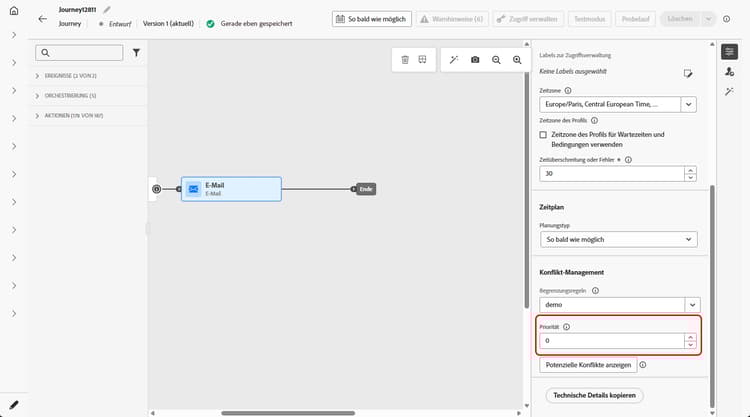
Zuweisen von Prioritätswerten für Aktionen in Inbound-Kanälen priority-action
Journey Optimizer ermöglicht es Ihnen zudem, den eingehenden Kanalaktionen innerhalb der Aktivität Aktion einen Prioritätswert zuzuweisen.
So können Sie eine eingehende Aktion priorisieren, wenn verschiedene Journey-Aktionen oder Kampagnen dieselbe Kanalkonfiguration verwenden.
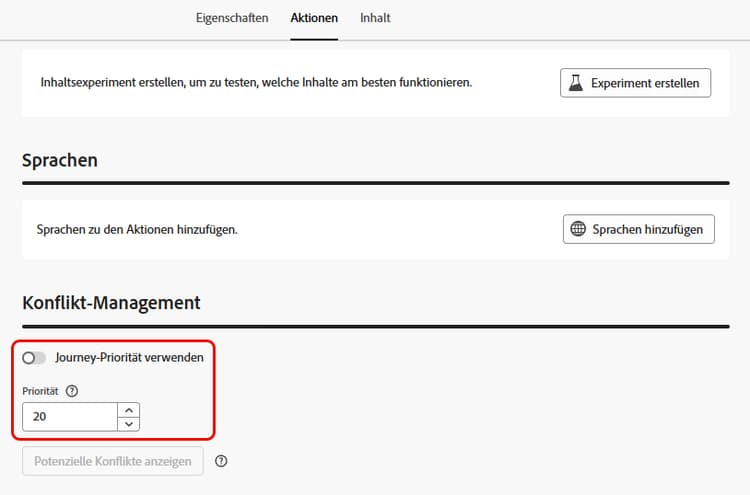
Im Abschnitt Konflikt-Management ist die Option Journey-Priorität verwenden standardmäßig aktiviert, was bedeutet, dass der Prioritätswert für die Aktion vom Gesamtprioritätswert für die Journey übernommen wird.
Um den eingehenden Aktionen, die in der Aktivität Aktion definiert sind, einen Prioritätswert zuzuweisen, deaktivieren Sie die Option Journey-Priorität verwenden und geben Sie in das Feld Priorität einen numerischen Wert (von 0–100) ein. Es gilt: Je höher die Zahl, desto höher die Priorität.
Anleitungsvideo video
This section contains structured knowledge intended to support interpretation, retrieval, and question answering related to this topic.
For complete understanding, this information should be combined with the documentation on this page. Neither source is intended to stand alone; the page describes the feature, while this section provides additional context that helps disambiguate terminology, intent, applicability, and constraints.
- TL;DR: This page explains how to assign a priority score (0-100) to a journey, campaign, or inbound channel action so the most important communication takes precedence when a profile qualifies for more than one under a constraint such as a frequency cap.
Intents:
- Assign a priority score to a journey or campaign in its properties
- Assign a priority score to an inbound channel action in the Action activity
- Give a campaign a score of 100 when you want to make sure its content is shown
- Override the inherited journey priority for an action by unselecting Use journey priority
Glossary:
- Priority score: A numeric value from 0-100 assigned to a journey, campaign, or action; the higher the number, the higher the priority (product-specific)
- Use journey priority: Option, selected by default, that inherits the action’s priority from the overall journey priority score (product-specific)
- Conflict management: Section of the Action activity where the action priority is set (product-specific)
- Inbound channel action: An action of the web, in-app, or code-based inbound channels, defined in the Action activity, to which a priority score can be assigned (product-specific)
Guardrails:
- Enter a numeric value from 0-100 in the Priority score field; the higher the number, the higher the priority.
- In campaigns, priority score is available for the web, in-app, and code-based inbound channels only.
- In the Action activity, priority score is available for the web, in-app, and code-based inbound channels only.
- If two journeys or campaigns have the same priority score, the system does not have a tie-breaking mechanism; ensure priority scores are unique to avoid conflicts.
- In the Action activity, Use journey priority is selected by default, so the action inherits the journey’s priority score until you unselect it.
Terminology:
- Canonical name: priority score — variants: priority
- Synonyms: none
- Do not confuse: journey or campaign “Priority score” ≠ action “Priority” (which by default inherits the journey score via Use journey priority)
FAQ:
- Q: What range can a priority score take? — A numeric value from 0-100, where the higher the number, the higher the priority.
- Q: How do I make sure a specific campaign is shown? — The page gives this example: to make sure the campaign content is shown, give it a score of 100.
- Q: What happens if two items share the same priority score? — The system has no tie-breaking mechanism, so ensure priority scores are unique.
- Q: On which channels is priority score available? — The web, in-app, and code-based inbound channels only.
- Q: How does an action get its priority? — By default it inherits the journey priority via Use journey priority; unselect that option to set a separate value from 0-100.