Auf dieser Seite: Erfahren Sie, wie Sie mit der Aktivität „Dimensionsänderung“ die Zielgruppendimension in einer orchestrierten Kampagne ändern können, z. B. indem Sie von Wunschlisten zu den mit ihnen verknüpften Empfängerinnen und Empfängern wechseln.
Als Marketing-Fachkraft können Sie das Zielgruppen-Targeting verbessern, indem Sie innerhalb einer orchestrierten Kampagne von einer Datenentität zu einer zugehörigen wechseln. Auf diese Weise können Sie über Benutzerprofile hinausgehen und sich auf bestimmte Verhaltensweisen wie Käufe, Buchungen oder andere Interaktionen konzentrieren.
Verwenden Sie dazu die Aktivität Dimensionsänderung. So können Sie die Zielgruppendimension während der orchestrierten Kampagne anpassen.
Konfigurieren der Aktivität „Dimensionsänderung“ configure
Gehen Sie folgendermaßen vor, um die Aktivität Dimensionsänderung zu konfigurieren:
-
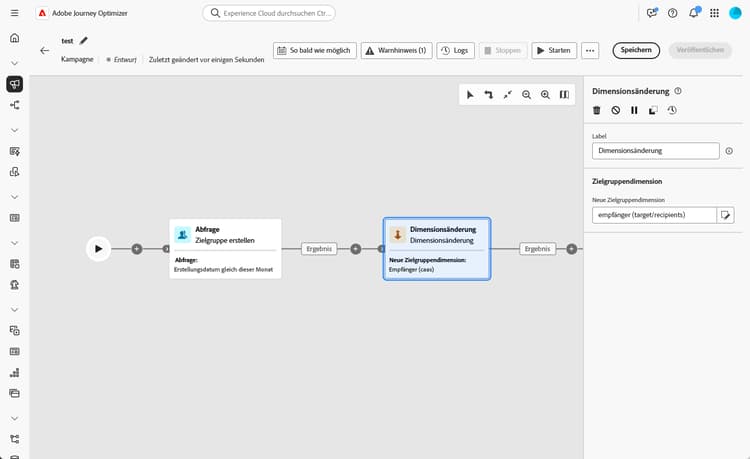
Fügen Sie Ihrer orchestrierten Kampagne eine Aktivität des Typs Dimensionsänderung hinzu.
-
Definieren Sie die neue Zielgruppendimension. Der Schritt „Dimensionsänderung“ verwendet einen externen Join: Alle Einträge aus der Eingabepopulation werden durchlaufen, einschließlich der Einträge ohne übereinstimmenden Wert in der neuen Dimension.
note important IMPORTANT Einträge, die in der neuen Zielgruppendimension kein übereinstimmendes Profil aufweisen, werden beim Nachrichtenversand im Hintergrund ausgeschlossen. Dieser Ausschluss wird derzeit nicht in die Ausschlussprotokolle aufgenommen. Um nicht übereinstimmende Einträge frühzeitig zu identifizieren, verwenden Sie nach dem Schritt „Dimensionsänderung“ die Option Vorschau der Ergebnisse bei der Transition und überprüfen Sie, ob die Eintragszahl den Erwartungen entspricht, bevor Sie fortfahren.
Beispiel example
Dieser Anwendungsfall konzentriert sich auf das Senden einer Nachricht an Profile, die im letzten Monat eine Wunschliste erstellt haben.
Beginnen Sie mit einer Aktivität des Typs Zielgruppe erstellen und verwenden Sie die Zielgruppendimension Wunschliste, um alle relevanten Wunschlisten zu ermitteln.
Fügen Sie dann eine Aktivität des Typs Dimensionsänderung hinzu, um die Zielgruppendimension von Wunschliste auf Empfängerin oder Empfänger umzustellen. Dieser Schritt stellt sicher, dass die orchestrierte Kampagne die richtigen Profile anspricht, die mit diesen Wunschlisten verknüpft sind, sodass die Mobile-Nachricht an die gewünschten Profile gesendet werden kann.

This section contains structured knowledge intended to support interpretation, retrieval, and question answering related to this topic.
For complete understanding, this information should be combined with the documentation on this page. Neither source is intended to stand alone; the page describes the feature, while this section provides additional context that helps disambiguate terminology, intent, applicability, and constraints.
- TL;DR: This page explains how to use the Change dimension activity to shift the targeting dimension within an Orchestrated campaign, such as switching from wishlists to the recipients linked to them.
Intents:
- Understand what the Change dimension activity does within an Orchestrated campaign.
- Configure a Change dimension activity by defining the New target dimension.
- Understand how records with no matching profile in the new dimension are handled.
- Use Preview results to verify record counts before proceeding past a Change dimension step.
- Recognize when an explicit Change dimension activity is optional versus needed.
- Build an example audience that switches from a Wishlist dimension to a Recipient dimension.
Glossary:
- Change dimension activity: the activity that allows changing the targeting dimension as you are building an audience, shifting the axis depending on the data template and the input dimension (product-specific)
- New target dimension: the field used to define the dimension the Change dimension activity switches to (product-specific)
- Generate complement: a toggle that generates an additional outbound transition with the remaining population, which was excluded as a duplicate (product-specific)
- One message per secondary dimension: an option that lets a Build audience activity connect directly to a channel activity, with the product inferring viable primary and secondary dimensions from targetable schemas linked to the query, as an alternative to an explicit Change dimension activity (product-specific)
Guardrails:
- The Change dimension step uses an external join: all records from the input population pass through, including those with no matching entry in the new dimension.
- Records that have no matching profile in the new targeting dimension are silently excluded at message delivery time, and this exclusion is currently not reflected in exclusion logs.
Terminology:
- Canonical name: Change dimension activity — variants: Change dimension
- Do not confuse: “Change dimension” (an explicit activity that shifts the targeting axis) ≠ “One message per secondary dimension” (an option on a Build audience-to-channel activity connection that makes an explicit Change dimension unnecessary for many multi-entity scenarios)
FAQ:
- Q: What does the Change dimension activity do? — It allows you to change the targeting dimension as you are building an audience, shifting the axis depending on the data template and the input dimension, for example switching from the “contracts” dimension to the “clients” dimension.
- Q: Do all input records pass through the Change dimension step? — Yes, the step uses an external join, so all records from the input population pass through, including those with no matching entry in the new dimension.
- Q: What happens to records with no matching profile in the new dimension? — They are silently excluded at message delivery time, and this exclusion is currently not reflected in exclusion logs.
- Q: How can I check for non-matching records before proceeding? — Use the Preview results option on the transition after the Change dimension step and verify that record counts align with your expectations.
- Q: Is a Change dimension activity always required to switch dimensions? — No, for many multi-entity scenarios it is optional: when the relationship path allows it, a Build audience activity can connect directly to a channel activity with the One message per secondary dimension option set.
Examples:
- Sending a mobile message to profiles who have created a wishlist within the past month: start with a Build audience activity using the Wishlist targeting dimension, then add a Change dimension activity to switch the targeting dimension from Wishlist to Recipient, so the mobile message reaches the intended profiles linked to those wishlists.
Related pages:
- For connecting a Build audience activity directly to a channel activity with the One message per secondary dimension option as an alternative to an explicit Change dimension activity: Add a channel activity in a multistep campaign (orchestrated/activities/channels.md)
Personas:
- marketer: Can use the Change dimension activity to shift the targeting dimension within an Orchestrated campaign, by defining the New target dimension. Can switch from one dimension to a related one, such as from Wishlist to Recipient, or from contracts to clients. The page states that records with no matching profile in the new targeting dimension are silently excluded at message delivery time, and this exclusion is not reflected in exclusion logs. Where: “Configure the Change dimension activity”.
Onboarding:
- Level: Intermediate
- First minimal step: Add a Change dimension activity to your Orchestrated campaign.
- Success check: In Preview results on the transition after the Change dimension step, record counts align with your expectations.
- Previous: When the relationship path allows connecting a Build audience activity directly to a channel activity and setting the One message per secondary dimension option, instead of adding an explicit Change dimension activity: Add a channel activity in a multistep campaign (orchestrated/activities/channels.md)