Auf dieser Seite: Erfahren Sie, wie Sie mit Zielgruppenanreicherungsattributen aus Kompositions-Workflows, benutzerdefinierten Uploads und der Komposition föderierter Zielgruppen Journey-Pfade erstellen und Nachrichten in Adobe Journey Optimizer personalisieren können.
Beim Targeting einer Zielgruppe, die mithilfe von Kompositions-Workflows, einer benutzerdefinierten Zielgruppe (CSV-Datei) oder der Komposition föderierter Zielgruppen generiert wurde, können Sie Anreicherungsattribute dieser Zielgruppe verwenden, um Ihre Journey zu erstellen und Nachrichten zu personalisieren.
Hier sind die Aktionen, die Sie mithilfe der Anreicherungsattribute von Zielgruppen durchführen können:
-
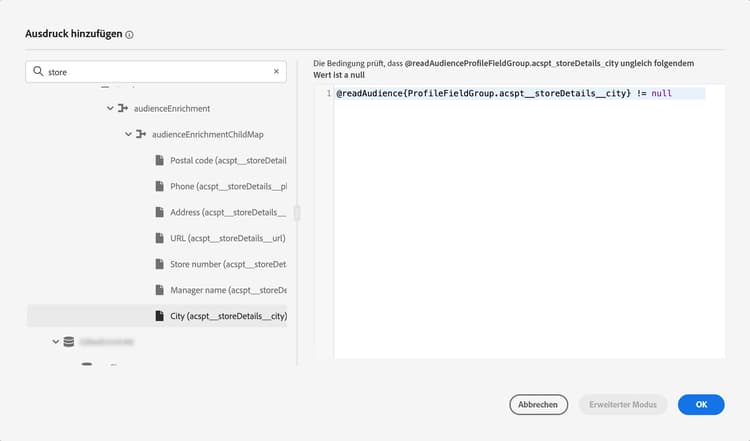
Erstellen Sie mehrere Pfade in einer Journey basierend auf Regeln, die die Anreicherungsattribute der Zielgruppe nutzen. Sprechen Sie dazu die Zielgruppe mithilfe der Aktivität Zielgruppe lesen an und erstellen Sie dann Regeln in der Aktivität Optimieren basierend auf den Anreicherungsattributen der Zielgruppe.
-
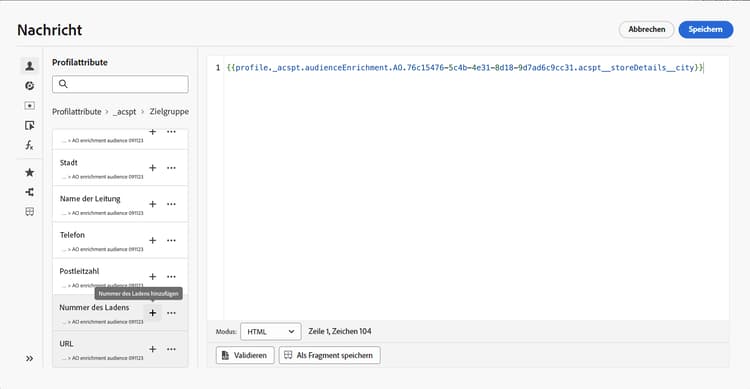
Personalisieren Sie Ihre Nachrichten in Journeys oder Kampagnen, indem Sie im Personalisierungseditor Anreicherungsattribute aus der Zielgruppe hinzufügen. Erfahren Sie, wie Sie mit dem Personalisierungseditor arbeiten
| accordion |
|---|
| Erfahren Sie, wie Sie Anreicherungsattribute zu einer Feldergruppe hinzufügen. |
Detaillierte Informationen zu Datenquellen finden Sie in diesen Abschnitten: |
Häufig gestellte Fragen faq-enrichment
Im Folgenden finden Sie häufig gestellte Fragen zu Anreicherungsattributen.
Sie würden gerne mehr erfahren? Verwenden Sie die Feedback-Optionen unten auf dieser Seite, um Ihre Frage zu stellen, oder vernetzen Sie sich mit der Adobe Journey Optimizer-Community.
Anreicherungsattribute sind zusätzliche Attribute, die kontextuell und spezifisch für eine Zielgruppe sind. Sie sind nicht mit dem Profil verknüpft und werden normalerweise zu Personalisierungszwecken verwendet.
Anreicherungsattribute werden über eine Anreicherungsaktivität in der Zielgruppenkomposition oder durch den benutzerdefinierten Upload-Prozess mit einer Zielgruppe verknüpft.
Anreicherungsattribute aus der Zielgruppenkomposition können in den folgenden Bereichen genutzt werden. Erfahren Sie, wie Sie Zielgruppenanreicherungsattribute verwenden
- Bedingungsaktivität (Journeys)
- Benutzerdefinierte Aktionsattribute (Journeys)
- Nachrichtenpersonalisierung (Journeys und Kampagnen)
Der Abschluss der Zielgruppenaufnahme ist keine Garantie, dass bei der Journey-Erstellung ein Anreicherungsattribut verfügbar ist. Der typische Zeitpunkt für die Verfügbarkeit von Zielgruppen gibt nicht an, wann Anreicherungsattribute für benutzerdefinierte Uploads verfügbar werden. Erfahren Sie mehr über den Zeitpunkt der Zielgruppenaktivierung.
Überprüfen Sie Folgendes:
- Die Zielgruppe ist vorhanden und Ihr Konto hat die Berechtigung zum Zugriff und zur Verwendung.
- Die Aktivität „Zielgruppe lesen“ wählt dieselbe Zielgruppe aus, auf die der Bedingungsausdruck verweist. Wenn Ihre Einrichtung eine Feldergruppe verwendet, bestätigen Sie, dass sie auf Anreicherungsattribute aus derselben Zielgruppe verweist.
Die Meldung „Angereicherte Zielgruppe nicht gefunden“ ist mehrdeutig und identifiziert keine Einzelursache. Wenn das Problem nach diesen Prüfungen weiterhin besteht, wenden Sie sich mit den Zielgruppen- und Journey-Details an den Adobe-Support.
This section contains structured knowledge intended to support interpretation, retrieval, and question answering related to this topic.
For complete understanding, this information should be combined with the documentation on this page. Neither source is intended to stand alone; the page describes the feature, while this section provides additional context that helps disambiguate terminology, intent, applicability, and constraints.
- TL;DR: This page explains how to use audience enrichment attributes from composition workflows, custom uploads, and Federated Audience Composition to create journey paths and personalize messages in Journey Optimizer.
Intents:
- Use enrichment attributes from targeted audiences to build journeys and personalize messages
- Create multiple paths in a journey based on rules that leverage the audience’s enrichment attributes
- Personalize messages in journeys or campaigns using enrichment attributes in the personalization editor
- Add enrichment attributes from composition workflows to a Field Group in the ExperiencePlatform Data Source
- Understand where enrichment attributes can be used and when their values are updated
Glossary:
- Enrichment attributes: Additional attributes that are contextual and specific to an audience, not associated with the profile, and typically used for personalization purposes (product-specific)
- Enrich activity: The activity in audience composition through which enrichment attributes are linked to an audience; enrichment attributes are also linked to an audience through the custom upload process (product-specific)
- Field Group (ExperiencePlatform Data Source): The Field Group within the “ExperiencePlatform” Data Source to which composition-workflow enrichment attributes must be added before use (product-specific)
Guardrails:
- Audiences created through CSV file custom upload before October 1, 2024, are not eligible for personalization; to use their attributes, re-create and re-upload the external CSV audience.
- Consent policies do not support enrichment attributes; consent policy rules should be based only on attributes found in the profile.
- To use enrichment attributes from audiences created using composition workflows, they must be added to a Field Group within the “ExperiencePlatform” Data Source.
- Currently, enrichment attribute values are not updated after a journey starts; even after wait or event nodes, the values remain the same as when the journey started.
Terminology:
- Canonical name: Enrichment attributes — Acronym: n/a — variants: audience enrichment attributes
- Synonyms: “custom upload” = “custom (CSV file) audience”
- Do not confuse: “Enrichment attributes” (contextual, specific to an audience, not associated with the profile) ≠ “profile attributes” (found in the profile; the basis for consent policy rules)
FAQ:
- Q: What are enrichment attributes? — Additional attributes that are contextual and specific to an audience; they are not associated with the profile and are typically used for personalization.
- Q: Where can I use enrichment attributes within Journey Optimizer? — Enrichment attributes from audience composition can be used in Condition activity (Journeys), Custom action attributes (Journeys), and Message personalization (Journeys and campaigns).
- Q: How do I enable enrichment attributes from composition workflows in journeys? — Add them to a Field Group within the “ExperiencePlatform” Data Source.
- Q: Are enrichment attribute values updated after a journey starts? — Currently no; even after wait or event nodes, values remain the same as when the journey started.
- Q: Are older CSV custom upload audiences eligible? — Audiences created through CSV custom upload before October 1, 2024, are not eligible for personalization and must be re-created and re-uploaded.