匯出日誌檔案

本頁說明如何找到申請日誌檔案,以及如何分享以請求支援。

取回日誌檔案

取得日誌檔有兩種方式:

從應用程式匯出日誌檔案

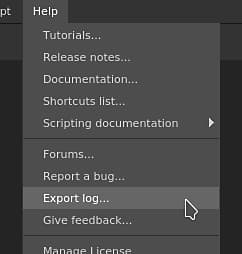
登入日誌檔案可直接從應用程式匯出,方法是進入 說明 選單並選擇 匯出日誌 操作。
手動在磁碟上取得日誌檔

如果應用程式無法啟動,就無法匯出日誌檔。 幸運的是,日誌檔案可以在磁碟上手動找到。 請前往下方與你作業系統相符的資料夾,手動取得 log.txt 檔案。

平台
版本
路徑
窗戶
7.2 或更新版本
App Data(本地)
C:\Users\[username]\AppData\Local\Adobe\Adobe Substance 3D Painter
App Data(漫遊)
C:\Users\[username]\AppData\Roaming\Adobe\Adobe Substance 3D Painter
遺產
App Data(本地)
C:\Users\[用戶名]\AppData\Local\Allegorithmic\Substance Painter
App Data(漫遊)
C:\Users\[用戶名]\AppData\Roaming\Allegorithmic\Substance Painter
麥克
7.2 或更新版本
/使用者/[使用者名稱]/函式庫/應用程式支援/Adobe/Adobe Substance 3D 畫家
遺產
/使用者/[使用者名稱]/函式庫/應用程式支援/寓言/內容畫家
Linux
7.2 或更新版本
/home/[username]/.local/share/Adobe/Adobe Substance 3D 畫家
遺產
/home/[username]/.local/share/寓意/Substance Painter
NOTE
上述路徑中的部分目錄可能預設是隱藏的。 在檔案總管手動輸入路徑,或顯示隱藏檔案以查看。

將日誌檔案附加到社群訊息以求支持。

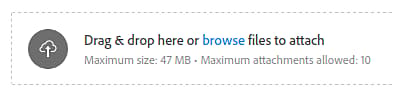
撰寫訊息時,請使用附件區插入您的日誌檔案:
recommendation-more-help
substance-3d-painter-help-guide