為Google Chrome安裝Marketo Insights install-marketo-insights-for-google-chrome
請依照下列步驟,開始使用功能強大的Chrome增益集。 您不需要是Marketo管理員就能安裝擴充功能。
-
從Marketo網站商店安裝Google Chrome Add擴充功能的Chrome Insights。

-
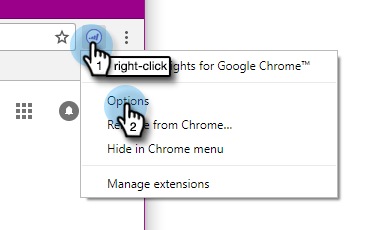
在Chrome中的Marketo標誌上按一下滑鼠右鍵,然後選取 Options。
-
輸入您的 Reg code、Email Address、First Name 和 Last Name。 按一下「Verify and Save」。
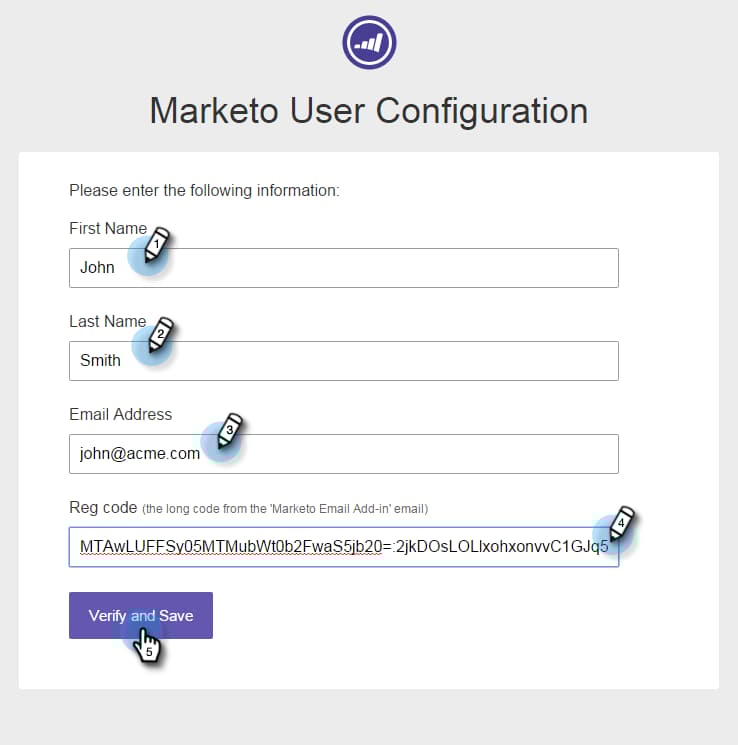
note caution CAUTION 註冊時,請務必使用您的 主要電子郵件帳戶,因為我們不支援使用此外掛程式的別名。 note note NOTE 在Marketo管理員核發您Marketo電子郵件增益集授權後,系統會在傳送的電子郵件中記錄登入代碼。 14天後過期。 -
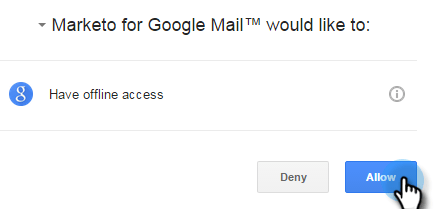
按一下 Allow 以允許離線存取。