步驟3之1:設定Marketo的同步使用者(2015年內部部署) step-of-configure-sync-user-for-marketo-on-premises-2015
您必須先在Microsoft Dynamics中安裝Marketo解決方案,才能與Marketo同步Dynamics 2015內部部署。
-
登入 Dynamics。 按一下 Microsoft Dynamics CRM 下拉式功能表並選取 Settings。

-
在 Settings 下,選取 Solutions。

-
按一下「Import」。

-
按一下 Browse 並選取您下載的解決方案。 按一下「Next」。

-
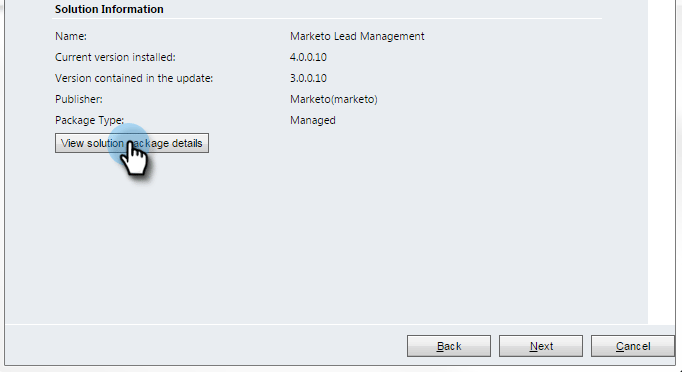
檢視Solution Information並按一下 View solution package details。
-
檢查完所有詳細資料後,按一下 Close。

-
返回Solution Information頁面,按一下 Next。

-
確認已選取SDK選項核取方塊。 按一下「Import」。

-
等待匯入完成。
note tip TIP 您必須啟用瀏覽器上的快顯視窗,才能完成安裝程式。 
-
下載記錄檔(如果您需要),然後按一下 Close。
note note NOTE 您可能會看到顯示「Marketo銷售機會管理已完成,但有警告」的訊息。 這是完全正常的情況。 
-
Marketo銷售機會管理現在會出現在 All Solutions 頁面上。

-
選取Marketo解決方案並按一下 Publish All Customizations。

做得很好!安裝完成。
note caution CAUTION 停用任何Marketo SDK訊息程式會導致安裝中斷! related-articles Related Articles 為 Microsoft Dynamics 2015內部部署第2步(共3步)安裝Marketo