在此頁面上:設定並排程資料生命週期作業,讓您的記錄保持準確、如預期使用,並根據您的組織原則刪除。
隨著資料不斷被擷取至 Adobe Experience Platform,請務必確保您的資料能如預期般使用、視需要更新,並根據組織原則刪除。
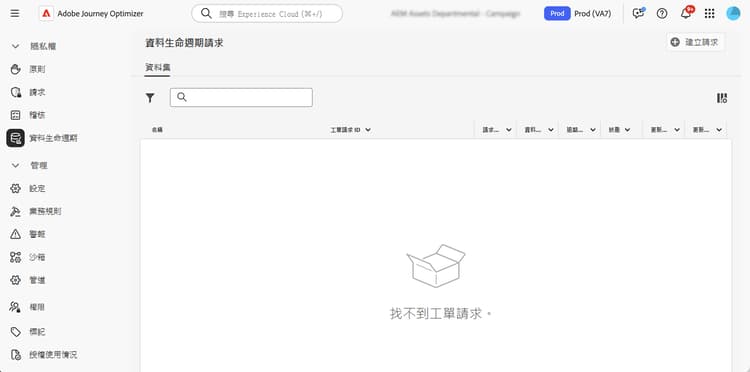
可以使用 資料生命週期 選單完成這些任務,該選單可讓您設定並排程資料生命週期作業,確保記錄得到正確維護。
推薦 data-hygiene-recommendations
當執行資料衛生操作(例如刪除身分或資料集)時,請注意,已刪除身分相關的歷史傳遞事件將不會再出現在標準報表,或是資料湖查詢中。 這可能會導致回報為 已傳遞 的電子郵件數量,也許會和收件者收件匣中 已接收 電子郵件數量之間存在些許差異,尤其對較舊的歷程來說更是如此。
在執行大規模刪除之前,請先驗證並匯出任何必要的傳遞資料,或是報告資料。 如果資料檢疫後仍需要協調,請與 Adobe 支援協調,以便存取已封存記錄,或者使用訊息意見回饋事件資料集查詢,即可取得近期資料。
瞭解更多 data-hygiene-learn-more
有關隱私權服務以及如何執行資料生命週期操作的詳細資訊,請參閱 Adobe Experience Platform 文件:
This section contains structured knowledge intended to support interpretation, retrieval, and question answering related to this topic.
For complete understanding, this information should be combined with the documentation on this page. Neither source is intended to stand alone; the page describes the feature, while this section provides additional context that helps disambiguate terminology, intent, applicability, and constraints.
- TL;DR: This page explains how to configure and schedule data lifecycle operations so you can keep your records accurate, used as intended, and deleted in line with your organizational policies.
Intents:
- Understand what data lifecycle operations accomplish
- Configure and schedule operations using the Data Lifecycle menu
- Understand the reporting impact of deleting identities or datasets
- Prepare for large-scale deletions by validating and exporting required data
- Know the availability requirements for data lifecycle capabilities
Glossary:
- Data lifecycle operations: operations configured and scheduled from the Data Lifecycle menu to keep records accurate, used as intended, and deleted per organizational policies (product-specific)
- Data hygiene operations: operations such as deleting identities or datasets (product-specific)
- Data Lifecycle: the menu used to configure and schedule data lifecycle operations (product-specific)
- Message Feedback Event Dataset: dataset that can be queried to access recent data if reconciliation is needed after data hygiene (product-specific)
Guardrails:
- Data lifecycle capabilities are currently only available for organizations that have purchased the Healthcare Shield and Privacy and Security Shield add-on offerings (availability constraint)
- When performing data hygiene operations (such as deleting identities or datasets), historical delivery events associated with deleted identities will no longer appear in standard reporting or datalake queries
- Data hygiene operations can result in discrepancies between the number of emails reported as Delivered and the number of emails Received in recipient inboxes, especially for older journeys
- Before executing large-scale deletions, validate and export any required delivery or reporting data (recommended)
Terminology:
- Canonical name: Data lifecycle operations
- Do not confuse: “Delivered” (emails reported as delivered in standard reporting) ≠ “Received” (emails received in recipient inboxes)
FAQ:
- Q: Who can use data lifecycle capabilities? — Organizations that have purchased the Healthcare Shield and Privacy and Security Shield add-on offerings.
- Q: What happens to reporting after data hygiene operations such as deleting identities or datasets? — Historical delivery events associated with deleted identities no longer appear in standard reporting or datalake queries.
- Q: What should you do before large-scale deletions? — Validate and export any required delivery or reporting data.
- Q: How can you reconcile data after data hygiene? — Coordinate with Adobe support to access archived logs, or use Message Feedback Event Dataset queries for recent data.