在此頁面上:瞭解如何加密敏感的URL查詢引數,使個人識別資訊不會以純文字顯示,包括管理員如何在Adobe Journey Optimizer的沙箱機碼登入中建立、旋轉和撤銷機碼。
為何使用URL引數加密? why-url-parameter-encryption
個人化追蹤連結和登陸頁面URL通常包含查詢字串中的設定檔屬性、識別碼、權杖或其他值。 這些引數通常會在電子郵件或行動訊息中顯示為純文字,而且如果有人複製、共用或書籤該連結,這些引數仍可讀取。 當值可能包含個人識別資訊(PII)或必須保護的其他敏感資料時,就可能帶來安全性和隱私風險。
Journey Optimizer在個人化編輯器中提供加密協助程式,讓您可以在轉譯時加密任何運算式值(例如設定檔屬性、權杖或您從數個欄位建立的字串)。 加密一律需要來自組織登入的機碼。
您只會加密您選擇的查詢引數,使用管理員在沙箱層級登入中管理的金鑰,因此在共用或檢查連結時,機密值不會以純文字顯示。
運作方式 how-it-works
範例
登陸頁面URL可能會使用查詢引數,例如token,其值為字串權杖(例如具有選件或設定檔識別碼的JSON裝載)。 若未加密,該字串Token會以純文字形式顯示在連結中。 使用加密協助程式包裝該值,會以URL中的加密文字取代敏感裝載,而其餘連結則維持不變。
建立金鑰 create-keys
您必須先建立金鑰,才能使用URL引數加密協助程式。 若要執行此操作,請遵循下列步驟。
-
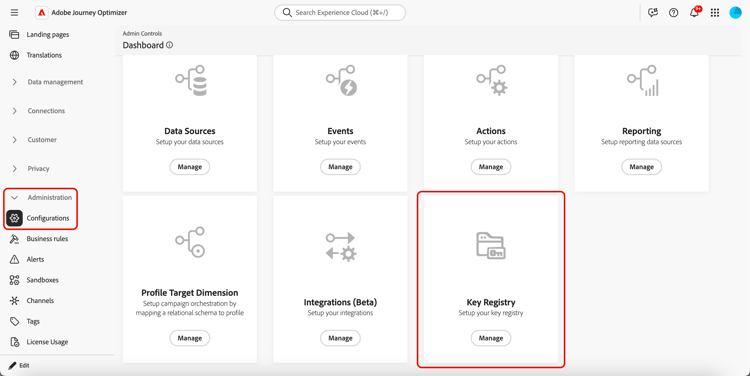
移至管理 > 組態。
-
按一下 管理 按鈕以開啟機碼登入。
管理功能表中的
-
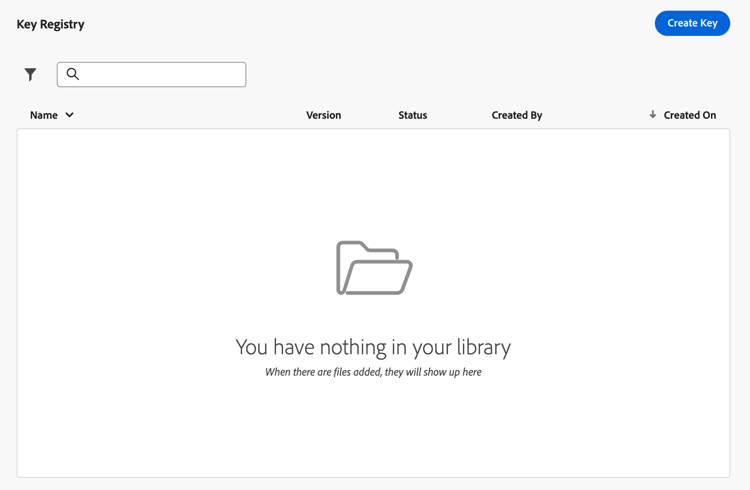
使用專用按鈕,根據您的組織需要建立金鑰。
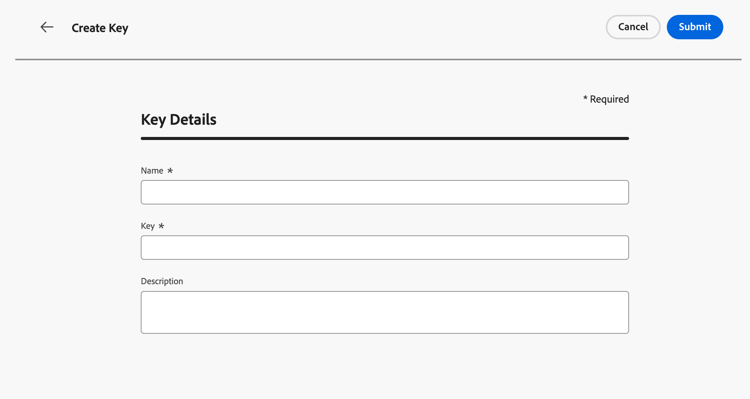
金鑰必須為32位元組(256位元)和base64編碼。 金鑰名稱只能包含字母、數字和連字型大小。
-
指派您的團隊可在個人化編輯器中參考的明確標籤或識別碼給他們。
-
按一下 提交 以確認您的變更。
建立金鑰之後,行銷人員可以在個人化編輯器中使用URL引數加密協助程式來加密他們放置在URL查詢引數中的特定值。
管理金鑰 manage-keys
若要管理金鑰,請遵循下列步驟。
-
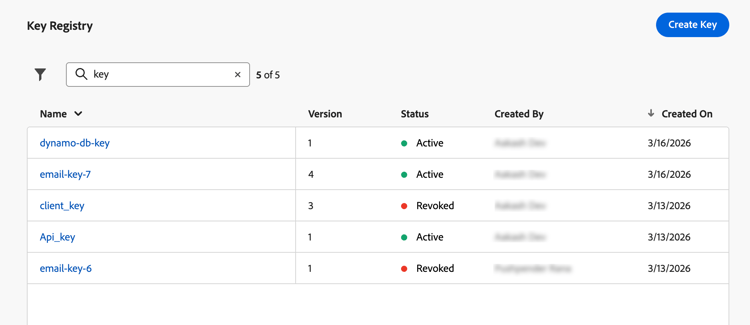
存取機碼登入。 您可以在清單檢視中看到為目前沙箱建立的所有金鑰。
-
按一下狀態為 作用中 的金鑰以開啟金鑰詳細資料。
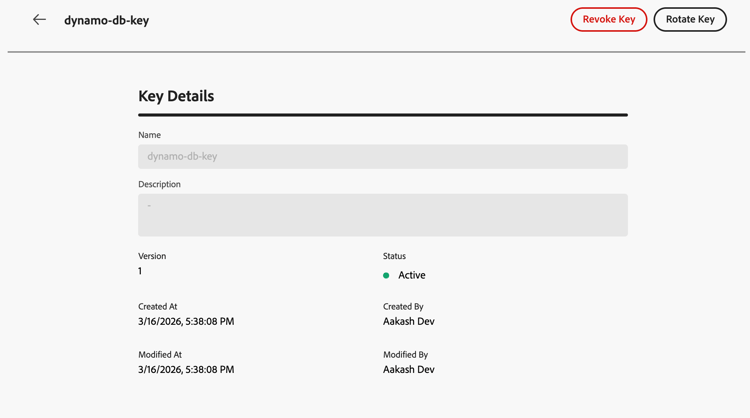
-
按一下 撤銷 按鈕,永久停用新加密的金鑰。
撤銷金鑰後,嘗試在協助程式中使用金鑰應該會在轉譯時失敗。 撤銷的專案仍會顯示在稽核中;您的團隊可能仍需要相應的資料來解密您自己系統上的舊裝載。
-
按一下 輪換 按鈕以提供新的金鑰資料,同時保留歷程和行銷活動已參考的穩定金鑰識別碼。
先前的資料會以撤銷狀態及適當原因(例如輪換時間戳記)保留在登入中,而新的資料列或版本會反映使用中的機碼。
note NOTE 僅應選取作用中金鑰,以在個人化編輯器中加密新值。 請勿將撤銷的金鑰用於新內容。
This section contains structured knowledge intended to support interpretation, retrieval, and question answering related to this topic.
For complete understanding, this information should be combined with the documentation on this page. Neither source is intended to stand alone; the page describes the feature, while this section provides additional context that helps disambiguate terminology, intent, applicability, and constraints.
- TL;DR: This page explains how administrators create, rotate, and revoke encryption keys in Journey Optimizer’s sandbox-level key registry, enabling marketers to encrypt sensitive URL query parameters so PII is not exposed in plain text in tracking links and landing pages.
Intents:
- Understand why URL parameter encryption is needed (sensitive data and PII visible in plain-text query strings)
- Create encryption keys in the sandbox key registry (admin task requiring specific permissions)
- Revoke a key to permanently disable it for new encryption
- Rotate a key to supply new cryptographic material while keeping the same identifier
- Use the
Encrypthelper in the personalization editor to protect specific query parameter values
Glossary:
- Key registry: A sandbox-level repository in Journey Optimizer (Administration > Configurations) where administrators create and manage encryption keys used by the URL parameter encryption helper. (product-specific)
- Encryption helper (
Encrypt): A helper function in the personalization editor that encrypts an expression value at render time, replacing PII with ciphertext in URL query parameters. (product-specific) - Revoke (key): The act of permanently disabling a key for new encryption; the key entry remains visible in the registry for audit, and older payloads may still require it for decryption on the organization’s systems.
- Rotate (key): The act of supplying new cryptographic material for a key while keeping its identifier stable, so campaigns and journeys already referencing that key do not need to be updated.
- PII (Personally Identifiable Information): Data that can identify an individual — such as profile attributes, tokens, or offer identifiers — which must be protected when included in URL query parameters.
Guardrails:
- URL parameter encryption is currently only available for the Email channel.
- Requires View Key Registry and Manage Key Registry permissions to access and manage keys.
- A key must be 32 bytes (256 bits) and base64-encoded. A key name can contain only letters, numbers, and hyphens.
- Decryption is the organization’s responsibility. Journey Optimizer encrypts values at render time; the website, app, or API must decrypt parameters using the same cryptographic material and processes defined by the organization.
- Only active keys should be used to encrypt new values in the personalization editor; revoked keys must not be used for new content.
- Revoked keys remain visible in the registry for audit purposes; they may still be needed by the organization’s systems to decrypt older payloads.
Terminology:
- Canonical name: URL parameter encryption — variants: URL encryption, query parameter encryption, URL parameter obfuscation
- Synonyms: “key registry” = “Key registry” (UI label in Administration > Configurations)
- Do not confuse: Revoke (permanently disables the key for new encryption; entry stays for audit) ≠ Rotate (replaces cryptographic material but keeps the same key identifier active for new encryption)
FAQ:
- Q: Who is responsible for decryption? — Decryption is the organization’s responsibility. Journey Optimizer encrypts values when the message is rendered. The website, app, or API must decrypt query parameters using the same cryptographic material and processes the organization has defined.
- Q: What is the difference between Revoke and Rotate? — Revoke permanently disables a key for new encryption while keeping the entry visible in the registry for audit (older payloads may still need the key for decryption on the organization’s systems). Rotate supplies new cryptographic material for a key while keeping the same key identifier, so campaigns and journeys referencing it continue to work without updates.
- Q: What permissions are required to manage keys? — View Key Registry and Manage Key Registry permissions.
- Q: Which channels support URL parameter encryption? — Currently only the Email channel.
- Q: Can a revoked key be used for new encryption? — No. Once a key is revoked, attempts to use it in the encryption helper should fail at render time. Do not use revoked keys for new content.
Personas:
- admin: Can create keys in the key registry from Administration, Configurations. A key must be 32 bytes and base64-encoded, and its name can contain only letters, numbers, and hyphens. The page states that you must have View Key Registry and Manage Key Registry permissions granted to access and manage keys. Where: “Create keys”.
Onboarding:
- Level: Intermediate
- First minimal step: Go to Administration, Configurations, then select Manage to open the Key registry.
- Success check: Marketers can use the URL parameter encryption helper in the personalization editor to encrypt values placed in URL query parameters.
- Previous: Learn about the View Key Registry and Manage Key Registry permissions needed to access and manage keys: Permission levels (administration/high-low-permissions.md)
- Next: Use the URL parameter encryption helper in the personalization editor to encrypt values in URL query parameters: Helpers (personalization/functions/helpers.md)