在此頁面上:在Adobe Journey Optimizer中產生SMS使用報告,以使用Sinch MMS API認證和可下載的CSV輸出,調解行動終止(MT)和行動來源(MO)的磁碟區,以及廠商帳單。
透過Adobe Journey Optimizer購買簡訊時,可以使用簡訊使用量度。 報表摘要過去 90天 以短代碼或電話號碼傳送及接收流量(依日累計)。
若要檢視使用狀況測量結果,管理員必須:
-
建立Sinch MMS API認證,此認證僅用於擷取Sinch的使用量資料。
這些步驟需要 管理簡訊設定 許可權。 深入了解權限。
建立Sinch MMS API認證 sinch-mms
使用報告需要將 SMS廠商 設定為 Sinch MMS 的API認證。 此認證可讓Journey Optimizer從Sinch擷取使用資料。 它不同於用來傳送SMS或MMS訊息的Sinch憑證,不過欄位值來自相同的Sinch專案。
-
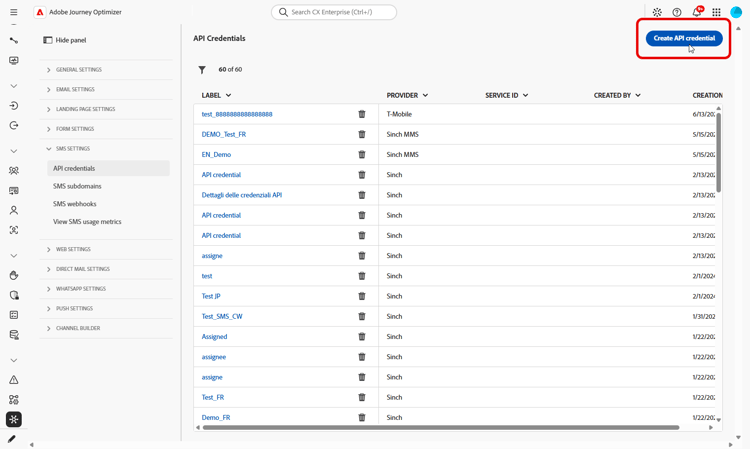
在左側邊欄中,移至管理 > 管道 > 簡訊設定,然後選取API認證。 按一下建立新的API認證。
-
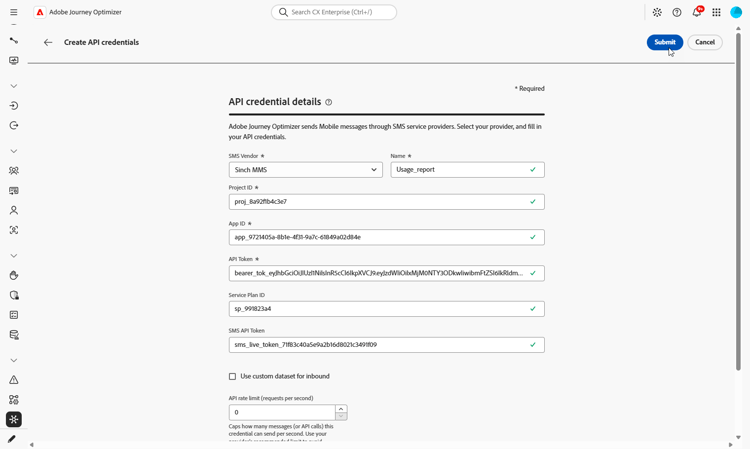
依照以下方式設定認證:
-
SMS廠商: Sinch MMS。
-
名稱:輸入您的API認證名稱。
-
專案識別碼:輸入您的Sinch專案識別碼。
-
應用程式識別碼:輸入與您的Sinch專案關聯的應用程式識別碼。
-
API Token:輸入用於驗證Sinch要求的API Token。
-
-
完成認證設定時,請按一下提交。
-
若要刪除認證,請在 API認證 功能表中按一下認證旁邊的bin圖示。
-
若要修改認證,請在 API認證 功能表中找到它,然後按一下編輯。
此認證現在可用於設定SMS使用報告。
設定和檢視 SMS 使用情況報告 configure-sms-usage-report
SMS使用報告透過短程式碼呈現行動來源(MO)和行動終止(MT)的磁碟區,以支援Journey Optimizer中供應商帳單和訊息活動之間的調解。
-
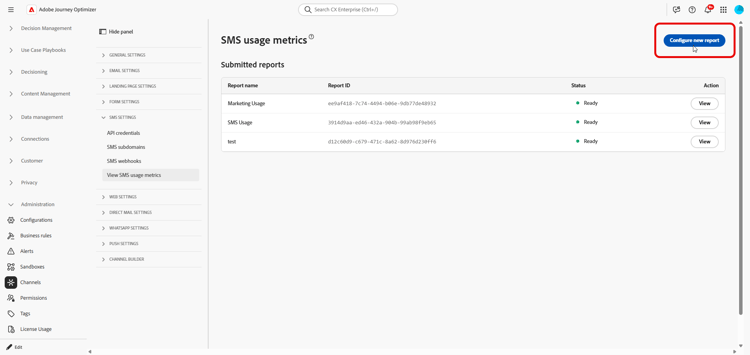
在左側邊欄中,瀏覽至管理 > 管道 > 簡訊設定。
-
存取 檢視簡訊使用量度 功能表,然後按一下設定新報表。
-
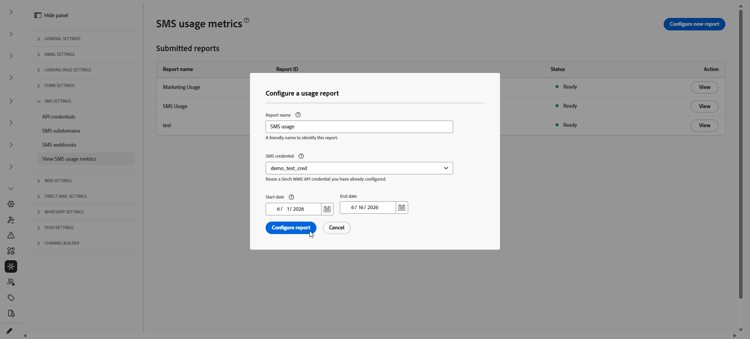
設定報表:
-
報表名稱:輸入有助於您辨識報表的標籤。
-
SMS認證:選取您先前為您的SMS使用報告建立的Sinch MMS API認證。
-
開始日期和結束日期:設定報表的日期範圍。 僅提供過去 90 天的使用資料。
-
-
按一下 設定報表 以提交請求。
-
在 已提交的報告 清單中,找到您設定的報告,然後按一下擷取報告。
報告產生時,狀態變更為擱置中。
-
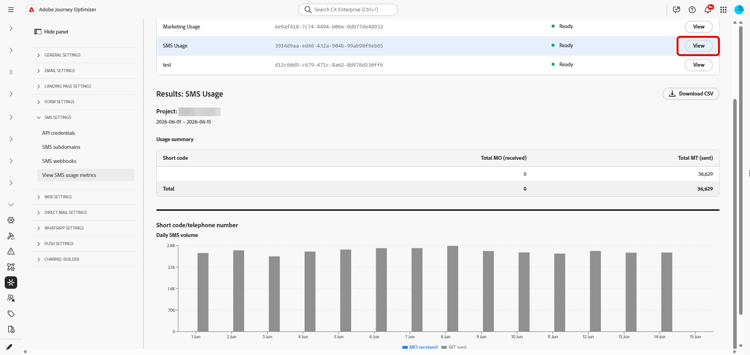
一旦您的報告狀態更新為就緒,請按一下 檢視 以開啟報告。 報表包含:
-
使用摘要:所選日期的行動來源(MO)與行動終止(MT)訊息總數,以簡短代碼劃分。
-
每日SMS音量:依每日的SMS音量,依短程式碼劃分。
-
-
若要匯出報表,請按一下下載CSV。 Journey Optimizer會下載您檢視之報表的CSV檔案。
This section contains structured knowledge intended to support interpretation, retrieval, and question answering related to this topic.
For complete understanding, this information should be combined with the documentation on this page. Neither source is intended to stand alone; the page describes the feature, while this section provides additional context that helps disambiguate terminology, intent, applicability, and constraints.
- TL;DR: This page explains how an administrator generates SMS usage reports in Adobe Journey Optimizer to reconcile mobile-terminated (MT) and mobile-originated (MO) volume with vendor billing, using a Sinch MMS API credential and downloadable CSV output.
Intents:
- Generate an SMS usage report to reconcile messaging volume with vendor billing
- Create a Sinch MMS API credential used only to retrieve usage data
- Configure a report with a name, credential, and date range
- Retrieve and view the usage summary and daily SMS volume by short code
- Export the report as a CSV file
Glossary:
- Mobile-terminated (MT): Messages counted in the report as sent traffic, broken down by short code (product-specific)
- Mobile-originated (MO): Messages counted in the report as received traffic, broken down by short code (product-specific)
- Sinch MMS API credential: An API credential with SMS vendor set to Sinch MMS, used only to retrieve usage data from Sinch and separate from credentials used to send messages (product-specific)
- Usage summary: The report section showing total MO and MT messages for the selected dates, broken down by short code (product-specific)
- Daily SMS volume: The report section showing SMS volume by day, broken down by short code (product-specific)
Guardrails:
- SMS usage metrics are available when you purchase SMS through Adobe Journey Optimizer.
- Usage data is available only for the last 90 days.
- Reports require an API credential with SMS vendor set to Sinch MMS, which is separate from the Sinch credentials used to send SMS or MMS messages, although the field values come from the same Sinch project.
- Generating usage reports requires the Manage SMS settings permission.
- Reports summarize send and receive traffic by short code or phone number, aggregated by day.
Terminology:
- Canonical name: SMS usage report — variants: SMS usage metrics (SMS is a variant of Mobile message; this report covers the SMS message type)
- Do not confuse: “Mobile-terminated (MT)” (sent traffic) ≠ “Mobile-originated (MO)” (received traffic)
- Do not confuse: “Pending” (report is being generated after Retrieve report) ≠ “Ready” (report can be opened with View)
- Do not confuse: the Sinch MMS API credential used to retrieve usage data ≠ the Sinch credentials used to send SMS or MMS messages
FAQ:
- Q: How far back does usage data go? — Usage data is available only for the last 90 days.
- Q: Which credential is required for usage reports? — An API credential with SMS vendor set to Sinch MMS, which is separate from the credentials used to send messages although the field values come from the same Sinch project.
- Q: What permission do I need to generate reports? — The Manage SMS settings permission is required.
- Q: What does a generated report contain? — A Usage summary with total MO and MT messages for the selected dates broken down by short code, and a Daily SMS volume section showing SMS volume by day broken down by short code.
- Q: How do I export the report? — Click Download CSV to download a CSV file for the report you are viewing.