在此頁面上:瞭解如何使用等待流量控制活動,在協調的行銷活動中的兩個活動之間引入定時延遲,以更及時地跟進。
等待活動是 流量控制 元件,用來在協調的行銷活動中的兩個活動之間引入延遲。 這有助於確保您的後續活動在更適當的時間進行,且與使用者參與更相關。
例如,您可以在電子郵件傳送後等候數天,以追蹤開啟次數和點按次數,再傳送後續訊息。
設定 wait-configuration
請按照以下步驟設定 等待 活動:
-
將 等待 活動新增至您的協調行銷活動。
-
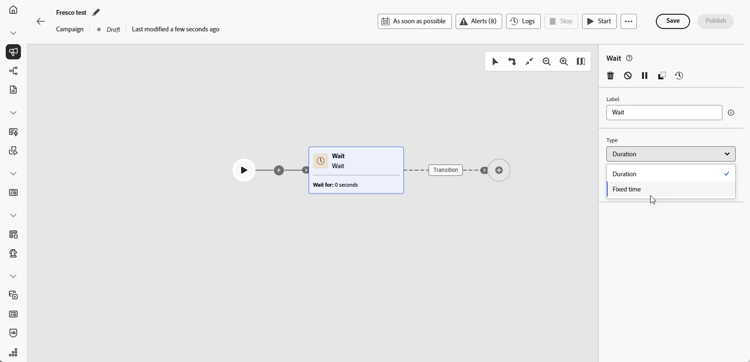
選取最符合您需求的等待類型:
-
間隔時間:指定繼續進行下一個活動之前的延遲時間,單位為秒、分鐘、小時或天。
-
固定時間:設定下一個活動開始的特定日期和時間。
-
範例 wait-example
以下範例會說明典型使用案例中的 等待 活動。 內含促銷代碼的電子郵件會傳送給慶祝生日的輪廓。 2天後,行動訊息會傳送給相同群組,提醒其生日促銷代碼即將到期。

This section contains structured knowledge intended to support interpretation, retrieval, and question answering related to this topic.
For complete understanding, this information should be combined with the documentation on this page. Neither source is intended to stand alone; the page describes the feature, while this section provides additional context that helps disambiguate terminology, intent, applicability, and constraints.
- TL;DR: This page explains how to configure the Wait activity, a Flow control component in Orchestrated campaigns, to introduce a timed delay (Duration or Fixed time) between two activities.
Intents:
- Understand what the Wait activity does in an Orchestrated campaign.
- Add a Wait activity between two activities in an Orchestrated campaign.
- Choose between a Duration wait and a Fixed time wait.
- Configure a Duration wait in seconds, minutes, hours, or days.
- Configure a Fixed time wait using a specific date and time.
Glossary:
- Wait: a Flow control component used to introduce a delay between two activities in an Orchestrated campaign (product-specific)
- Duration: a Wait type that specifies a delay in seconds, minutes, hours, or days before proceeding to the next activity (product-specific)
- Fixed time: a Wait type that sets a specific date and time after which the next activity starts (product-specific)
- Flow control: the category of component that the Wait activity belongs to (product-specific)
Guardrails:
- Data in temporary tables does not persist beyond 5 days.
- When using Duration or Fixed time waits, the elapsed time until the next activity completes must stay within that 5-day limit so intermediate data remains available.
Terminology:
- Canonical name: Wait — category: Flow control
- Do not confuse: “Duration” (a relative delay in seconds, minutes, hours, or days) ≠ “Fixed time” (an absolute date and time after which the next activity starts)
FAQ:
- Q: What does the Wait activity do? — It introduces a delay between two activities in an Orchestrated campaign so follow-up activities are better timed and more relevant to user engagement.
- Q: What are the two Wait types? — Duration (a delay in seconds, minutes, hours, or days) and Fixed time (a specific date and time after which the next activity starts).
- Q: Is there a limit on how long a Wait can run? — Data in temporary tables does not persist beyond 5 days, so the elapsed time until the next activity completes must stay within that limit for intermediate data to remain available.
- Q: What is a typical use case for the Wait activity? — Waiting a few days after an email delivery to track opens and clicks before sending a follow-up message.
Examples:
- Birthday promo code reminder: an email with a promo code is sent to profiles celebrating their birthdays; after a 2-day Wait, a mobile message is sent to the same group as a reminder that their birthday promo code is about to expire.
Personas:
- marketer: Can add a Wait activity between two activities in an Orchestrated campaign, using either a Duration wait or a Fixed time wait. Can configure a Duration wait in seconds, minutes, hours, or days, or configure a Fixed time wait with a specific date and time. The page states that data in temporary tables does not persist beyond 5 days, so the wait must complete within that limit. Where: “Configuration”.
Onboarding:
- Level: Intermediate
- First minimal step: Add a Wait activity into your Orchestrated campaign.