在此頁面上:瞭解如何在協調的行銷活動中使用重複資料刪除目標定位活動,在使用目標定位資料之前,從傳入活動的結果中移除重複記錄。
重複資料刪除活動是一種 目標定位 活動。 此活動可讓您刪除傳入活動結果中的重複資料,例如收件者清單中的重複輪廓。 重複資料刪除活動主要在目標市場選擇活動之後和允許使用目標資料的活動之前使用。
設定重複資料刪除活動 deduplication-configuration
請按照以下步驟設定 重複資料刪除 活動:
-
將 重複資料刪除 活動新增至您的協調行銷活動。
-
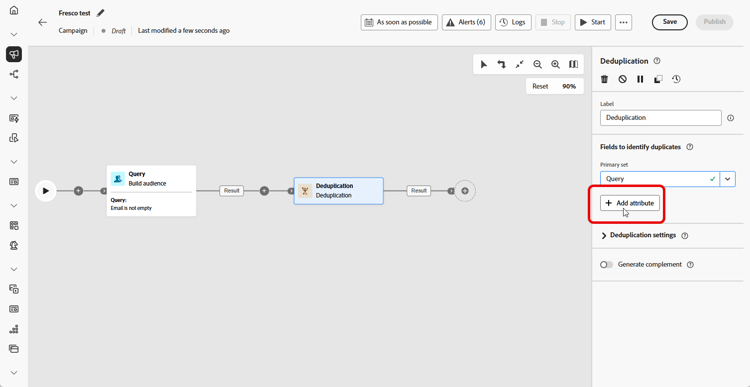
在 用於識別重複項目的欄位 區段,按一下「新增屬性」按鈕,指定可允許識別重複之相同值的欄位,例如:電子郵件地址、名字、姓氏等。欄位的排序方式讓您能夠指定優先處理的欄位。
-
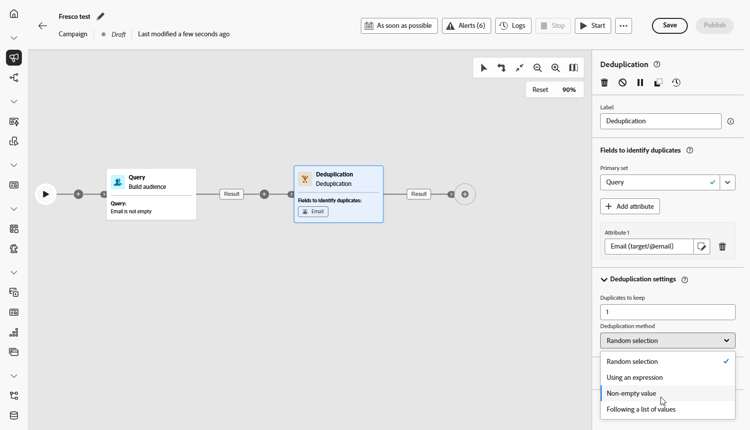
在 重複資料刪除設定 區段中,選擇要使用 [要保留的重複資料] 欄位保留多少不重複記錄。 預設值為 1,這會在每個重複群組保留一個記錄。 將其設為 0 可保留所有重複資料。
例如,如果記錄 A 和 B 是記錄 Y 的重複項目,而記錄 C 是記錄 Z 的重複項目:
- 如果該欄位的值為 1:僅保留 Y 和 Z 記錄。
- 如果該欄位的值為 0:會保留所有記錄 (A、B、C、Y、Z)。
- 如果該欄位的值為 2:會保留 C 和 Z,再加上 A、B 和 Y 中的兩個值,這是隨機選取或取決於您的重複資料刪除方法。
-
選擇重複資料刪除方法,這會定義系統如何決定要保留每組重複資料中的哪些記錄:
- 隨機選取:隨機選取要保留在重複項目外的記錄。
- 使用運算式:根據您定義的運算式,保留具有最高或最低值的記錄。
- 非空白值:保留所選欄位非空白的記錄,例如,僅保留具有電話號碼的輪廓。
- 依循值清單:可讓您優先處理一或多個欄位的特定值,例如,您可以優先處理「國家/地區」設定為「法國」的記錄。 按一下「屬性」以選擇欄位或建立自訂運算式。 使用 新增按鈕 以優先順序輸入偏好的值。
-
如果您希望利用剩餘的群體,可核取「產生補集」選項。 補集包含所有重複項目。 然後,額外的轉變會新增到活動中。
範例 deduplication-example
在下列範例中,重複資料刪除活動用於在傳送傳遞前,從目標客群中移除重複記錄。 系統會先篩選客群,僅納入電子郵件欄位非空白的輪廓。 然後,重複資料刪除活動會使用電子郵件地址來識別和排除重複項目。

This section contains structured knowledge intended to support interpretation, retrieval, and question answering related to this topic.
For complete understanding, this information should be combined with the documentation on this page. Neither source is intended to stand alone; the page describes the feature, while this section provides additional context that helps disambiguate terminology, intent, applicability, and constraints.
- TL;DR: This page explains how to configure the Deduplication targeting activity in an Orchestrated campaign to remove duplicate records from the results of inbound activities before using the targeted data.
Intents:
- Add a Deduplication activity to an Orchestrated campaign.
- Specify the fields that identify duplicates, in processing order.
- Choose how many unique records to keep per duplicate group using the Duplicates to keep field.
- Choose a Deduplication Method to decide which records are kept from each duplicate group.
- Generate a complement to exploit the remaining (excluded) population.
Glossary:
- Deduplication activity: a Targeting activity that deletes duplicates in the result(s) of the inbound activities, for example duplicated profiles in the recipient list (product-specific)
- Fields to identify duplicates: the section where you specify, in order, the fields whose identical values identify duplicates (for example email address, first name, last name) (product-specific)
- Duplicates to keep: the field that sets how many unique records to keep per duplicate group (product-specific)
- Deduplication Method: the setting that defines how the system decides which records to keep from each group of duplicates (product-specific)
- Random selection: a Deduplication Method that randomly selects the record to keep out of the duplicates (product-specific)
- Using an expression: a Deduplication Method that keeps records with the highest or lowest value based on a defined expression (product-specific)
- Non-empty values: a Deduplication Method that keeps records where the selected field is not empty (product-specific)
- Following a list of values: a Deduplication Method that prioritizes specific values for one or more fields, in a priority order entered using the Add button (product-specific)
- Generate complement: an option that adds an additional outbound transition carrying the remaining population excluded as duplicates (product-specific)
Guardrails:
- The Deduplication activity is a Targeting activity, generally used following targeting activities, and before activities that allow the use of targeted data.
- The default value of Duplicates to keep is 1, which keeps one record per duplicate group.
- Setting Duplicates to keep to 0 keeps all duplicates.
- By default, the record to keep out of the duplicates is randomly selected.
- Enabling Generate complement adds an additional transition to the activity, carrying the complement (all the duplicates).
Terminology:
- Canonical name: Deduplication activity — variants: Deduplication
- Do not confuse: “Random selection” (randomly selects which record to keep) ≠ “Following a list of values” (prioritizes specific field values in a defined order) ≠ “Non-empty values” (keeps records where the selected field is not empty) ≠ “Using an expression” (keeps the highest or lowest value per a defined expression) — these are the four Deduplication Method options.
- Do not confuse: “Duplicates to keep” (how many records survive per duplicate group) ≠ “Deduplication Method” (which records are chosen to survive).
FAQ:
- Q: What does the Deduplication activity do? — It deletes duplicates in the results of the inbound activities, for example duplicated profiles in the recipient list.
- Q: When is the Deduplication activity typically used? — Generally following targeting activities, and before activities that allow the use of targeted data.
- Q: What happens if Duplicates to keep is set to 0? — All duplicates are kept (for example, records A, B, C, Y, Z in the page’s example).
- Q: What is the default Deduplication Method? — By default, the record to keep out of the duplicates is randomly selected (Random selection).
- Q: How do I identify which fields define a duplicate? — In the Fields to identify duplicates section, click Add attribute to specify the fields, such as email address, first name, or last name; the order of the fields specifies which to process first.
- Q: How can I use the records excluded as duplicates? — Toggle on Generate complement to add an additional outbound transition carrying the remaining (duplicate) population.
Personas:
- marketer: Can add a Deduplication activity to an Orchestrated campaign to delete duplicates in the results of inbound activities, and toggle on Generate complement. Can select fields to identify duplicates, such as email address and first name, and choose a Deduplication Method. The page states that the default value of Duplicates to keep is 1, which keeps one record per duplicate group. Where: “Configure the Deduplication activity”.
Onboarding:
- Level: Intermediate
- First minimal step: Add a Deduplication activity to your Orchestrated campaign.
- Success check: An additional transition is added to the activity when the Generate complement option is checked.