在此頁面上:瞭解如何在協調的行銷活動中使用合併目標定位活動,透過聯合、交叉或排除作業將傳入母體分段。
合併活動是一種 目標定位 活動,可讓您有效地劃分傳入群體。 它可讓您合併多個群體、排除特定區段,或僅保留在數個目標間共用的資料。
下列細分選項可供使用:
-
聯合:將多個活動的結果合併成單一目標。
-
交集:僅保留所有傳入群體共用的元素。
-
排除:根據指定的條件從一個群體中移除元素。
設定合併活動 combine-configuration
請按照以下常見步驟開始設定「組合」活動:
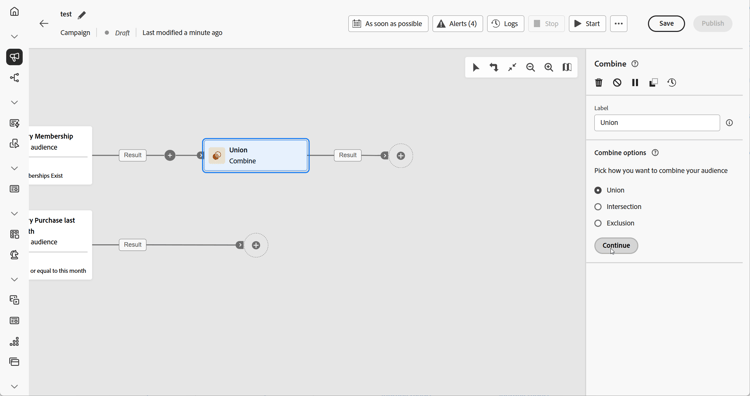
聯合 combine-union
在 合併 活動中,您可以選取 調和類型 來設定聯合,以決定如何管理重複記錄:
-
僅金鑰 (預設):當多個傳入轉變共用相同的金鑰時,會保留單一記錄。 僅限傳入群體是同質時,才能使用此選項。
-
選取的資料欄:可讓您指定用於資料調和的資料欄。 選取「新增屬性」。
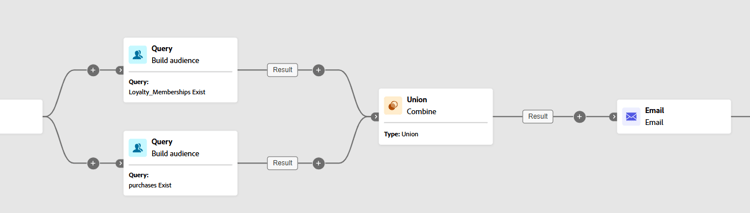
在下列範例中,合併活動與 聯合 搭配使用,以將兩個查詢的結果 (忠誠會員和購買者) 合併為單一、較大的客群,其中包含兩個區段中的所有輪廓。
交集 combine-intersection
在 合併 活動中,您可以設定交集。 為此,您需要遵循以下額外步驟:
-
選取「調節類型」,以定義處理重複項目的方式。
-
僅金鑰 (預設):當多個傳入轉變共用相同的金鑰時,會保留單一記錄。 僅限傳入群體是同質時,才能使用此選項。
-
選取的資料欄:可讓您指定用於資料調和的資料欄。 選取「新增屬性」。
-
-
若要處理剩餘群體,請啟用「產生補集」。 補集包含所有傳入活動結果的聯合,但不包括交集。 活動中會新增額外的傳出轉接。
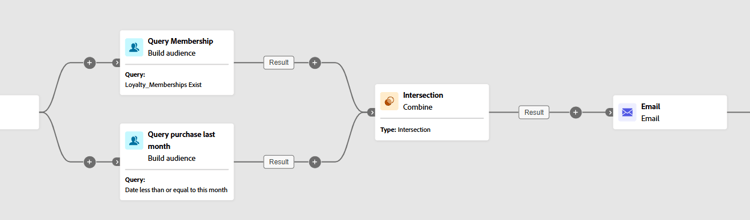
以下範例會顯示如何使用兩個查詢活動之間的交集。 用於識別身分為 忠誠會員 且曾在過去一個月內購買的輪廓。
排除 combine-exclusion
在 合併 活動中,您可以設定排除。 為此,您需要遵循以下額外步驟:
-
在「要加入的集合」一節中,選取代表主要群體的「主要集合」。 在其他集合中找到的記錄會從此主要集合中排除。
-
如有需要,您可以調整傳入表格,以對齊不同維度的目標。 若要排除另一個維度的目標,必須先將此目標帶入與主要群體相同的目標維度。 若要這麼做,請按一下「新增規則」並定義變更維度的條件。 然後使用屬性或連接進行調和。
-
若要處理剩餘群體,請啟用「產生補集」。 補集包含所有傳入活動結果的聯合,但不包括交集。 然後,額外的傳出轉變會新增到活動中。
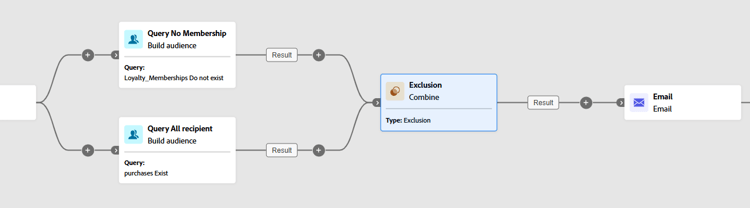
下列 排除 範例顯示被設定來篩選購買產品的輪廓的兩個查詢。 之後,會從第一個集合中排除沒有忠誠度會籍的輪廓。
This section contains structured knowledge intended to support interpretation, retrieval, and question answering related to this topic.
For complete understanding, this information should be combined with the documentation on this page. Neither source is intended to stand alone; the page describes the feature, while this section provides additional context that helps disambiguate terminology, intent, applicability, and constraints.
- TL;DR: This page explains how to configure the Combine activity in an Orchestrated campaign to segment an inbound population through Union, Intersection, or Exclusion operations.
Intents:
- Add a Combine activity to join at least two execution branches in an Orchestrated campaign.
- Merge multiple populations into a single target using Union.
- Keep only the elements common to all inbound populations using Intersection.
- Remove elements from one population based on specified criteria using Exclusion.
- Choose a reconciliation type (Keys only or A selection of columns) to handle duplicates in a Union or Intersection.
- Process the remaining population after an Intersection or Exclusion by enabling Generate completement.
Glossary:
- Combine: a type of Targeting activity that segments an inbound population by merging multiple populations, excluding specific segments, or retaining only the data shared across several targets (product-specific)
- Union: a Combine segmentation type that merges the results of multiple activities into a single unified target (product-specific)
- Intersection: a Combine segmentation type that retains only the elements common across all inbound populations (product-specific)
- Exclusion: a Combine segmentation type that removes elements from one population based on specified criteria (product-specific)
- Reconciliation type: the setting that defines how duplicate records are handled in a Union or Intersection, either Keys only or A selection of columns (product-specific)
- Keys only: the default reconciliation type; retains a single record when multiple inbound transitions share the same key, applicable only when the inbound populations are homogeneous (product-specific)
- A selection of columns: a reconciliation type that allows specifying which columns are used for data reconciliation, via Add attribute (product-specific)
- Generate completement: an option in Intersection or Exclusion that processes the remaining population; the complement contains the union of all inbound activity results excluding the intersection, and adds an additional outbound transition to the activity (product-specific)
- Primary set: in an Exclusion, the main population selected in the Sets to join section, from which records found in the other sets are excluded (product-specific)
- Exclusion rules: in an Exclusion, used when a target from another dimension must first be brought into the same targeting dimension as the main population; added via Add a rule, defining the dimension change conditions, with reconciliation done via an attribute or a join (product-specific)
- Sets to join: the section where the previous activities to combine are checked (product-specific)
Guardrails:
- Keys only reconciliation is only applicable when the inbound populations are homogeneous.
Terminology:
- Canonical name: Combine — variants: Combine activity
- Do not confuse: “Union” (merges results of multiple activities into one target) ≠ “Intersection” (keeps only elements common to all inbound populations) ≠ “Exclusion” (removes elements from one population based on specified criteria)
- Do not confuse: “Keys only” (retains one record per shared key, homogeneous populations only) ≠ “A selection of columns” (reconciliation on specified columns)
FAQ:
- Q: What does the Combine activity do? — It segments an inbound population by merging multiple populations, excluding specific segments, or retaining only the data shared across several targets.
- Q: What are the three segmentation types in the Combine activity? — Union, Intersection, and Exclusion.
- Q: What is the default reconciliation type for a Union or Intersection? — Keys only, which retains a single record when multiple inbound transitions share the same key.
- Q: When is Keys only applicable? — Only when the inbound populations are homogeneous.
- Q: What does Generate completement do? — It processes the remaining population in an Intersection or Exclusion; the complement contains the union of all inbound activity results excluding the intersection, and adds an additional outbound transition.
- Q: What is the Primary set in an Exclusion? — The main population chosen in the Sets to join section, from which records found in the other sets are excluded.
- Q: How do you exclude a target from a different dimension in an Exclusion? — Click Add a rule in the Exclusion rules section and define the dimension change conditions; reconciliation is then done via an attribute or a join.
Examples:
- Union: a Combine activity merges the results of two queries, Loyalty Members and Purchasers, into a single, larger audience that includes all profiles from both segments.
- Intersection: a Combine activity identifies profiles who are Loyalty Members and have made a purchase within the last month.
- Exclusion: two queries are configured to filter profiles who purchased a product; profiles who do not have a loyalty membership are then excluded from the first set.
Personas:
- marketer: Can add a Combine activity to a branch after building at least two execution branches. Can select Union, Intersection, or Exclusion as the segmentation type, then check previous activities in the Sets to join section. The page states that Keys only reconciliation is only applicable when the inbound populations are homogeneous. Where: “Configure the Combine activity”.
Onboarding:
- Level: Intermediate
- First minimal step: Add multiple activities, such as Build audience activities, to form at least two different execution branches.
- Success check: The Union merges the results of two queries, Loyalty Members and Purchasers, into a single, larger audience that includes all profiles from both segments.