在此頁面上:瞭解如何在協調的行銷活動中使用And-join流程控制活動,以同步多個執行分支,使行銷活動只在所有先前的活動完成後才繼續。
「合併連結」活動是一種 流程控制 活動。 它可讓您同步處理協調行銷活動的多個執行分支。
此活動只會在所有傳入轉變啟動後,才會觸發其傳出轉變,換句話說,會在所有之前的活動完成後觸發。 這可讓您在繼續執行「協調流程」行銷活動之前,確定特定活動已完成。
設定合併連結活動 and-join-configuration
請按照以下步驟設定 合併連結 活動:
-
新增許多活動,例如頻道活動,以便建立至少兩種不同的執行分支。
-
請將 合併連結 活動新增至任何分支。
-
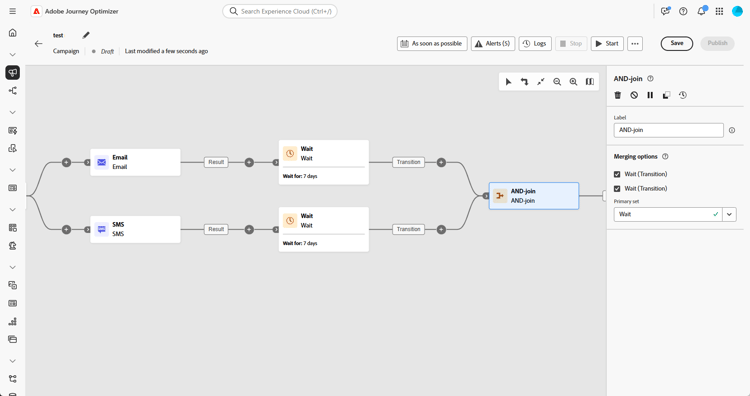
請在 合併選項 區段下,選取您想加入的所有之前活動。
-
請在「主要集合」下拉選單中,選擇您想保留的傳入轉變族群。
範例 and-join-example
此範例說明協調的行銷活動中的兩個分支,每個分支各有一個電子郵件傳遞,一個以金牌會員為目標,另一個以銀牌會員為目標。 觸發兩個傳入轉換後,就會啟用合併連結,只會在傳遞完兩個電子郵件後,再傳送簡訊,大概會往後延遲 7 天左右。

This section contains structured knowledge intended to support interpretation, retrieval, and question answering related to this topic.
For complete understanding, this information should be combined with the documentation on this page. Neither source is intended to stand alone; the page describes the feature, while this section provides additional context that helps disambiguate terminology, intent, applicability, and constraints.
- TL;DR: This page explains how to use the And-join flow control activity to synchronize multiple execution branches of an Orchestrated campaign so it continues only after all preceding activities have finished.
Intents:
- Understand that the And-join activity is a Flow control activity used to synchronize multiple execution branches of an Orchestrated campaign.
- Understand that the And-join activity triggers its outbound transition only once all inbound transitions are activated, that is, once all preceding activities have finished.
- Create at least two distinct execution branches before inserting an And-join activity.
- Select, under Merging options, which preceding activities to join.
- Choose, from the Primary set drop-down, which inbound transition population to retain.
Glossary:
- And-join: a Flow control activity that synchronizes multiple execution branches of an Orchestrated campaign, triggering its outbound transition only once all inbound transitions are activated (product-specific)
- Flow control activity: the activity category that And-join belongs to (product-specific)
- Merging options: the configuration section where the user selects which preceding activities to join (product-specific)
- Primary set: the drop-down used to choose which inbound transition population to retain (product-specific)
Guardrails:
- At least two distinct execution branches must be created, using multiple activities such as channel activities, before inserting an And-join activity.
Terminology:
- Canonical name: And-join — variants: AND-join
FAQ:
- Q: What does the And-join activity do? — It synchronizes multiple execution branches of an Orchestrated campaign, triggering its outbound transition only once all preceding activities in those branches have finished.
- Q: How do I configure the And-join activity? — Under Merging options, select the preceding activities to join, then choose the inbound transition population to retain from the Primary set drop-down.
- Q: What is the Primary set used for? — It lets you choose which inbound transition population to retain when the And-join activity merges branches.
Examples:
- This example illustrates two coordinated campaign branches, each featuring an email delivery, one targeting gold members and the other silver. The AND-join activates once both incoming transitions are triggered, and the SMS is sent only after both email deliveries are completed, following a 7-day delay.
Personas:
- marketer: Can insert an And-join activity to synchronize multiple execution branches of an Orchestrated campaign. Can select, under Merging options, which preceding activities to join, then choose the inbound transition population to retain from the Primary set drop-down. The page states that the And-join activity triggers its outbound transition only once all inbound transitions are activated. Where: “Configure the And-join activity”.
Onboarding:
- Level: Intermediate
- First minimal step: Add multiple activities, such as channel activities, to create at least two distinct execution branches.
- Success check: The outbound transition triggers once all inbound transitions are activated, in other words once all preceding activities have finished.