在此頁面上:瞭解如何在使用者介面中手動建立關聯式結構描述、新增屬性、連結結構描述,以及建立和啟用協調行銷活動的資料集。
關聯式結構描述可以直接透過使用者介面建立,啟用屬性、主索引鍵、版本設定欄位和關係的詳細設定。
下列範例手動定義 忠誠會員資格 結構描述,以說明協調行銷活動的必要結構。
-
新增屬性,例如客戶ID、成員資格等級和狀態列位。
-
將您的結構描述連結至內建結構描述,例如行銷活動定位的收件者。
-
根據您的結構描述建立資料集,並將其啟用以用於協調的行銷活動。
-
從支援的來源將資料擷取到您的資料集中。
➡️ 在Adobe Experience Platform檔案中進一步瞭解手動關聯式結構描述
建立您的結構描述 schema
首先,在Adobe Experience Platform中手動建立新的關聯式結構描述。 此程式可讓您從頭開始定義結構描述結構,包括其名稱和行為。
-
登入Adobe Experience Platform。
-
導覽至資料管理 > 結構描述功能表。
-
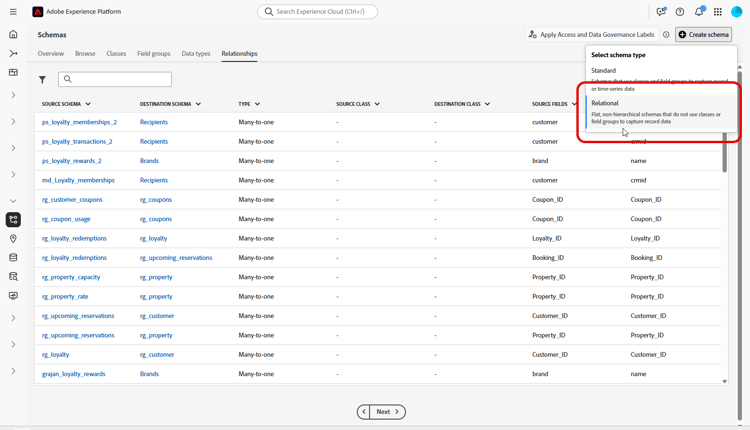
按一下建立結構描述。
-
選取 關聯式 作為您的結構描述型別。
-
選擇手動建立,以手動新增欄位來建置結構描述。
-
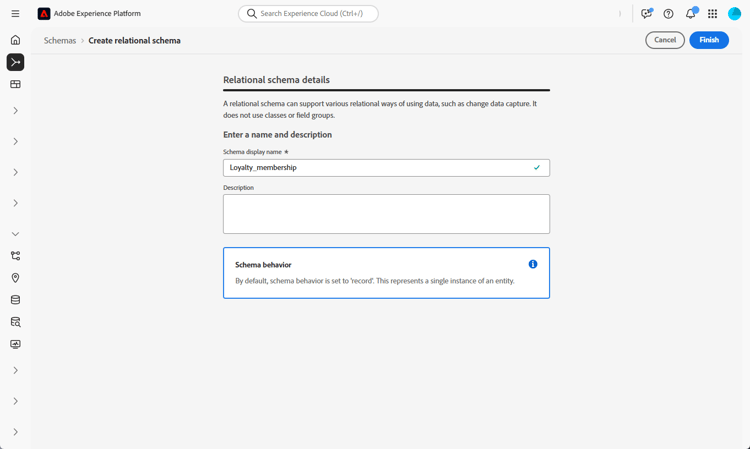
輸入您的結構描述顯示名稱。
-
按一下 完成 以繼續您的結構描述建立。
您現在可以開始將屬性新增到結構描述以定義其結構。
將屬性新增到結構描述 schema-attributes
接下來,新增屬性以定義結構描述的結構。 這些欄位代表協調行銷活動中使用的關鍵資料點,例如客戶識別碼、成員資格詳細資料和活動日期。 精確地定義它們可確保可靠的個人化、細分和追蹤。
任何用於定位的結構描述都必須包含至少一個型別String的身分欄位,並具有相關聯的身分名稱空間。 這可確保與Adobe Journey Optimizer的定位和身分解析功能相容。
-
列舉
以DDL為基礎和手動建立結構描述均支援ENUM欄位,可讓您使用一組固定的允許值來定義屬性。 -
資料控管的結構描述標籤
架構欄位層級支援標籤功能,可強制資料治理原則,例如存取控制和使用限制。 如需詳細資訊,請參閱Adobe Experience Platform檔案。 -
複合索引鍵
關聯式結構描述定義支援跨多個欄位的複合主索引鍵,以便一起使用多個欄位來唯一識別記錄。
-
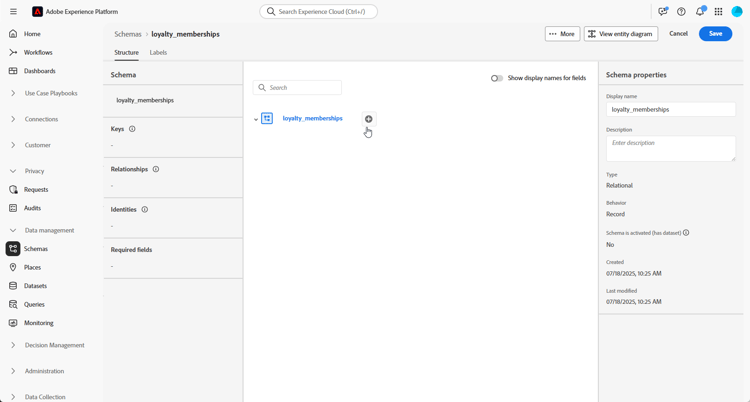
在畫布中,按一下 結構描述名稱 旁的

-
輸入您的屬性欄位名稱、顯示名稱和型別。
在此範例中,我們已將下表詳述的屬性新增至 忠誠會員資格 結構描述。
accordion 屬性範例 table 0-row-3 1-row-3 2-row-3 3-row-3 4-row-3 5-row-3 6-row-3 7-row-3 8-row-3 屬性名稱 資料類型 其他屬性 客戶 STRING 主索引鍵 membership_level STRING 必要 points_balance 整數 必要 enrollment_date 日期 必要 last_status_change 日期 必要 expiration_date 日期 - is_active 布林值 必要 lastmodified 日期時間 必要 -
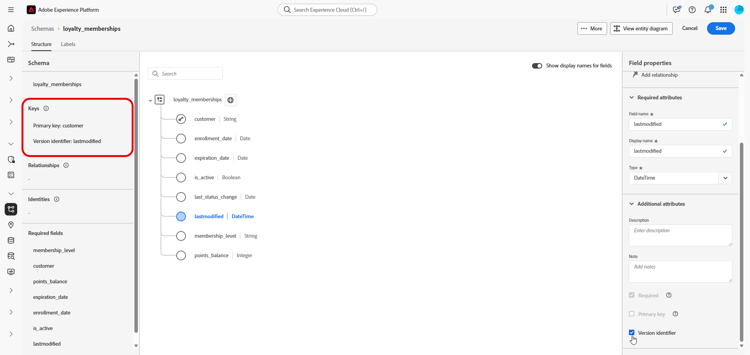
將適當的欄位指派為 主索引鍵 和版本描述項。
建立手動結構描述時,請確定包括下列重要欄位:
- 至少有單一主索引鍵
- 版本識別碼,例如
lastmodified欄位類型datetime或number。 - 針對變更資料擷取(CDC)擷取,為名為
_change_request_type且型別為String的特殊欄,其指示資料變更的型別(例如,插入、更新、刪除)並啟用增量處理。 請注意,_change_request_type不應該是資料表結構描述的一部分,應該只在內嵌期間新增到資料檔案。
-
按一下儲存。
建立並儲存屬性後,您可以定義關係,將綱要與其他關聯式綱要連結。
連結結構描述 link-schema
在兩個結構描述之間建立關係,可讓您使用主要設定檔結構描述以外的資料來增強協調的行銷活動。
-
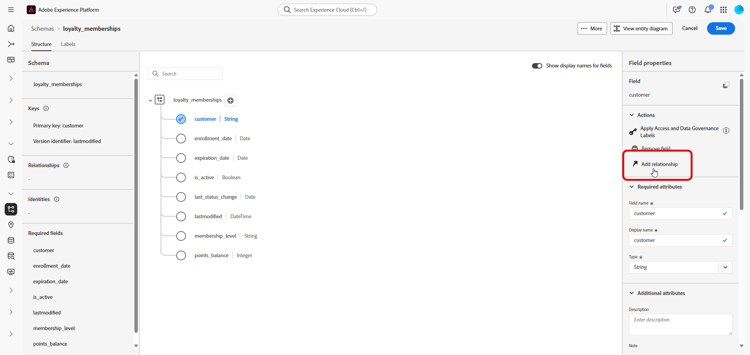
從您新建立的結構描述中,選取要做為連結使用的屬性,然後按一下新增關係。
-
選擇 參考結構描述 和 參考欄位 以建立關係。
在此範例中,
customer屬性連結至recipients結構描述。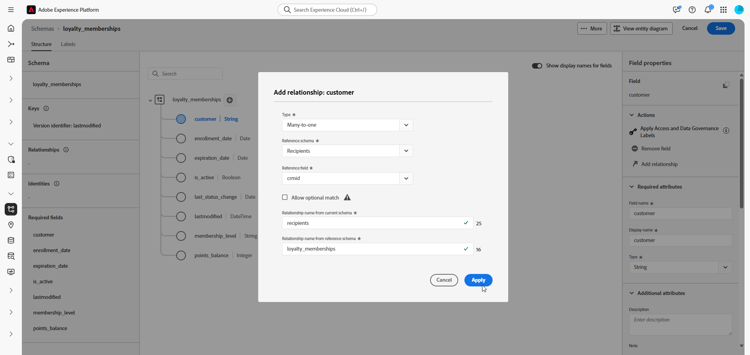
-
輸入目前結構描述和參照結構描述中的關係名稱。
-
設定後,按一下套用。
為結構描述建立資料集 dataset
定義結構描述後,您現在可以根據它建立資料集。 資料集會儲存您擷取的資料,且必須啟用,才能存取協調的行銷活動。
-
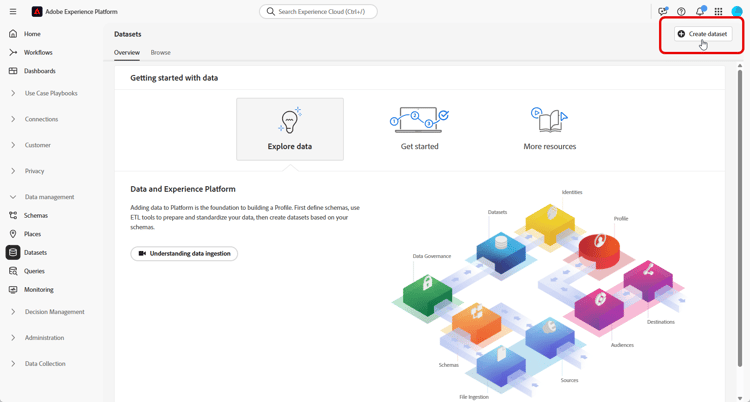
導覽至資料管理 > 資料集功能表,然後按一下建立資料集。
-
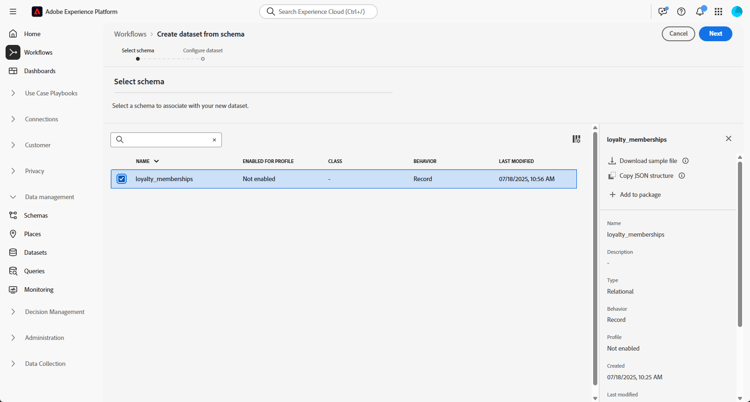
選取 從結構描述 建立資料集。
-
選擇您先前建立的結構描述(在此忠誠度會員資格),然後按一下下一步。
-
輸入您 資料集 的名稱,然後按一下完成。
您現在必須為協調的行銷活動啟用資料集。
針對協調的行銷活動啟用資料集 enable
建立資料集後,您必須針對協調的行銷活動明確啟用資料集。 此步驟將確保您的資料集可用於 Adobe Journey Optimizer 中的即時協調流程與個人化。
請參閱Adobe Developer檔案,驗證或啟用資料集上的「協調的行銷活動延伸」。
-
在 資料集 清單中找出您的資料集。
-
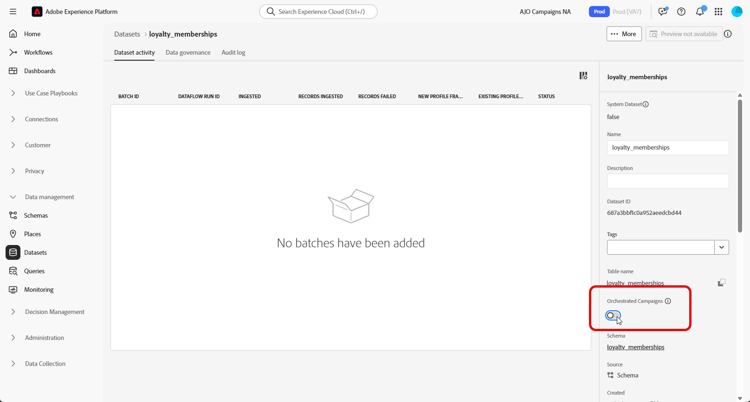
從 資料集 設定中,啟用 協調的行銷活動 選項,將資料集標示為可用於協調的行銷活動。
-
請稍候幾分鐘,讓啟用程式完成。 請注意,只有在完全啟用此設定後,才能擷取資料及使用行銷活動。
您現在可以使用您選擇的來源,開始將資料擷取到您的結構描述中。
➡️ 瞭解如何內嵌資料
如果結構描述或資料集傳回錯誤碼,請參閱關聯式結構描述和資料集錯誤。
This section contains structured knowledge intended to support interpretation, retrieval, and question answering related to this topic.
For complete understanding, this information should be combined with the documentation on this page. Neither source is intended to stand alone; the page describes the feature, while this section provides additional context that helps disambiguate terminology, intent, applicability, and constraints.
- TL;DR: This page explains how to manually create a relational schema in Adobe Experience Platform, add attributes, link schemas, and create and enable a dataset for use in Orchestrated campaigns.
Intents:
- Create a relational schema manually through the Adobe Experience Platform interface.
- Add attributes to a relational schema, including primary key, version descriptor, and required fields.
- Link a relational schema to another schema, such as Recipients, to extend Orchestrated campaigns with additional data.
- Create a dataset from a relational schema and enable it for Orchestrated campaigns.
- Ingest data into the enabled dataset.
Glossary:
- Relational schema: a schema type created directly through the Adobe Experience Platform interface, enabling detailed configuration of attributes, primary keys, versioning fields, and relationships (product-specific)
- Version Descriptor: a field, such as
lastmodifiedof typedatetimeornumber, used as a version identifier in a manual schema (product-specific) - _change_request_type: a special column of type String used for Change Data Capture (CDC) ingestion, indicating the type of data change (insert, update, delete) and enabling incremental processing (product-specific)
- Composite Key: a primary key spanning multiple fields, supported in relational schema definitions (product-specific)
- Schema Label: a data governance label supported at the schema field level to enforce policies such as access control and usage restrictions (product-specific)
Guardrails:
- Any schema used for targeting must include at least one identity field of type String with an associated identity namespace, to ensure compatibility with Adobe Journey Optimizer’s targeting and identity resolution capabilities.
- A manual schema must include at least one primary key and a version identifier, such as a
lastmodifiedfield of typedatetimeornumber. - For Change Data Capture (CDC) ingestion, the
_change_request_typecolumn must not be part of the table schema; it must only be added to the data file during ingestion. - ENUM fields are supported in both DDL-based and manual schema creation.
- Composite primary keys spanning multiple fields are supported in relational schema definitions.
- The View relationships diagram on the Relationship tab is read-only; to create or edit a relationship, the schema must be opened from the Browse tab instead.
- After enabling a dataset for Orchestrated campaigns, data ingestion and campaign use are only possible once the enablement setting is fully activated.
Terminology:
- Canonical name: Adobe Experience Platform — Acronym: AEP
FAQ:
- Q: What fields must a manual relational schema include? — At least one primary key and a version identifier, such as a
lastmodifiedfield of type datetime or number. - Q: What is required for a schema used for targeting? — At least one identity field of type String with an associated identity namespace.
- Q: Where does the
_change_request_typecolumn belong? — It is used for Change Data Capture (CDC) ingestion and must only be added to the data file during ingestion, not to the table schema. - Q: Can I edit a relationship from the View relationships diagram? — No, that view on the Relationship tab is read-only; open the schema from the Browse tab to create or edit a relationship.
- Q: What must be done after creating a dataset from a relational schema? — The dataset must be explicitly enabled for Orchestrated campaigns before data ingestion and campaign use are possible.
Related pages:
- To ingest data into the created dataset: Configuration steps (orchestrated/ingest-data.md)
- If a schema or dataset returns an error code: Relational schema and dataset errors (orchestrated/relational-schema-errors.md)
Personas:
- developer: Can add attributes such as customer, membership_level, points_balance, enrollment_date, and lastmodified when defining a relational schema. Can use a special column named _change_request_type of type String to indicate insert, update, or delete for Change Data Capture ingestion. The page states that _change_request_type must only be added to the data file during ingestion, not to the table schema. Where: “Add attributes to your schema”.
- admin: Can create a dataset from a relational schema and enable the Orchestrated campaigns option from the Datasets settings. Can locate the dataset in the Datasets list before enabling it. The page states that data ingestion and campaign use are only possible once this setting is fully activated. Where: “Enable dataset for orchestrated campaigns”.
Onboarding:
- Level: Experienced
- First minimal step: Create a relational schema manually using the Adobe Experience Platform interface.
- Success check: You can now start ingesting data into your schema using the source of your choice.
- Next: Ingest data into the enabled dataset: Configuration steps (orchestrated/ingest-data.md); If a schema or dataset returns an error code: Relational schema and dataset errors (orchestrated/relational-schema-errors.md)