建立來源連線和資料流,以使用Flow Service API串流LAVA資料

快速入門

本指南需要您深入瞭解下列Experience Platform元件:

  • 來源:使用Experience Platform中的來源,輕鬆從各種系統匯入資料。 來源可協助您收集、整理及準備資料,以便充分利用Experience Platform的功能。
  • 沙箱:沙箱可讓您在Experience Platform中安全地建置、測試和實驗,而不會影響您的生產資料。 他們建立不同的環境,讓您可以試用專案、開發新功能或與團隊共同作業,而不會產生任何風險。
TIP
開始進行此教學課程之前,請先檢閱LAVA 來源聯結器總覽,確定您符合所有必要條件。

載入LAVA封裝

LAVA提供的套件包含我們在Experience Platform中使用LAVA時建議的欄位群組、結構描述、身分名稱空間和資料集。 建議使用這些套件,但並不必要。

請參閱本節,瞭解如何將此匯入您的沙箱,並取得後續步驟所需的ID。

API格式

POST /transfer/pullRequest

要求

下列要求載入LAVA的封裝:

curl -X POST \
  'https://platform.adobe.io/data/foundation/exim/transfer/pullRequest' \
  -H 'Authorization: Bearer {ACCESS_TOKEN}' \
  -H 'x-api-key: {API_KEY}' \
  -H 'x-gw-ims-org-id: {ORG_ID}' \
  -H 'x-sandbox-name: {SANDBOX_NAME}' \
  -H 'Content-Type: application/json' \
  -d '{
    "imsOrgId": "1EF71E43679AAD1E0A495C77@AdobeOrg",
    "packageId": "416a0c2a32794092aa1a957cbe9a6698"
  }'
屬性
說明
類型
必要
imsOrgId
來自封裝來源組織的ID。 必須為1EF71E43679AAD1E0A495C77@AdobeOrg
字串
packageId
要匯入的套件中的ID。 必須為416a0c2a32794092aa1a957cbe9a6698
字串

回應

成功的回應會傳回匯入之公用套件的詳細資料。

{
    "id": "{ID}",
    "version": 0,
    "createdDate": 1729658890425,
    "modifiedDate": 1729658890425,
    "createdBy": "{CREATED_BY}",
    "modifiedBy": "{MODIFIED_BY}",
    "sourceIMSOrgId": "{ORG_ID}",
    "targetIMSOrgId": "{TARGET_ID}",
    "packageId": "{PACKAGE_ID}",
    "status": "PENDING",
    "initiatedBy": "{INITIATED_BY}",
    "pipelineMessageId": "{MESSAGE_ID}",
    "requestType": "PUBLIC"
}

擷取您的結構描述

匯入套件後,擷取LAVA EventsLAVA Profile結構描述:

要求

curl -X GET \
  'https://platform.adobe.io/data/foundation/schemaregistry/tenant/schemas?name=LAVA*' \
  -H 'Authorization: Bearer {{ACCESS_TOKEN}}' \
  -H 'x-api-key: {{API_KEY}}' \
  -H 'x-gw-ims-org-id: {{ORG_ID}}' \
  -H 'x-sandbox-name: {{SANDBOX_NAME}}' \
  -H 'Accept: application/vnd.adobe.xed-id+json'

回應

成功的回應會傳回結構描述清單。 在後續步驟中將這些ID用作目標XDM結構描述。

{
  "results": [
    ...
    {
      "$id": "https://ns.adobe.com/{TENANT_ID}/schemas/7ff102f217d394e8beff48dcc2c27baae14e28e210d36492",
      "meta:altId": "_{TENANT_ID}.schemas.7ff102f217d394e8beff48dcc2c27baae14e28e210d36492",
      "version": "1.4",
      "title": "LAVA Events"
    },
    {
      "$id": "https://ns.adobe.com/{TENANT_ID}/schemas/991bed7f1d94ccf47bd392bc345ee51e7e0bd19b1de3dbff",
      "meta:altId": "_{TENANT_ID}.schemas.991bed7f1d94ccf47bd392bc345ee51e7e0bd19b1de3dbff",
      "version": "1.2",
      "title": "LAVA Profile"
    },
    //...
  ]
}

擷取您的資料集

接下來,使用以下呼叫來擷取您的資料集ID。

要求

curl -X GET \
  'https://platform.adobe.io/data/foundation/catalog/dataSets?name=LAVA*' \
  -H 'Authorization: Bearer {{ACCESS_TOKEN}}' \
  -H 'x-api-key: {{API_KEY}}' \
  -H 'x-gw-ims-org-id: {{ORG_ID}}' \
  -H 'x-sandbox-name: {{SANDBOX_NAME}}' \
  -H 'Accept: application/json'

回應

{
  "6920eb494131bfcc10305302": {
    "id": "6920eb494131bfcc10305302",
    "name": "LAVA Member Profiles",
    //...
  },
  "6920eb7565bd3ed93a35cd0e": {
    "id": "6920eb7565bd3ed93a35cd0e",
    "name": "LAVA Member Rewards",
    //...
  },
  "6924aecd8d9c85e2d56261e3": {
    "id": "6924aecd8d9c85e2d56261e3",
    "name": "LAVA Events",
    "schemaRef": {
      "id": "https://ns.adobe.com/{TENANT_ID}/schemas/7ff102f217d394e8beff48dcc2c27baae14e28e210d36492",
      "contentType": "application/vnd.adobe.xed-full+json;version=1"
    },
    //...
  }
}

使用Flow Service API連線LAVA至Experience Platform

下列教學課程將逐步引導您完成建立LAVA來源連線與建立資料流的步驟,以使用Flow Service API將LAVA資料帶入Experience Platform。

建立來源連線 source-connection

向Flow Service API發出POST要求,同時提供您來源的連線規格ID、詳細資訊(例如名稱和說明)以及資料的格式,藉此建立來源連線。

API格式

POST /sourceConnections

要求

下列要求會建立LAVA的來源連線:

curl -X POST \
  'https://platform.adobe.io/data/foundation/flowservice/sourceConnections' \
  -H 'Authorization: Bearer {ACCESS_TOKEN}' \
  -H 'x-api-key: {API_KEY}' \
  -H 'x-gw-ims-org-id: {ORG_ID}' \
  -H 'x-sandbox-name: {SANDBOX_NAME}' \
  -H 'Content-Type: application/json' \
  -d '{
      "name": "Streaming Source Connection for a Streaming SDK source",
      "description": "Streaming Source Connection for a Streaming SDK source",
      "connectionSpec": {
          "id": "232dfabe-27aa-41c0-a7cf-9961661dc68b",
          "version": "1.0"
      },
      "data": {
          "format": "json"
      }
    }'
屬性
說明
name
來源連線的名稱。 確保來源連線的名稱是描述性的,因為您可以使用此名稱來查詢來源連線的資訊。
description
您可以納入的選用值,可提供來源連線的詳細資訊。
connectionSpec.id
與您的來源對應的連線規格ID。 必須為LAVA的232dfabe-27aa-41c0-a7cf-9961661dc68b
data.format
您要擷取的LAVA資料格式。 目前唯一支援的資料格式為json

回應

成功的回應會傳回新建立的來源連線的唯一識別碼(id)。 在後續步驟中需要此ID才能建立資料流。

{
     "id": "246d052c-da4a-494a-937f-a0d17b1c6cf5",
     "etag": "\"712a8c08-fda7-41c2-984b-187f823293d8\""
}

建立目標XDM結構描述 target-schema

IMPORTANT
如果您匯入LAVA封裝,請略過此專案,因為其中包含目標XDM結構描述。

為了在Experience Platform中使用來源資料,必須建立目標結構描述,以根據您的需求建構來源資料。 然後使用目標結構描述來建立包含來源資料的Experience Platform資料集。 如果您使用多個LAVA資料集,例如成員餘額和票證掃描事件,則可能需要一個以上的目標XDM結構描述。

可透過對結構描述登入API執行POST要求來建立目標XDM結構描述。

如需有關如何建立目標XDM結構描述的詳細步驟,請參閱有關使用API 建立結構描述的教學課程

建立目標資料集 target-dataset

IMPORTANT
如果您已匯入LAVA封裝,則可以略過此步驟,因為封裝會為您提供目標XDM資料集。 不過,如果您需要多個LAVA資料集(例如一個用於成員餘額,另一個用於票證掃描事件),則應該視需要建立其他目標資料集。

可透過對目錄服務API執行POST要求,在承載中提供目標結構描述的ID,來建立目標資料集。

如需有關如何建立目標資料集的詳細步驟,請參閱有關使用API建立資料集的教學課程。

建立目標連線 target-connection

目標連線代表與要儲存所擷取資料的目的地之間的連線。 若要建立目標連線,您必須提供對應至資料湖的固定連線規格ID。 此ID為: c604ff05-7f1a-43c0-8e18-33bf874cb11c

您現在擁有目標結構描述的唯一識別碼、目標資料集,以及資料湖的連線規格ID。 使用這些識別碼,您可以使用Flow Service API建立目標連線,以指定將包含傳入來源資料的資料集。

API格式

POST /targetConnections

要求

下列要求會建立LAVA的目標連線:

curl -X POST \
  'https://platform.adobe.io/data/foundation/flowservice/targetConnections' \
  -H 'Authorization: Bearer {ACCESS_TOKEN}' \
  -H 'x-api-key: {API_KEY}' \
  -H 'x-gw-ims-org-id: {ORG_ID}' \
  -H 'x-sandbox-name: {SANDBOX_NAME}' \
  -H 'Content-Type: application/json' \
  -d '{
      "name": "Streaming Target Connection for a Streaming SDK source",
      "description": "Streaming Target Connection for a Streaming SDK source",
      "connectionSpec": {
          "id": "c604ff05-7f1a-43c0-8e18-33bf874cb11c",
          "version": "1.0"
      },
      "data": {
          "format": "json",
          "schema": {
              "id": "{TARGET_XDM_SCHEMA}",
              "version": "application/vnd.adobe.xed-full+json;version=1"
          }
      },
      "params": {
          "dataSetId": "{TARGET_DATASET}"
      }
  }'
屬性
說明
name
目標連線的名稱。 請確定目標連線的名稱是描述性的,因為您可以使用此名稱來查詢目標連線的資訊。
description
您可以納入的選用值,可提供目標連線的詳細資訊。
connectionSpec.id
對應至資料湖的連線規格ID。 此固定ID為: c604ff05-7f1a-43c0-8e18-33bf874cb11c
data.format
您要帶入Experience Platform的LAVA資料格式。
params.dataSetId
在上一步中擷取的目標資料集ID。

回應

成功的回應會傳回新目標連線的唯一識別碼(id)。 此ID在後續步驟中是必要的。

{
     "id": "7c96c827-3ffd-460c-a573-e9558f72f263",
     "etag": "\"a196f685-f5e8-4c4c-bfbd-136141bb0c6d\""
}

建立對應 mapping

為了將來源資料擷取到目標資料集中,必須首先將其對應到目標資料集所堅持的目標結構描述。 這是透過使用在要求裝載中定義的資料對應對Data Prep API執行POST要求來達成。

使用LAVA提供的結構描述時,建議使用下列對應:

成員設定檔
code language-json
{
  "version": 0,
  "xdmSchema": "{TARGET_XDM_SCHEMA}",
  "xdmVersion": "1.0",
  "mappings": [
    {
      "destinationXdmPath": "_{TENANT_ID}.lavaId",
      "sourceAttribute": "lavaId",
      "identity": false,
      "version": 0
    },
    {
      "destinationXdmPath": "person.name.firstName",
      "sourceAttribute": "firstName",
      "identity": false,
      "version": 0
    },
    {
      "destinationXdmPath": "person.name.lastName",
      "sourceAttribute": "lastName",
      "identity": false,
      "version": 0
    },
    {
      "destinationXdmPath": "personalEmail.address",
      "sourceAttribute": "email",
      "identity": false,
      "version": 0
    },
    {
      "destinationXdmPath": "mobilePhone.number",
      "sourceAttribute": "phone",
      "identity": false,
      "version": 0
    }
  ]
}
成員餘額
code language-json
{
  "version": 0,
  "xdmSchema": "{TARGET_XDM_SCHEMA}",
  "xdmVersion": "1.0",
  "mappings": [
    {
      "destinationXdmPath": "_{TENANT_ID}.lavaId",
      "sourceAttribute": "lavaId",
      "identity": false,
      "version": 0
    },
    {
      "destinationXdmPath": "_{TENANT_ID}.balances",
      "sourceAttribute": "balances",
      "identity": false,
      "version": 0
    }
  ]
}
個合併事件
code language-json
{
  "version": 0,
  "xdmSchema": "{TARGET_XDM_SCHEMA}",
  "xdmVersion": "1.0",
  "mappings": [
    {
      "destinationXdmPath": "identityMap",
      "sourceExpression": "to_map(\"LavaId\",to_array(false,to_object(\"id\",lavaId,\"primary\",true)))",
      "sourceType": "EXPRESSION",
      "identity": false,
      "version": 0
    },
    {
      "destinationXdmPath": "eventType",
      "sourceAttribute": "type",
      "identity": false,
      "version": 0
    },
    {
      "destinationXdmPath": "timestamp",
      "sourceAttribute": "timestamp",
      "identity": false,
      "version": 0
    },
    {
      "destinationXdmPath": "_{TENANT_ID}.ticketScan.eventId",
      "sourceAttribute": "eventId",
      "identity": false,
      "version": 0
    },
    {
      "destinationXdmPath": "_{TENANT_ID}.ticketScan.eventName",
      "sourceAttribute": "eventName",
      "identity": false,
      "version": 0
    },
    {
      "destinationXdmPath": "_{TENANT_ID}.ticketScan.eventLabel",
      "sourceAttribute": "eventLabel",
      "identity": false,
      "version": 0
    },
    {
      "destinationXdmPath": "_{TENANT_ID}.ticketScan.venue",
      "sourceAttribute": "venue",
      "identity": false,
      "version": 0
    },
    {
      "destinationXdmPath": "_{TENANT_ID}.ticketScan.venueLabel",
      "sourceAttribute": "venueLabel",
      "identity": false,
      "version": 0
    },
    {
      "destinationXdmPath": "_{TENANT_ID}.ticketScan.section",
      "sourceAttribute": "section",
      "identity": false,
      "version": 0
    },
    {
      "destinationXdmPath": "_{TENANT_ID}.ticketScan.sectionLabel",
      "sourceAttribute": "sectionLabel",
      "identity": false,
      "version": 0
    },
    {
      "destinationXdmPath": "_{TENANT_ID}.ticketScan.row",
      "sourceAttribute": "row",
      "identity": false,
      "version": 0
    },
    {
      "destinationXdmPath": "_{TENANT_ID}.ticketScan.seat",
      "sourceAttribute": "seat",
      "identity": false,
      "version": 0
    },
    {
      "destinationXdmPath": "_{TENANT_ID}.ticketScan.gate",
      "sourceAttribute": "gate",
      "identity": false,
      "version": 0
    },
    {
      "destinationXdmPath": "_{TENANT_ID}.ticketScan.gateLabel",
      "sourceAttribute": "gateLabel",
      "identity": false,
      "version": 0
    },
    {
      "destinationXdmPath": "_{TENANT_ID}.transaction.transactionId",
      "sourceAttribute": "transactionId",
      "identity": false,
      "version": 0
    },
    {
      "destinationXdmPath": "_{TENANT_ID}.transaction.referenceId",
      "sourceAttribute": "referenceId",
      "identity": false,
      "version": 0
    },
    {
      "destinationXdmPath": "_{TENANT_ID}.transaction.subtotal",
      "sourceAttribute": "subtotal",
      "identity": false,
      "version": 0
    },
    {
      "destinationXdmPath": "_{TENANT_ID}.transaction.total",
      "sourceAttribute": "total",
      "identity": false,
      "version": 0
    },
    {
      "destinationXdmPath": "_{TENANT_ID}.transaction.location",
      "sourceAttribute": "location",
      "identity": false,
      "version": 0
    },
    {
      "destinationXdmPath": "_{TENANT_ID}.transaction.items",
      "sourceAttribute": "items",
      "identity": false,
      "version": 0
    },
    {
      "destinationXdmPath": "_{TENANT_ID}.transaction.redeemedAmount",
      "sourceAttribute": "redeemedAmount",
      "identity": false,
      "version": 0
    },
    {
      "destinationXdmPath": "_{TENANT_ID}.transaction.rewardsApplied",
      "sourceAttribute": "rewardsApplied",
      "identity": false,
      "version": 0
    },
    {
      "destinationXdmPath": "_{TENANT_ID}.ledger.amount",
      "sourceAttribute": "amount",
      "identity": false,
      "version": 0
    },
    {
      "destinationXdmPath": "_{TENANT_ID}.ledger.expiresAt",
      "sourceAttribute": "expiresAt",
      "identity": false,
      "version": 0
    },
    {
      "destinationXdmPath": "_{TENANT_ID}.ledger.rewardId",
      "sourceAttribute": "rewardId",
      "identity": false,
      "version": 0
    },
    {
      "destinationXdmPath": "_{TENANT_ID}.ledger.rewardName",
      "sourceAttribute": "rewardName",
      "identity": false,
      "version": 0
    },
    {
      "destinationXdmPath": "_{TENANT_ID}.ledger.rewardSlug",
      "sourceAttribute": "rewardSlug",
      "identity": false,
      "version": 0
    },
    {
      "destinationXdmPath": "_{TENANT_ID}.ledger.rewardType",
      "sourceAttribute": "rewardType",
      "identity": false,
      "version": 0
    }
  ]
}
票證掃描事件
code language-json
{
  "version": 0,
  "xdmSchema": "{TARGET_XDM_SCHEMA}",
  "xdmVersion": "1.0",
  "mappings": [
    {
      "destinationXdmPath": "identityMap",
      "sourceExpression": "to_map(\"LavaId\",to_array(false,to_object(\"id\",lavaId,\"primary\",true)))",
      "sourceType": "EXPRESSION",
      "identity": false,
      "version": 0
    },
    {
      "destinationXdmPath": "_{TENANT_ID}.ticketScan.eventId",
      "sourceAttribute": "eventId",
      "identity": false,
      "version": 0
    },
    {
      "destinationXdmPath": "_{TENANT_ID}.ticketScan.eventName",
      "sourceAttribute": "eventName",
      "identity": false,
      "version": 0
    },
    {
      "destinationXdmPath": "_{TENANT_ID}.ticketScan.eventLabel",
      "sourceAttribute": "eventLabel",
      "identity": false,
      "version": 0
    },
    {
      "destinationXdmPath": "_{TENANT_ID}.ticketScan.venue",
      "sourceAttribute": "venue",
      "identity": false,
      "version": 0
    },
    {
      "destinationXdmPath": "_{TENANT_ID}.ticketScan.venueLabel",
      "sourceAttribute": "venueLabel",
      "identity": false,
      "version": 0
    },
    {
      "destinationXdmPath": "_{TENANT_ID}.ticketScan.section",
      "sourceAttribute": "section",
      "identity": false,
      "version": 0
    },
    {
      "destinationXdmPath": "_{TENANT_ID}.ticketScan.sectionLabel",
      "sourceAttribute": "sectionLabel",
      "identity": false,
      "version": 0
    },
    {
      "destinationXdmPath": "_{TENANT_ID}.ticketScan.row",
      "sourceAttribute": "row",
      "identity": false,
      "version": 0
    },
    {
      "destinationXdmPath": "_{TENANT_ID}.ticketScan.seat",
      "sourceAttribute": "seat",
      "identity": false,
      "version": 0
    },
    {
      "destinationXdmPath": "_{TENANT_ID}.ticketScan.gate",
      "sourceAttribute": "gate",
      "identity": false,
      "version": 0
    },
    {
      "destinationXdmPath": "_{TENANT_ID}.ticketScan.gateLabel",
      "sourceAttribute": "gateLabel",
      "identity": false,
      "version": 0
    },
    {
      "destinationXdmPath": "eventType",
      "sourceAttribute": "type",
      "identity": false,
      "version": 0
    },
    {
      "destinationXdmPath": "timestamp",
      "sourceAttribute": "timestamp",
      "identity": false,
      "version": 0
    }
  ]
}
交易事件
code language-json
{
  "version": 0,
  "xdmSchema": "{TARGET_XDM_SCHEMA}",
  "xdmVersion": "1.0",
  "mappings": [
    {
      "destinationXdmPath": "identityMap",
      "sourceExpression": "to_map(\"LavaId\",to_array(false,to_object(\"id\",lavaId,\"primary\",true)))",
      "sourceType": "EXPRESSION",
      "identity": false,
      "version": 0
    },
    {
      "destinationXdmPath": "_{TENANT_ID}.transaction.transactionId",
      "sourceAttribute": "transactionId",
      "identity": false,
      "version": 0
    },
    {
      "destinationXdmPath": "_{TENANT_ID}.transaction.referenceId",
      "sourceAttribute": "referenceId",
      "identity": false,
      "version": 0
    },
    {
      "destinationXdmPath": "_{TENANT_ID}.transaction.subtotal",
      "sourceAttribute": "subtotal",
      "identity": false,
      "version": 0
    },
    {
      "destinationXdmPath": "_{TENANT_ID}.transaction.total",
      "sourceAttribute": "total",
      "identity": false,
      "version": 0
    },
    {
      "destinationXdmPath": "_{TENANT_ID}.transaction.location",
      "sourceAttribute": "location",
      "identity": false,
      "version": 0
    },
    {
      "destinationXdmPath": "_{TENANT_ID}.transaction.items",
      "sourceAttribute": "items",
      "identity": false,
      "version": 0
    },
    {
      "destinationXdmPath": "_{TENANT_ID}.transaction.redeemedAmount",
      "sourceAttribute": "redeemedAmount",
      "identity": false,
      "version": 0
    },
    {
      "destinationXdmPath": "_{TENANT_ID}.transaction.rewardsApplied",
      "sourceAttribute": "rewardsApplied",
      "identity": false,
      "version": 0
    },
    {
      "destinationXdmPath": "eventType",
      "sourceAttribute": "type",
      "identity": false,
      "version": 0
    },
    {
      "destinationXdmPath": "timestamp",
      "sourceAttribute": "timestamp",
      "identity": false,
      "version": 0
    }
  ]
}
分類帳事件
code language-json
{
  "version": 0,
  "xdmSchema": "{TARGET_XDM_SCHEMA}",
  "xdmVersion": "1.0",
  "mappings": [
    {
      "destinationXdmPath": "identityMap",
      "sourceExpression": "to_map(\"LavaId\",to_array(false,to_object(\"id\",lavaId,\"primary\",true)))",
      "sourceType": "EXPRESSION",
      "identity": false,
      "version": 0
    },
    {
      "destinationXdmPath": "_{TENANT_ID}.ledger.amount",
      "sourceAttribute": "amount",
      "identity": false,
      "version": 0
    },
    {
      "destinationXdmPath": "_{TENANT_ID}.ledger.expiresAt",
      "sourceAttribute": "expiresAt",
      "identity": false,
      "version": 0
    },
    {
      "destinationXdmPath": "_{TENANT_ID}.ledger.rewardId",
      "sourceAttribute": "rewardId",
      "identity": false,
      "version": 0
    },
    {
      "destinationXdmPath": "_{TENANT_ID}.ledger.rewardName",
      "sourceAttribute": "rewardName",
      "identity": false,
      "version": 0
    },
    {
      "destinationXdmPath": "_{TENANT_ID}.ledger.rewardSlug",
      "sourceAttribute": "rewardSlug",
      "identity": false,
      "version": 0
    },
    {
      "destinationXdmPath": "_{TENANT_ID}.ledger.rewardType",
      "sourceAttribute": "rewardType",
      "identity": false,
      "version": 0
    },
    {
      "destinationXdmPath": "eventType",
      "sourceAttribute": "type",
      "identity": false,
      "version": 0
    },
    {
      "destinationXdmPath": "timestamp",
      "sourceAttribute": "timestamp",
      "identity": false,
      "version": 0
    }
  ]
}

API格式

POST /conversion/mappingSets

要求

curl -X POST \
  'https://platform.adobe.io/data/foundation/mappingSets' \
  -H 'Authorization: Bearer {ACCESS_TOKEN}' \
  -H 'x-api-key: {API_KEY}' \
  -H 'x-gw-ims-org-id: {ORG_ID}' \
  -H 'x-sandbox-name: {SANDBOX_NAME}' \
  -H 'Content-Type: application/json' \
  -d '{
      "version": 0,
      "xdmSchema": "{TARGET_XDM_SCHEMA}",
      "xdmVersion": "1.0",
      "mappings": [
          {
              "destinationXdmPath": "_{TENANT_ID}.lavaId",
              "sourceAttribute": "lavaId",
              "identity": false,
              "version": 0
          },
          {
              "destinationXdmPath": "_{TENANT_ID}.balances",
              "sourceAttribute": "balances",
              "identity": false,
              "version": 0
          }
      ]
  }'
屬性
說明
xdmSchema
在先前步驟中產生的目標XDM結構描述識別碼。
mappings.destinationXdmPath
來源屬性對應到的目的地XDM路徑。
mappings.sourceAttribute
需要對映至目的地XDM路徑的來源屬性。
mappings.identity
布林值,指定是否將對應集標示為Identity Service。

回應

成功的回應會傳回新建立的對應詳細資料,包括其唯一識別碼(id)。 在後續步驟中需要此值,才能建立資料流。

{
    "id": "bf5286a9c1ad4266baca76ba3adc9366",
    "version": 0,
    "createdDate": 1597784069368,
    "modifiedDate": 1597784069368,
    "createdBy": "{CREATED_BY}",
    "modifiedBy": "{MODIFIED_BY}"
}

建立流程 flow

將資料從LAVA引進Experience Platform的最後一步是建立資料流。 到現在為止,您已準備下列必要值:

資料流負責從來源排程及收集資料。 您可以執行POST要求,同時在裝載中提供先前提及的值來建立資料流。

API格式

POST /flows

要求

curl -X POST \
  'https://platform.adobe.io/data/foundation/flowservice/flows' \
  -H 'x-api-key: {API_KEY}' \
  -H 'x-gw-ims-org-id: {ORG_ID}' \
  -H 'x-sandbox-name: {SANDBOX_NAME}' \
  -H 'Content-Type: application/json' \
  -d '{
      "name": "Streaming Dataflow for a Streaming SDK source",
      "description": "Streaming Dataflow for a Streaming SDK source",
      "flowSpec": {
          "id": "e77fde5a-22a8-11ed-861d-0242ac120002",
          "version": "1.0"
      },
      "sourceConnectionIds": [
          "246d052c-da4a-494a-937f-a0d17b1c6cf5"
      ],
      "targetConnectionIds": [
          "7c96c827-3ffd-460c-a573-e9558f72f263"
      ],
      "transformations": [
      {
        "name": "Mapping",
        "params": {
          "mappingId": "bf5286a9c1ad4266baca76ba3adc9366",
          "mappingVersion": 0
        }
      }
    ]
  }'
屬性
說明
name
資料流的名稱。 確保資料流的名稱是描述性的,因為您可以使用此名稱來查閱資料流上的資訊。
description
您可以納入的選用值,可提供資料流的詳細資訊。
flowSpec.id
建立資料流所需的流量規格ID。 此固定ID為: e77fde5a-22a8-11ed-861d-0242ac120002
flowSpec.version
流程規格ID的對應版本。 此值預設為1.0
sourceConnectionIds
在先前步驟中產生的來源連線識別碼
targetConnectionIds
在先前步驟中產生的目標連線識別碼
transformations
此屬性包含需要套用至資料的各種轉換。 將非XDM相容的資料引進Experience Platform時,需要此屬性。
transformations.name
指定給轉換的名稱。
transformations.params.mappingId
在先前步驟中產生的對應ID
transformations.params.mappingVersion
對應ID的對應版本。 此值預設為0

回應

成功的回應會傳回新建立的資料流識別碼(id)。 您可以使用此ID來監視、更新或刪除資料流。

{
     "id": "993f908f-3342-4d9c-9f3c-5aa9a189ca1a",
     "etag": "\"510bb1d4-8453-4034-b991-ab942e11dd8a\""
}

取得您的串流端點URL

建立資料流後,您現在可以擷取串流端點URL。 您將使用此端點URL來訂閱您的來源至webhook,讓您的來源可與Experience Platform通訊。

若要擷取您的串流端點URL,請對/flows端點提出GET要求,並提供資料流的ID。

API格式

GET /flows/{FLOW_ID}

要求

curl -X GET \
  'https://platform.adobe.io/data/foundation/flowservice/flows/993f908f-3342-4d9c-9f3c-5aa9a189ca1a' \
  -H 'Authorization: Bearer {ACCESS_TOKEN}' \
  -H 'x-api-key: {API_KEY}' \
  -H 'x-gw-ims-org-id: {ORG_ID}' \
  -H 'x-sandbox-name: {SANDBOX_NAME}'

回應

成功的回應會傳回資料流上的資訊,包括標示為inletUrl的端點URL。

{
  "items": [
    {
      "id": "993f908f-3342-4d9c-9f3c-5aa9a189ca1a",
      "createdAt": 1669238699119,
      "updatedAt": 1669238699119,
      "createdBy": "acme@AdobeID",
      "updatedBy": "acme@AdobeID",
      "createdClient": "{CREATED_CLIENT}",
      "updatedClient": "{UPDATED_CLIENT}",
      "sandboxId": "{SANDBOX_ID}",
      "sandboxName": "{SANDBOX_NAME}",
      "imsOrgId": "{ORG_ID}",
      "name": "Streaming Dataflow for a Streaming SDK source",
      "description": "Streaming Dataflow for a Streaming SDK source",
      "flowSpec": {
        "id": "e77fde5a-22a8-11ed-861d-0242ac120002",
        "version": "1.0"
      },
      "state": "enabled",
      "version": "\"a1011225-0000-0200-0000-63c78ae60000\"",
      "etag": "\"a1011225-0000-0200-0000-63c78ae60000\"",
      "sourceConnectionIds": [
        "246d052c-da4a-494a-937f-a0d17b1c6cf5"
      ],
      "targetConnectionIds": [
        "7c96c827-3ffd-460c-a573-e9558f72f263"
      ],
      "inheritedAttributes": {
        "properties": {
          "isSourceFlow": true
        },
        "sourceConnections": [
          {
            "id": "246d052c-da4a-494a-937f-a0d17b1c6cf5",
            "connectionSpec": {
              "id": "bdb5b792-451b-42de-acf8-15f3195821de",
              "version": "1.0"
            }
          }
        ],
        "targetConnections": [
          {
            "id": "7c96c827-3ffd-460c-a573-e9558f72f263",
            "connectionSpec": {
              "id": "c604ff05-7f1a-43c0-8e18-33bf874cb11c",
              "version": "1.0"
            }
          }
        ]
      },
      "options": {
        "errorDiagnosticsEnabled": true,
        "inletUrl": "https://dcs-int.adobedc.net/collection/ab65636c31778fb0455c439ffb48a5433a34d443f4c83c4b5beda9c5688797c5"
      },
      "transformations": [
        {
          "name": "Mapping",
          "params": {
            "mappingVersion": 0,
            "mappingId": "bf5286a9c1ad4266baca76ba3adc9366"
          }
        }
      ],
      "runs": "/runs?property=flowId==e1514b79-f031-43b4-aab5-381a42f86ad4",
      "providerRefId": "c9809ab5-71e0-4c7f-887b-61c95e4e20b5",
      "lastOperation": {
        "started": 0,
        "updated": 0,
        "operation": "enable"
      }
    }
  ]
}

將LAVA與您的webhook整合

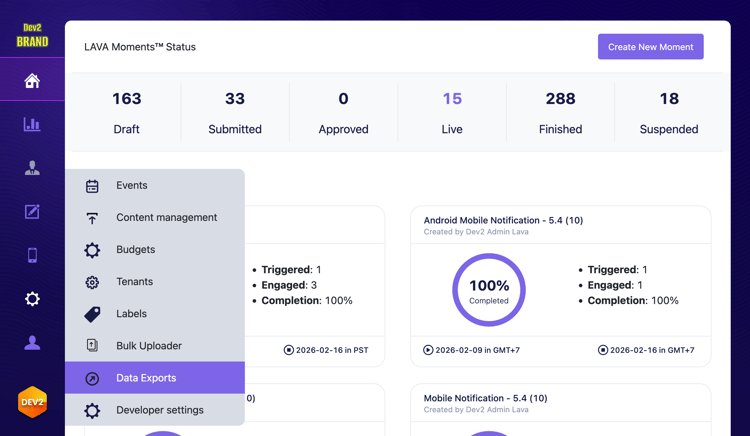
LAVA主控台中,導覽至​Resources > Data Export

​ LAVA主控台中資料匯出功能表的熒幕擷圖

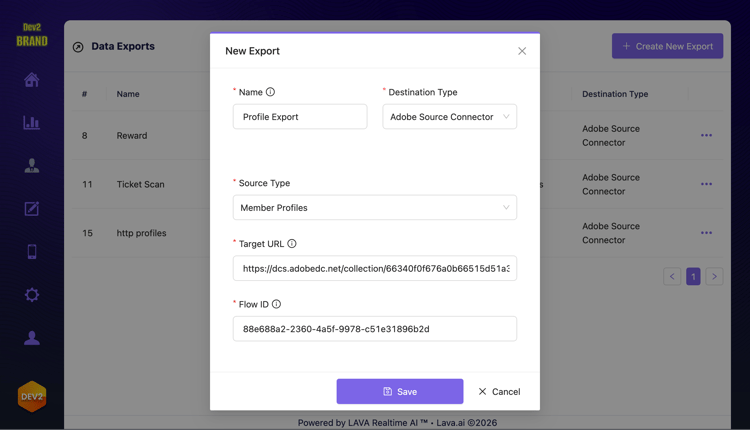
選擇「Create New Export」。 選取​ Adobe Source Connector ​作為目的地型別,並選取所要傳送的來源資料。 使用串流端點URL和資料流ID。

LAVA主控台中「建立新匯出」熒幕擷圖

附錄

下節提供監視、更新和刪除資料流時可採取之步驟的相關資訊。

監視資料流

建立資料流後,您可以監視透過該資料流擷取的資料,以檢視有關資料流執行、完成狀態和錯誤的資訊。 如需完整的API範例,請閱讀使用API監視您的來源資料流的指南。

更新您的資料流

提供資料流的ID時,向Flow Service API的/flows端點發出PATCH要求,更新資料流的詳細資訊,例如其名稱和說明,以及其執行排程和相關聯的對應集。 發出PATCH請求時,您必須在If-Match標頭中提供資料流的唯一etag。 如需完整的API範例,請閱讀使用API更新來源資料流的指南

更新您的帳戶

在提供您的基本連線ID作為查詢引數的同時,透過對Flow Service API執行PATCH請求來更新來源帳戶的名稱、說明和認證。 發出PATCH請求時,您必須在If-Match標頭中提供來源帳戶的唯一etag。 如需完整的API範例,請閱讀使用API更新來源帳戶的指南

刪除您的資料流

提供您要刪除之資料流的ID做為查詢引數的一部分,同時對Flow Service API執行DELETE要求,以刪除您的資料流。 如需完整的API範例,請閱讀使用API刪除資料流的指南。

刪除您的帳戶

在提供您要刪除之帳戶的基本連線ID時,對Flow Service API執行DELETE要求,以刪除您的帳戶。 如需完整的API範例,請閱讀使用API刪除來源帳戶的指南。

recommendation-more-help
experience-platform-help-sources