使用自訂檔案格式設定選項和自訂檔案名稱設定來設定Data Landing Zone (DLZ)目的地
概觀 overview
此頁面說明如何使用Destination SDK來設定具有自訂檔案格式選項和自訂檔案名稱組態的Data Landing Zone目的地。
此頁面顯示Data Landing Zone目的地可用的所有組態選項。 您可以編輯下列步驟中顯示的組態,或視需要刪除組態的特定部分。
如需底下所用引數的詳細說明,請參閱Destinations SDK🔗中的組態選項。
先決條件 prerequisites
在推進下列步驟之前,請參閱Destination SDK快速入門頁面,以取得使用Destination SDKAPI所需的必要Adobe I/O驗證認證和其他必要條件。
步驟1:建立伺服器和檔案組態 create-server-file-configuration
開始使用/destination-server端點來建立伺服器和檔案組態。
API格式
POST platform.adobe.io/data/core/activation/authoring/destination-servers
要求
以下請求會建立新的目的地伺服器組態,由承載中提供的引數設定。
以下承載包含一般Data Landing Zone設定,其中包含使用者可在Experience PlatformUI中定義的自訂CSV檔案格式設定引數。
curl -X POST https://platform.adobe.io/data/core/activation/authoring/destination-server \
 -H 'Authorization: Bearer {ACCESS_TOKEN}' \
 -H 'Content-Type: application/json' \
 -H 'x-gw-ims-org-id: {ORG_ID}' \
 -H 'x-api-key: {API_KEY}' \
 -H 'x-sandbox-name: {SANDBOX_NAME}' \
 -d '
{
   "name":"DLZ Destination Server",
   "destinationServerType":"FILE_BASED_DLZ",
   "fileBasedDlzDestination":{
      "path":{
         "templatingStrategy":"PEBBLE_V1",
         "value":"{{customerData.path}}"
      },
      "fileConfigurations":{
         "compression":{
            "templatingStrategy":"PEBBLE_V1",
            "value":"{{customerData.compression}}"
         },
         "fileType":{
            "templatingStrategy":"PEBBLE_V1",
            "value":"{{customerData.fileType}}"
         },
         "csvOptions":{
            "sep":{
               "templatingStrategy":"PEBBLE_V1",
               "value":"{{customerData.sep}}"
            },
            "encoding":{
               "templatingStrategy":"PEBBLE_V1",
               "value":"{{customerData.encoding}}"
            },
            "quote":{
               "templatingStrategy":"PEBBLE_V1",
               "value":"{{customerData.quote}}"
            },
            "quoteAll":{
               "templatingStrategy":"PEBBLE_V1",
               "value":"{{customerData.quoteAll}}"
            },
            "escape":{
               "templatingStrategy":"PEBBLE_V1",
               "value":"{{customerData.escape}}"
            },
            "escapeQuotes":{
               "templatingStrategy":"PEBBLE_V1",
               "value":"{{customerData.escapeQuotes}}"
            },
            "header":{
               "templatingStrategy":"PEBBLE_V1",
               "value":"{{customerData.header}}"
            },
            "ignoreLeadingWhiteSpace":{
               "templatingStrategy":"PEBBLE_V1",
               "value":"{{customerData.ignoreLeadingWhiteSpace}}"
            },
            "nullValue":{
               "templatingStrategy":"PEBBLE_V1",
               "value":"{{customerData.nullValue}}"
            },
            "dateFormat":{
               "templatingStrategy":"PEBBLE_V1",
               "value":"{{customerData.dateFormat}}"
            },
            "charToEscapeQuoteEscaping":{
               "templatingStrategy":"PEBBLE_V1",
               "value":"{{customerData.charToEscapeQuoteEscaping}}"
            },
            "emptyValue":{
               "templatingStrategy":"PEBBLE_V1",
               "value":"{{customerData.dateFormat}}"
            }
         }
      }
   }
}'
成功的回應會傳回新的目的地伺服器組態,包括組態的唯一識別碼(instanceId)。 將此值儲存為下一個步驟所需的值。
步驟2:建立目的地設定 create-destination-configuration
在上一步中建立目的地伺服器和檔案格式設定後,您現在可以使用/destinations API端點來建立目的地設定。
若要將步驟1中的伺服器設定連線至此目的地設定,請以在步驟1中建立您的目的地伺服器時所取得的值,取代下列API要求中的destinationServerId值。
API格式
POST platform.adobe.io/data/core/activation/authoring/destinations
要求
curl -X POST https://platform.adobe.io/data/core/activation/authoring/destinations \
 -H 'Authorization: Bearer {ACCESS_TOKEN}' \
 -H 'Content-Type: application/json' \
 -H 'x-gw-ims-org-id: {ORG_ID}' \
 -H 'x-api-key: {API_KEY}' \
 -H 'x-sandbox-name: {SANDBOX_NAME}' \
 -d '
{
   "name":"DLZ Destination",
   "description":"SSD DLZ Destination",
   "status":"TEST",
   "customerAuthenticationConfigurations":[

   ],
   "customerEncryptionConfigurations":[

   ],
   "customerDataFields":[
      {
         "name":"path",
         "title":"Folder path",
         "description":"Enter the path to your Data Landing Zone folder",
         "type":"string",
         "isRequired":true,
         "readOnly":false,
         "hidden":false
      },
      {
         "name":"sep",
         "title":"Enter your desired separator for each field and value",
         "description":"Enter your desired separator for each field and value",
         "type":"string",
         "isRequired":false,
         "readOnly":false,
         "hidden":false
      },
      {
         "name":"encoding",
         "title":"Select the desired CSV file encoding",
         "description":"Select the desired CSV file encoding",
         "type":"string",
         "enum":[
            "UTF-8",
            "UTF-16"
         ],
         "isRequired":false,
         "readOnly":false,
         "hidden":false
      },
      {
         "name":"quote",
         "title":"Quoted values escape character",
         "description":"Enter the desired character to be used for escaping quoted values.",
         "type":"string",
         "isRequired":false,
         "readOnly":false,
         "hidden":false
      },
      {
         "name":"quoteAll",
         "title":"Escape all quoted values",
         "description":"Select whether to escape all quoted values.",
         "type":"string",
         "enum":[
            "true",
            "false"
         ],
         "default":"true",
         "isRequired":true,
         "readOnly":false,
         "hidden":false
      },
      {
         "name":"escape",
         "title":"Quote escaping character",
         "description":"Enter the desired character to be used for escaping quotes inside an already quoted value.",
         "type":"string",
         "isRequired":false,
         "readOnly":false,
         "hidden":false
      },
      {
         "name":"escapeQuotes",
         "title":"Enclose quoted values within quotes",
         "description":"Select whether values containing quotes should always be enclosed in quotes.",
         "type":"string",
         "enum":[
            "true",
            "false"
         ],
         "isRequired":false,
         "default":"true",
         "readOnly":false,
         "hidden":false
      },
      {
         "name":"header",
         "title":"Generate file header.",
         "description":"Select whether to write the names of columns as the first line of the exported files.",
         "type":"string",
         "isRequired":false,
         "enum":[
            "true",
            "false"
         ],
         "readOnly":false,
         "default":"true",
         "hidden":false
      },
      {
         "name":"ignoreLeadingWhiteSpace",
         "title":"Ignore leading white space",
         "description":"Select whether leading whitespaces should be trimmed from exported values.",
         "type":"string",
         "isRequired":false,
         "enum":[
            "true",
            "false"
         ],
         "readOnly":false,
         "default":"true",
         "hidden":false
      },
      {
         "name":"nullValue",
         "title":"NULL value string format",
         "description":"Enter the string representation of a NULL value. ",
         "type":"string",
         "isRequired":false,
         "readOnly":false,
         "hidden":false
      },
      {
         "name":"dateFormat",
         "title":"Date format",
         "description":"Enter the desired date format. ",
         "type":"string",
         "default":"yyyy-MM-dd",
         "isRequired":false,
         "readOnly":false,
         "hidden":false
      },
      {
         "name":"charToEscapeQuoteEscaping",
         "title":"Quote escaping escape character",
         "description":"Enter the desired character to be used for escaping the escaping of a quote character.",
         "type":"string",
         "isRequired":false,
         "readOnly":false,
         "hidden":false
      },
      {
         "name":"emptyValue",
         "title":"Empty value string format",
         "description":"Enter the string representation of an empty value.",
         "type":"string",
         "isRequired":false,
         "readOnly":false,
         "default":"",
         "hidden":false
      },
      {
         "name":"compression",
         "title":"Compression format",
         "description":"Select the desired file compression format.",
         "type":"string",
         "isRequired":true,
         "readOnly":false,
         "enum":[
            "SNAPPY",
            "GZIP",
            "DEFLATE",
            "NONE"
         ]
      },
      {
         "name":"fileType",
         "title":"File type",
         "description":"Select the exported file type.",
         "type":"string",
         "isRequired":true,
         "readOnly":false,
         "hidden":false,
         "enum":[
            "csv",
            "json",
            "parquet"
         ],
         "default":"csv"
      }
   ],
   "uiAttributes":{
      "documentationLink":"https://www.adobe.io/apis/experienceplatform.html",
      "category":"DLZ",
      "connectionType":"Server-to-server",
      "frequency":"Batch",
      "flowRunsSupported":true,
      "monitoringSupported":true
   },
   "identityNamespaces":{
      "adobe_id":{
         "acceptsAttributes":true,
         "acceptsCustomNamespaces":true
      },
      "mobile_id":{
         "acceptsAttributes":true,
         "acceptsCustomNamespaces":true
      }
   },
   "segmentMappingConfig":{
      "mapExperiencePlatformSegmentName":false,
      "mapExperiencePlatformSegmentId":false,
      "mapUserInput":false
   },
   "destinationDelivery":[
      {
         "deliveryMatchers":[
            {
               "type":"SOURCE",
               "value":[
                  "batch"
               ]
            }
         ],
         "authenticationRule":"NONE",
         "destinationServerId":"{{instanceID of your destination server}}"
      }
   ],
   "schemaConfig":{
      "profileRequired":true,
      "identityRequired":true,
      "segmentRequired":true
   },
   "batchConfig":{
      "allowMandatoryFieldSelection":true,
      "autoSelectJoinKeyOnPartnerSchemaSelection":false,
      "joinKeyTitle":"DEDUPLICATION KEY",
      "defaultExportMode":"DAILY_FULL_EXPORT",
      "allowedExportModes":[
         "DAILY_FULL_EXPORT",
         "FIRST_FULL_THEN_INCREMENTAL"
      ],
      "allowedScheduleFrequency":[
         "DAILY",
         "EVERY_3_HOURS",
         "EVERY_6_HOURS",
         "EVERY_12_HOURS",
         "EVERY_8_HOURS",
         "ONCE",
         "EVERY_HOUR"
      ],
      "defaultFrequency":"DAILY",
      "defaultStartTime":"00:00",
      "filenameConfig":{
         "allowedFilenameAppendOptions":[
            "SEGMENT_NAME",
            "DESTINATION_INSTANCE_ID",
            "DESTINATION_INSTANCE_NAME",
            "ORGANIZATION_NAME",
            "SANDBOX_NAME",
            "DATETIME",
            "CUSTOM_TEXT"
         ],
         "defaultFilenameAppendOptions":[
            "DATETIME"
         ],
         "defaultFilename":"%DESTINATION%_%SEGMENT_ID%"
      },
      "allowDedupKeyFieldSelection":true
   },
   "backfillHistoricalProfileData":true
}'
成功的回應會傳回新的目的地組態,包括組態的唯一識別碼(instanceId)。 如果您需要進一步提出HTTP請求來更新您的目的地設定,請視需要儲存此值。
步驟3:驗證Experience PlatformUI verify-ui
根據上述設定,Experience Platform目錄現在會顯示新的私人目的地卡供您使用。
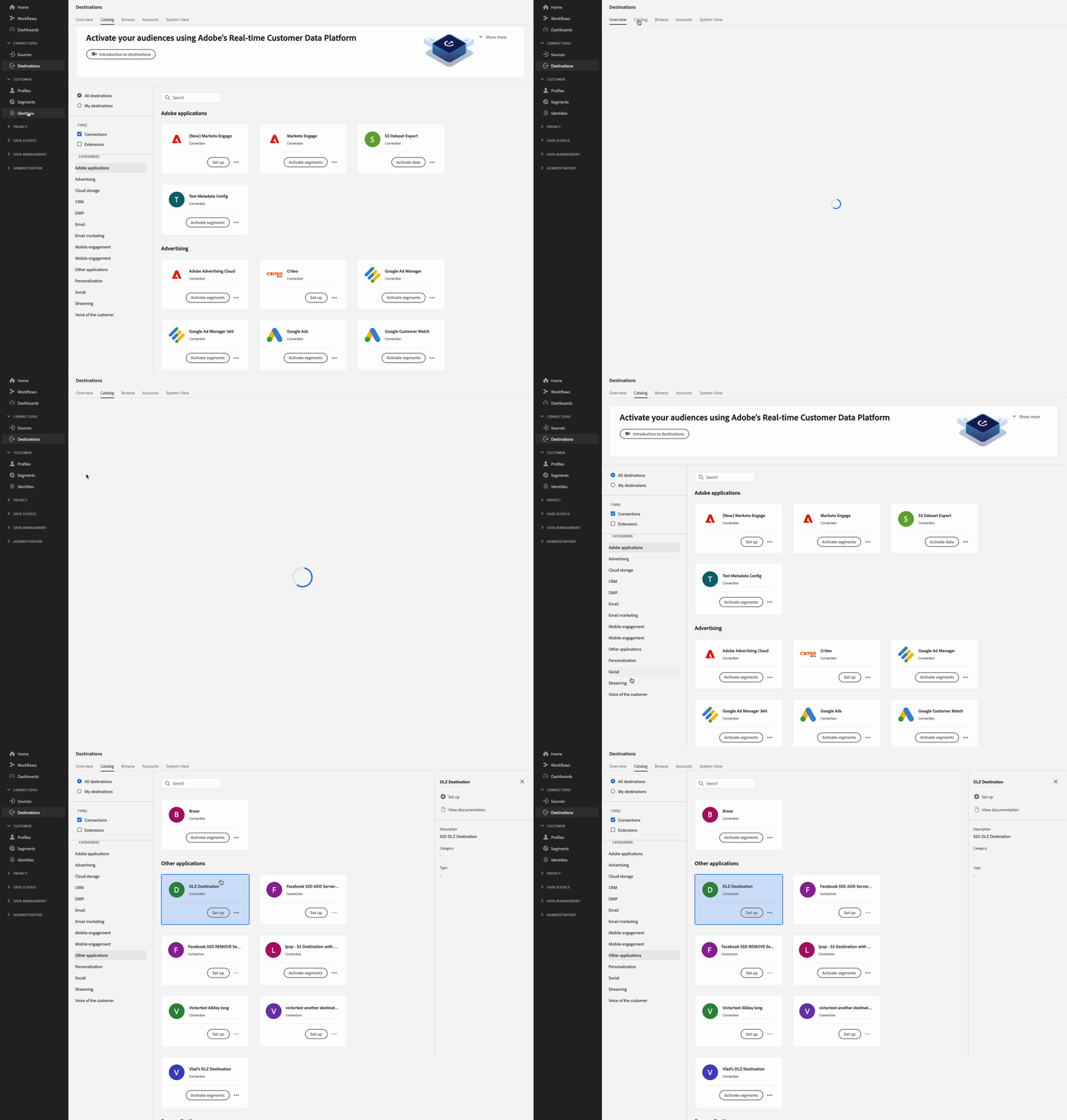
在下列影像和錄製中,請注意檔案型目的地啟動工作流程中的選項如何與您在目的地設定中選取的選項相符。
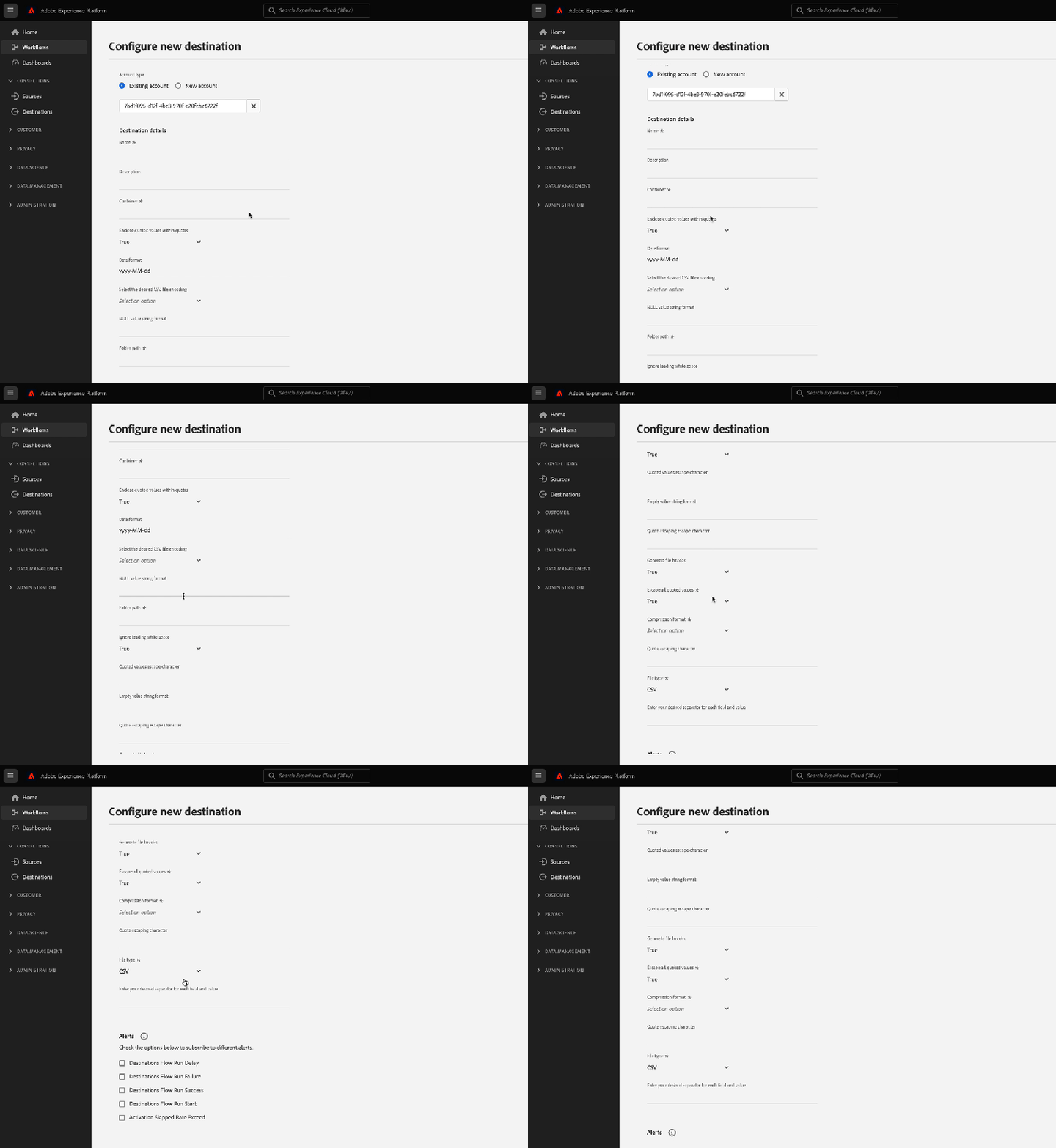
填寫目的地的詳細資料時,請注意顯示的欄位是您在設定中設定的自訂資料欄位。
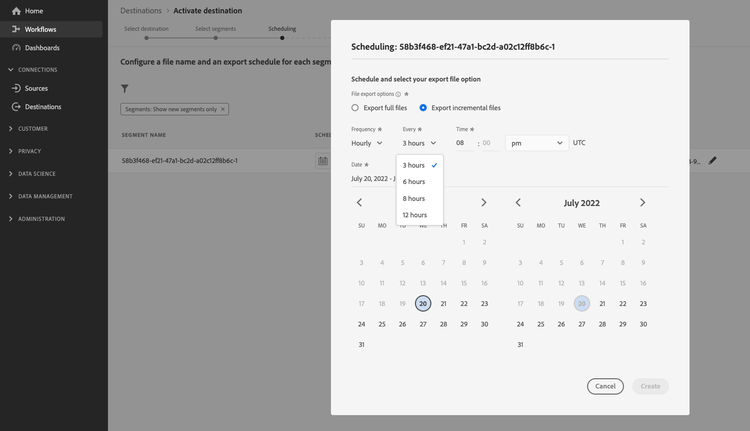
排程匯出間隔時,請注意顯示的欄位是您在batchConfig設定中設定的欄位。
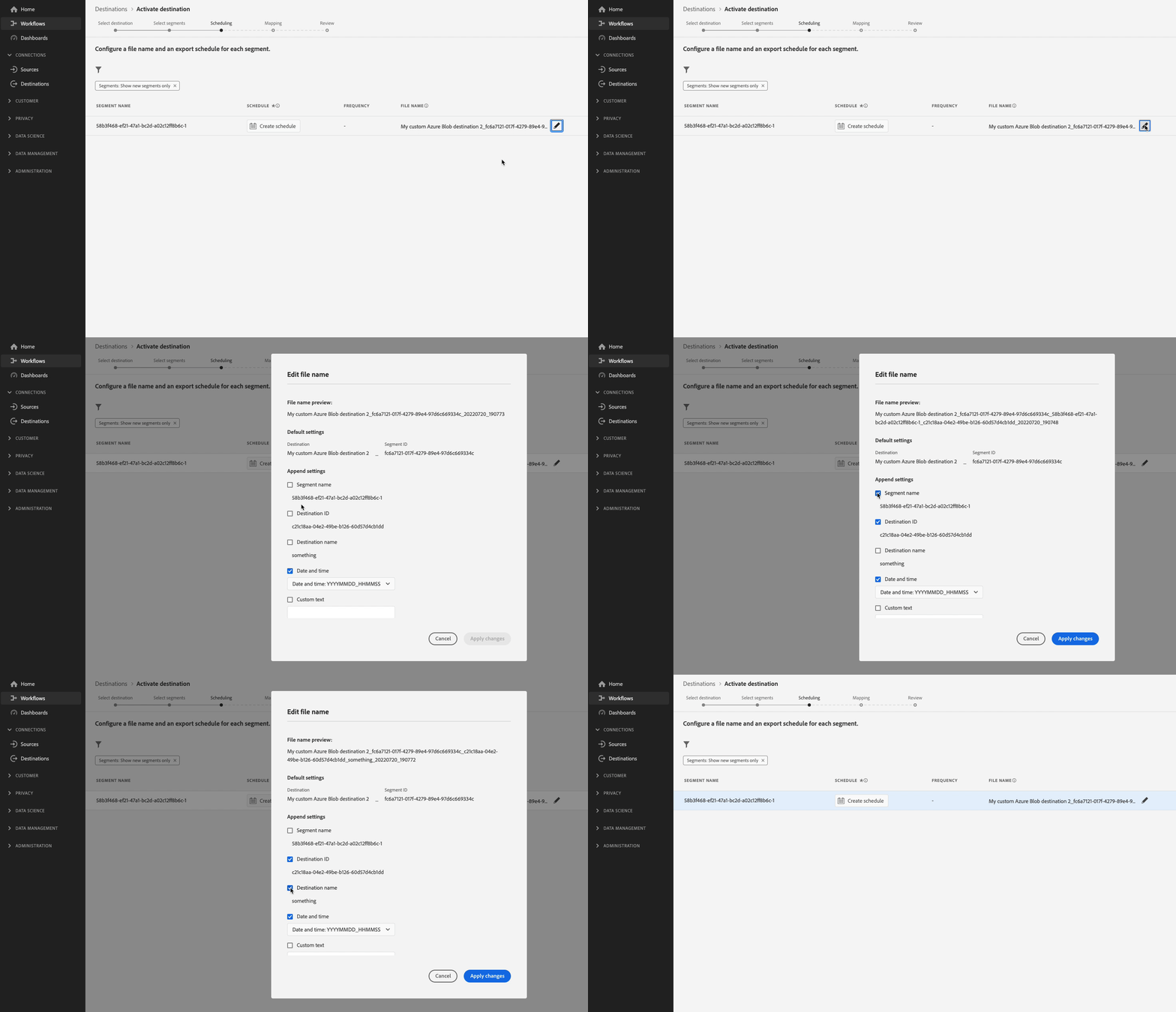
檢視檔案名稱組態選項時,請注意顯示的欄位如何代表您在組態中設定的filenameConfig選項。
如果您要調整上述任何欄位,請重複步驟1和兩個,以根據您的需求修改設定。
步驟4: (選用)將目的地設為Publish publish-destination
設定目的地後,請使用目的地發佈API將您的設定提交給Adobe進行檢閱。
步驟5: (選用)記錄您的目的地 document-destination
如果您是建立產品化整合的獨立軟體廠商(ISV)或系統整合商(SI),請使用自助服務檔案程式,為您在Experience Platform目的地目錄中的目的地建立產品檔案頁面。
後續步驟 next-steps
閱讀本文後,您現在知道如何使用Destination SDK來撰寫自訂Data Landing Zone目的地。 接下來,您的團隊可以使用檔案型目的地的啟動工作流程,將資料匯出至目的地。