來自 AEM 的雙向傳輸層安全性 (mTLS) 驗證
了解如何從 AEM 對需要雙向傳輸層安全性 (mTLS) 驗證的 Web API 進行 HTTPS 呼叫。
mTLS 或雙向 TLS 驗證會要求用戶端和伺服器兩者進行雙向驗證,藉以增強 TLS 通訊協定的安全性。這項驗證使用數位憑證來執行驗證。在強大安全性和身分驗證極為重要的情境中經常使用這項驗證。
預設情況下,嘗試與需要進行 mTLS 驗證的 Web API 建立 HTTPS 連線時,連線會失敗並出現以下錯誤:
javax.net.ssl.SSLHandshakeException: Received fatal alert: certificate_required
當用戶端未提供憑證來驗證自身的身分時,就會出現此問題。
來了解如何使用 Apache HttpClient 和 AEM 的 KeyStore 與 TrustStore 成功呼叫需要 mTLS 驗證的 API。
HttpClient 與載入 AEM KeyStore 素材
概略來說,從 AEM 呼叫受 mTLS 保護的 API 需要進行以下步驟。
AEM 憑證產生
與您組織的安全性團隊合作申請 AEM 憑證。安全性團隊提供或詢問與憑證相關的詳細資訊,例如金鑰、憑證申請檔 (CSR),並使用 CSR 來發行憑證。
為進行示範,產生與憑證相關的詳細資訊,例如金鑰、憑證申請檔 (CSR)。在下方範例中,使用自我簽署 CA 來發行憑證。
-
首先,產生內部憑證授權單位 (CA) 憑證。
code language-shell # Create an internal Certification Authority (CA) certificate openssl req -new -x509 -days 9999 -keyout internal-ca-key.pem -out internal-ca-cert.pem -
產生 AEM 憑證。
code language-shell # Generate Key openssl genrsa -out client-key.pem # Generate CSR openssl req -new -key client-key.pem -out client-csr.pem # Generate certificate and sign with internal Certification Authority (CA) openssl x509 -req -days 9999 -in client-csr.pem -CA internal-ca-cert.pem -CAkey internal-ca-key.pem -CAcreateserial -out client-cert.pem # Verify certificate openssl verify -CAfile internal-ca-cert.pem client-cert.pem -
將 AEM 私密金鑰轉換為 DER 格式,AEM 的 KeyStore 需要 DER 格式的私密金鑰。
code language-shell openssl pkcs8 -topk8 -inform PEM -outform DER -in client-key.pem -out client-key.der -nocrypt
憑證交換
若使用自我簽署 CA 作為 AEM 憑證 (如上所述),請將憑證或內部憑證授權單位 (CA) 憑證傳送給 API 提供者。
此外,如果 API 提供者使用自我簽署的 CA 憑證,請接收 API 提供者所提供的憑證或內部憑證授權單位 (CA) 憑證。
憑證匯入
若要匯入 AEM 的憑證,請依照下列步驟進行:
-
以 管理員 身分登入 AEM Author。
-
導覽至「AEM Author」>「工具」>「安全性」>「使用者」>「建立或選取現有使用者」。
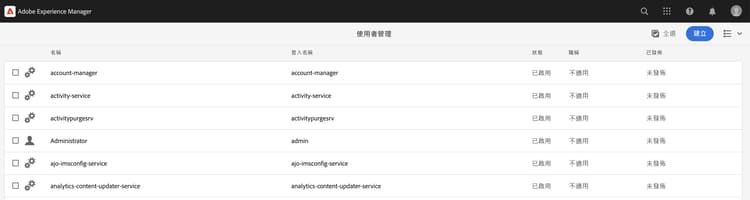
為進行示範,已建立一個新的使用者,名稱為
mtl-demo-user。 -
按一下使用者名稱,開啟「使用者屬性」。
-
按一下「Keystore」索引標籤,然後按一下「建立 Keystore」按鈕。接著在「設定 Keystore 存取密碼」對話框中,設定此使用者的 Keystore 密碼,然後按一下「儲存」。
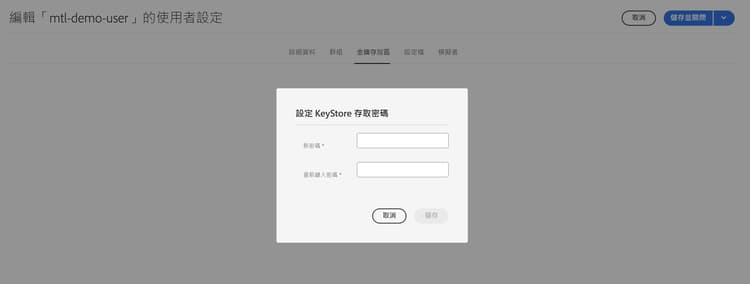
-
在新畫面中,在 從 DER 檔案新增私密金鑰 區段之下,請依照下列步驟進行:
-
輸入別名
-
匯入在上述步驟產生的 DER 格式 AEM 私密金鑰。
-
匯入在上述步驟產生的憑證鏈檔案。
-
按一下「提交」
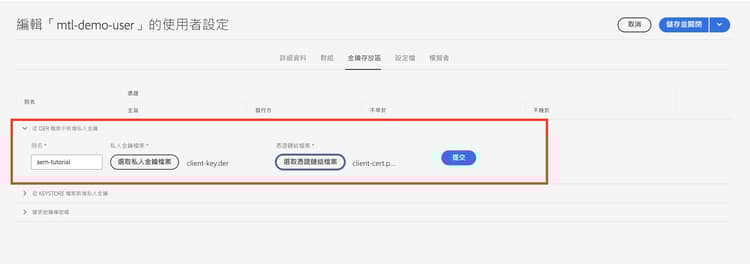
-
-
檢查並確認憑證是否已成功匯入。
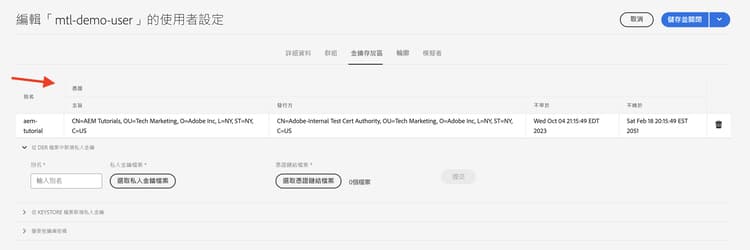
若 API 提供者使用自我簽署的 CA 憑證,請將接收到的憑證匯入 AEM 的 TrustStore,並依照此處的步驟進行。
同樣地,若 AEM 使用自我簽署的 CA 憑證,需要求 API 提供者匯入憑證。
使用 HttpClient 之原型 mTLS API 叫用程式碼
如下方所示更新 Java™ 程式碼。若要使用 @Reference 註解來取得 AEM 的 KeyStoreService 服務,呼叫程式碼必須為 OSGi 元件/服務,或者 Sling 模型 (且有使用 @OsgiService)。
...

// Get AEM's KeyStoreService reference
@Reference
private com.adobe.granite.keystore.KeyStoreService keyStoreService;

...

// Get AEM KeyStore using KeyStoreService
KeyStore aemKeyStore = getAEMKeyStore(keyStoreService, resourceResolver);

if (aemKeyStore != null) {

    // Create SSL Context
    SSLContextBuilder sslbuilder = new SSLContextBuilder();

    // Load AEM KeyStore material into above SSL Context with keystore password
    // Ideally password should be encrypted and stored in OSGi config
    sslbuilder.loadKeyMaterial(aemKeyStore, "admin".toCharArray());

    // If API provider cert is self-signed, load AEM TrustStore material into above SSL Context
    // Get AEM TrustStore
    KeyStore aemTrustStore = getAEMTrustStore(keyStoreService, resourceResolver);
    sslbuilder.loadTrustMaterial(aemTrustStore, null);

    // Create SSL Connection Socket using above SSL Context
    SSLConnectionSocketFactory sslsf = new SSLConnectionSocketFactory(
            sslbuilder.build(), NoopHostnameVerifier.INSTANCE);

    // Create HttpClientBuilder
    HttpClientBuilder httpClientBuilder = HttpClientBuilder.create();
    httpClientBuilder.setSSLSocketFactory(sslsf);

    // Create HttpClient
    CloseableHttpClient httpClient = httpClientBuilder.build();

    // Invoke API
    closeableHttpResponse = httpClient.execute(new HttpGet(MTLS_API_ENDPOINT));

    // Code that reads response code and body from the 'closeableHttpResponse' object
    ...
}

/**
 * Returns the AEM KeyStore of a user. In this example we are using the
 * 'mtl-demo-user' user.
 *
 * @param keyStoreService
 * @param resourceResolver
 * @return AEM KeyStore
 */
private KeyStore getAEMKeyStore(KeyStoreService keyStoreService, ResourceResolver resourceResolver) {

    // get AEM KeyStore of 'mtl-demo-user' user, you can create a user or use an existing one.
    // Then create keystore and upload key, certificate files.
    KeyStore aemKeyStore = keyStoreService.getKeyStore(resourceResolver, "mtl-demo-user");

    return aemKeyStore;
}

/**
 *
 * Returns the global AEM TrustStore
 *
 * @param keyStoreService OOTB OSGi service that makes AEM based KeyStore
 *                         operations easy.
 * @param resourceResolver
 * @return
 */
private KeyStore getAEMTrustStore(KeyStoreService keyStoreService, ResourceResolver resourceResolver) {

    // get AEM TrustStore from the KeyStoreService and ResourceResolver
    KeyStore aemTrustStore = keyStoreService.getTrustStore(resourceResolver);

    return aemTrustStore;
}

...
- 將 OOTB
com.adobe.granite.keystore.KeyStoreServiceOSGi 服務注入到您的 OSGi 元件中。 - 使用
KeyStoreService和ResourceResolver取得使用者的 AEM KeyStore,使用getAEMKeyStore(...)方法可完成此作業。 - 若 API 提供者使用自我簽署的 CA 憑證,請取得全域 AEM TrustStore,使用
getAEMTrustStore(...)方法可完成此作業。 - 建立一個
SSLContextBuilder物件,請參閱 Java™ API 詳細資訊。 - 使用
loadKeyMaterial(final KeyStore keystore,final char[] keyPassword)方法將使用者的 AEM KeyStore 載入到SSLContextBuilder中。 - Keystore 密碼是建立 Keystore 時所設定的密碼,其應該會儲存在 OSGi 設定中,請參閱機密設定值。
避免 JVM Keystore 變更
使用私人憑證有效叫用 mTLS API 的傳統方法必須修改 JVM Keystore。使用 Java™ keytool 命令匯入私人憑證即可做到。
然而,此方法不符合安全性最佳實務,而 AEM 提供極佳的選項,即使用使用者特定的 KeyStore 和 Global TrustStore 以及 KeyStoreService。
解決方案套件
影片中示範的範例 Node.js 專案可於此處下載。
AEM servlet 程式碼可於 WKND 網站專案的 tutorial/web-api-invocation 分支中找到,請參閱此處。