呼叫具有私人憑證的內部 API
了解如何使用私人或自我簽署憑證,從 AEM 進行對 Web API 的 HTTPS 呼叫。
預設情況下,嘗試與使用自我簽署憑證的 Web API 建立 HTTPS 連線時,連線會失敗並出現下列錯誤:
PKIX path building failed: sun.security.provider.certpath.SunCertPathBuilderException: unable to find valid certification path to requested target
當 API 的 SSL 憑證不是由經認可的憑證授權單位 (CA) 所發行,而且 Java™ 應用程式無法驗證 SSL/TLS 憑證時,通常會發生這個問題。
了解如何使用 Apache HttpClient 和 AEM 的全域 TrustStore 成功呼叫具有私人或自我簽署憑證的 API。
使用 HttpClient 之原型 API 叫用程式碼
以下程式碼會與 Web API 建立 HTTPS 連線:
...
String API_ENDPOINT = "https://example.com";

// Create HttpClientBuilder
HttpClientBuilder httpClientBuilder = HttpClientBuilder.create();

// Create HttpClient
CloseableHttpClient httpClient = httpClientBuilder.build();

// Invoke API
CloseableHttpResponse closeableHttpResponse = httpClient.execute(new HttpGet(API_ENDPOINT));

// Code that reads response code and body from the 'closeableHttpResponse' object
...
程式碼使用 Apache HttpComponent 的 HttpClient 程式庫類別及其方法。
HttpClient 及載入 AEM TrustStore 素材
若要呼叫具有 私人或自我簽署憑證 的 API 端點,HttpClient 的 SSLContextBuilder 必須載入 AEM 的 TrustStore,並藉以使連線更方便。
請依照下列步驟進行:
-
以 管理員 身分登入 AEM Author。
-
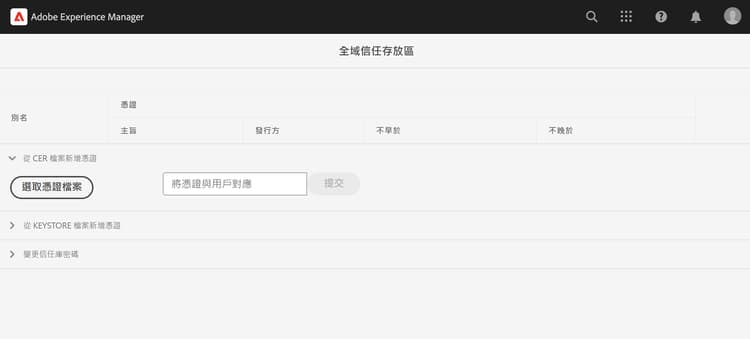
導覽至「AEM Author」>「工具」>「安全性」>「Trust Store」,然後開啟「Global Trust Store」。若為首次存取,請設定 Global Trust Store 的密碼。
-
若要匯入私人憑證,請按一下「選取憑證檔案」按鈕,然後選取副檔名為
.cer的所需憑證檔案。按一下「提交」按鈕來匯入憑證檔案。 -
如下方所示,更新 Java™ 程式碼。請注意,若要使用
@Reference取得 AEM 的KeyStoreService,呼叫程式碼必須為 OSGi 元件/服務,或者 Sling 模型 (且有使用@OsgiService)。code language-java ... // Get AEM's KeyStoreService reference @Reference private com.adobe.granite.keystore.KeyStoreService keyStoreService; ... // Get AEM TrustStore using KeyStoreService KeyStore aemTrustStore = getAEMTrustStore(keyStoreService, resourceResolver); if (aemTrustStore != null) { // Create SSL Context SSLContextBuilder sslbuilder = new SSLContextBuilder(); // Load AEM TrustStore material into above SSL Context sslbuilder.loadTrustMaterial(aemTrustStore, null); // Create SSL Connection Socket using above SSL Context SSLConnectionSocketFactory sslsf = new SSLConnectionSocketFactory( sslbuilder.build(), NoopHostnameVerifier.INSTANCE); // Create HttpClientBuilder HttpClientBuilder httpClientBuilder = HttpClientBuilder.create(); httpClientBuilder.setSSLSocketFactory(sslsf); // Create HttpClient CloseableHttpClient httpClient = httpClientBuilder.build(); // Invoke API closeableHttpResponse = httpClient.execute(new HttpGet(API_ENDPOINT)); // Code that reads response code and body from the 'closeableHttpResponse' object ... } /** * * Returns the global AEM TrustStore * * @param keyStoreService OOTB OSGi service that makes AEM based KeyStore * operations easy. * @param resourceResolver * @return */ private KeyStore getAEMTrustStore(KeyStoreService keyStoreService, ResourceResolver resourceResolver) { // get AEM TrustStore from the KeyStoreService and ResourceResolver KeyStore aemTrustStore = keyStoreService.getTrustStore(resourceResolver); return aemTrustStore; } ...- 將 OOTB
com.adobe.granite.keystore.KeyStoreServiceOSGi 服務注入到您的 OSGi 元件中。 - 使用
KeyStoreService和ResourceResolver取得全域 AEM TrustStore,getAEMTrustStore(...)方法可以完成這項作業。 - 建立一個
SSLContextBuilder物件,請參閱 Java™ API 詳細資訊。 - 使用
loadTrustMaterial(KeyStore truststore,TrustStrategy trustStrategy)方法將全域 AEM TrustStore 載入到SSLContextBuilder中。 - 在上述方法中,對
TrustStrategy傳遞null,確保在 API 執行期間只有 AEM 信任的憑證會成功。
- 將 OOTB
避免 JVM Keystore 變更
使用私人憑證有效地叫用內部 API 的傳統方法,必須修改 JVM Keystore。使用 Java™ keytool 指令匯入私人憑證即可做到。
然而,此方法不符合安全性最佳實務,而 AEM 提供極佳的選項,即使用 Global Trust Store 和 KeyStoreService。
解決方案套件
影片中示範的範例 Node.js 專案可於此處下載。
AEM servlet 程式碼可於 WKND 網站專案的 tutorial/web-api-invocation 分支中找到,請參閱此處。