內容片段中的CF參考不會自動調整以符合副本的語言
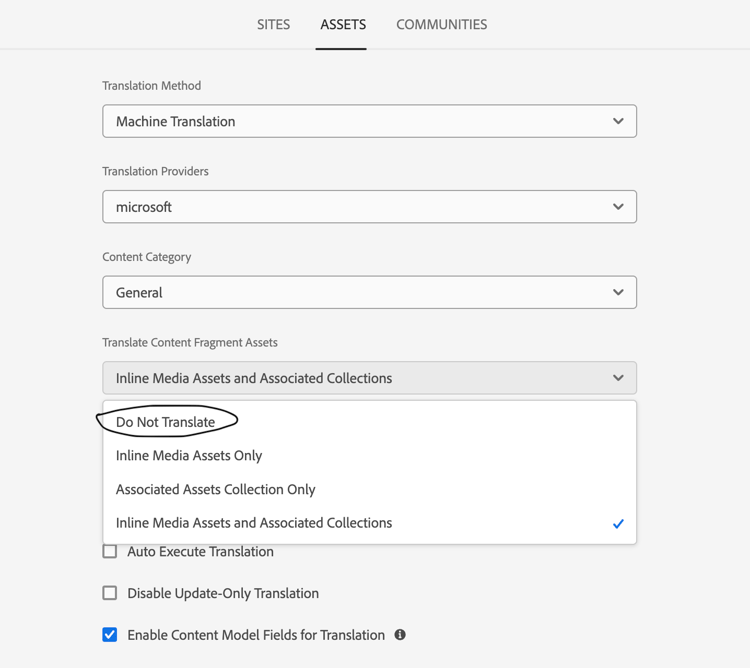
本文說明如何解決內容片段中的CF (內容片段)參考未自動調整以符合副本語言的問題。 將 翻譯內容片段Assets 選項從 不翻譯 變更為內嵌媒體Assets和相關集合,即可解決此問題。
說明 description
環境
Adobe Experience Manager (AEM)
問題/症狀
內容片段中的CF參考不會自動調整以符合副本的語言。
例如:
以下是參照CF /content/dam/wknd-shared/en/contributors/richard-roe的內容片段: https://author-pXXXXX-eYYYYYYY.adobeaemcloud.com/ui#/aem/editor.html/content/dam/wknd-shared/en/test_1。
必須建立在此連結下建立的第一個內容片段(CF)的語言副本。 不過,參考的CF仍指向/content/dam/wknd-shared/en/contributors/richard-roe,而不是正確的路徑(應為/content/dam/wknd-shared/nl/contributors/richard-roe.)
解決方法 resolution
檢閱翻譯設定後,發現錯誤是由全域翻譯設定所造成,其中資產的 翻譯內容片段Assets 選項設為不翻譯。
請參閱下圖,瞭解在將選項變更為 內嵌媒體Assets和相關集合 後,參考的CF已正確更新至適當的語言資料夾。
相關閱讀
在AEM as a Cloud Service (AEMaaCS)使用手冊中設定翻譯整合架構。
recommendation-more-help
experience-cloud-kcs-help-kbarticles