透過資料導向更新縮小內容效能差距
選取以縮放。
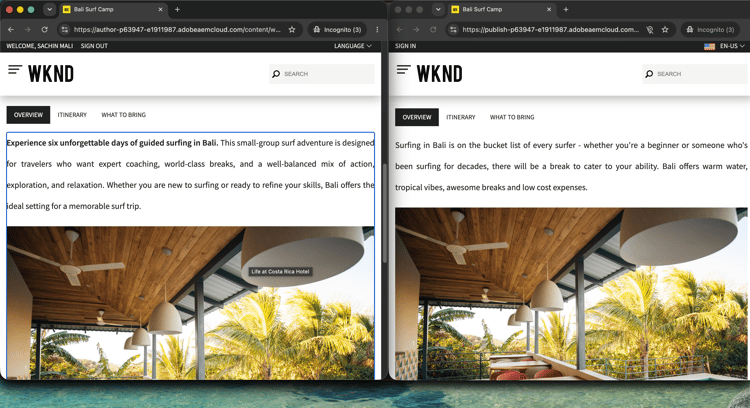
內容效能差距會影響行銷活動的成果,通常表示您必須在分析工具和CMS之間切換。 本逐步解說會說明如何在單一AI工作階段中執行此作業:在Customer Journey Analytics中找出有轉換差距的行銷活動、診斷原因、在AEM中檢查表現不佳的內容,並在不離開交談的情況下套用更新。
每個步驟會顯示一個代表性提示和範例AI回應。 您可以完成更多 個 區段,在同一工作階段中進行更多探索。
開始之前
CX Enterprise Coworker涵蓋整個逐步解說,無需伺服器設定。 試用CX Enterprise Coworker
如果您想要直接連線您自己的AI使用者端,請使用下列標籤來連線兩個MCP伺服器。
將兩個MCP伺服器連線為自訂聯結器。 分別新增各個。
- 移至Claude.ai中的設定>整合。
- 選取新增自訂聯結器,輸入伺服器URL,然後選取連線。
- 使用您的Adobe ID登入,然後為第二個伺服器重複此程式。
| table 0-row-2 1-row-2 2-row-2 | |
|---|---|
| 伺服器 | 端點 |
| Customer Journey Analytics MCP伺服器 | https://cja-mcp.adobe.io/mcp |
| AEM MCP伺服器 | https://mcp.adobeaemcloud.com/adobe/mcp/aem |
完整設定: Claude.ai自訂聯結器檔案
使用ChatGPT Developer Mode (Pro、Plus、Business、Enterprise或Education plan required)連線兩部MCP伺服器。 分別新增每個伺服器。
- 在 ChatGPT設定 中啟用開發人員模式。
- 移至 設定>整合 並選取新增自訂聯結器>遠端MCP伺服器。
- 輸入伺服器URL,選取連線,然後使用您的Adobe ID登入。
- 對第二個伺服器重複此動作。
| table 0-row-2 1-row-2 2-row-2 | |
|---|---|
| 伺服器 | 端點 |
| Customer Journey Analytics MCP伺服器 | https://cja-mcp.adobe.io/mcp |
| AEM MCP伺服器 | https://mcp.adobeaemcloud.com/adobe/mcp/aem |
完整設定: ChatGPT MCP檔案
使用Gemini、Microsoft Copilot、Cursor、Claude Code或其他與MCP相容的環境嗎? 使用下列端點連線到兩個MCP伺服器:
| table 0-row-2 1-row-2 2-row-2 | |
|---|---|
| 伺服器 | 端點 |
| Customer Journey Analytics MCP伺服器 | https://cja-mcp.adobe.io/mcp |
| AEM MCP伺服器 | https://mcp.adobeaemcloud.com/adobe/mcp/aem |
所有支援使用者端的完整設定指示: 連線到您的AI使用者端
步驟1:尋找有轉換間隔的行銷活動
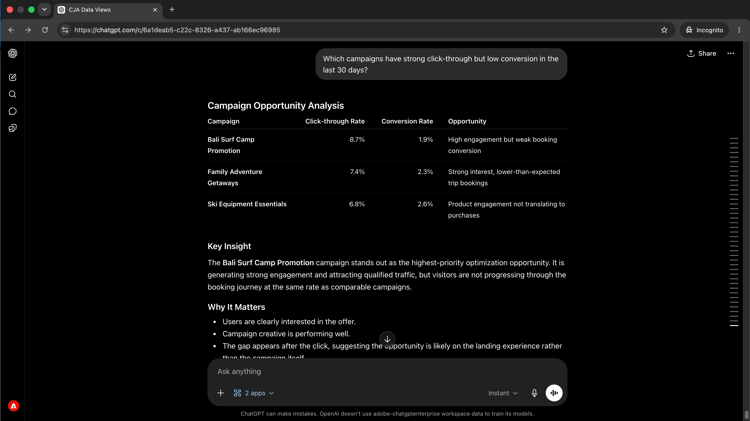
使用CJA來揭露點進強烈但轉換率低的行銷活動。 此模式(高意圖、低完成)通常指向登陸頁面上的內容或體驗問題。
Which campaigns have strong click-through but low conversion in the last 30 days?
從CJA高點進但低轉換的
選取以縮放。
步驟2:診斷根本原因
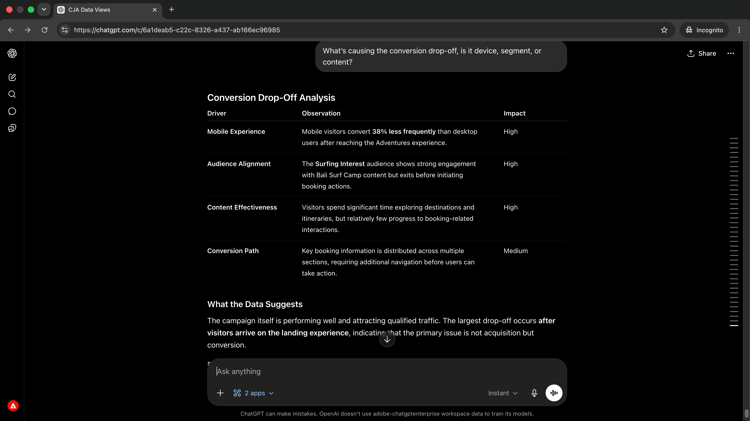
請跟進以瞭解導致差異的原因。 詢問流失率是否集中在特定裝置型別、對象區段或內容互動上。
What's causing the conversion drop-off, is it device, segment, or content?
選取以縮放。
步驟3:檢閱AEM中的內容
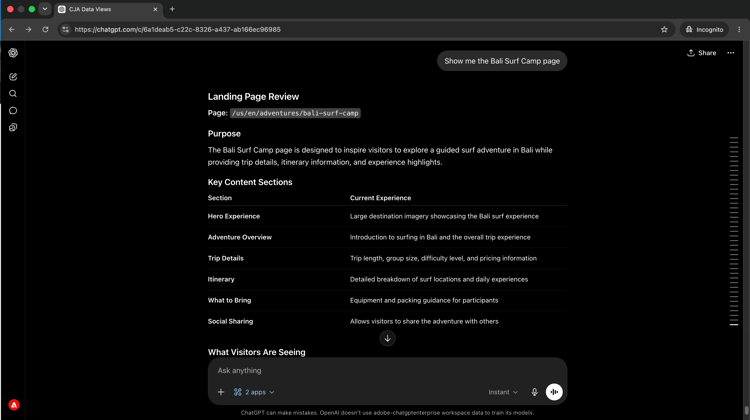
在識別表現缺佳的促銷活動後,在同一工作階段中從AEM提取登入頁面。 檢視頁面目前顯示內容是瞭解要變更內容的起點。
Show me the Bali Surf Camp page.
選取以縮放。
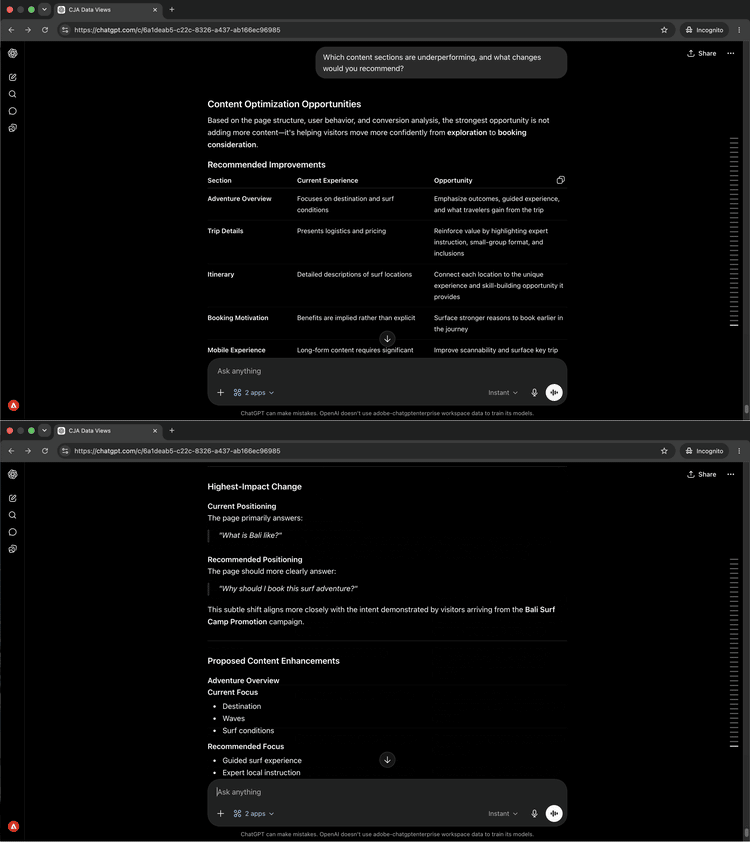
步驟4:取得鎖定目標的建議
要求您的AI使用者端將顯示的資料與頁面上的內容連線起來。 跨兩個來源的AI原因可識別哪些內容區段可能會導致流失以及要變更的內容。
Which content sections are underperforming, and what changes would you recommend?
選取以縮放。
步驟5:套用並檢閱變更
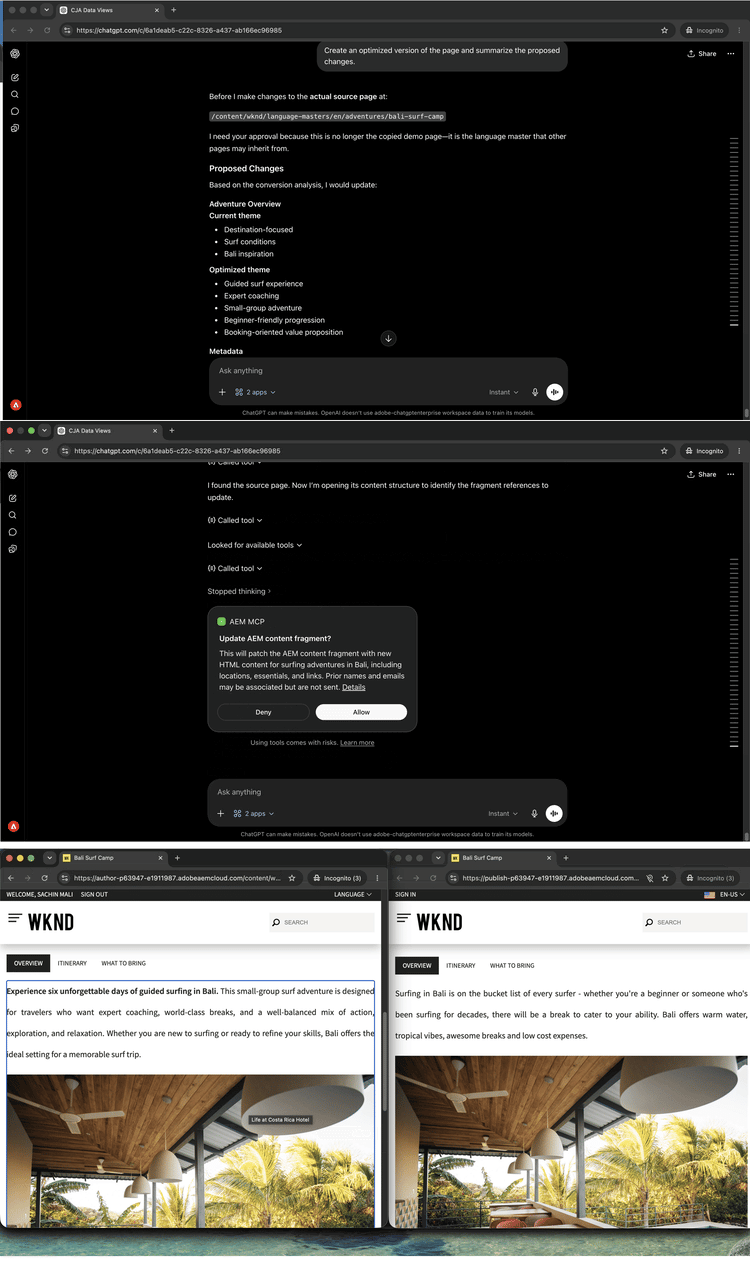
要求您的AI使用者端根據建議建立頁面的最佳化版本,並摘要變更內容及原因。
Create an optimized version of the Bali Surf Camp page and summarize the proposed changes.
選取以縮放。
您完成的內容
您在單一AI工作階段中連線Customer Journey Analytics和AEM,並從行銷活動資料移至已部署的內容變更,無需切換工具。 您找出具有轉換差距的行銷活動、診斷根本原因、檢查登入頁面、收到以資料和內容為基礎的目標建議,並將變更套用至相同對話中。 這縮短了Analytics insight與已發佈內容之間的回饋迴路,並可在相同工作階段中縮放為任意數量的表現缺佳頁面。
您可以完成更多工作
透過在同一工作階段中連結CJA和AEM,您就能涵蓋從識別問題到送貨修正的整個週期。 展開下面的案例以檢視您可以嘗試的提示。
高流量和低參與度表示內容問題,而非流量問題。 這些提示可協助您在行銷活動期限強制問題之前顯示需要注意的特定頁面和模式。
提示
| code language-none |
|---|
|
| code language-none |
|---|
|
| code language-none |
|---|
|
| code language-none |
|---|
|
一旦您知道哪些專案表現缺佳,請根據效能資料所顯示的內容,進行目標性的變更。 這些提示可讓您根據診斷更新特定區段。
提示
| code language-none |
|---|
|
| code language-none |
|---|
|
| code language-none |
|---|
|
| code language-none |
|---|
|
工作階段期間所做的變更可能會快速累積。 這些提示可協助您在行銷活動上線之前檢閱就緒內容、群組更新以供檢閱,以及完全提升。
提示
| code language-none |
|---|
|
| code language-none |
|---|
|
| code language-none |
|---|
|
| code language-none |
|---|
|