保持內容最新狀態,並加快傳送更新的速度
選取以縮放。
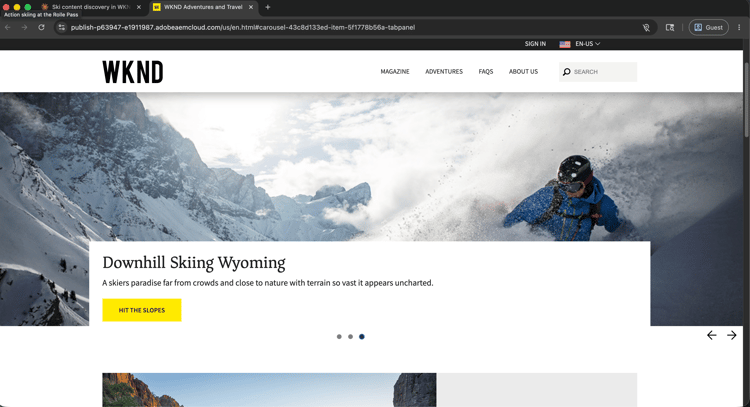
維持最新的網站內容是持續不斷的營運壓力。 本逐步解說說明內容團隊如何透過AI使用者端尋找、檢閱、更新和發佈AEM頁面和內容片段,使用AEM MCP伺服器來縮短內容決策與即時更新之間的時間。
每個步驟會顯示一個代表性提示和範例AI回應。 您可以完成更多 個 區段,在同一工作階段中進行更多探索。
開始之前
最快的方法就是CX Enterprise Coworker,它不需要伺服器設定或AI使用者端設定。 試用CX Enterprise Coworker
如果您想將自己的AI使用者端直接連線到AEM,請參閱以下標籤。
以自訂聯結器連線AEM MCP伺服器。
- 移至Claude.ai中的設定>整合。
- 選取 新增自訂聯結器 並輸入伺服器URL:
https://mcp.adobeaemcloud.com/adobe/mcp/aem - 選取 連線 並使用您的Adobe ID登入。
完整設定: Claude.ai自訂聯結器檔案
使用ChatGPT Developer Mode (需要Pro、Plus、Business、Enterprise或Education計畫)連線AEM MCP伺服器。
- 在 ChatGPT設定 中啟用開發人員模式。
- 移至 設定>整合 並選取新增自訂聯結器>遠端MCP伺服器。
- 輸入伺服器URL:
https://mcp.adobeaemcloud.com/adobe/mcp/aem - 選取 連線 並使用您的Adobe ID登入。
完整設定: ChatGPT MCP檔案
使用Gemini、Microsoft Copilot、Cursor、Claude Code或其他與MCP相容的環境嗎? 使用此端點連線至AEM MCP伺服器:
| code language-none |
|---|
|
所有支援使用者端的完整設定指示: 連線到您的AI使用者端
步驟1:在您的AEM環境中尋找內容
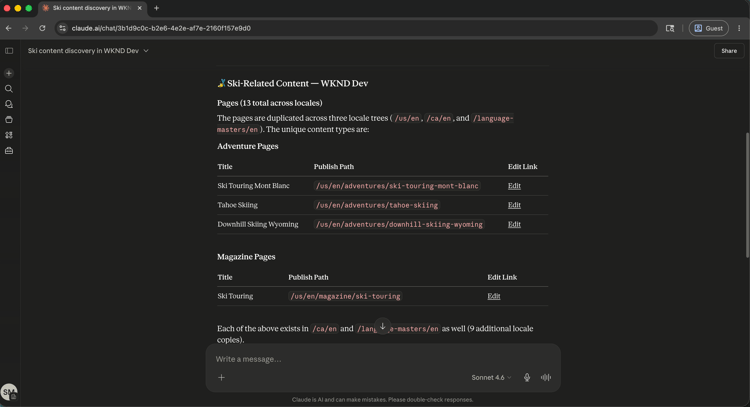
首先,請您的AI使用者端探索您的AEM環境並搜尋內容。 您可以依主題、關鍵字或內容型別搜尋,而不需要知道確切路徑。
From WKND Dev environment, find all ski related content.
選取以縮放。
步驟2:檢閱特定頁面
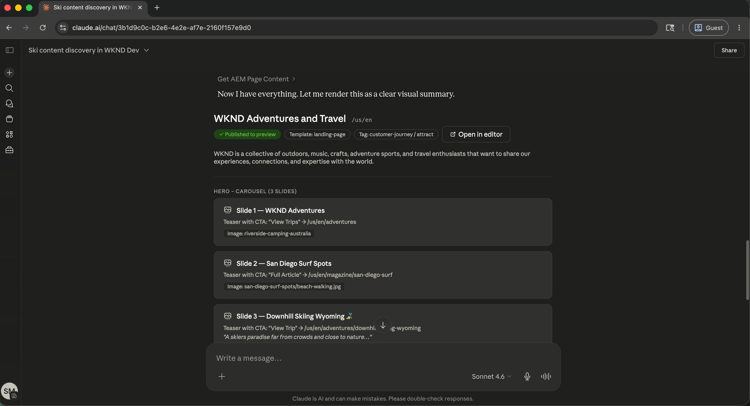
找到相關內容後,請要求您的AI使用者端顯示特定頁面。 您可以依名稱或路徑參照頁面。 MCP伺服器會解析參考並傳回內容結構。
Show me the US English Home Page.
選取以縮放。
步驟3:改善內容
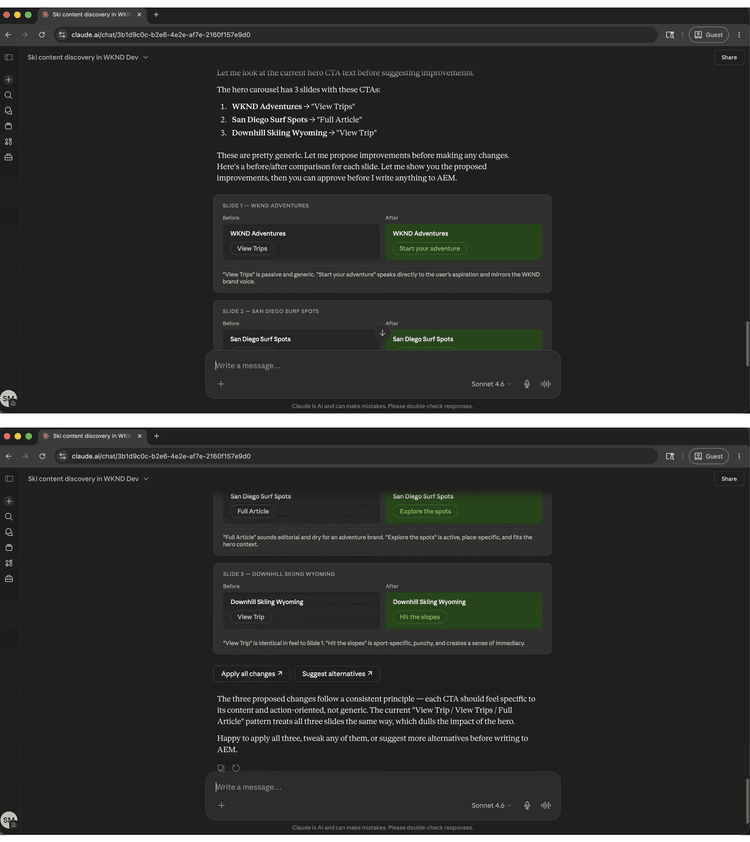
檢視頁面內容後,請要求您的AI使用者端提出改進或套用改進。 AI可以根據頁面目前所顯示的內容提出副本變更,並在寫入任何內容之前要求確認。
Improve the Hero CTAs.
選取以縮放。
步驟4:發佈和共用
確認更新後,發佈頁面並擷取可共用的URL,全都透過相同的對話進行。
Publish the changes and share the URL.
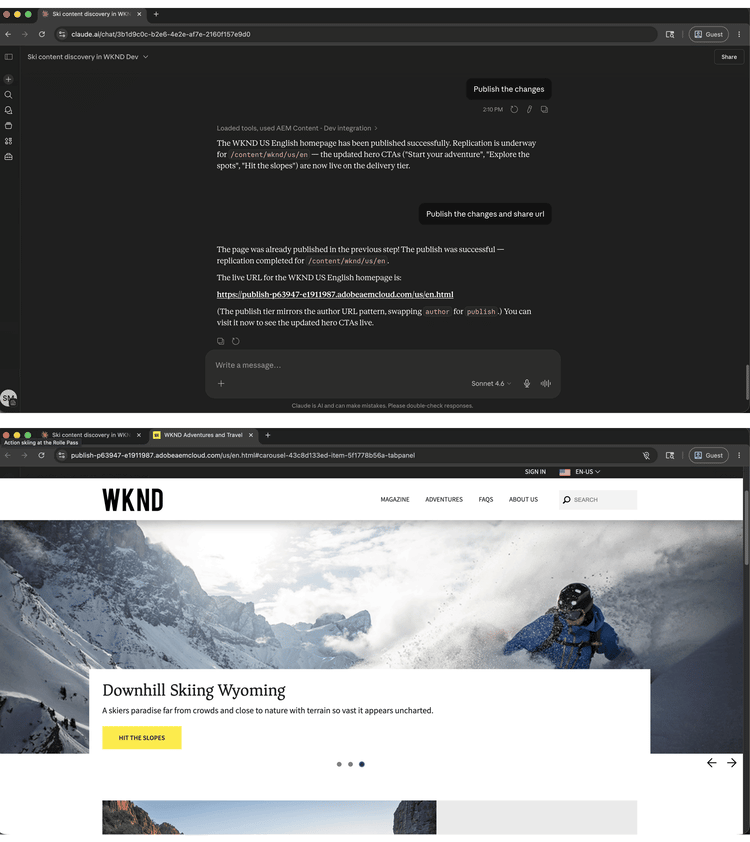
選取以縮放。
您完成的內容
您在不開啟AEM介面的情況下,使用AEM MCP伺服器來尋找內容、檢閱即時頁面、套用AI建議的改進以及發佈結果。 透過在單一AI工作階段中結合內容探索、編輯和發佈,內容團隊可以從識別間隙轉移到以更快的速度和更少的內容切換送出更新。 相同的工作流程可縮放至多個頁面、內容片段,以及協調的行銷活動啟動。
您可以完成更多工作
AEM MCP伺服器的處理方式遠不止逐步解說。 展開下列案例以檢視可在相同工作階段中嘗試的提示。
手動完成內容稽核相當耗時。 這些提示可協助您快速顯示過時內容、從未出貨的草稿,以及需要在重大推播之前修復的間隙。
提示
| code language-none |
|---|
|
| code language-none |
|---|
|
| code language-none |
|---|
|
| code language-none |
|---|
|
| code language-none |
|---|
|
SEO和協助工具間隙可快速在大型網站間複合。 這些提示可協助您在稽核或啟動之前,找到並優先處理最重要的問題。
提示
| code language-none |
|---|
|
| code language-none |
|---|
|
| code language-none |
|---|
|
| code language-none |
|---|
|
| code language-none |
|---|
|
中斷的資產參考和未處理的上傳會減慢內容生產的速度。 這些提示可協助您在資產封鎖頁面更新或行銷活動之前尋找和管理資產。
提示
| code language-none |
|---|
|
| code language-none |
|---|
|
| code language-none |
|---|
|
| code language-none |
|---|
|
啟動行銷活動通常表示要協調多個內容片段和頁面之間的變更。 這些提示可協助您群組更新、升級前檢閱及整潔出貨。
提示
| code language-none |
|---|
|
| code language-none |
|---|
|
| code language-none |
|---|
|
| code language-none |
|---|
|
| code language-none |
|---|
|
| code language-none |
|---|
|