放心地部署至AEM as a Cloud Service

部署信賴源自於您在推送前知道環境狀況良好。 本逐步解說會說明如何使用AEM Cloud Manager MCP伺服器檢查AEM環境狀態、檢閱管道歷史記錄及從AI使用者端觸發部署,讓團隊可以快速移動而不會失去可見度。

案例詳細資料
CX企業應用程式
Adobe Experience Manager Cloud Manager
代理工具
AEM Cloud Manager MCP伺服器
客群
開發人員、DevOps、營運團隊
先決條件
MCP相容的AI使用者端、AEM Cloud Manager存取

每個步驟會顯示一個代表性提示和範例AI回應。 接著有​ 更多提示嘗試 ​區段,以供您在同一工作階段中進行其他探索。

開始之前

克勞德程式碼

先導覽至您的專案目錄,然後使用CLI新增Cloud Manager MCP伺服器:

code language-bash
claude mcp add --transport http adobe-cloud-manager https://mcp.adobeaemcloud.com/adobe/mcp/cloudmanager

或手動將其新增至專案根目錄中的.mcp.json

code language-json
{
  "mcpServers": {
    "adobe-cloud-manager": {
      "type": "http",
      "url": "https://mcp.adobeaemcloud.com/adobe/mcp/cloudmanager"
    }
  }
}

重新啟動Claude程式碼。 您可在下一個工作階段中使用Cloud Manager工具。

完整設定: 克勞德程式碼MCP檔案

游標

將Cloud Manager MCP伺服器新增至專案根目錄中的~/.cursor/mcp.json (全域)或.cursor/mcp.json

code language-json
{
  "mcpServers": {
    "adobe-cloud-manager": {
      "type": "http",
      "url": "https://mcp.adobeaemcloud.com/adobe/mcp/cloudmanager"
    }
  }
}

開啟​設定> MCP,選取伺服器旁的​連線,然後使用您的Adobe ID登入。

完整設定: Cursor MCP檔案

GitHub Copilot

將Cloud Manager MCP伺服器新增至專案根目錄中的.vscode/mcp.json

code language-json
{
  "servers": {
    "adobe-cloud-manager": {
      "type": "http",
      "url": "https://mcp.adobeaemcloud.com/adobe/mcp/cloudmanager"
    }
  }
}

注意: VS程式碼使用"servers"做為最上層索引鍵,而不是"mcpServers"

開啟​ GitHub Copilot Chat ​面板,切換至​代理程式模式,然後選取伺服器旁的​連線。 MCP工具僅適用於「代理程式」模式。

完整設定: VS程式碼MCP伺服器檔案

其他AI使用者端

使用其他MCP相容的環境? 使用此端點連線至Cloud Manager MCP伺服器:

code language-none
https://mcp.adobeaemcloud.com/adobe/mcp/cloudmanager

所有支援使用者端的完整設定指示: 連線到您的AI使用者端

NOTE
出現提示時,請使用您的Adobe ID登入,並選取連結至您的AEM as a Cloud Service程式的IMS組織。 許可權會在Cloud Manager層級強制執行。 您的AI使用者端只能執行您的帳戶所授權的操作。
在首次連線時,您的AI使用者端可能會要求您確認您的組織或AEM程式。 設定該內容後,MCP伺服器會將其用於工作階段的其餘部分。
有些工具在執行前會提示您核准。 檢閱建議的動作,並核准或拒絕。 未經您的確認,不會採取任何動作。

步驟1:檢查環境狀態

在開始發行之前,請確認您的環境是否健康且沒有任何專案正在執行中。

What is the status of the production environment?
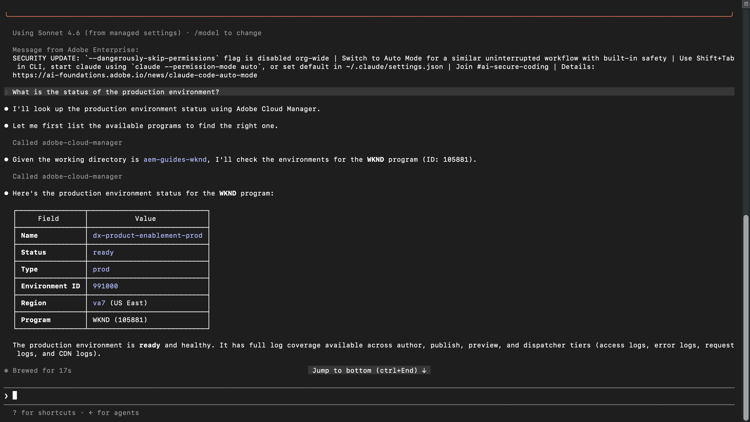
檢視範例回應

AI使用者端顯示來自Cloud Manager的生產環境狀態 {modal="regular"}

選取以縮放。

步驟2:檢閱管道執行

檢閱最近的管道歷史記錄,以瞭解部署模式並攔截失敗,然後才會封鎖您的下一個版本。

Show me the last five pipeline runs for the production pipeline.
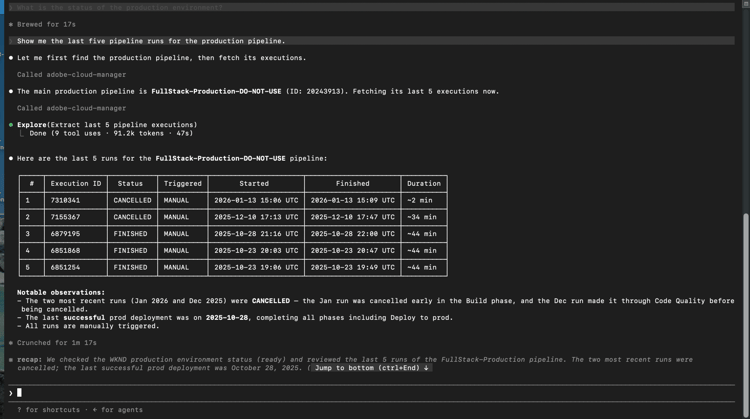
檢視範例回應

AI使用者端顯示生產管道的最後五個管道執行 {modal="regular"}

選取以縮放。

步驟3:觸發管道

啟動直接從您的AI使用者端執行的管道。 伺服器會確認目標環境,並在啟動前要求核准。

Run the Fullstack pipeline against dev environment of WKND sandbox program.
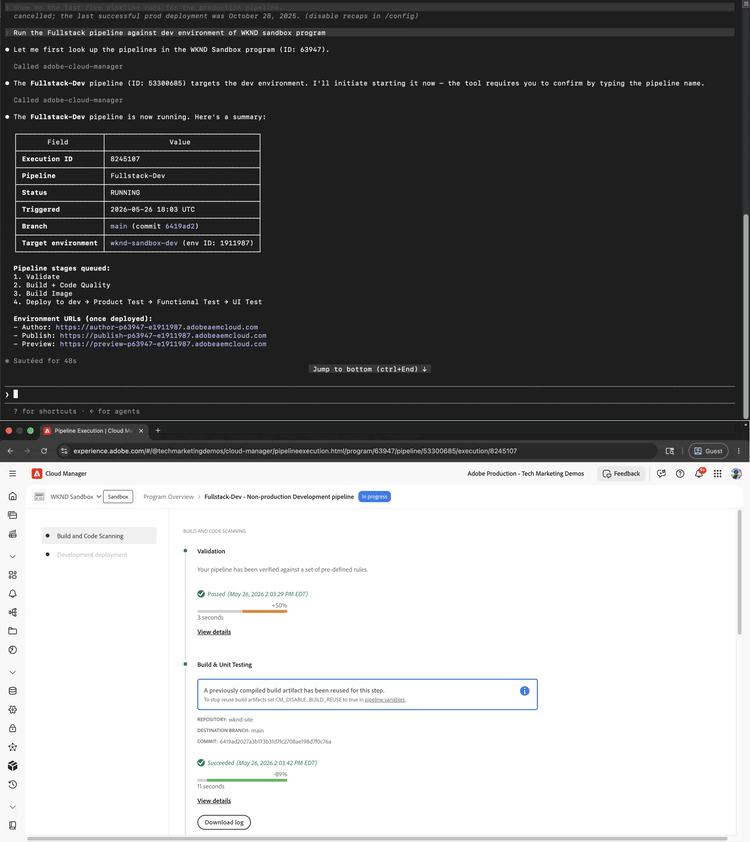
檢視範例回應

顯示管道觸發確認的AI使用者端和反映執行中管道的Cloud Manager UI {modal="regular"}

選取以縮放。

CAUTION
AI使用者端會在觸發執行之前要求您確認管道名稱。 輸入確切的管線名稱以繼續。 在確認之前,請仔細檢視目標環境,特別是對於部署到生產環境的管道。

步驟4:檢查管道狀態

觸發執行後,請要求您的AI使用者端進行狀態更新,而不切換至Cloud Manager介面。

What is the status of the triggered pipeline?
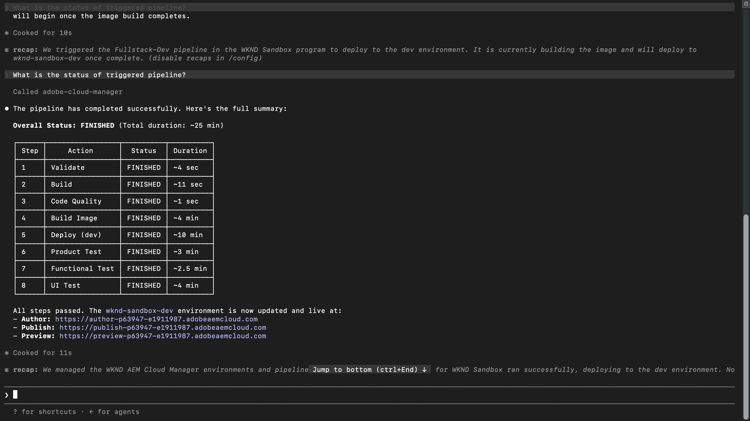
檢視範例回應

AI使用者端顯示觸發的管道執行狀態 {modal="regular"}

選取以縮放。

您完成的內容

您在不開啟Cloud Manager介面的情況下,使用AEM Cloud Manager MCP伺服器來檢查環境健康情況、檢閱管道歷史記錄、觸發部署及驗證其狀態。 透過在單一AI工作階段中結合環境可見度和部署控制,開發和營運團隊可以更快回應問題,並將其工作流程儲存在他們已使用的工具內。

您可以完成更多工作

Cloud Manager MCP伺服器的處理能力,遠不止上述逐步說明所涵蓋的範圍。 展開下列案例以檢視可在相同工作階段中嘗試的提示。

在發行版本推出前發現問題

部署通常因管道執行之前可見的原因而失敗。 這些提示可協助您確認環境健康狀態、檢查衝突的執行以及驗證環境間的版本一致性,然後再確認發行。

提示

code language-none
We're about to kick off a production release. Give me a full status check on all environments first.
code language-none
Is there anything currently running in the staging pipeline? I don't want to queue on top of an active run.
code language-none
Before I promote main branch to production, confirm main was deployed to Dev and all environments are on the same AEM version.
code language-none
What repositories are connected to the WKND program?
課程修正已在執行中的部署

意外觸發或核准門停止可能會級聯到受阻的管道或不需要的部署。 這些提示可讓您取消或推進執行中的管道,而無需切換至Cloud Manager介面。

提示

code language-none
The staging pipeline kicked off by mistake. Cancel it before it deploys.
code language-none
The release pipeline is waiting at the approval gate. Advance it to continue the deployment.
瞭解您的部署歷程記錄

瞭解上次成功的時間、管道執行的時間長短,以及模式是否正在變更,可協助您規劃發行並在變更為事件之前捕捉緩慢的降級情況。 使用這些提示來隨選提取該記錄。

提示

code language-none
What is the status of the last production pipeline execution? If it failed, explain why.
code language-none
When was the last successful deployment to the staging environment?
code language-none
Our pipeline times are creeping up. What's the longest run we've had in the last 30 days?
讓中斷的組建回到正軌

當管道發生故障時,解決問題的最快路徑是瞭解其確切損壞位置以及原因。 這些會提示表面失敗詳細資料、變更記錄和品質閘道問題,讓您的團隊無需手動挖掘記錄即可診斷和修正。

提示

code language-none
We're seeing a regression on the live site. What changed in production over the last week?
code language-none
Which pipelines have failed in the last 7 days, and at what stage did they fail?
code language-none
The last pipeline failed at the code quality step. What specific issues need to be fixed before I can retry?
code language-none
Pull the step logs for the last failed run. I need to see exactly what the quality gate flagged.

進一步資訊

資源
您會找到的內容
AEM as a Cloud Service 文件
完整的AEM應用程式檔案
recommendation-more-help
cx-enterprise-agentic-tools-help