[僅限PaaS]{class="badge informative" title="僅適用於雲端專案(Adobe管理的PaaS基礎結構)和內部部署專案的Adobe Commerce 。"}
異動客戶流失
此主題示範如何設定控制面板,協助您定義交易式客戶的流失率。
此分析包含進階計算資料行。
計算欄
要建立的欄
-
customer_entity資料表 -
Customer's lifetime number of orders -
選取定義:
Count -
選取table:
sales_flat_order -
選取column:
entity_id -
Path: sales_flat_order.customer_id = customer_entity.entity_id
-
Filter:
-
已計算的訂單
-
sales_flat_order資料表 -
Customer's lifetime number of orders -
選取定義:聯結欄
-
選取table:
customer_entity -
選取column:
Customer's lifetime number of orders -
Path:
sales_flat_order.customer_id = customer_entity.entity_id -
Filter:
Orders we count -
Seconds since created_at -
選取定義:
Age -
選取column:
created_at -
Customer's order number是由分析人員建立,作為您 [定義流失] 票證的一部分 -
Is customer's last order是由分析人員建立,作為您 [定義流失] 票證的一部分 -
Seconds since previous order是由分析人員建立,作為您 [定義流失] 票證的一部分 -
Months since order是由分析人員建立,作為您 [定義流失] 票證的一部分 -
Months since previous order是由分析人員建立,作為您 [定義流失] 票證的一部分
量度
沒有新量度!
報表
-
初始重複順序機率
-
量度A:所有時間重複訂單
-
Metric:
Number of orders -
Filter:
Customer's order number greater than 1 -
量度B:所有時間訂單
-
Metric:訂單數
-
Formula:初始重複順序機率
-
公式:A/B -
Format:Percent -
Time period:
All time -
Interval:None -
Chart type:Scalar -
自訂單 以來的指定月份重複訂單機率
-
量度A:自上次訂購後依月份重複訂購(隱藏)
-
Metric:
Number of orders -
Perspective:Cumulative -
Filter:
Customer's order number greater than 1 -
量度B:按訂購後月份的最後訂單(隱藏)
-
Metric:
Number of orders -
Perspective:Cumulative -
Filter:
Is customer's last order? (Yes/No) = Yes -
量度C:所有時間重複訂單(隱藏)
-
Metric:
Number of orders -
Filter:
Customer's order number greater than 1 -
群組依據:Independent -
量度D:所有上次訂單(隱藏)
-
Metric:
Number of orders -
Filter:
Is customer's last order? (Yes/No) = Yes -
群組依據:Independent -
Formula:初始重複順序機率
-
公式:(C-A)/(C+D-A-B) -
Format:Percent -
Time period:
All time -
Interval:None -
Group by:
Months since previous order -
顯示top.bottom:前24個類別,依類別名稱排序
-
Chart type:Line
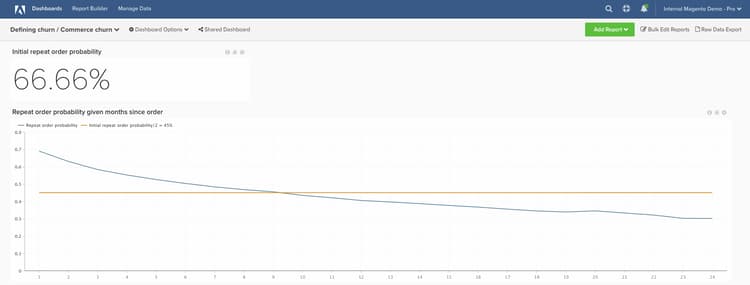
初始重複訂購機率報表代表「重複訂購總數/訂購總數」。 每個訂單都是重複訂單的機會;重複訂單的數量是實際重複訂單的子集。
您使用的公式將簡化為(X個月後發生的重複訂單總數)/ (至少X個月前的訂單總數)。 它向我們顯示,從歷史來看,由於自下訂單以來已有X個月,使用者下另一個訂單的可能性為Y%。
當您建置控制面板後,最常見的問題是:如何使用此功能來判斷流失臨界值?
此問題沒有「一個正確答案」。 但是,Adobe建議尋找直線與初始重複機率一半的值相交的點。 這時您可以說「如果使用者要重複訂單,他們現在可能已經完成了。」 基本上,目標是選取從「保留」切換為「重新啟用」的合理臨界值。
編譯所有報表後,您可以視需要在控制面板上組織報表。 結果看起來可能像頁面頂端的影像
如果您在建立此分析時遇到任何問題,或只是想與專業服務團隊互動,請聯絡支援人員。