历程属性属性 journey-properties
在简单表达式编辑器以及高级表达式编辑器中,Event和 数据源 类别下方,您可以访问 历程属性 类别。 此类别包含与给定用户档案的历程相关的技术字段。 这是系统从实时历程中检索到的信息,例如历程ID或遇到的特定错误。
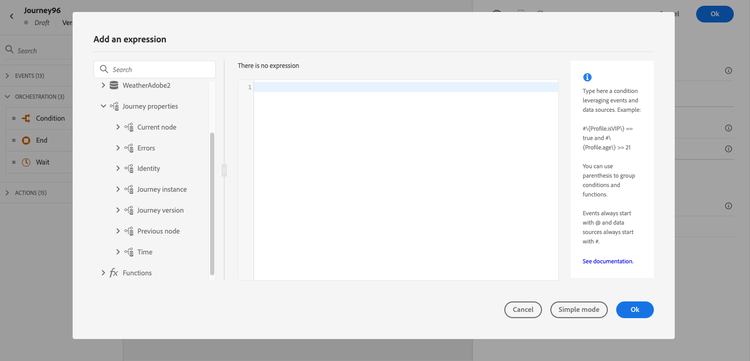
它包含有关以下内容的信息:
-
历程版本:历程uid、历程版本uid、实例uid等。
-
错误:数据提取、操作执行等。
-
当前步骤、上一个当前步骤等。
-
已丢弃的配置文件
字段列表在此部分🔗中可用。
您可以使用这些字段构建表达式。 在历程执行期间,直接从历程中检索值。
以下是一些用例示例:
-
记录丢弃的用户档案:您可以将从消息中排除的所有用户档案按照上限规则发送到第三方系统以进行记录。 为此,您可以设置超时和错误时的路径,并添加条件以筛选特定错误类型,例如“通过设置规则上限来放弃人员”。 然后,您可以通过自定义操作将已丢弃的用户档案推送到第三方系统。
-
发生错误时发送警报:每次消息发生错误时,您都可以向第三方系统发送通知。 为此,您可以设置路径以防出错,还可以添加条件和自定义操作。 例如,您可以通过Slack渠道发送包含所遇到错误说明的通知。
-
优化报表中的错误 :您可以为每个错误类型定义条件,而不是让出错的消息只有一个路径。 这将允许您优化报告并查看所有错误类型数据。
字段列表 journey-properties-fields
出错的最新活动(节点)的错误类型。 可能的类型:
- 事件:事件、反应、SQ(示例:受众资格)
- 流量控制:结束、条件、等待
- 操作:ACS操作、跳转、自定义操作
最新活动(节点)的错误代码出错。 可能的错误:
- HTTP错误代码
- 上限
- timedout
- 错误(示例:发生意外错误时的默认值。 不应该/极少数发生)
This section contains structured knowledge intended to support interpretation, retrieval, and question answering related to this topic.
For complete understanding, this information should be combined with the documentation on this page. Neither source is intended to stand alone; the page describes the feature, while this section provides additional context that helps disambiguate terminology, intent, applicability, and constraints.
- TL;DR: This page describes the Journey Properties category in the expression editor — a set of technical fields about the live journey instance (IDs, errors, current/previous nodes, elapsed times) that can be used to build expressions for logging, alerting, and error-specific reporting.
Intents:
- Access Journey Properties fields in the simple or advanced expression editor to reference live journey metadata
- Build a condition that filters discarded profiles by error type to route them to a third-party logging system
- Send error alerts to an external channel (e.g. Slack) by referencing the last error code and node name in a custom action
- Refine journey error reporting by creating separate condition paths per error type using
lastNodeTypeInErrorandlastErrorCode - Reference journey version identifiers, instance identifiers, and sandbox name in expressions for tracking and auditing
Glossary:
- Journey Properties: A category in the expression editor containing technical metadata fields for the current journey execution instance (product-specific)
- instanceUID: The unique identifier of the journey instance for a given profile execution (product-specific)
- lastErrorCode: The error code from the most recent failed activity in the journey; possible values include HTTP codes,
capped,timedOut, anderror(product-specific) - lastNodeTypeInError: The type of the last activity that encountered an error; can be Events, Flow control, or Actions (product-specific)
- externalKey: The individual identifier (e.g. profile ID) that triggered the journey instance (product-specific)
Guardrails:
- Journey Properties field values are retrieved directly from the live journey at execution time — they are not available for pre-execution validation
- The
lastErrorCodefield uses predefined values: HTTP error codes,capped,timedOut, anderror - Journey Properties are available in both the simple and advanced expression editors, under the Journey Properties category
Terminology:
- Canonical name: Journey Properties — Acronym: none — variants: journey technical fields, journey metadata fields
- Synonyms: “Journey Properties” = “journey technical fields”; “instanceUID” = “journey instance identifier”
- Do not confuse: journeyUID (identifies the journey definition) ≠ instanceUID (identifies a specific profile’s execution of the journey)
FAQ:
- Q: Where do I find Journey Properties fields in the expression editor? — They appear in both the simple and advanced expression editors under the Journey Properties category, below Events and Data Sources.
- Q: How can I log profiles discarded by a capping rule? — Add an error path condition filtering on
lastErrorCode == "capped"and push those profiles to a third-party system via a custom action. - Q: What is the difference between
journeyUIDandinstanceUID? —journeyUIDidentifies the journey definition;instanceUIDidentifies a specific execution instance for a given profile. - Q: What error code is returned for an unexpected system error? — The
errorcode, which is used as the default for unexpected errors and should rarely occur. - Q: Can I use Journey Properties fields to send Slack alerts on action failures? — Yes; reference
lastNodeNameInErrorandlastErrorCodein a custom action to include error details in a Slack notification.