在此页面上:设置到Cloud Storage目标的实时连接,以便导出Journey Optimizer数据集用于报表、存档和外部数据分析。
Journey Optimizer允许您与云存储位置建立实时连接,以导出数据集的内容。
通过定期导出数据,您可以确保拥有客户互动的完整和最新记录,以便随时用于报告、存档或数据分析。
可用的云存储目标 destinations
您可以在 目录 选项卡中将数据集导出到6个可从 目标 菜单访问的云存储目标。
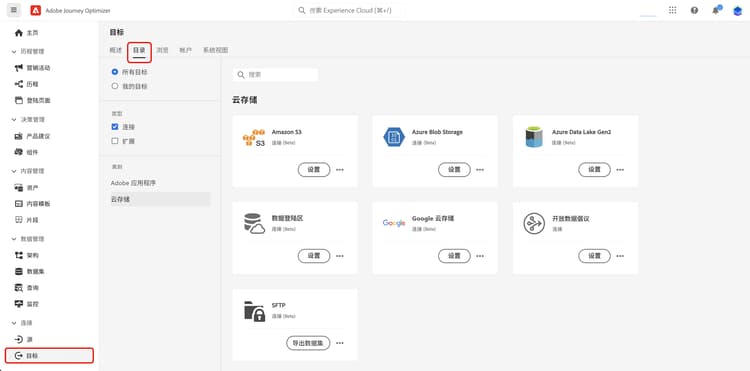
有关每个目标的详细信息,请参阅Adobe Experience Platform文档:
先决条件 prerequisites
要导出数据集,您需要下面列出的访问控制权限。 阅读访问控制概述或联系您的产品管理员以获取所需的权限。
导出数据集的关键步骤 main-steps
将数据集导出到云存储位置的主要步骤如下:

有关每个步骤的详细信息,请参阅Adobe Experience Platform文档。
-
设置您的云存储目标。 如果您尚未这样做,请从目标目录连接到云存储目标。 请参阅Adobe Experience Platform文档以了解如何创建新的目标连接。
-
选择要导出数据集的云存储目标。 在目标目录中,单击所需卡片上的 导出数据集 按钮,然后选择要使用的连接。
note NOTE 如果您使用Adobe Journey Optimizer以及实时客户档案,目标卡片将显示 激活 按钮,根据您启用的权限,允许您导出数据集并激活此目标的受众。 -
选择要导出到选定目标的数据集。 了解有关可用于导出的Journey Optimizer数据集的更多信息
-
计划数据集的导出。 指定导出应何时开始以及开始频率。
-
检查配置结束时显示的摘要,以查看并确认导出。
导出完成后,数据集的内容将根据您配置的计划存储在云存储位置。 了解如何验证成功的数据集导出。
可用于导出的数据集 datasets
从下表了解您可以导出哪些Journey Optimizer数据集。 有关每个架构的字段,请参阅Adobe Journey Optimizer架构引用。
将新的自定义属性字段添加到选件项目架构后,这些新属性可能在最多一小时的延迟内显示在数据集中。 为避免潜在的数据丢失或不一致,建议在做出任何依赖新添加属性的更改或更新之前至少等待一小时。
报表数据集和有效负载元数据映射 reporting-payload-metadata-mapping
对于基于代码的体验和决策响应的自定义报表,请使用 scopeDetails.correlationID 将交互或反馈数据加入到AJO实体数据集,并检索促销活动、历程和消息元数据。 使用 exdRequestID 将单个决策请求绑定到Analytics事件。
如果correlationID缺失(例如,保留受众),请使用导出的数据集和记录的连接密钥,而不是对未记录的负载字段进行解码。 实体数据集查询示例显示如何在correlationID上联接。
This section contains structured knowledge intended to support interpretation, retrieval, and question answering related to this topic.
For complete understanding, this information should be combined with the documentation on this page. Neither source is intended to stand alone; the page describes the feature, while this section provides additional context that helps disambiguate terminology, intent, applicability, and constraints.
- TL;DR: This page explains how to set up a live connection to cloud storage destinations so you can export Journey Optimizer datasets for reporting, archival, and external data analysis.
Intents:
- Export Journey Optimizer datasets to a cloud storage destination on a schedule.
- Identify which cloud storage destinations are available.
- Determine which datasets can be exported.
- Obtain the access control permissions required to export datasets.
- Join exported data for custom reporting using documented join keys.
Glossary:
- Dataset export: establishing a live connection with a cloud storage location to export dataset content (product-specific)
- Cloud storage destination: an export target such as Amazon S3, Azure Blob, Azure Data Lake Gen 2, Data Landing Zone, Google Cloud Storage, or SFTP
- AJO Message Export Dataset: stores sent email and SMS message content marked for export; data is retained for seven calendar days from ingestion (product-specific)
scopeDetails.correlationID: used to join interaction or feedback data to the AJO Entity Dataset and retrieve campaign, journey, and message metadata (product-specific)exdRequestID: used to tie a single decision request to analytics events (product-specific)
Guardrails:
- Datasets can be exported to the 6 cloud storage destinations: Amazon S3, Azure Blob, Azure Data Lake Gen 2, Data Landing Zone, Google Cloud Storage, and SFTP.
- Required access control permissions: Manage and Activate Dataset Destinations (Destinations), View Datasets (Data Management), and View Destinations (Destinations).
- AJO Message Export Dataset data is retained for 7 calendar days from ingestion.
- The AJO Message Feedback Event Dataset uses batch ingestion; expect a data latency of up to 2 hours.
- Cloud storage destinations are accessed from the Destinations menu, in the Catalog tab.
Terminology:
- Do not confuse: the Export datasets button (dataset export) ≠ the Activate button (which, when Real-Time Customer profiles are used, exports datasets and activates audiences)
FAQ:
- Q: Which cloud storage destinations can I export to? — Amazon S3, Azure Blob, Azure Data Lake Gen 2, Data Landing Zone, Google Cloud Storage, and SFTP.
- Q: What permissions do I need to export datasets? — Manage and Activate Dataset Destinations, View Datasets, and View Destinations.
- Q: How long is AJO Message Export Dataset data kept? — Seven calendar days from ingestion.
- Q: Where do I start a dataset export? — From the Destinations menu, Catalog tab; select Export datasets on the destination card and choose the connection.
- Q: How do I join exported data for reporting? — Use
scopeDetails.correlationIDto join to the AJO Entity Dataset, andexdRequestIDto tie a single decision request to analytics events.