在此页面上:了解如何加密敏感的URL查询参数,以便个人身份信息不会以纯文本显示,包括管理员如何在Adobe Journey Optimizer的sandbox key注册表中创建、轮换和撤销密钥。
为何使用URL参数加密? why-url-parameter-encryption
个性化跟踪链接和登陆页面URL通常包括查询字符串中的配置文件属性、标识符、令牌或其他值。 这些参数通常以纯文本的形式显示在电子邮件或移动消息中,如果有人复制、共享或书签链接,这些参数将始终可读。 当值可能包含个人身份信息(PII)或他们必须保护的其他敏感数据时,这可能会带来安全和隐私风险。
Journey Optimizer在个性化编辑器中提供了一个加密帮助程序,以便您可以在渲染时加密任何表达式值(例如,配置文件属性、令牌或您从多个字段构建的字符串)。 加密始终需要您组织的注册表中的密钥。
您只使用管理员在沙盒级注册表中管理的密钥加密您选择的查询参数,因此,共享或检查链接时,机密值不会以明文显示。
工作原理 how-it-works
- 管理员使用密钥注册表创建密钥和根据您组织的安全策略管理密钥。
- 营销人员在个性化编辑器中插入
Encrypt帮助程序并传递要保护的值以及注册表中的活动键标识符。 有关语法和选项,请参阅本节。
示例
登陆页面URL可能使用查询参数,例如token,其值是字符串令牌(例如,具有选件或配置文件标识符的JSON有效负载)。 如果不进行加密,则该字符串令牌将在链接中显示为纯文本。 使用加密帮助程序包装该值会将URL中的敏感有效负载替换为密文,而链接的其余部分保持不变。
创建键 create-keys
在能够使用URL参数加密帮助程序之前,您需要创建一个密钥。 要实现此目的,请执行以下步骤。
-
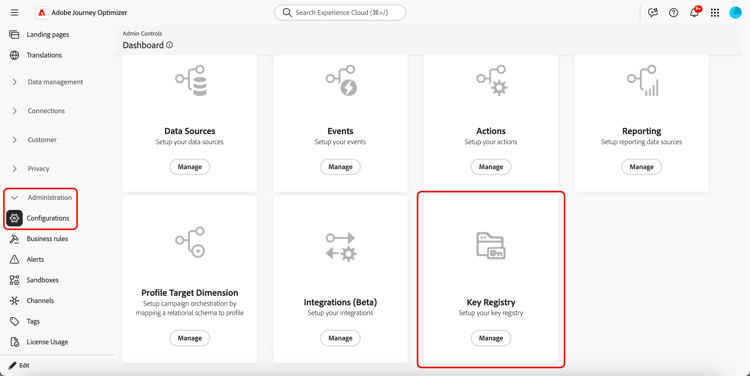
转到管理 > 配置。
-
单击 管理 按钮以打开密钥注册表。
“管理”菜单中的
-
使用专用按钮,根据组织需要创建密钥。
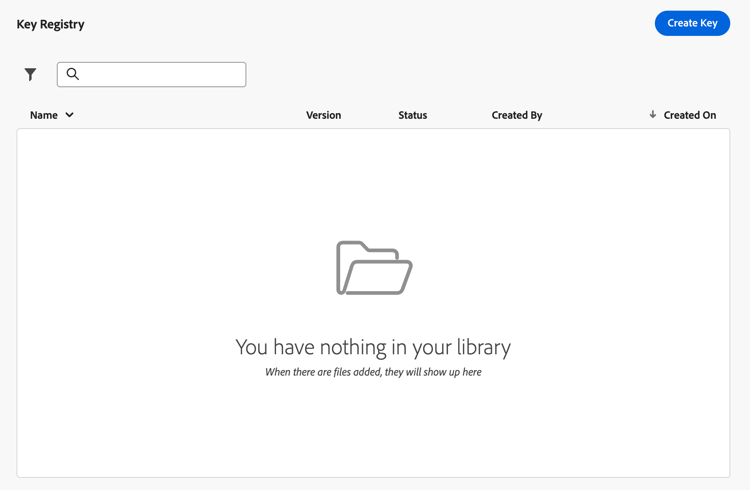
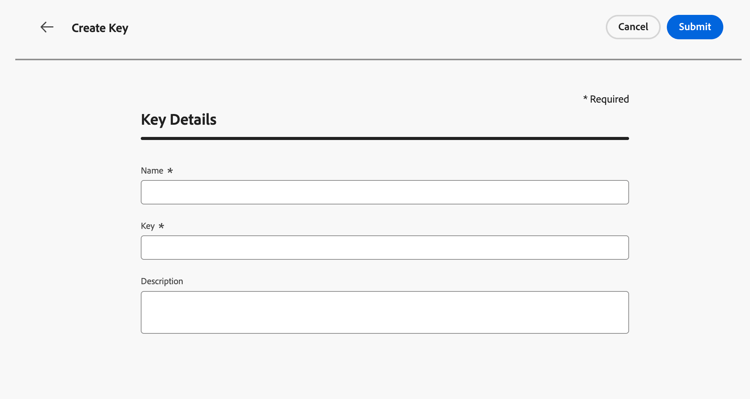
密钥必须为32字节(256位)并按base64编码。 密钥名称只能包含字母、数字和连字符。
-
为他们分配一个您的团队可在个性化编辑器中引用的清晰标签或标识符。
-
单击 提交 以确认更改。
创建密钥后,营销人员可以使用个性化编辑器中的URL参数加密帮助程序来加密他们放置在URL查询参数中的特定值。
管理密钥 manage-keys
要管理密钥,请执行以下步骤。
-
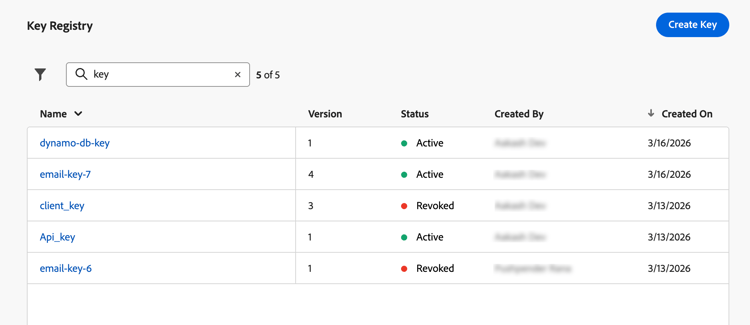
访问键注册表。 您可以在列表视图中查看为当前沙盒创建的所有键。
-
单击状态为 活动 的键以打开键详细信息。
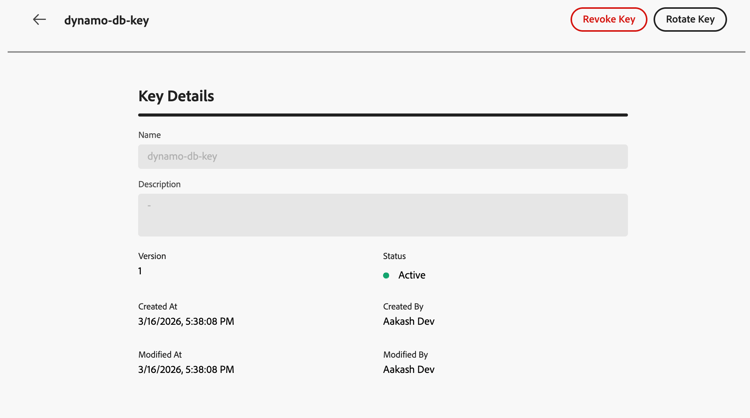
-
单击 撤销 按钮可永久禁用新加密的密钥。
密钥被撤销后,在渲染时尝试在帮助程序中使用它应会失败。 撤销的条目仍会显示在审核中;您的团队可能仍需要相应的资料来解密您自己系统上的旧负载。
-
单击 轮换 按钮提供新的关键资料,同时保留历程和营销活动已引用该资料的稳定关键标识符。
在注册表中保留以前的资料具有撤销状态和适当的原因(例如轮换时间戳),并且新行或新版本反映活动密钥。
note NOTE 应仅选择活动密钥以在个性化编辑器中加密新值。 请勿将已撤销密钥用于新内容。
This section contains structured knowledge intended to support interpretation, retrieval, and question answering related to this topic.
For complete understanding, this information should be combined with the documentation on this page. Neither source is intended to stand alone; the page describes the feature, while this section provides additional context that helps disambiguate terminology, intent, applicability, and constraints.
- TL;DR: This page explains how administrators create, rotate, and revoke encryption keys in Journey Optimizer’s sandbox-level key registry, enabling marketers to encrypt sensitive URL query parameters so PII is not exposed in plain text in tracking links and landing pages.
Intents:
- Understand why URL parameter encryption is needed (sensitive data and PII visible in plain-text query strings)
- Create encryption keys in the sandbox key registry (admin task requiring specific permissions)
- Revoke a key to permanently disable it for new encryption
- Rotate a key to supply new cryptographic material while keeping the same identifier
- Use the
Encrypthelper in the personalization editor to protect specific query parameter values
Glossary:
- Key registry: A sandbox-level repository in Journey Optimizer (Administration > Configurations) where administrators create and manage encryption keys used by the URL parameter encryption helper. (product-specific)
- Encryption helper (
Encrypt): A helper function in the personalization editor that encrypts an expression value at render time, replacing PII with ciphertext in URL query parameters. (product-specific) - Revoke (key): The act of permanently disabling a key for new encryption; the key entry remains visible in the registry for audit, and older payloads may still require it for decryption on the organization’s systems.
- Rotate (key): The act of supplying new cryptographic material for a key while keeping its identifier stable, so campaigns and journeys already referencing that key do not need to be updated.
- PII (Personally Identifiable Information): Data that can identify an individual — such as profile attributes, tokens, or offer identifiers — which must be protected when included in URL query parameters.
Guardrails:
- URL parameter encryption is currently only available for the Email channel.
- Requires View Key Registry and Manage Key Registry permissions to access and manage keys.
- A key must be 32 bytes (256 bits) and base64-encoded. A key name can contain only letters, numbers, and hyphens.
- Decryption is the organization’s responsibility. Journey Optimizer encrypts values at render time; the website, app, or API must decrypt parameters using the same cryptographic material and processes defined by the organization.
- Only active keys should be used to encrypt new values in the personalization editor; revoked keys must not be used for new content.
- Revoked keys remain visible in the registry for audit purposes; they may still be needed by the organization’s systems to decrypt older payloads.
Terminology:
- Canonical name: URL parameter encryption — variants: URL encryption, query parameter encryption, URL parameter obfuscation
- Synonyms: “key registry” = “Key registry” (UI label in Administration > Configurations)
- Do not confuse: Revoke (permanently disables the key for new encryption; entry stays for audit) ≠ Rotate (replaces cryptographic material but keeps the same key identifier active for new encryption)
FAQ:
- Q: Who is responsible for decryption? — Decryption is the organization’s responsibility. Journey Optimizer encrypts values when the message is rendered. The website, app, or API must decrypt query parameters using the same cryptographic material and processes the organization has defined.
- Q: What is the difference between Revoke and Rotate? — Revoke permanently disables a key for new encryption while keeping the entry visible in the registry for audit (older payloads may still need the key for decryption on the organization’s systems). Rotate supplies new cryptographic material for a key while keeping the same key identifier, so campaigns and journeys referencing it continue to work without updates.
- Q: What permissions are required to manage keys? — View Key Registry and Manage Key Registry permissions.
- Q: Which channels support URL parameter encryption? — Currently only the Email channel.
- Q: Can a revoked key be used for new encryption? — No. Once a key is revoked, attempts to use it in the encryption helper should fail at render time. Do not use revoked keys for new content.
Personas:
- admin: Can create keys in the key registry from Administration, Configurations. A key must be 32 bytes and base64-encoded, and its name can contain only letters, numbers, and hyphens. The page states that you must have View Key Registry and Manage Key Registry permissions granted to access and manage keys. Where: “Create keys”.
Onboarding:
- Level: Intermediate
- First minimal step: Go to Administration, Configurations, then select Manage to open the Key registry.
- Success check: Marketers can use the URL parameter encryption helper in the personalization editor to encrypt values placed in URL query parameters.
- Previous: Learn about the View Key Registry and Manage Key Registry permissions needed to access and manage keys: Permission levels (administration/high-low-permissions.md)
- Next: Use the URL parameter encryption helper in the personalization editor to encrypt values in URL query parameters: Helpers (personalization/functions/helpers.md)