在此页面上:在Adobe Journey Optimizer中生成SMS使用情况报告,以使用Sinch MMS API凭据和可下载的CSV输出协调移动端终止(MT)和移动端发起(MO)的卷,以及供应商计费。
通过Adobe Journey Optimizer购买短信时,可以使用短信使用情况量度。 报告汇总了过去 90天 内按短代码或电话号码汇总的发送和接收流量(按天汇总)。
要查看使用情况度量,管理员必须:
这些步骤需要 管理短信设置 权限。 了解有关权限的更多信息。
创建Sinch MMS API凭据 sinch-mms
使用报告需要将 SMS供应商 的API凭据设置为Sinch MMS。 此凭据允许Journey Optimizer从Sinch检索使用数据。 它与用于发送短信或彩信消息的Sinch凭据不同,尽管字段值来自相同的Sinch项目。
-
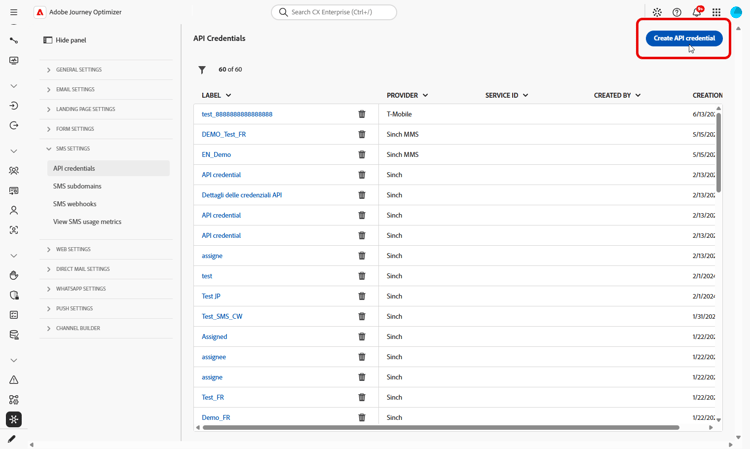
在左边栏中,转到管理 > 渠道 > 短信设置,然后选择API凭据。 单击新建API凭据。
-
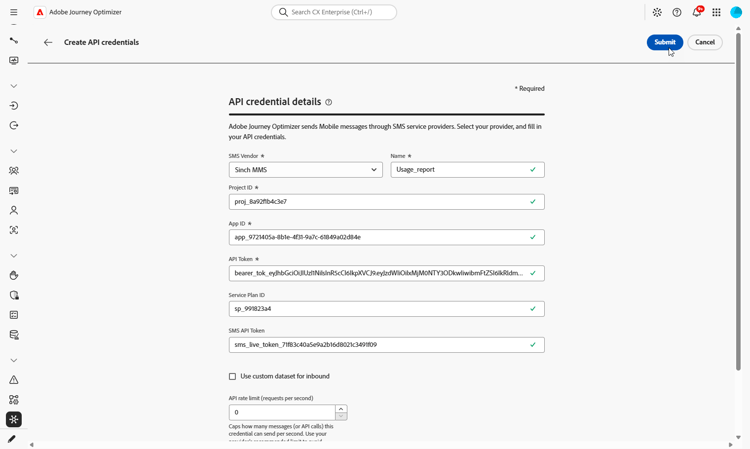
按如下方式配置凭据:
-
SMS供应商: Sinch MMS。
-
名称:输入API凭据的名称。
-
项目ID:输入Sinch项目的ID。
-
应用程序ID:输入与您的Sinch项目关联的应用程序ID。
-
API令牌:输入用于向Sinch验证请求的API令牌。
-
-
配置完凭据后,单击提交。
-
要删除凭据,请在 API凭据 菜单中单击其旁边的bin图标。
-
要修改凭据,请在 API凭据 菜单中找到它,然后单击编辑。
凭据现在可用于配置短信使用情况报表。
配置并查看短信使用情况报告 configure-sms-usage-report
SMS使用情况报告通过短代码显示源自移动设备(MO)和终止移动设备(MT)的卷,以支持Journey Optimizer中供应商计费和消息传送活动之间的对账。
-
在左边栏中,浏览到管理 > 渠道 > 短信设置。
-
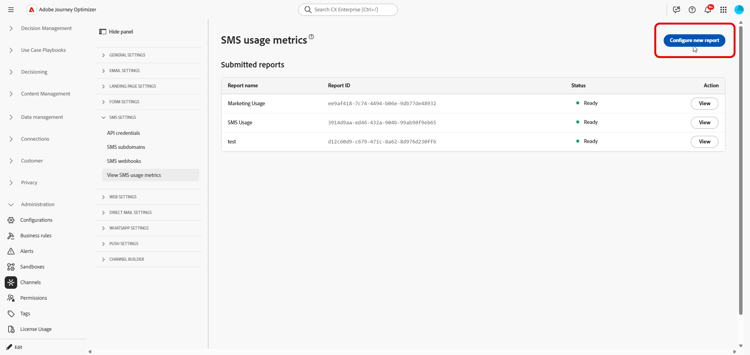
访问 查看短信使用量度 菜单,然后单击配置新报表。
-
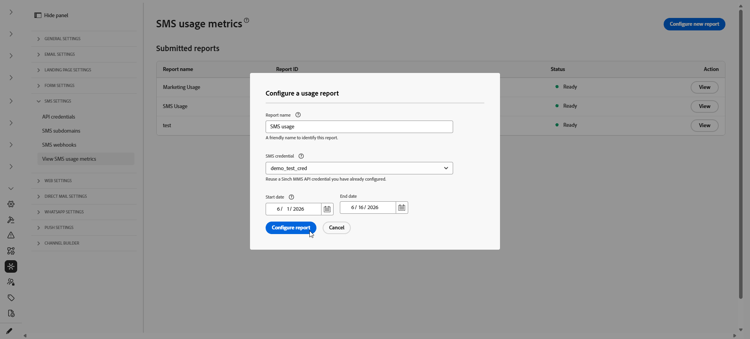
配置报表:
-
报表名称:输入有助于识别报表的标签。
-
SMS凭据:选择您之前为SMS使用情况报告创建的Sinch MMS API凭据。
-
开始日期和结束日期:设置报表的日期范围。 使用数据仅提供过去 90 天的记录。
-
-
单击 配置报表 提交请求。
-
在 提交的报表 列表中,找到您配置的报告,然后单击检索报表。
生成报告时,状态更改为挂起。
-
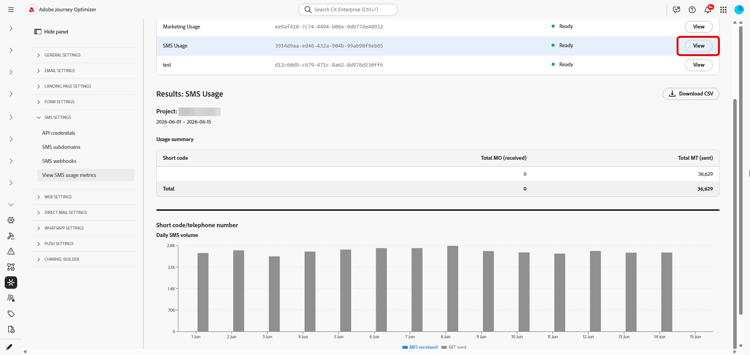
报告状态更新为 就绪 后,单击 查看 以打开报告。 该报告包括:
-
使用情况摘要:所选日期的移动设备发起的(MO)和移动终止的(MT)消息总数,按短代码细分。
-
每日短信卷:按日划分的短信卷,按短代码划分。
-
-
要导出报告,请单击下载CSV。 Journey Optimizer会为您正在查看的报表下载一个CSV文件。
This section contains structured knowledge intended to support interpretation, retrieval, and question answering related to this topic.
For complete understanding, this information should be combined with the documentation on this page. Neither source is intended to stand alone; the page describes the feature, while this section provides additional context that helps disambiguate terminology, intent, applicability, and constraints.
- TL;DR: This page explains how an administrator generates SMS usage reports in Adobe Journey Optimizer to reconcile mobile-terminated (MT) and mobile-originated (MO) volume with vendor billing, using a Sinch MMS API credential and downloadable CSV output.
Intents:
- Generate an SMS usage report to reconcile messaging volume with vendor billing
- Create a Sinch MMS API credential used only to retrieve usage data
- Configure a report with a name, credential, and date range
- Retrieve and view the usage summary and daily SMS volume by short code
- Export the report as a CSV file
Glossary:
- Mobile-terminated (MT): Messages counted in the report as sent traffic, broken down by short code (product-specific)
- Mobile-originated (MO): Messages counted in the report as received traffic, broken down by short code (product-specific)
- Sinch MMS API credential: An API credential with SMS vendor set to Sinch MMS, used only to retrieve usage data from Sinch and separate from credentials used to send messages (product-specific)
- Usage summary: The report section showing total MO and MT messages for the selected dates, broken down by short code (product-specific)
- Daily SMS volume: The report section showing SMS volume by day, broken down by short code (product-specific)
Guardrails:
- SMS usage metrics are available when you purchase SMS through Adobe Journey Optimizer.
- Usage data is available only for the last 90 days.
- Reports require an API credential with SMS vendor set to Sinch MMS, which is separate from the Sinch credentials used to send SMS or MMS messages, although the field values come from the same Sinch project.
- Generating usage reports requires the Manage SMS settings permission.
- Reports summarize send and receive traffic by short code or phone number, aggregated by day.
Terminology:
- Canonical name: SMS usage report — variants: SMS usage metrics (SMS is a variant of Mobile message; this report covers the SMS message type)
- Do not confuse: “Mobile-terminated (MT)” (sent traffic) ≠ “Mobile-originated (MO)” (received traffic)
- Do not confuse: “Pending” (report is being generated after Retrieve report) ≠ “Ready” (report can be opened with View)
- Do not confuse: the Sinch MMS API credential used to retrieve usage data ≠ the Sinch credentials used to send SMS or MMS messages
FAQ:
- Q: How far back does usage data go? — Usage data is available only for the last 90 days.
- Q: Which credential is required for usage reports? — An API credential with SMS vendor set to Sinch MMS, which is separate from the credentials used to send messages although the field values come from the same Sinch project.
- Q: What permission do I need to generate reports? — The Manage SMS settings permission is required.
- Q: What does a generated report contain? — A Usage summary with total MO and MT messages for the selected dates broken down by short code, and a Daily SMS volume section showing SMS volume by day broken down by short code.
- Q: How do I export the report? — Click Download CSV to download a CSV file for the report you are viewing.