在此页面上:了解如何使用电子邮件的自动同步默认纯文本版本或创建自定义版本,以及每种方法何时最有效。
建议创建文本版本的电子邮件正文,以便在无法显示 HTML 内容时使用。
从安全的角度来看,提供纯文本版本很重要,因为HTML电子邮件可能会带来风险,例如恶意脚本、跟踪像素或依赖丰富格式和链接的网络钓鱼尝试。 纯文本可减少攻击面,通常为注重安全的收件人或限制或删除HTML的公司电子邮件系统所首选。 提供两个版本后,收件人可以选择符合其安全和隐私要求的格式。
访问默认文本版本 plain-text-default
默认情况下,电子邮件设计器会创建 纯文本 版本的电子邮件,包括个性化字段。 此版本将自动生成并与 HTML 版本的内容同步。
要访问默认文本版本,请从电子邮件内容中选择 纯文本 图标。

使用自定义文本版本 plain-text-custom
如果您希望为纯文本版本使用其他内容,请执行以下步骤:
-
从电子邮件中选择 纯文本 图标。
-
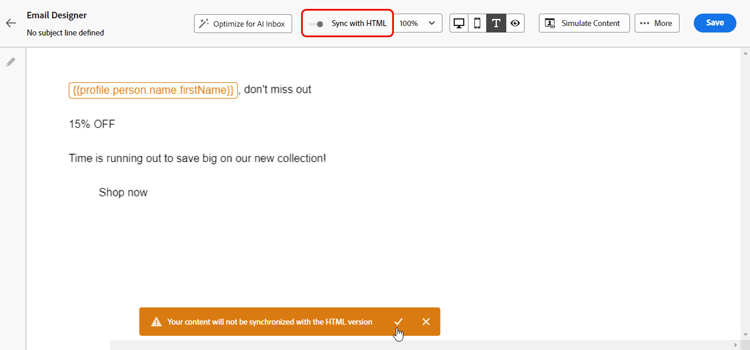
使用 与 HTML 同步 切换以禁用同步。 单击复选标记以确认您的选择。
-
然后,您可以根据需要编辑自定义纯文本版本。
-
禁用同步时,在 纯文本 视图中所做的更改不会反映在HTML视图中。
-
如果在更新纯文本内容后重新启用 与HTML同步 选项,您的更改将丢失,并替换为从HTML版本生成的文本内容。
何时使用自定义纯文本版本 when-to-use
了解何时创建自定义纯文本版本而不是使用自动同步有助于确保最佳的电子邮件投放和可读性。
在以下情况下使用自定义纯文本(禁用同步):
- 复杂的HTML布局 — 您的HTML电子邮件包含多列布局、表或无法很好地转换为纯文本的复杂CSS。
- 包含大量视觉内容 — 您的电子邮件严重依赖图像,并且您想为禁用图像的客户端提供描述性文本替代项。
- 不同的消息结构 — 您想要提供针对纯文本阅读器优化的简化或重新组织的消息结构。
- 辅助功能要求 — 您需要特定的纯文本格式才能符合辅助功能标准。
- 旧版电子邮件客户端 — 您的受众包括使用需要特殊格式内容的旧版电子邮件客户端(如Outlook 2003、纯文本移动客户端)的用户。
- ASCII格式 — 您希望包含特定的纯文本格式,如ASCII图片、表格或特定的换行符。
在以下情况下使用自动同步(默认):
- 简单的HTML设计 — 您的HTML电子邮件具有简单线性结构,可很好地转换为纯文本。
- 内容一致 — 您希望在HTML版本和纯文本版本之间保持完全一致。
- 频繁更新 — 您定期更新电子邮件内容,希望避免手动重复。
- Personalization工作正常 — 您的个性化字段在这两种格式中都工作正常。
- 时间限制 — 您需要快速启动电子邮件,而无需额外的纯文本自定义。
实际示例 practical-examples
以下示例演示了可帮助您决定使用自定义纯文本还是自动同步的真实情景。 每个示例都解释了背景、建议的方法和作出该决定的理由。
方案:包含图像、样式按钮和颜色编码部分的多列新闻稿。

建议:使用自定义纯文本(禁用同步)。
为何选择自定义纯文本: HTML版本使用三列网格布局,其中包含横幅图像、样式按钮和颜色编码部分。 这些视觉元素无法通过自动同步很好地转换为纯文本,从而导致内容混乱、难以阅读。 自定义纯文本版本允许您将内容重构为线性、易于扫描的格式,具有清晰的节标题和正确格式化的链接。
自定义纯文本示例:
| code language-none |
|---|
|
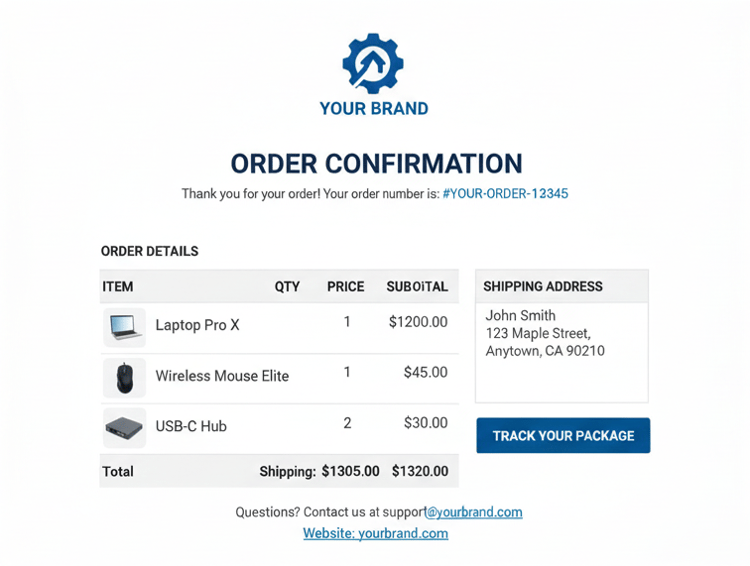
方案:包含结构化数据(订单编号、物料、价格、配送详细信息)的订单确认。
推荐:使用自动同步。
为什么自动同步有效:订单确认具有简单的线性结构,可自然地从HTML转换为纯文本。 信息在逻辑上流动(订单详细信息→项目→发运总额),→及个性化字段(如订单编号和客户名称)在两种格式中的工作方式相同。 结构化、表格式的数据可以完全转换,无需手动调整,节省了时间,同时保持了清晰度。
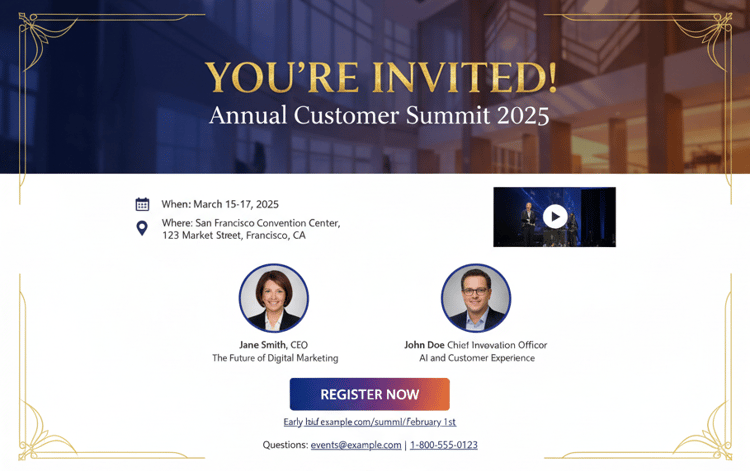
方案:包含背景图像、嵌入式视频和交互式元素的活动邀请。
建议:使用自定义纯文本(禁用同步)。
为什么选择自定义纯文本: HTML版本依赖于视觉效果 — 背景图像、视频嵌入和交互式RSVP按钮。 自动同步会去除这些元素,留下带有中断引用的混淆文本版本。 自定义纯文本版本允许您以组织良好的格式提供清晰的事件详细信息、演讲者信息和直接注册链接,该格式无需视觉元素即可工作。
自定义纯文本示例:
| code language-none |
|---|
|
常见使用案例 common-use-cases
以下用例演示了创建自定义纯文本版本(禁用同步)很有帮助的情况。 每个示例都显示了HTML版本带来的挑战,以及自定义纯文本解决方案如何解决该挑战。
挑战: HTML显示产品网格,其中包含图片、价格和购买按钮
纯文本解决方案:创建包含明确产品名称、价格和直接链接的结构化列表
| code language-none |
|---|
|
挑战:带有公司徽标和样式格式的品牌欢迎电子邮件
纯文本解决方案:使用ASCII艺术或文本格式创建可视层次结构
| code language-none |
|---|
|
挑战: HTML包含样式化按钮和表单元素
纯文本解决方案:提供包含说明的纯文本链接
| code language-none |
|---|
|
常见问题 faq
我的个性化字段是否会以纯文本工作?
是,像{{profile.firstName}}这样的个性化字段在HTML版本和纯文本版本中的工作方式相同。
如何测试纯文本版本?
- 切换到Email Designer中的 纯文本 视图。 了解如何操作
- 向纯文本电子邮件客户端(如旧版本的Pine或基本移动电子邮件应用程序)发送测试电子邮件。
如果我忘记创建纯文本版本,会发生什么情况?
系统会自动从您的HTML生成纯文本版本,该版本可能未设置最佳格式,但可以确保向纯文本客户端投放。
我能否在HTML中使用其他个性化设置与纯文本?
可以,禁用同步后,您可以单独自定义每个版本,包括使用不同的个性化字段或内容。
哪些电子邮件客户端仅支持纯文本?
只有文本格式的现代客户非常少,但某些公司电子邮件策略、辅助工具和旧版移动设备可能会显示纯文本。 这也是HTML渲染失败时的回退方法。
我应该多久更新一次纯文本版本?
每当您对HTML内容进行重大更改时都更新它。 如果核心消息保持不变,则小幅度的HTML调整可能不需要纯文本更新。
能否在纯文本电子邮件中包含链接?
是! 包含完整URL(例如https://example.com/page),并且大多数电子邮件客户端会自动使其可点击。
我应该以纯文本包含图像吗?
否,纯文本不支持图像。 相反,请描述图像显示的内容或提供链接以联机查看图像。
This section contains structured knowledge intended to support interpretation, retrieval, and question answering related to this topic.
For complete understanding, this information should be combined with the documentation on this page. Neither source is intended to stand alone; the page describes the feature, while this section provides additional context that helps disambiguate terminology, intent, applicability, and constraints.
- TL;DR: This page explains how to use the auto-synced default plain text version of an email or create a custom one by disabling sync, and when each approach works best.
Intents:
- Access the default, auto-generated plain text version of an email
- Create and edit a custom plain text version by disabling synchronization
- Decide when to use custom plain text versus auto-sync
- Understand how personalization fields behave in the plain text version
- Test the plain text version
Glossary:
- Plain text version: A text version of the email body, used when HTML content cannot be displayed (product-specific)
- Default (auto-synced) plain text: The Plain text version the Email Designer generates automatically, including personalization fields, and keeps synchronized with the HTML content (product-specific)
- Sync with HTML: The toggle that enables or disables synchronization between the Plain text and HTML versions (product-specific)
- Custom plain text version: A plain text version you edit independently after disabling Sync with HTML (product-specific)
Guardrails:
- When synchronization is disabled, changes made in Plain text view are not reflected in HTML view.
- If you re-enable Sync with HTML after updating your plain text content, your changes are lost and replaced with text content generated from the HTML version.
- If you do not create a plain text version, the system automatically generates one from your HTML, which may not be optimally formatted but ensures delivery to text-only clients.
- Plain text does not support images; describe what the image shows or link to view it online.
- Personalization fields work identically in both HTML and plain text versions; once sync is disabled you can use different personalization in each.
Terminology:
- Canonical name: text version of an email — Acronym: n/a — variants: plain text version, Plain text, custom plain text
- Synonyms: “auto-sync” = “Sync with HTML enabled”
- Do not confuse: “default (auto-synced) plain text” (generated from and synchronized with HTML) ≠ “custom plain text version” (edited independently after disabling sync)
FAQ:
- Q: How do I create a custom plain text version? — Select the Plain text icon, use the Sync with HTML toggle to disable synchronization and confirm, then edit the custom plain text as desired.
- Q: What happens to my custom text if I re-enable sync? — Your changes are lost and replaced with text content generated from the HTML version.
- Q: Do personalization fields work in plain text? — Yes; personalization fields work identically in both HTML and plain text versions.
- Q: What if I forget to create a plain text version? — The system automatically generates one from your HTML, ensuring delivery to text-only clients.
- Q: When should I use custom plain text instead of auto-sync? — For complex HTML layouts, visual-heavy content, a different messaging structure, accessibility requirements, legacy email clients, or specific ASCII formatting.
- Q: How do I test my plain text version? — Toggle to Plain text view in the Email Designer, and send test emails to text-only clients.