在此页面上:了解如何生成基于反馈和基于跟踪的重定向规则,这些规则将根据收件人如何响应上一个编排的营销活动而与收件人进行跟进。
通过重新定位,可根据收件人对之前编排的营销活动的响应方式来跟进收件人。 例如,您可以向已收到但未单击第一封邮件的收件人发送第二封电子邮件。
编排的营销活动为此提供了两个主要架构:
- 邮件反馈:捕获与投放相关的事件,例如已发送的邮件、已打开的邮件、已退回的邮件等。
- 电子邮件跟踪:捕获用户操作,例如点击和打开。
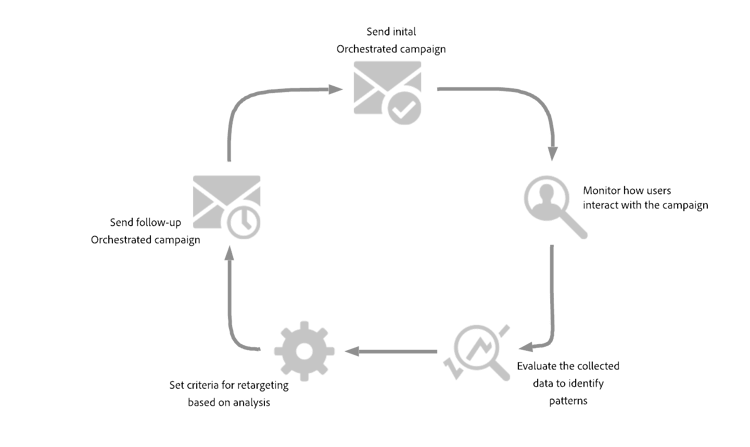
创建基于反馈的重定位规则 feedback-retarget
基于反馈的重定位规则允许您根据 消息反馈 架构中捕获的消息投放事件重新定位收件人。 这些事件包括发送、打开、退回或标记为垃圾邮件的邮件。
利用此数据,您可以定义规则来识别收到上一封邮件的收件人,从而启用基于特定投放状态的跟进通信。
-
创建新的编排的营销活动。
-
添加 生成受众 活动并将定向维度设置为收件人(caas)。 单击继续。
-
若要快速入门,您可以使用内置 营销活动反馈 筛选器根据邮件投放事件定位收件人。
accordion 详细的分步说明 -
在 规则生成器 中,单击选择或保存筛选器,然后从列表中选择促销活动反馈。
-
选择筛选器规则并选择要定位的行为,如发送的邮件。
-
单击

-
选择特定营销活动:从列表中选择特定营销活动,以重新定位与该营销活动进行交互的收件人。
-
来自过渡的营销活动:引用编排营销活动中上一个活动的营销活动。
-
-
-
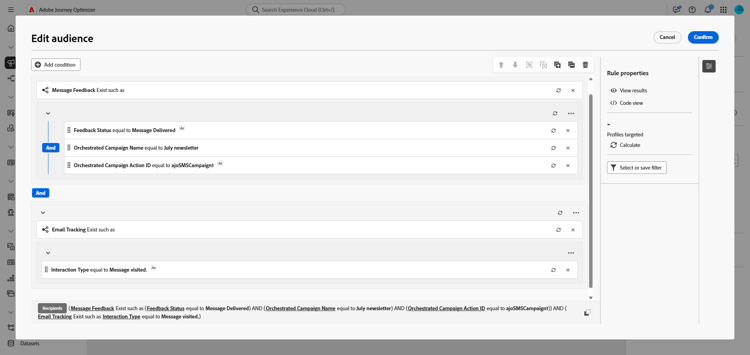
或者,您也可以手动构建自定义规则。 在 规则生成器 中,单击添加条件,然后从 属性选取器 中选择消息反馈。 单击 确认 创建 存在消息反馈,如 条件。
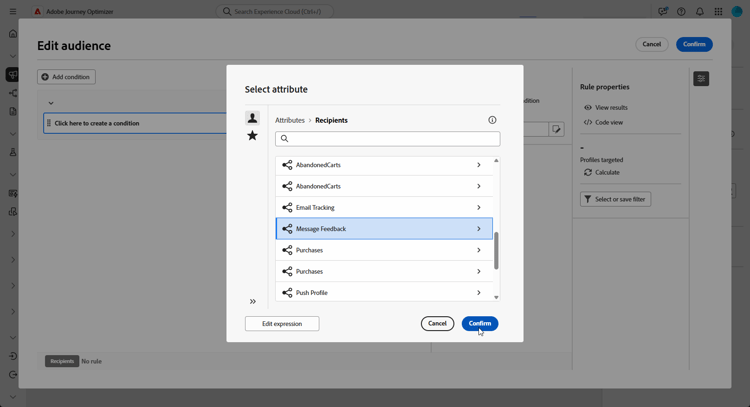
-
选择 反馈状态 属性以定位邮件投放事件。
accordion 详细的分步说明 -
添加链接到 消息反馈 属性的其他条件。
-
搜索 反馈状态 属性,然后单击确认。
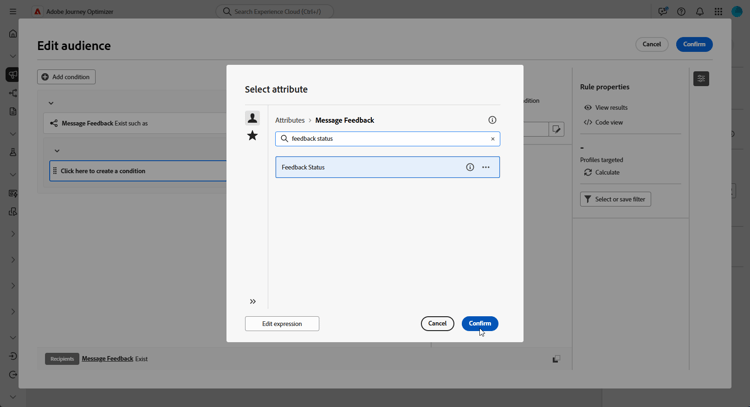
-
在 自定义条件 菜单中,在 值 下拉列表中选择要跟踪的投放状态。
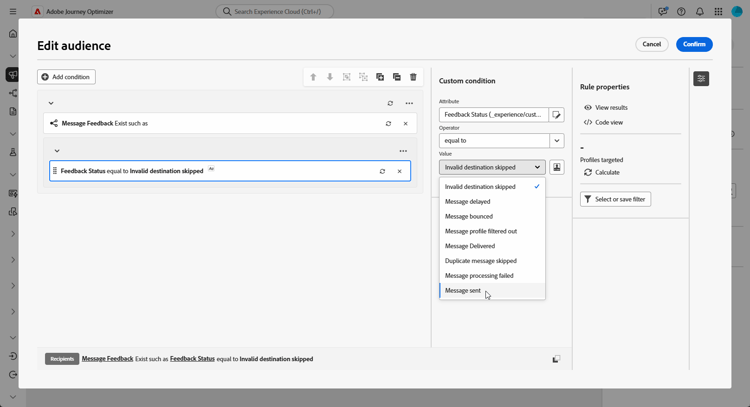
-
-
选择 编排的营销活动名称 属性以定位特定的编排的营销活动。
accordion 详细的分步说明 -
添加链接到 消息反馈 属性的其他条件,搜索实体,并导航到:
_experience > CustomerJourneyManagement > Entities > AJO Orchestrated Campaign entity。 -
选择编排的活动名称。
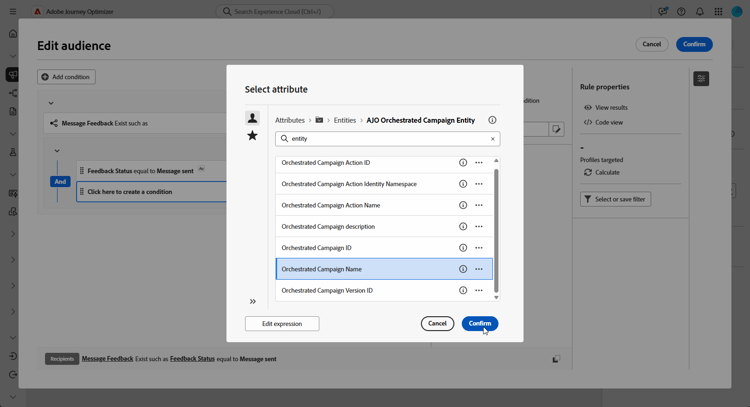
-
在 自定义条件 菜单中,在 值 字段中指定促销活动名称。
-
-
选择 协调的营销活动操作名称 属性,以针对协调的营销活动中的特定消息或活动。
accordion 详细的分步说明 -
添加链接到 消息反馈 属性的其他条件,搜索实体,并导航到:
_experience > CustomerJourneyManagement > Entities > AJO Orchestrated Campaign entity。 -
选择协调的活动操作名称。
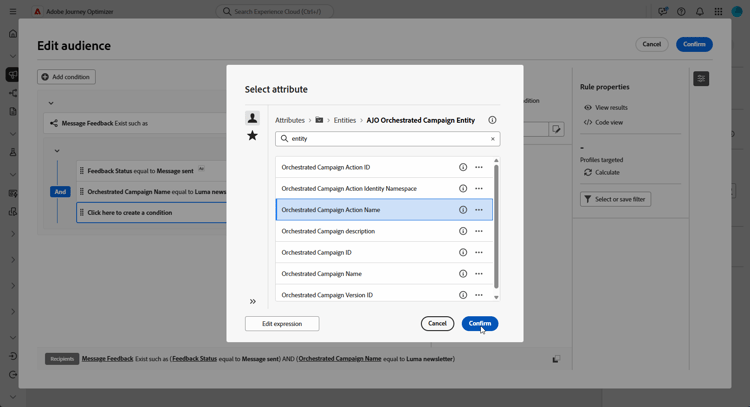
-
在 自定义条件 菜单中,在 值 字段中指定促销活动操作名称。
单击活动的“标签”字段旁边的

-
-
或者,您也可以按促销活动ID (UUID)进行筛选,您可在促销活动属性中找到该ID。
现在,您已配置基于反馈的重定位规则,以根据上一封邮件(例如已发送、已打开、已退回或标记为垃圾邮件)的投放状态识别收件人。 定义此受众后,您可以添加跟进电子邮件或通过配置使用用户交互数据的基于跟踪的重定位规则来进一步优化定位。
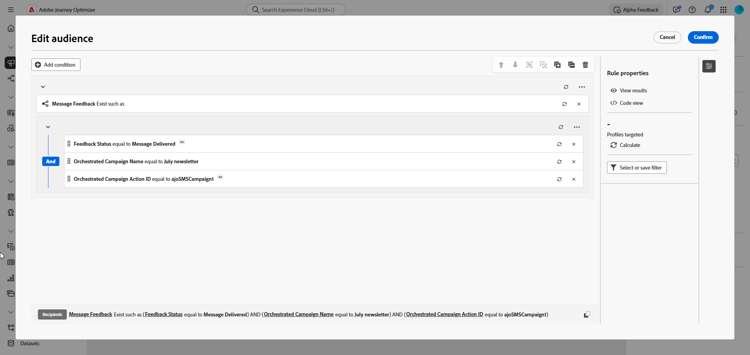
创建基于跟踪的重定位规则 tracking-based
基于跟踪的重定位规则使用 电子邮件跟踪 架构中的数据,根据收件人与消息的交互来定位收件人。 它捕获用户操作,如电子邮件打开和链接点击。
要根据邮件交互(例如,打开或单击)重新定位收件人,请按如下方式使用 电子邮件跟踪 实体:
-
创建新的编排的营销活动。
-
添加 构建受众 活动,并将定向维度设置为收件人(caas),以重点关注以前编排的活动收件人。
-
若要快速入门,您可以使用内置 营销活动反馈 筛选器根据邮件投放事件定位收件人。
accordion 详细的分步说明 -
在 规则生成器 中,单击选择或保存筛选器,然后从列表中选择促销活动反馈。
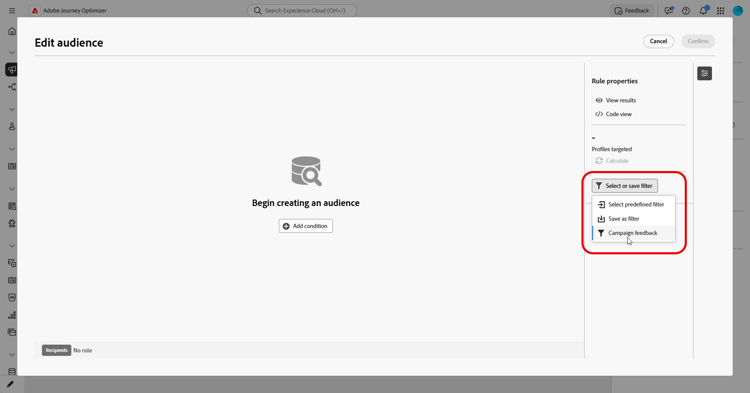
-
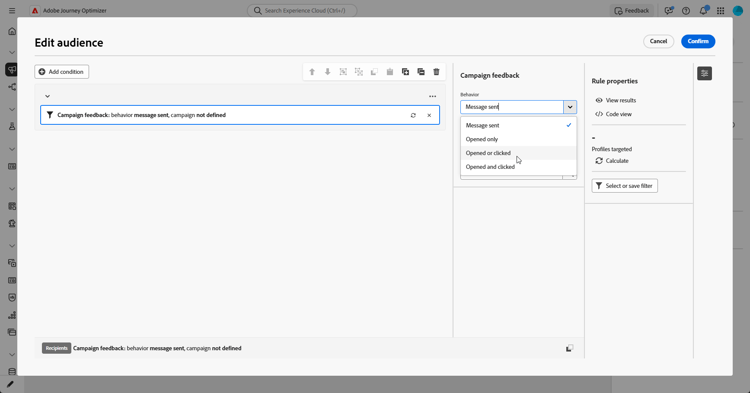
选择筛选器规则并选择要定位的行为,如 打开的消息 或单击了消息。
-
单击
-
选择特定营销活动:从列表中选择特定营销活动,以重新定位与该营销活动进行交互的收件人。
-
来自过渡的营销活动:引用编排营销活动中上一个活动的营销活动。
-
-
-
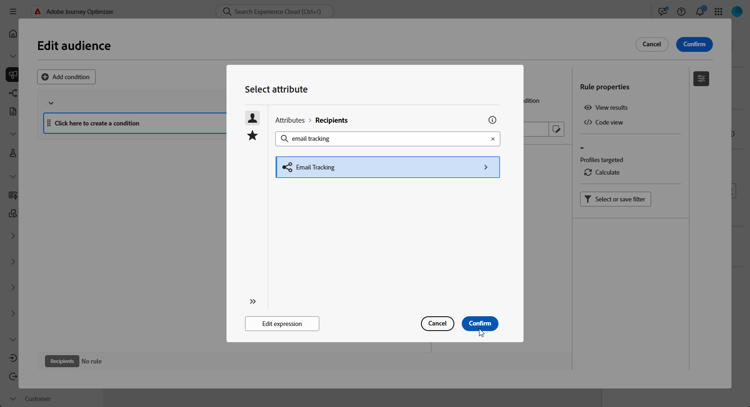
或者,您也可以手动构建自定义规则。 在 规则生成器 中,单击添加条件,然后从 属性选取器 中选择电子邮件跟踪。
单击 确认 创建 电子邮件跟踪存在,如 条件。
-
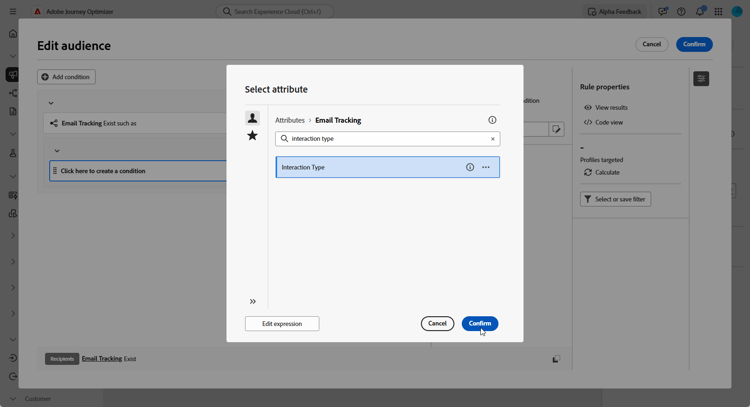
若要定位收件人与消息的交互,请添加另一个链接到 电子邮件跟踪 属性的条件,并搜索 交互类型 属性。
-
从自定义条件选项中,使用 包含在 中作为运算符,并根据您的用例选择一个或多个值,例如 打开的消息 或点击的消息链接。
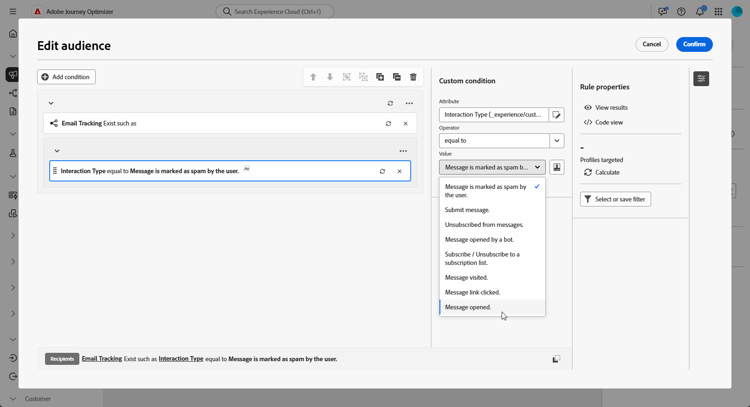
您现在已配置基于跟踪的重定位规则,以使用 电子邮件跟踪 属性中的数据,根据收件人与上一封邮件(如电子邮件打开次数或链接点击次数)的交互来定位收件人。 定义此受众后,您可以添加跟进操作或进一步优化定位,方法是将其与基于反馈的重定位规则相结合,以包含已发送、已退回或标记为垃圾邮件的邮件结果。
This section contains structured knowledge intended to support interpretation, retrieval, and question answering related to this topic.
For complete understanding, this information should be combined with the documentation on this page. Neither source is intended to stand alone; the page describes the feature, while this section provides additional context that helps disambiguate terminology, intent, applicability, and constraints.
- TL;DR: This page explains how to build feedback-based and tracking-based retargeting rules in an Orchestrated campaign so you can follow up with recipients based on how they responded to a previous Orchestrated campaign.
Intents:
- Create a feedback-based retargeting rule using the Message Feedback schema to target recipients by delivery status (sent, opened, bounced, marked as spam).
- Create a tracking-based retargeting rule using the Email Tracking schema to target recipients by interaction (opens, clicks).
- Use the built-in Campaign feedback filter to quickly target recipients based on message delivery events.
- Target a specific previous campaign by selecting a specific campaign, referencing a campaign from a previous activity (Campaign from transition), or filtering by Campaign ID (UUID).
- Target a specific message or activity within an Orchestrated campaign using the Orchestrated Campaign Action Name attribute.
- Combine a feedback-based retargeting rule with a tracking-based retargeting rule to refine targeting.
Glossary:
- Message Feedback: a schema that captures delivery-related events, such as message sent, opened, bounced, etc. (product-specific)
- Email Tracking: a schema that captures user actions, such as clicks and opens (product-specific)
- Feedback-based retargeting rule: a rule that retargets recipients based on message delivery events captured in the Message Feedback schema (product-specific)
- Tracking-based retargeting rule: a rule that targets recipients based on their interactions with a message, using data from the Email Tracking schema (product-specific)
- Campaign feedback filter: a built-in filter, selectable in the Rule Builder, used to quickly target recipients based on message delivery events by choosing a Behavior (such as Message sent, Message opened, or Message clicked) (product-specific)
- Feedback Status: an attribute of the Message Feedback condition used to target a specific message delivery status (product-specific)
- Interaction Type: an attribute of the Email Tracking condition used to target a specific user interaction, such as Message Opened or Message Link Clicked (product-specific)
- Orchestrated Campaign Name: an attribute used to target a specific Orchestrated campaign by name (product-specific)
- Orchestrated Campaign Action Name: an attribute used to target a specific message or activity within an Orchestrated campaign (product-specific)
Guardrails:
- Feedback-based retargeting rules build custom conditions linked to the Message Feedback attribute; tracking-based retargeting rules build custom conditions linked to the Email Tracking attribute. Both rule types can also use the same built-in Campaign feedback filter as a quick-start option to target recipients based on message delivery events.
- Within the Campaign feedback filter, the Campaign from transition option references a campaign from a previous activity in the same Orchestrated campaign, as an alternative to selecting a specific campaign from the list.
- The Orchestrated Campaign Action Name can also be found by clicking the information icon next to the Label field of the activity.
- The Email Tracking interaction condition uses the “Included in” operator, with one or more values selected depending on the use case.
Terminology:
- Canonical name: Orchestrated campaign retargeting — variants: feedback-based retargeting rule, tracking-based retargeting rule
- Do not confuse: “Message Feedback” (delivery-related events: sent, opened, bounced, spam) ≠ “Email Tracking” (user interaction events: opens, clicks)
- Do not confuse: “Select a specific campaign” (choose a particular campaign from a list) ≠ “Campaign from transition” (reference a campaign from a previous activity in the Orchestrated campaign)
FAQ:
- Q: What is the difference between a feedback-based and a tracking-based retargeting rule? — A feedback-based rule targets recipients using the Message Feedback schema (delivery events such as sent, opened, bounced, or marked as spam); a tracking-based rule targets recipients using the Email Tracking schema (user interactions such as opens and clicks).
- Q: Can I use the same filter to start both types of retargeting rules? — Yes, both rule types can use the built-in Campaign feedback filter to target recipients based on message delivery events, selecting a Behavior such as Message sent, Message opened, or Message clicked.
- Q: How can I target a specific previous campaign? — Select a specific campaign from your list, reference a campaign from a previous activity using Campaign from transition, or filter by Campaign ID (UUID) found in your Campaign properties.
- Q: How do I target a specific message or activity within an Orchestrated campaign? — Use the Orchestrated Campaign Action Name attribute; action names can be found by clicking the information icon next to the Label field of the activity.
- Q: Can I combine feedback-based and tracking-based retargeting rules? — Yes, you can combine a tracking-based retargeting rule with a feedback-based retargeting rule to include message outcomes such as sent, bounced, or marked as spam.
Personas:
- marketer: Can build a feedback-based retargeting rule using the Message Feedback attribute and choose a delivery status to track with the Feedback Status attribute. Can build a tracking-based retargeting rule using the Email Tracking attribute and the Interaction Type attribute with the Included in operator. The page states that a specific campaign can be targeted by selecting a campaign, using Campaign from transition, or filtering by Campaign ID (UUID). Where: “Create a feedback-based retargeting rule”.
Onboarding:
- Level: Intermediate
- First minimal step: Create a new Orchestrated campaign.
- Success check: You have configured a feedback-based retargeting rule to identify recipients by delivery status, such as sent, opened, bounced, or marked as spam.