智能仪表板
智能仪表板可全面查看购买群组和帐户指标,帮助您更有效地监控和制定营销策略。
要访问智能仪表板,请在左侧导航中选择 仪表板 项。
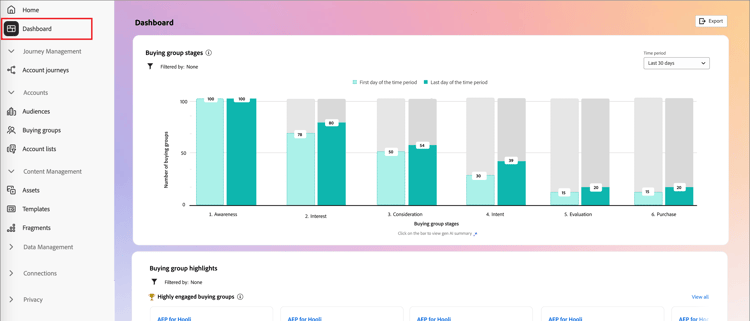
智能仪表板还提供对帐户和购买群组详细信息页面的访问权限,这些页面包括两种类型的创作AI功能:
- 帐户和购买组的摘要
- 人员、购买组和帐户的目标检测
要利用智能功能板提供的信息和见解,您的Journey Optimizer B2B edition实例必须配备以下所需项目:
购买群组阶段 buying-group-stages
购买组阶段图表提供了跨不同阶段的购买组进展的概览(基于管理员设置的过渡规则)。
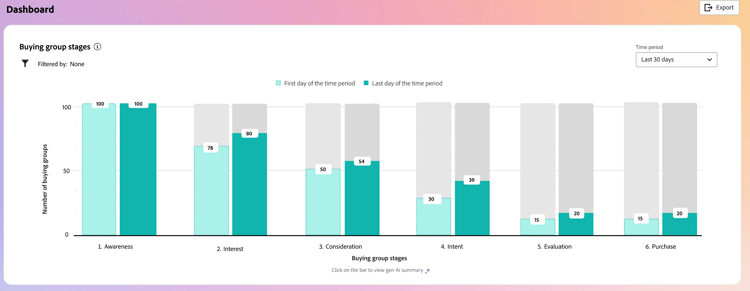
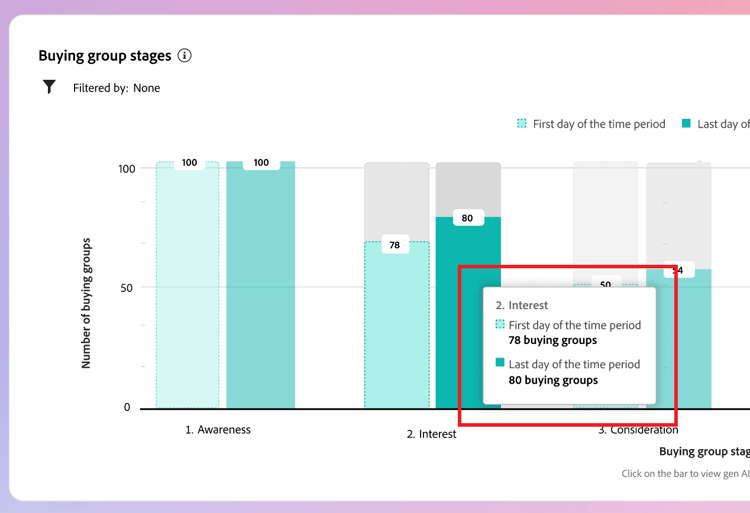
The chart uses the buying group stages from the most recently published version of the buying group stages model. There are two bars for each stage. The first bar indicates the number of buying groups on the first date of the selected time frame. And the second (in comparison) is the number of buying groups on the last date of the time frame. You can hover over each bar to see the number of buying groups in each stage.
Generative AI summary
Click a bar to surface a generative AI summary of buying groups in that stage for the selected time period.
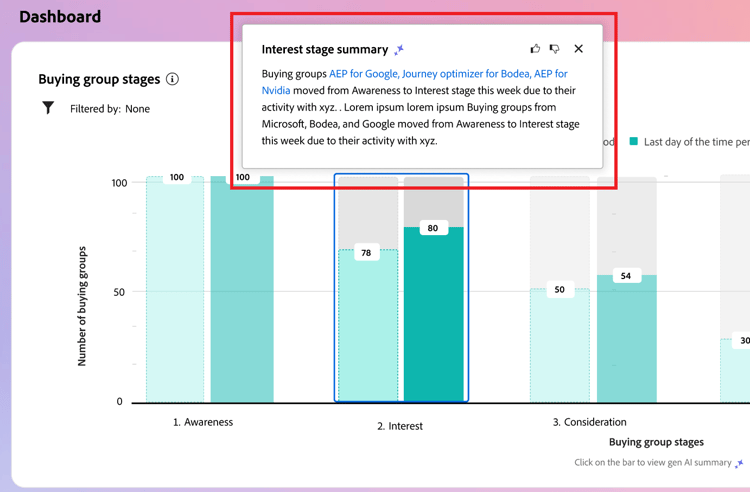
The generated summary provides an overview of buying group progression across different stages based on the configured transition rules.
时段 time-period-stages
Use the date filter at the top right to change the date range for the data visualizations. Click the down arrow to set a relative date range, or to set custom start and end dates.
Attribute filter attribute-filter-stages
Click the Filter (

- Solution Interest
- 帐户
- 阶段名称
购买群组亮点 buying-group-highlights
The Buying group highlights section is organized into three rows to surface information about the buying groups of interest to your organization.
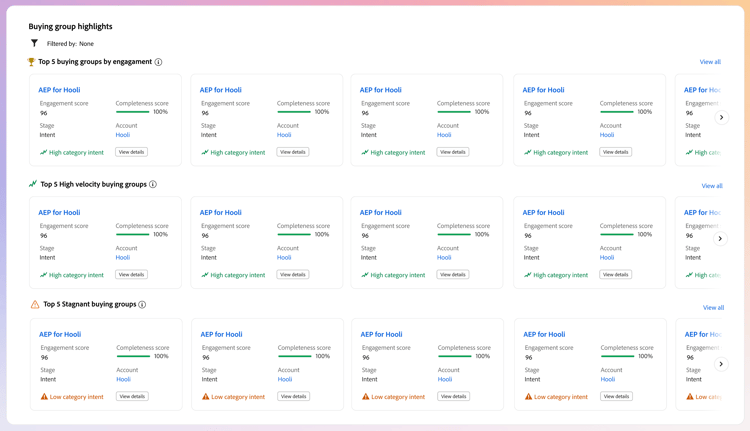
- Top 5 buying groups by engagement - This row displays the top engaged buying groups based on their normalized engagement score.
- Top 5 High velocity buying groups - This row displays the top buying groups based on the velocity with which they are progressing through the buying group stages.
- Top 5 Stagnant buying groups - This row displays the most stagnant buying groups that are not progressing through stages despite a high completeness score.
Each card includes the following data:
-
Buying group name. Click the name to open the buying group detail page.
-
Account name. Click the name to open the account detail page (hyperlinked to account detail page).
-
Current stage for the buying group.
-
Engagement score (normalized across all buying groups). If all buying groups have the same top score, it displays the last updated score.
-
Completeness score (ranging from 1-100). If all buying groups have the same top score, it displays the last updated score.
-
Category intent. Click View details to view the intent data:
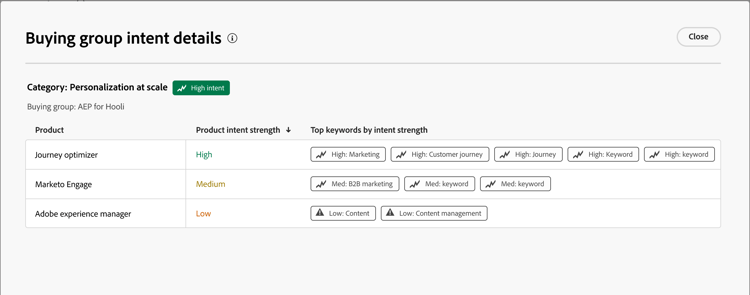
- The details popup displays the category name with intent level at the top.
- The data for each row is organized in columns: the product name, product intent strength, and top keywords by intent strength.
- The sort order is high to low for category, product, and keywords. If one or more of each type has the same intent strength, the sort uses alphabetical order.
At the top right of the Buying group highlights panel, click View All to navigate to the Buying groups list page.
Attribute filter attribute-filter-bg-highlights
Click the Filter (
- 解决方案兴趣
- 购买群组
- 帐户
时段 time-period-bg-highlights
Use the date filter at the top right to change the date range for the data visualizations. Click the down arrow to set a relative date range, or to set custom start and end dates.
激增帐户 account-surge
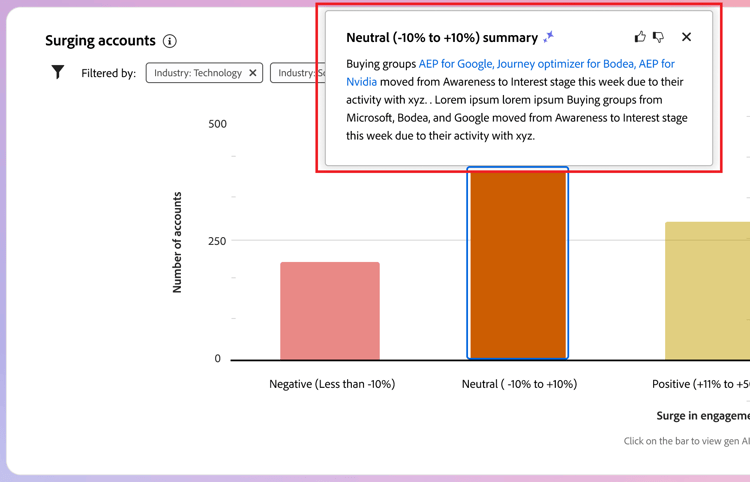
The Surging accounts section displays a visualization of the accounts with a significant change in engagement momentum within the selected time frame.
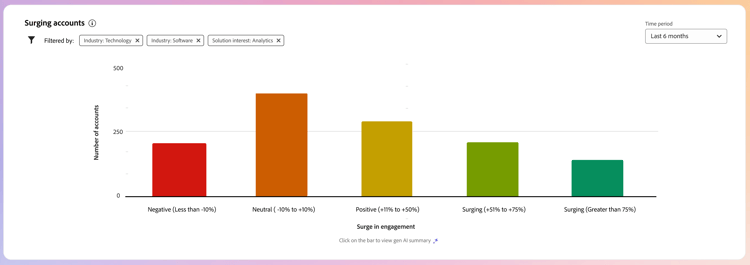
Hover over each bar to view the number of accounts in each category.
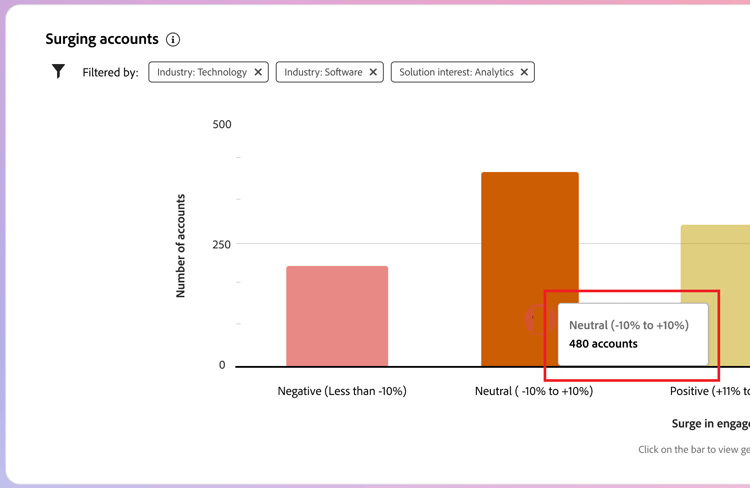
单击条形,以显示所选时间范围内类别中帐户的创作AI摘要。
属性过滤器 attribute-filter-acct-surge
单击左上角的筛选器 (
- 解决方案兴趣
- 行业
- 区域
时段 time-period-acct-surge
使用右上角的日期过滤器可更改数据可视化的日期范围。 单击向下箭头可设置相对日期范围,或设置自定义开始日期和结束日期。
帐户亮点 account-highlights
帐户重点部分分为两行,以显示有关您组织感兴趣的帐户的信息。
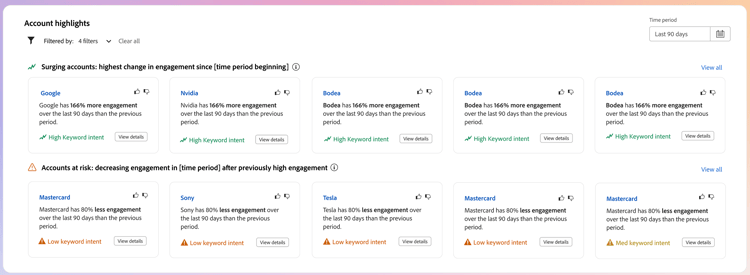
- 正在激增的帐户 — 此行显示了在所选时间范围内参与度增长显着的帐户。
- 有风险的帐户 — 此行显示了在所选时间范围内参与度动量显着减少的帐户。
每个信息卡都包含以下数据:
-
帐户名称。 单击名称以打开帐户详细信息页面。
-
帐户的生成AI摘要。
-
关键词意图。 单击 查看详细信息 查看目的数据:
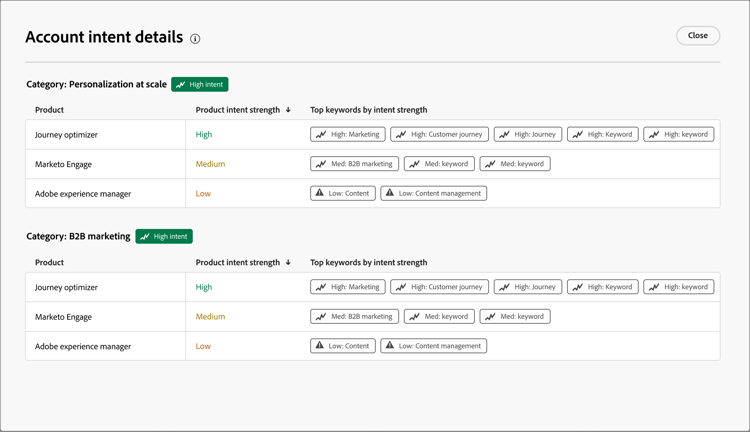
- 详细信息弹出窗口显示类别名称,意图级别位于顶部。
- 每行的数据按列组织:产品名称、产品意图强度和按意图强度排列的关键字。
- 类别、产品和关键字的排序顺序从高到低。 如果每种类型中的一种或多种具有相同的目的强度,则排序使用字母顺序。
属性过滤器 attribute-filter-acct-highlights
单击左上角的过滤器 (
- 解决方案兴趣
- 购买群组
时段 time-period-acct-highlights
使用右上角的日期过滤器可更改数据可视化的日期范围。 单击向下箭头可设置相对日期范围,或设置自定义开始日期和结束日期。
联系覆盖范围 contact-coverage
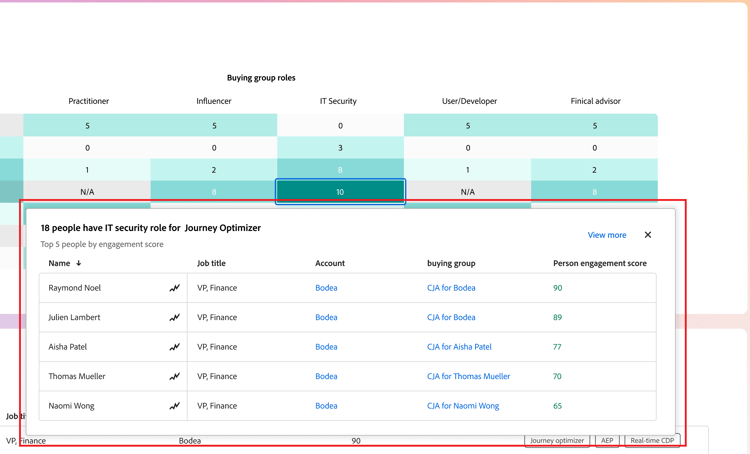
联系人覆盖范围部分显示了与解决方案兴趣相关的特定角色的联系人数目。 角色和解决方案兴趣的分配基于购买组模板。
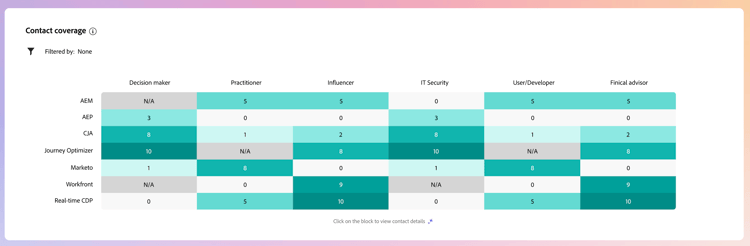
将鼠标悬停在每个单元格上可查看角色/解决方案感兴趣的联系人数量。
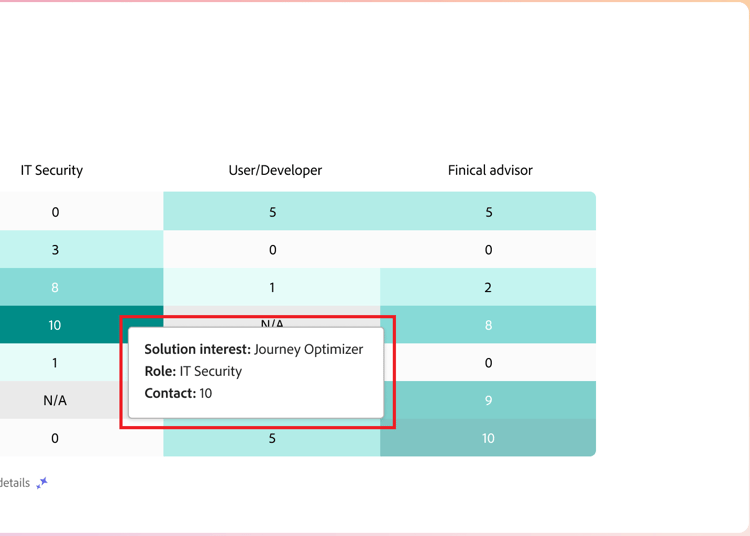
单击单元格可查看有关角色/解决方案感兴趣的联系人的详细信息。
属性过滤器 attribute-filter-contact-coverage
单击左上角的过滤器 (
- 解决方案兴趣
- 帐户
联系重叠 contact-overlap
联系人重叠部分显示了一个联系人列表,这些联系人由于与多个解决方案兴趣关联而属于多个购买组。
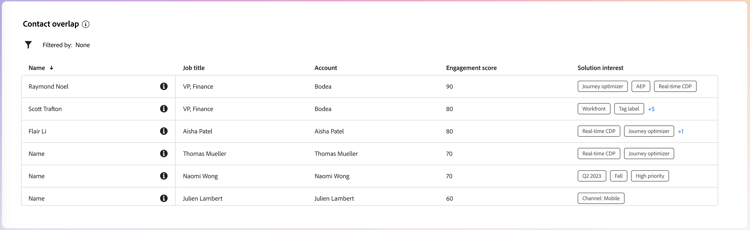
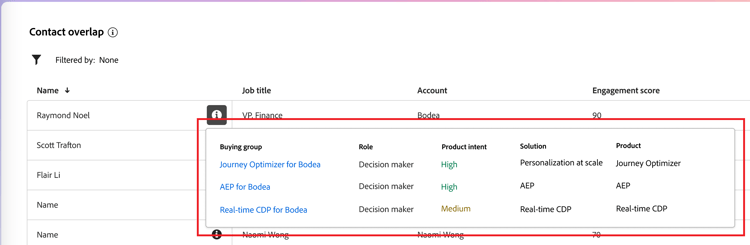
单击信息 (

- 购买团体名称(单击该名称可打开购买团体详细信息页面)
- 角色
- 解决方案兴趣
- 产品意图
- 产品
属性过滤器 attribute-filter-contact-overage
单击左上角的过滤器 (
- 解决方案兴趣
- 角色
- 帐户