灵活的受众评估指南
灵活的受众评估允许您按需运行批量分段作业。 通过灵活的受众评估,您可以运行临时活动发布、及时通信或其他时效性活动。
护栏 guardrails
在运行灵活的受众评估时,请牢记以下条件:
- 每个沙盒每天只能使用灵活的受众评估两次。 此限制在午夜(UTC)重置。
- 您每 生产 沙盒每年最多有 个 灵活的受众评估运行,共50个。
- 年份的定义为从Experience Platform合同签订之日起的一年,以便进行灵活的受众评估。 例如,如果您从5月18日开始合同,则您的灵活受众评估运行次数将每隔5月18日重置一次。
- 您每 开发 沙盒每年最多有 次 运行100次灵活受众评估。
- 年份的定义为从Experience Platform合同签订之日起的一年,以便进行灵活的受众评估。 例如,如果您从5月18日开始合同,则您的灵活受众评估运行次数将每隔5月18日重置一次。
- 所有受众 都必须 具有“分段服务”的来源。
- 必须使用批处理分段评估所有受众。
- 所有受众 必须 是基于人员的受众。
- 每个灵活受众评估运行最多只能选择20个受众。
访问 access
要使用灵活的受众评估,您必须具有以下权限:
- 在 Profile Management 部分下评估受众的区段。
有关基于角色的访问控制的详细信息,请阅读访问控制概述。
运行灵活的受众评估
您可以使用Experience Platform API或UI运行灵活的受众评估。
要在Experience Platform API中运行灵活的受众评估,您需要创建一个区段作业,其中包含您要评估的所有区段定义(受众)的ID。
| note |
|---|
| NOTE |
| 您只能为每个区段作业API调用添加 个最多 个20个区段定义ID。 |
您可以通过向/segment/jobs端点发出POST请求并在请求正文中包含区段定义的ID来创建新的区段作业。
| accordion | ||||||||
|---|---|---|---|---|---|---|---|---|
| 用于创建新区段作业的示例请求 | ||||||||
|
成功的响应返回HTTP状态200,其中包含有关新创建的区段作业的信息。
| accordion | ||
|---|---|---|
| 创建新区段作业时的示例响应。 | ||
|
创建区段作业后,您可以通过向/segment/jobs端点发出GET请求来检查其状态,在请求路径中提供新创建的区段作业的ID。
| accordion | ||
|---|---|---|
| 检索区段作业的示例请求 | ||
|
成功的响应返回HTTP状态200,其中包含有关指定区段作业的详细信息。
| accordion | ||
|---|---|---|
| 用于检索区段作业的示例响应。 | ||
|
要在Experience Platform UI中运行灵活的受众评估,请在 客户 部分中选择受众。
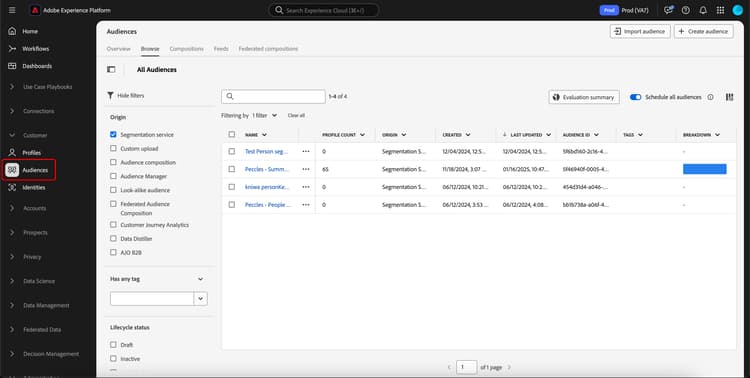
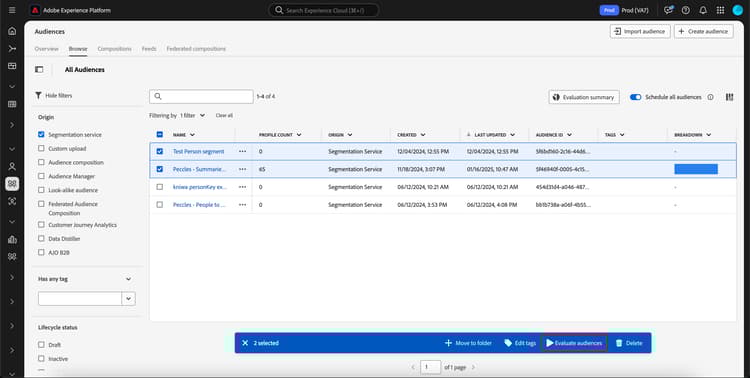
此时将显示“受众门户”,其中包含组织内所有人员受众的列表。 在Audience Portal中,您可以选择想要评估的受众,然后选择评估受众。
此时将显示 按需评估受众 弹出框,其中显示了将使用按需区段作业评估的受众列表。 如果受众不符合按需评估的条件,则它将被自动从评估作业中删除。 确认列出的受众就是您要评估的受众。
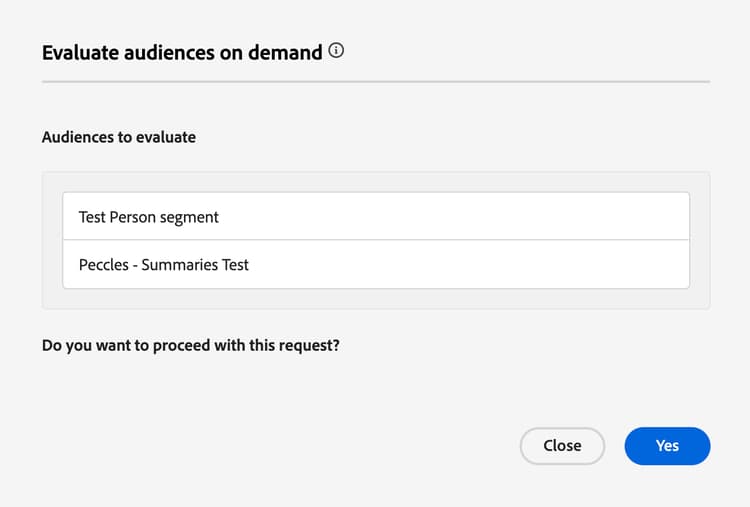
确认列出了正确的受众后,您可以继续请求,并将开始灵活的受众评估。 您可以在评估作业监视视图中查看此受众评估的状态。
| note |
|---|
| NOTE |
区段作业的状态可能会在监控仪表板中报告为“已排队”状态。 您可以查看区段作业的最新状态,方法是向/segment/jobs端点发出GET请求,并在请求路径中提供区段作业的ID。 在“API”选项卡中可找到有关使用此端点的更多信息。 |
| 如果您运行灵活的受众评估并希望评估将受众激活到目标,则需要确保将频率设置为在区段评估后。 对已设置为在区段评估🔗后激活的受众运行灵活的受众评估,将在灵活的受众评估作业完成后立即激活受众,而不考虑任何之前的每日激活作业。 |
视频 video
以下视频演示了如何在Experience Platform中访问和使用灵活的受众评估。
常见问题 faq
以下部分列出了与灵活受众评估相关的常见问题解答。