使用Destination SDK创建的目标模板规范
使用目标服务器配置的模板规范部分配置如何格式化发送到目标的HTTP请求。
在模板规范中,您可以定义如何在XDM架构和平台支持的格式之间转换配置文件属性字段。
模板规范是实时(流)目标的目标服务器配置的一部分。
要了解此组件在何处适合使用Destination SDK创建的集成,请参阅配置选项文档中的关系图,或参阅如何使用Destination SDK配置流目标的指南。
您可以通过/authoring/destination-servers端点配置目标的模板规范。 有关详细的API调用示例,请参阅以下API参考页面,您可以在其中配置此页面中显示的组件。
支持的集成类型 supported-integration-types
有关哪些类型的集成支持此页面上描述的功能,请参阅下表。
配置模板规范 configure-template-spec
Adobe使用类似于Jinja的模板化语言将字段从XDM架构转换为目标支持的格式。
有关转换的更多信息,请访问以下链接:
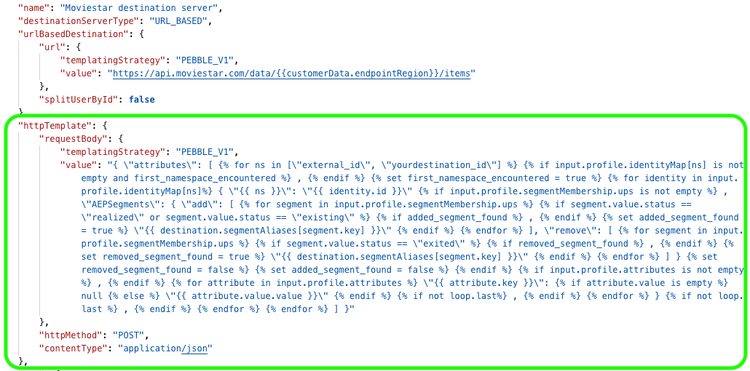
请参阅下面的HTTP请求模板示例,以及每个参数的说明。
{
   "httpTemplate":{
      "httpMethod":"POST",
      "requestBody":{
         "templatingStrategy":"PEBBLE_V1",
         "value":"{ \"attributes\": [ {% for ns in [\"external_id\", \"yourdestination_id\"] %} {% if input.profile.identityMap[ns] is not empty and first_namespace_encountered %} , {% endif %} {% set first_namespace_encountered = true %} {% for identity in input.profile.identityMap[ns]%} { \"{{ ns }}\": \"{{ identity.id }}\" {% if hasSegments(input.profile.segmentMembership) %} , \"AEPSegments\": { \"add\": [ {% for namespace in input.profile.segmentMembership %} {% for segment in input.profile.segmentMembership[namespace.key] %} {% if (segment.value.status == \"realized\" or segment.value.status == \"existing\") and destination.namespaceSegmentAliases[namespace.key][segment.key] is defined %} {% if added_segment_found %} , {% endif %} {% set added_segment_found = true %} \"{{ destination.namespaceSegmentAliases[namespace.key][segment.key] }}\" {% endif %} {% endfor %} {% endfor %} ], \"remove\": [ {% for namespace in input.profile.segmentMembership %} {% for segment in input.profile.segmentMembership[namespace.key] %} {% if segment.value.status == \"exited\" and destination.namespaceSegmentAliases[namespace.key][segment.key] is defined %} {% if removed_segment_found %} , {% endif %} {% set removed_segment_found = true %} \"{{ destination.namespaceSegmentAliases[namespace.key][segment.key] }}\" {% endif %} {% endfor %} {% endfor %} ] } {% set removed_segment_found = false %} {% set added_segment_found = false %} {% endif %} {% if input.profile.attributes is not empty %} , {% endif %} {% for attribute in input.profile.attributes %} \"{{ attribute.key }}\": {% if attribute.value is empty %} null {% else %} \"{{ attribute.value.value }}\" {% endif %} {% if not loop.last%} , {% endif %} {% endfor %} } {% if not loop.last %} , {% endif %} {% endfor %} {% endfor %} ] }"
      },
      "contentType":"application/json"
   }
}
httpMethodGET、PUT、POST、DELETE、PATCH。templatingStrategyPEBBLE_V1。value有关如何编写模板的信息,请阅读上使用模板的部分。
有关字符转义的更多信息,请参阅RFC JSON标准第七节。
有关简单转换的示例,请参阅配置文件属性转换。
contentTypeapplication/json。转换模板以支持外部受众 template-converter-tool
旧模板仅读取ups命名空间中的受众成员资格。 更新这些模板以对segmentMembership中的每个命名空间进行迭代,以便它们还可以读取外部受众的成员资格。
有关如何配置目标以支持外部受众的信息,请参阅配置对外部受众的支持。
使用 模板转换器 工具自动转换现有模板。 该工具将只读取ups命名空间的模板重写为在segmentMembership中的所有命名空间(包括外部受众)上迭代的模板。
该工具需要Java Runtime Environment (JRE) 11或更高版本。 它支持两种模式:
-
命令行界面(CLI)模式:从终端运行该工具,并将现有模板作为参数传递。
code language-shell java -jar templates-converter-cli.jar "your-existing-template-string"该工具将转换后的模板打印到终端上。
-
用户界面(UI)模式:使用图形界面运行工具。 此模式需要JavaFX SDK,它包含在下载的存档中。
code language-shell java --module-path="./javafx-sdk-17.0.7/lib" --add-modules=javafx.controls,javafx.fxml -jar templates-converter-ui.jar
转换模板后,使用渲染模板API针对多个示例配置文件测试该模板,以确认它仍正确呈现,然后再将其添加到目标服务器配置。
配置请求标头 headers
除了请求正文之外,您还可以将自定义HTTP标头添加到Experience Platform对您的目标发起的调用中。 每个标头条目使用与目标服务器中的其他模板化字段相同的templatingStrategy和value字段。
"httpTemplate": {
  "httpMethod": "POST",
  "headers": [
    {
      "header": "Authorization",
      "value": {
        "templatingStrategy": "PEBBLE_V1",
        "value": "Basic {{ (authData.username + ':' + authData.password) | base64encode }}"
      }
    },
    {
      "header": "x-integration",
      "value": {
        "templatingStrategy": "PEBBLE_V1",
        "value": "{{customerData.integrationId}}"
      }
    },
    {
      "header": "Amazon-Advertising-API-ClientId",
      "value": {
        "templatingStrategy": "PEBBLE_V1",
        "value": "{{authData.clientId}}"
      }
    },
    {
      "header": "Accept",
      "value": {
        "templatingStrategy": "NONE",
        "value": "application/json"
      }
    }
  ]
}
headerAuthorization、Content-Type或自定义标头。value.templatingStrategyPEBBLE_V1。 将NONE用于静态值。value.value{{customerData.integrationId}}、{{authData.clientId}}或{{ (authData.username + ':' + authData.password) | base64encode }}。某些合作伙伴API需要使用来自客户提供的身份验证凭据的值填充的自定义标头,而不是标准Authorization标头。 上面显示的Amazon-Advertising-API-ClientId标头是此模式的示例,其中标头值直接来自authData字段。
对于使用需要自定义Base64编码标头的基本身份验证的目标,请参阅自定义基本身份验证标头。
后续步骤 next-steps
阅读本文后,您应该更好地了解什么是模板规范以及如何对其进行配置。
要了解有关其他目标服务器组件的更多信息,请参阅以下文章: