针对页面差异进行开发 developing-for-page-difference
本视频说明如何为AEM Sites的“页面差异”功能提供自定义样式。
自定义页面差异样式 customizing-page-difference-styles
NOTE
此视频将自定义CSS添加到we.Retail客户端库,应在其中对自定义程序的AEM Sites项目进行这些更改;在以下示例代码中:
my-project。AEM的页面差异通过直接加载/libs/cq/gui/components/common/admin/diffservice/clientlibs/diffservice/css/htmldiff.css获取OOTB CSS。
由于此直接加载CSS而不使用客户端库类别,因此我们必须为自定义样式找到另一个注入点,并且此自定义注入点是项目的创作clientlib。
这样做的好处是允许这些自定义样式覆盖特定于租户。
准备创作clientlib prepare-the-authoring-clientlib
确保您的项目在/apps/my-project/clientlib/authoring.处存在authoring clientlib
<?xml version="1.0" encoding="UTF-8"?>
<jcr:root xmlns:cq="http://www.day.com/jcr/cq/1.0" xmlns:jcr="http://www.jcp.org/jcr/1.0"
        jcr:primaryType="cq:ClientLibraryFolder"
        categories="[my-project.authoring]"/>
提供自定义CSS provide-the-custom-css
将指向将提供覆盖样式的较少文件的项目的authoring clientlib a css.txt添加到。 Less由于其许多方便的功能(包括本示例中使用的类包装)而首选使用。
base=./css

htmldiff.less
创建包含位于/apps/my-project/clientlibs/authoring/css/htmldiff.less的样式覆盖的less文件,并根据需要提供覆盖样式。
/* Wrap with body to gives these rules more specificity than the OOTB */
body {

    /* .html-XXXX are the styles that wrap text that has been added or removed */

    .html-added {
        background-color: transparent;
     color: initial;
        text-decoration: none;
     border-bottom: solid 2px limegreen;
    }

    .html-removed {
        background-color: transparent;
     color: initial;
        text-decoration: none;
     border-bottom: solid 2px red;
    }

    /* .cq-component-XXXX require !important as the class these are overriding uses it. */

    .cq-component-changed {
        border: 2px dashed #B9DAFF !important;
        border-radius: 8px;
    }

    .cq-component-moved {
        border: 2px solid #B9DAFF !important;
        border-radius: 8px;
    }

    .cq-component-added {
        border: 2px solid #CCEBB8 !important;
        border-radius: 8px;
    }

    .cq-component-removed {
        border: 2px solid #FFCCCC !important;
        border-radius: 8px;
    }
}
通过页面组件包含创作clientlib CSS include-the-authoring-clientlib-css-via-the-page-component
在项目基页的/apps/my-project/components/structure/page/customheaderlibs.html中直接在</head>标记之前包含创作clientlibs类别,以确保加载样式。
这些样式应限制为编辑和预览 WCM模式。
<head>
  ...
  <sly data-sly-test="${wcmmode.preview || wcmmode.edit}"
       data-sly-call="${clientLib.css @ categories='my-project.authoring'}"/>
</head>
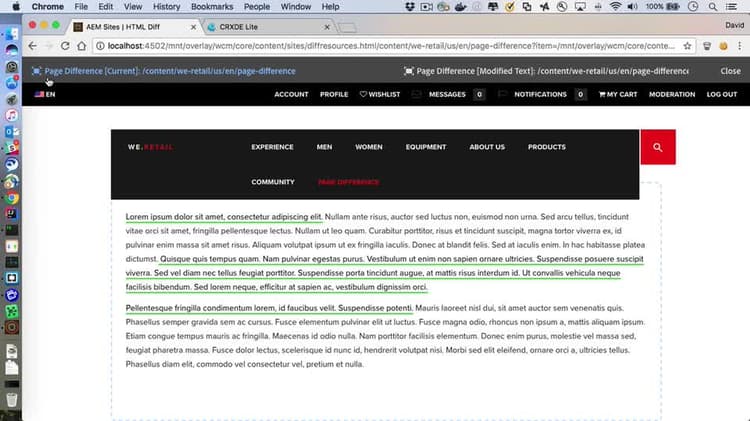
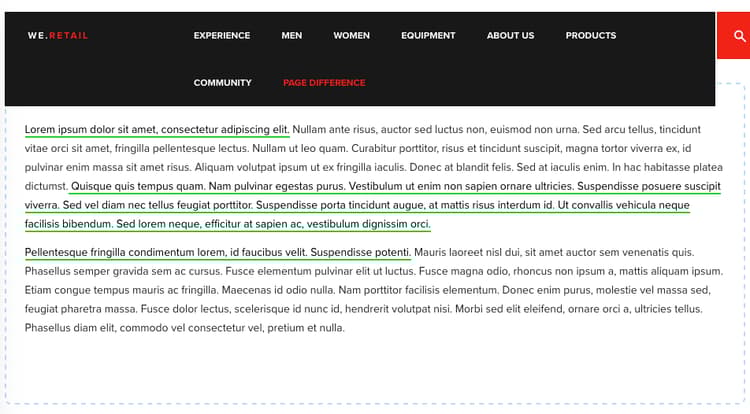
应用了上述样式的diff'd页面的最终结果如下所示(添加了HTML并更改了组件)。
其他资源 additional-resources
recommendation-more-help
bb44cebf-d964-4e3c-b64e-ce882243fe4d