升级前的维护任务 pre-upgrade-maintenance-tasks
在开始升级之前,请务必遵循这些维护任务,以确保系统已准备就绪,并且可以在出现问题时回滚:
确保有足够的磁盘空间 ensure-sufficient-disk-space
在执行升级时,除了内容和代码升级活动之外,还必须执行存储库迁移。 迁移过程会以新的Segment Tar格式创建存储库的副本。 因此,您需要足够的磁盘空间来保留存储库的第二个(可能更大)版本。
完全备份AEM fully-back-up-aem
在开始升级之前,应完全备份AEM。 确保备份存储库、应用程序安装、数据存储和Mongo实例(如果适用)。 有关备份和还原AEM实例的详细信息,请参阅备份和还原。
将更改备份到/etc backup-changes-etc
升级过程很好地维护和合并了存储库中/apps和/libs路径下的现有内容和配置。 对于对/etc路径所做的更改(包括Context Hub配置),通常需要在升级后重新应用这些更改。 虽然升级会为无法在/var下合并的任何更改创建备份副本,但Adobe建议您在开始升级之前手动备份这些更改。
生成快速入门.properties文件 generate-quickstart-properties
从jar文件启动AEM时,将在crx-quickstart/conf下生成quickstart.properties文件。 如果AEM以前仅使用启动脚本启动,则此文件不存在,且升级失败。 确保检查此文件是否存在,如果AEM不存在,请从jar文件重新启动它。
配置工作流和审核日志清除 configure-wf-audit-purging
WorkflowPurgeTask和com.day.cq.audit.impl.AuditLogMaintenanceTask任务需要单独的OSGi配置,没有它们将无法工作。 如果它们在升级前任务执行期间失败,则缺少配置是最可能的原因。 因此,请确保为这些任务添加OSGi配置,或者如果不想运行它们,则从升级前优化任务列表中完全删除它们。 有关配置工作流清除任务的文档可在管理工作流实例中找到,有关审核日志维护任务配置的文档可在AEM 6🔗中的审核日志维护中找到。
安装、配置和运行升级前任务 install-configure-run-pre-upgrade-tasks
由于AEM所允许的自定义级别,环境通常不遵循统一的执行升级方式。 因此,创建标准化的升级程序是一个困难的过程。
在以前的版本中,对于已停止或无法安全恢复的AEM升级,也会遇到困难。 此问题导致出现以下情况:需要重新启动完整升级过程,或者执行了有缺陷的升级而未触发任何警告。
为了解决这些问题,Adobe在升级过程中添加了几项增强功能,使其更具可复原性并且更便于用户使用。 以前必须手动执行的升级前维护任务正在优化和自动化。 此外,还添加了升级后报告,以便可以完全审查该过程,希望更容易发现任何问题。
升级前维护任务当前分布于各种手动部分或完全执行的接口上。 AEM 6.3中引入的升级前维护优化功能能够以统一的方式触发这些任务,并能够根据需要检查其结果。
从AEM 6.0开始,升级前优化步骤中包含的所有任务都与所有版本兼容。
如何设置 how-to-set-it-up
在AEM 6.3及更高版本中,快速入门jar中包含升级前维护优化任务。
使用方法 how-to-use-it
PreUpgradeTasksMBean OSGI组件预配置了可以一次运行的所有升级前维护任务列表。 您可以按照以下步骤配置任务:
-
通过浏览到 https://serveraddress:serverport/system/console/configMgr 转到Web控制台
-
搜索“preupgradetasks”,然后单击第一个匹配的组件。 组件的全名为
com.adobe.aem.upgrade.prechecks.mbean.impl.PreUpgradeTasksMBeanImpl -
修改必须运行的维护任务列表,如下所示:
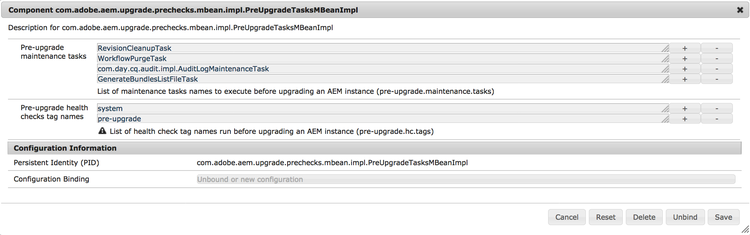
根据用于启动实例的运行模式,任务列表会有所不同。 以下是对每个维护任务所针对的运行模式的描述。
DataStoreGarbageCollectionTask调用具有标记和扫描阶段(如果已使用)的数据存储垃圾收集操作。 对于使用共享数据存储的部署,请确保正确重新配置它或准备实例以避免删除另一个实例引用的项目。 在触发此升级前任务之前,此过程可能需要在所有实例上手动运行标记阶段。升级前运行状况检查的默认配置 default-configuration-of-the-pre-upgrade-health-checks
PreUpgradeTasksMBeanImpl OSGI组件预配置了调用runAllPreUpgradeHealthChecks方法时要执行的升级前运行状况检查标记的列表:
-
system - granite维护运行状况检查使用的标记
-
升级前 — 自定义标记,可添加到所有可设置为在升级前运行的运行状况检查中
该列表可编辑。 除了标记之外,您还可以使用加号 (+) 和减号 (-) 按钮来添加更多自定义标记或删除默认标记。
MBean方法
可以使用JMX控制台访问受管Bean功能。
您可以通过以下方式访问MBean:
-
转到位于 https://serveraddress:serverport/system/console/jmx 的JMX控制台
-
搜索 PreUpgradeTasks 并单击结果
-
从 操作 部分中选择任意方法,然后在以下窗口中选择调用。
以下是PreUpgradeTasksMBeanImpl公开的所有可用方法的列表:
- JMX控制台
- 连接到JMX的任何外部应用程序
- cURL
禁用自定义登录模块 disable-custom-login-modules
在Apache Oak中,为存储库级别的身份验证配置自定义LoginModules的方式发生了根本性变化。
在使用CRX2配置的AEM版本中,该文件放在repository.xml文件中,而从AEM 6开始,它通过Web控制台在Apache Felix JAAS Configuration Factory服务中完成。
因此,在升级后,必须禁用任何现有配置并重新创建Apache Oak。
要禁用repository.xml的JAAS配置中定义的自定义模块,必须编辑配置以使用默认LoginModule,如以下示例所示:
<Security >
             ....
          <!--
                 Use LoginModule authenticating against repository itself
                 -->
                 <LoginModule class = "com.day.crx.core.CRXLoginModule" >
                     <param name = "anonymousId" value = "anonymous" />
                     <param name = "adminId" value ="admin" />
                     <param name = "disableNTLMAuth" value = "true" />
                     <param name = "tokenExpiration" value = "43200000" />
                     <!--
param name="trust_credentials_attribute" value="d5b9167e95dad6e7d3b5d6fa8df48af8"/
                -->
                 </LoginModule >
         </ Security>
从/install目录中删除更新 remove-updates-install-directory
删除通过本地文件系统上的crx-quickstart/install目录部署的所有Service Pack、功能包或修补程序。 这样做可防止在更新完成后,在新AEM版本之上意外安装旧修补程序和Service Pack。
停止任何冷备用实例 stop-tarmk-coldstandby-instance
如果使用TarMK冷备用,请停止任何冷备用实例。 这样做可以确保在升级过程中出现问题,高效地重新上线。 成功完成升级后,必须从升级的主实例重建冷备用实例。
禁用自定义计划作业 disable-custom-scheduled-jobs
禁用应用程序代码中包含的任何OSGi计划作业。
执行脱机修订版清理 execute-offline-revision-cleanup
如果使用TarMK,则在升级之前应运行脱机修订版清理。 这样做可以使存储库迁移步骤和后续升级任务的执行速度更快,并且有助于确保在升级完成后可以成功执行在线修订版清理。 有关运行脱机修订清理的信息,请参阅正在执行脱机修订清理。
执行数据存储垃圾收集 execute-datastore-garbage-collection
对CRX3实例运行修订清理后,您应该运行数据存储垃圾收藏集以删除数据存储中所有未引用的Blob。 有关说明,请参阅有关数据存储垃圾收集的文档。
根据需要升级数据库模式 upgrade-the-database-schema-if-needed
通常,AEM用于持久性的基础Apache Oak栈栈会根据需要负责升级数据库架构。
但是,在架构无法自动升级时可能会出现这种情况。 此类情况大多是高安全性环境,在这种环境中,数据库以权限有限的用户身份运行。 如果发生这种情况,AEM将继续使用旧架构。
要防止发生这种情况,请执行以下操作升级架构:
-
关闭必须升级的AEM实例。
-
升级数据库模式。 请查阅数据库类型的文档,了解需要什么工具才能获得结果。
有关Oak如何处理架构升级的详细信息,请参阅Apache网站上的此页面。
-
继续升级AEM。
删除可能妨碍升级的用户 delete-users-that-might-hinder-the-upgrade
- 您正在从AEM 6.3之前的AEM版本升级
- 在升级过程中,您会遇到以下提到的任何错误。
在极少数情况下,服务用户最终可能会在旧版AEM中被错误地标记为常规用户。
如果发生这种情况,升级将失败,并出现如下消息:
ERROR [Apache Sling Repository Startup Thread] com.adobe.granite.repository.impl.SlingRepositoryManager Exception in a SlingRepositoryInitializer, SlingRepository service registration aborted
java.lang.RuntimeException: Unable to create service user [communities-utility-reader]:java.lang.RuntimeException: Existing user communities-utility-reader is not a service user.
要解决此问题,请确保执行以下操作:
-
将实例与生产流量分离
-
创建一个或多个导致问题的用户的备份。 您可以通过包管理器完成此任务。 有关详细信息,请参阅如何使用包。
-
删除一个或多个导致问题的用户。 以下是可能属于此类别的用户列表:
dynamic-media-replicationcommunities-ugc-writercommunities-utility-readercommunities-user-adminoauthservicesling-scripting
旋转日志文件 rotate-log-files
Adobe建议在开始升级之前存档当前的日志文件。 这样,在升级期间和升级后,可以更轻松地监视和扫描日志文件,以识别并解决可能出现的任何问题。