放心地部署到AEM as a Cloud Service

部署信心来自于在推送之前知道您的环境是健康的。 此演练展示了如何使用AEM Cloud Manager MCP服务器从AI客户端检查AEM环境状态、查看管道历史记录和触发部署,以使团队可以快速移动而不会失去可见性。

方案详细信息
CX企业级应用程序
Adobe Experience Manager Cloud Manager
代理工具
AEM Cloud Manager MCP服务器
受众
开发人员、DevOps、运营团队
先决条件
与MCP兼容的AI客户端、AEM Cloud Manager访问

每个步骤显示一个代表性提示和一个AI响应示例。 随后还有​ 更多提示尝试 ​部分,以供在同一会话中进行其他探索。

开始之前

克劳德代码

首先导航到您的项目目录,然后使用CLI添加Cloud Manager MCP Server:

code language-bash
claude mcp add --transport http adobe-cloud-manager https://mcp.adobeaemcloud.com/adobe/mcp/cloudmanager

或将其手动添加到项目根目录中的.mcp.json

code language-json
{
  "mcpServers": {
    "adobe-cloud-manager": {
      "type": "http",
      "url": "https://mcp.adobeaemcloud.com/adobe/mcp/cloudmanager"
    }
  }
}

重新启动Claude代码。 Cloud Manager工具可在您的下一个会话中使用。

完整设置: Claude Code MCP文档

游标

将Cloud Manager MCP服务器添加到项目根目录中的~/.cursor/mcp.json (全局)或.cursor/mcp.json

code language-json
{
  "mcpServers": {
    "adobe-cloud-manager": {
      "type": "http",
      "url": "https://mcp.adobeaemcloud.com/adobe/mcp/cloudmanager"
    }
  }
}

打开​设置> MCP,选择服务器旁边的​连接,然后使用您的Adobe ID登录。

完整设置: Cursor MCP文档

GitHub Copilot

将Cloud Manager MCP服务器添加到项目根目录中的.vscode/mcp.json

code language-json
{
  "servers": {
    "adobe-cloud-manager": {
      "type": "http",
      "url": "https://mcp.adobeaemcloud.com/adobe/mcp/cloudmanager"
    }
  }
}

注意: VS代码使用"servers"作为顶级键,而不是"mcpServers"

打开​ GitHub Copilot聊天 ​面板,切换到​代理模式,然后选择服务器旁边的​连接。 MCP工具仅在代理模式下可用。

完整设置: VS代码MCP服务器文档

其他AI客户端

是否使用其他与MCP兼容的环境? 使用以下端点连接到Cloud Manager MCP服务器:

code language-none
https://mcp.adobeaemcloud.com/adobe/mcp/cloudmanager

所有受支持客户端的完整设置说明: 连接到您的AI客户端

NOTE
出现提示时,请使用您的Adobe ID登录,然后选择链接到您的AEM as a Cloud Service项目的IMS组织。 权限是在Cloud Manager级别强制实施的。 您的AI客户端只能执行您的帐户授权的操作。
在首次连接时,您的AI客户端可能会要求您确认您的组织或AEM项目。 设置该上下文后,MCP服务器会将其用于会话的其余部分。
某些工具在执行之前会提示您审批。 审查提议的行动,并批准或拒绝。 未经确认,不执行任何操作。

步骤1:检查环境状态

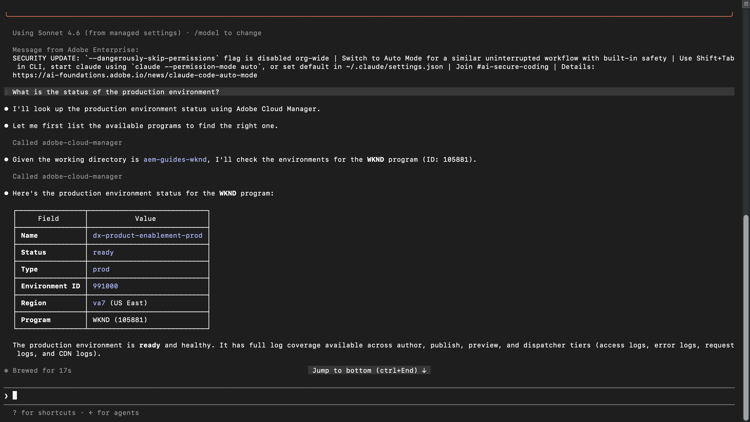
在开始发布之前,请确认您的环境是否正常运行,并且没有任何活动正在运行。

What is the status of the production environment?
查看示例响应

AI客户端显示来自Cloud Manager的生产环境状态 {modal="regular"}

选择缩放。

步骤2:查看管道运行

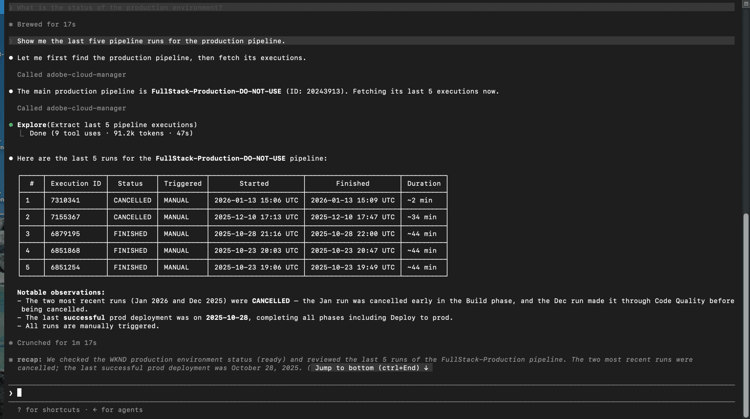
查看最近的管道历史记录,了解部署模式并捕获故障,以防它们阻止您的下一个版本。

Show me the last five pipeline runs for the production pipeline.
查看示例响应

显示生产管道最后五个管道运行的AI客户端 {modal="regular"}

选择缩放。

步骤3:触发管道

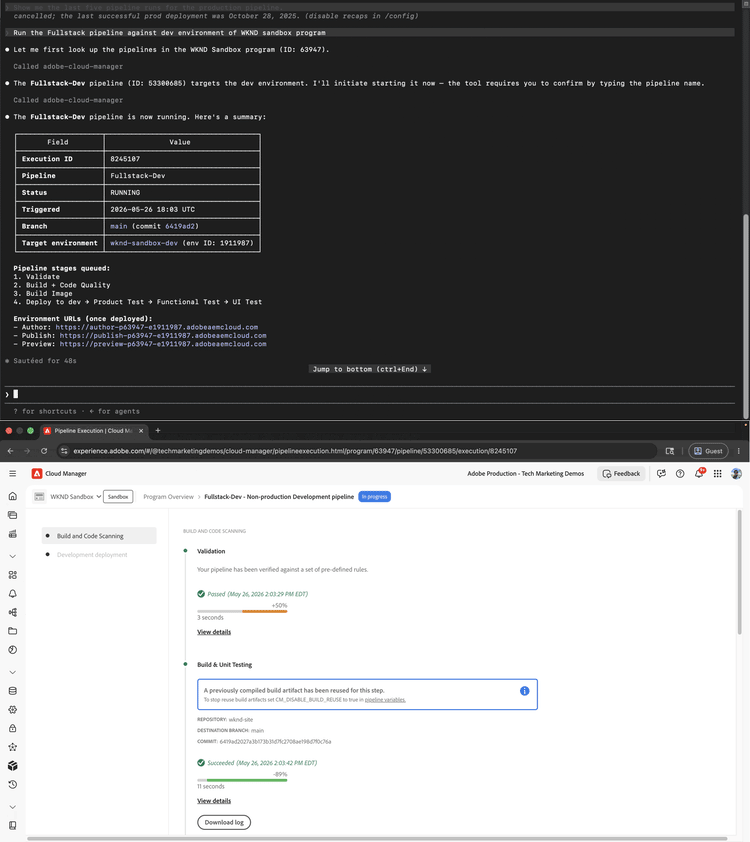
启动直接从您的AI客户端运行的管道。 服务器在启动之前确认目标环境并请求审批。

Run the Fullstack pipeline against dev environment of WKND sandbox program.
查看示例响应

显示管道触发器确认的AI客户端和反映正在运行的管道的Cloud Manager UI {modal="regular"}

选择缩放。

CAUTION
AI客户端将要求您在触发运行之前确认管道名称。 输入确切的管道名称以继续。 在确认之前,请仔细查看目标环境,特别是对于部署到生产环境的管道。

步骤4:检查管道状态

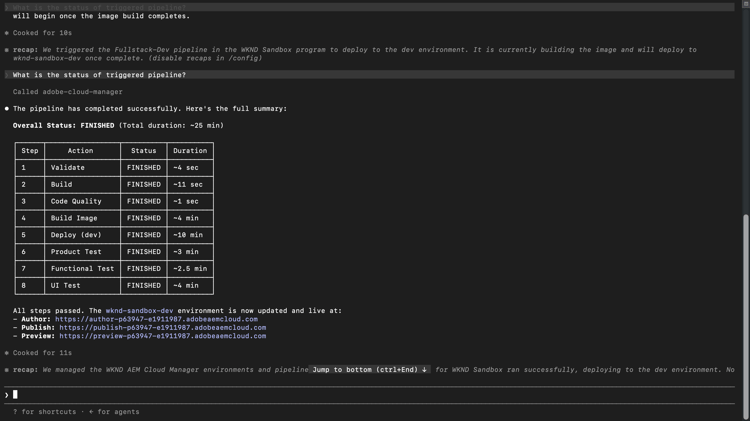
触发运行后,无需切换到Cloud Manager界面即可要求AI客户端进行状态更新。

What is the status of the triggered pipeline?
查看示例响应

AI客户端显示触发的管道运行的状态 {modal="regular"}

选择缩放。

您完成了哪些工作

您使用AEM Cloud Manager MCP服务器在不打开Cloud Manager界面的情况下检查环境运行状况、审查管道历史记录、触发部署并验证其状态。 通过在单个AI会话中结合环境可视性和部署控制,开发和运营团队可以更快地响应问题,并将其工作流保存在他们已使用的工具中。

您可以完成更多任务

Cloud Manager MCP服务器的处理能力远远超过上述演练所涵盖的范围。 展开下面的方案以查看可在同一会话中尝试的提示。

在发布之前捕获问题

部署失败的原因通常在管道运行之前可见。 在提交到版本之前,这些提示可帮助您确认环境运行状况、检查是否存在冲突的运行以及验证跨环境的版本一致性。

提示

code language-none
We're about to kick off a production release. Give me a full status check on all environments first.
code language-none
Is there anything currently running in the staging pipeline? I don't want to queue on top of an active run.
code language-none
Before I promote main branch to production, confirm main was deployed to Dev and all environments are on the same AEM version.
code language-none
What repositories are connected to the WKND program?
课程更正已在运行中的部署

意外触发或停止的批准关口可能会级联到受阻的管道或不需要的部署中。 这些提示允许您取消或前进正在运行的管道,而无需切换到Cloud Manager界面。

提示

code language-none
The staging pipeline kicked off by mistake. Cancel it before it deploys.
code language-none
The release pipeline is waiting at the approval gate. Advance it to continue the deployment.
了解您的部署跟踪记录

了解事物最后成功的时间、管道运行的时间长短以及模式是否正在更改可以帮助您规划发行并在发生事件之前捕获缓慢的退化情况。 使用这些提示可根据需要提取历史记录。

提示

code language-none
What is the status of the last production pipeline execution? If it failed, explain why.
code language-none
When was the last successful deployment to the staging environment?
code language-none
Our pipeline times are creeping up. What's the longest run we've had in the last 30 days?
将损坏的内部版本重新纳入轨道

当管道发生故障时,解决问题的最快路径是了解管道在哪里发生故障以及故障原因。 这些会提示表面故障详细信息、更改历史记录和质量审核问题,以便您的团队无需手动挖掘日志即可诊断和修复。

提示

code language-none
We're seeing a regression on the live site. What changed in production over the last week?
code language-none
Which pipelines have failed in the last 7 days, and at what stage did they fail?
code language-none
The last pipeline failed at the code quality step. What specific issues need to be fixed before I can retry?
code language-none
Pull the step logs for the last failed run. I need to see exactly what the quality gate flagged.

更多信息

资源
您将找到什么
AEM as a Cloud Service 文档
完整的AEM应用程序文档
recommendation-more-help
cx-enterprise-agentic-tools-help