Criar um plug-in Python
Este guia passo a passo descreve como criar um plug-in Python simples que permite exportar canais de um conjunto de texturas com uma predefinição de exportação específica.
Navegue até a pasta de plug-ins
Para adicionar um novo plug-in Python, um arquivo de script simples pode ser criado na pasta de plug-ins do Substance 3D Painter.
Para acessar a pasta Python, navegue até:
2 - Criar o novo arquivo de plug-in
Na raiz da pasta de plug-ins, crie um novo arquivo de texto e dê a ele o nome de custom_export.py .
3 - Conteúdo de script
Abra o arquivo de script vazio em um editor de texto e cole o trecho de código seguinte. Dê uma olhada nos comentários do código para obter mais detalhes sobre seu comportamento.
import os

# Substance 3D Painter modules
import substance_painter.ui
import substance_painter.export
import substance_painter.project
import substance_painter.textureset

# PySide module to build custom UI
from PySide2 import QtWidgets

plugin_widgets = []

def export_textures() :
    # Verify if a project is open before trying to export something
    if not substance_painter.project.is_open() :
        return

    # Get the currently active layer stack (paintable)
    stack = substance_painter.textureset.get_active_stack()

    # Get the parent Texture Set of this layer stack
    material = stack.material()

    # Build Export Preset resource URL
    # - Context: name of the library where the resource is located
    # - Name: name of the resource (filename without extension or Substance graph path)
    export_preset = substance_painter.resource.ResourceID(
        context="starter_assets",
        name="PBR Metallic Roughness" )

    print( "Preset:" )
    print( export_preset.url() )

    # Setup the export settings
    resolution = material.get_resolution()

    # Setup the export path, in this case the textures
    # will be put next to the spp project file on the disk
    Path = substance_painter.project.file_path()
    Path = os.path.dirname(Path) + "/"

    # Build the configuration
    config = {
        "exportShaderParams"  : False,
        "exportPath" : Path,
        "exportList" : [ { "rootPath" : str(stack) } ],
        "exportPresets" : [ { "name" : "default", "maps" : [] } ],
        "defaultExportPreset" : export_preset.url(),
        "exportParameters" : [
            {
                "parameters" : { "paddingAlgorithm": "infinite" }
            }
        ]
    }

    substance_painter.export.export_project_textures( config )

def start_plugin():
    # Create a text widget for a menu
    Action = QtWidgets.QAction("Custom Python Export",
            triggered=export_textures)

    # Add this widget to the existing File menu of the application
    substance_painter.ui.add_action(
    substance_painter.ui.ApplicationMenu.File,
    Action )

    # Store the widget for proper cleanup later when stopping the plugin
    plugin_widgets.append(Action)

def close_plugin():
    # Remove all widgets that have been added to the UI
    for widget in plugin_widgets:
    substance_painter.ui.delete_ui_element(widget)

    plugin_widgets.clear()

if __name__ == "__main__":
    start_plugin()
Carregar e habilitar o plug-in
Inicie o Substance 3D Painter para fazer o aplicativo descobrir o plug-in.
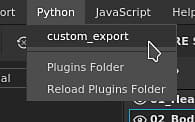
Clique no menu Python e clique no nome do plug-in para habilitá-lo:
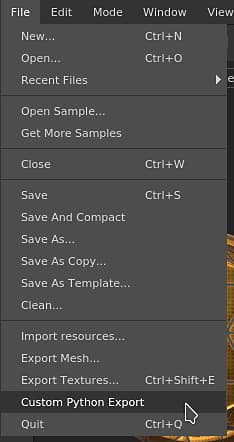
Por fim, clique no menu Arquivo e selecione Exportar Python personalizado para acionar a função de exportação do script: