사용자 환경 설정 - 설정 자동화

영구 또는 세션 기반
기본 파일이 아닌 다른 구성 파일을 사용하도록 Designer을 구성하는 방법에는 두 가지가 있으며, 장점과 단점이 있습니다.
- user_preferences.xml을 영구적으로 수정 중\ 이 파일은 Windows용 ~User\AppData\Local\Adobe\Adobe Substance 3D Designer에 있습니다. 이 설정을 수정하면 Designer은 시작 방법, 시작 시기 또는 위치에 관계없이 정의된 내용을 항상 사용합니다. 변경을 하려면 XML을 다시 수정해야 합니다. 이 두 방법은 아래에 설명되어 있으며 약간 관련되어 있는 경우가 있습니다.
- 명령줄 인수를 통해 세션을 일시적으로 설정하는 중\ Designer은 시작할 때 명령줄 인수를 사용하여 해당 세션의 SBSCFG 파일을 재정의할 수 있습니다(자세한 방법은 아래 참조). 이 솔루션은 간단하고 우아한 솔루션으로 XML을 수정하는 것보다 훨씬 더 빠른 방법으로 프로젝트를 전환할 수 있습니다. 위험은 여러 바로 가기(예: Windows의 시작 메뉴 및 바탕 화면)를 통해 열면 완전히 명확하지 않은 상태에서 다른 결과를 얻을 수 있다는 것입니다. 또한 사용자가 단축키를 user_preferences.xml보다 훨씬 쉽게 삭제, 이동 또는 수정할 수 있기 때문에 조작 불가능 상태가 아닙니다.
XML 수정
수동으로 환경 설정 수정
자동화된 설정이 없거나 테스트용으로 편집 > 환경 설정…으로 이동한 다음 왼쪽의 “프로젝트” 섹션을 클릭하세요.
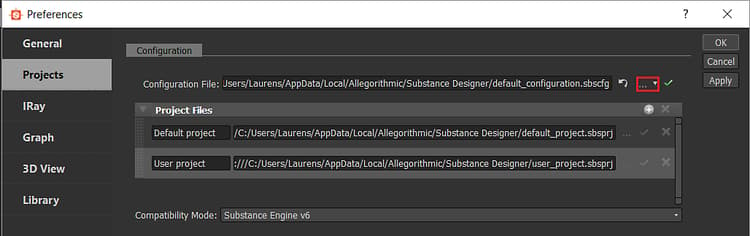
빨간색으로 표시된 버튼을 사용하면 다른SBSCFG 파일을 선택할 수 있습니다.
스크립트를 통해 수정
프로젝트 및 구성 파일과 마찬가지로 사용자 환경 설정은 관련 설정을 명확하게 식별할 수 있는 구조화된 XML입니다. 메모장++이나 Sublime Text와 같은 텍스트 편집기를 통해 수정하기보다는 외부 스크립트 설정을 통해 수정하는 것이 매우 적합합니다.
스크립팅의 장점은 사용자가 버튼을 클릭하는 것 외에는 다른 작업을 할 필요가 없고, 충분히 복잡한 시스템이 만들어지면 파일 및 설정을 수동으로 관리할 필요 없이 프로젝트를 쉽게 관리하고 바꿀 수 있다는 것입니다.
관련 줄은 다음과 같습니다.
  <configuration>

   <configurationfile>file:///C:/Users/John/AppData/Local/Adobe/Adobe Substance 3D Designer/default_configuration.sbscfg</configurationfile>

  </configuration>
Python 예
다음은 다른 구성 파일의 user_preferences.xml 을 수정하는 Windows용 간단한 Python 2.7 예제 함수입니다. 이렇게 하면 값이 다시 변경될 때까지 영구적으로 변경됩니다. 그런 다음 사용자 정의 sbscfg 파일의 경로를 매개 변수로 사용하여 SetConfigurationFile 함수를 호출할 수 있습니다.
파이썬 스크립트는 강력하고 깔끔한 코드를 허용하며 다른 곳에 쉽게 통합할 수 있지만, 사용자가 이를 실행하려면 실행 파일로 컴파일해야 하거나 사용자에게 파이썬 배포가 필요하다는 단점이 있습니다.
import xml.etree.ElementTree as ElementTree

import os


##Example Python script for changing Substance 3D Designer user preference file##


def SetConfigurationFile(p_ConfigPath):

## Check is the path passed as parameter exists.

    if(os.path.isfile(p_ConfigPath)):

## replace backslashes by forwardslahes to ensure consistency

        p_ConfigPath = p_ConfigPath.replace("\", "/")

## get Local Appadata path from Environment variables, construct full path to user_preferences.xml and check if it exists.

        m_AppDataPath = os.environ.get('LOCALAPPDATA')

        if m_AppDataPath != None:

            m_UserPrefsPath = os.path.join(m_AppDataPath, str("Adobe/Adobe Substance 3D Designer/user_preferences.xml"))

            if(os.path.isfile(m_UserPrefsPath)):

## read XML elementtree from file, find correct element until we get to the actual line that defines the configurationfile path

                m_PrefsTree = ElementTree.parse(m_UserPrefsPath)

                m_PrefsRoot = m_PrefsTree.getroot()

                m_PrefsElement = m_PrefsRoot.find("preferences")

                m_XMLError = True

                if(m_PrefsElement != None):

                    m_ConfigElement = m_PrefsElement.find("configuration")

                    if(m_ConfigElement != None):

                        m_ConfigFileElement = m_ConfigElement.find("configurationfile")

                        if(m_ConfigFileElement != None):

                            m_XMLError = False

## Check if path is already set, to avoid double work

                            if m_ConfigFileElement.text.replace("file:///","") == p_ConfigPath:

                                print "configurationfile is already set to desired path. Aborting."

                                return True

                            else:

## construct correctly formatted path, insert into elementtree

                                m_ConfigPath = str("file:///" + p_ConfigPath)

                                m_ConfigFileElement.text = m_ConfigPath


## Write to file

                                m_XMLString = str("<?xml version="1.0" encoding="UTF-8"?>n") + ElementTree.tostring(m_PrefsRoot, 'utf-8')

                                m_File = open(m_UserPrefsPath,'w')

                                m_File.write(m_XMLString)

                                m_File.close()

                                print "configuration file path succesfully changed!"

                                return True

                if m_XMLError:

## if this flag was not set to false, we can assume something was missing or went wrong when walking through the XML

                    print("Error: malformed content in user_preferences.xml!")

                    return False

            else:

                print "Error: user_preferences.xml does not exist, try starting Substance 3D Designer first!"

                return False

        else:

            print "Error: LocalAppData path returned None"

            return False

    else:

        print "Error: Invalid Configuration File path!"

        return False
명령줄 인수 바로 가기
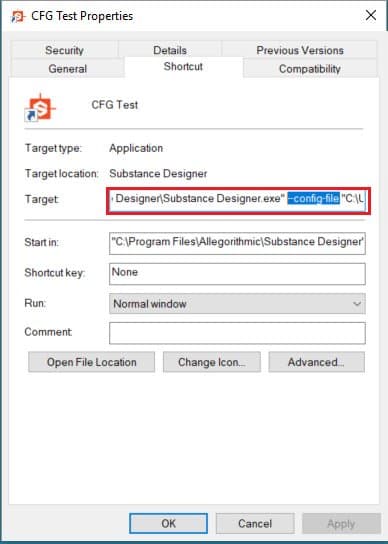
훨씬 더 간단한 방법으로 Designer에서는 “—config-file”(선택 사항) 인수를 통해 시작할 때 특정 SBSCFG를 사용하도록 할 수 있습니다.
수동 설정
프로덕션 환경에서 수동 방법을 사용하는 것은 권장되지 않지만 SBSCFG 파일을 이미 설정한 경우 테스트를 위해 이 작업을 매우 빠르게 수행할 수 있습니다.
-
스페이스 추가
-
Target 섹션에서 designer에 대한 경로 뒤에 —config-file 을 추가합니다.
-
다른 스페이스 추가
-
경로에 공백 문제를 방지하려면 경로를 추가합니다. 따옴표로 묶음
-
결과는 다음과 같습니다.
“C:\Program Files\Adobe\Adobe Substance 3D Designer\Adobe Substance 3D Designer.exe” —config-file “C:\Dev\Substance\custom_configuration.sbscfg”