이 페이지에서: Sinch MMS API 자격 증명과 다운로드 가능한 CSV 출력을 사용하여 MT(모바일 착신) 및 MO(모바일 원본) 볼륨을 공급업체 청구와 조정하기 위해 Adobe Journey Optimizer에서 SMS 사용 보고서를 생성합니다.
SMS 사용 지표는 Adobe Journey Optimizer을 통해 SMS를 구매할 때 사용할 수 있습니다. 보고서는 지난 90일 동안 일별로 집계된 짧은 코드 또는 전화 번호별로 보내고 받는 트래픽을 요약합니다.
사용량 지표를 보려면 관리자는 다음 작업을 수행해야 합니다.
-
Sinch MMS API 자격 증명을 만듭니다 Sinch에서 사용 데이터를 검색하는 데만 사용됩니다.
이 단계를 수행하려면 SMS 설정 관리 권한이 필요합니다. 권한에 대해 자세히 알아보십시오.
Sinch MMS API 자격 증명 만들기 sinch-mms
사용량 보고서를 사용하려면 SMS 공급업체이(가) Sinch MMS(으)로 설정된 API 자격 증명이 필요합니다. 이 자격 증명을 사용하면 Journey Optimizer이 Sinch에서 사용 데이터를 검색할 수 있습니다. 필드 값은 동일한 Sinch 프로젝트에서 가져오지만 SMS 또는 MMS 메시지를 전송하는 데 사용되는 Sinch 자격 증명과 별개입니다.
-
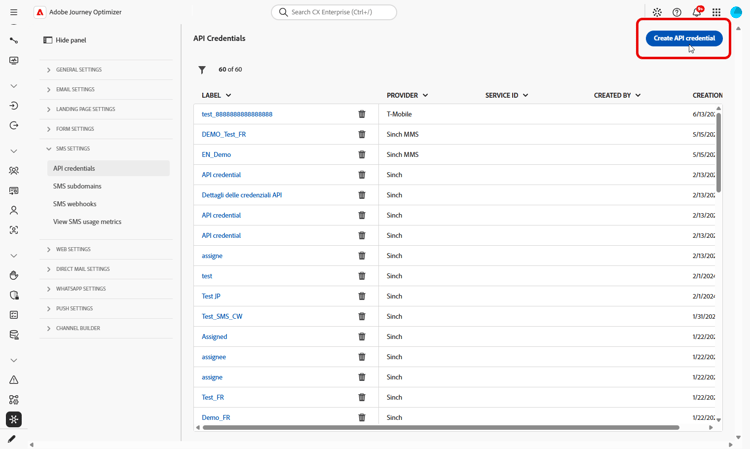
왼쪽 레일에서 관리 > 채널 > SMS 설정으로 이동한 다음 API 자격 증명을 선택합니다. 새 API 자격 증명 만들기를 클릭합니다.
-
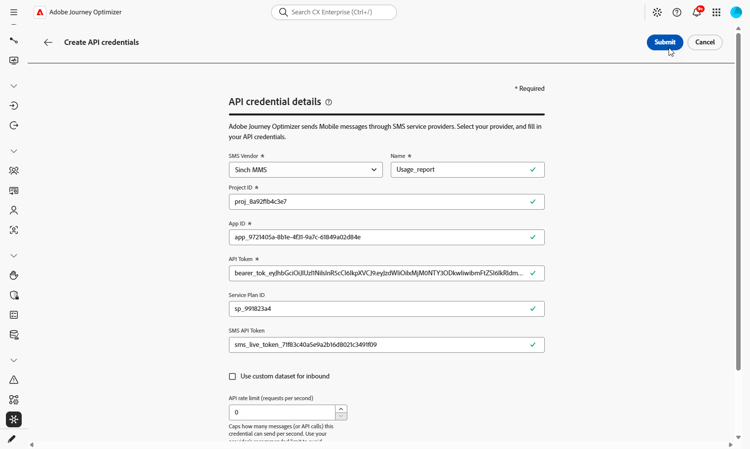
다음과 같이 자격 증명을 구성합니다.
-
SMS 공급업체: Sinch MMS.
-
이름: API 자격 증명의 이름을 입력하십시오.
-
프로젝트 ID: Sinch 프로젝트의 ID를 입력하십시오.
-
앱 ID: Sinch 프로젝트와 연결된 응용 프로그램의 ID를 입력합니다.
-
API 토큰: Sinch에 대한 요청을 인증하는 데 사용되는 API 토큰을 입력하십시오.
-
-
자격 증명 구성을 마치면 제출을 클릭합니다.
-
자격 증명을 삭제하려면 API 자격 증명 메뉴에서 해당 자격 증명 옆에 있는 bin 아이콘을 클릭합니다.
-
자격 증명을 수정하려면 API 자격 증명 메뉴에서 자격 증명을 찾은 다음 편집을 클릭합니다.
이제 SMS 사용 보고서를 구성하는 데 자격 증명을 사용할 수 있습니다.
SMS 사용량 보고서 구성 및 조회 configure-sms-usage-report
SMS 사용 보고서는 Journey Optimizer에서 공급업체 청구와 메시징 활동 간의 조정을 지원하기 위해 짧은 코드로 MO(Mobile-Originated) 및 MT(Mobile-Terminated) 볼륨을 표시합니다.
-
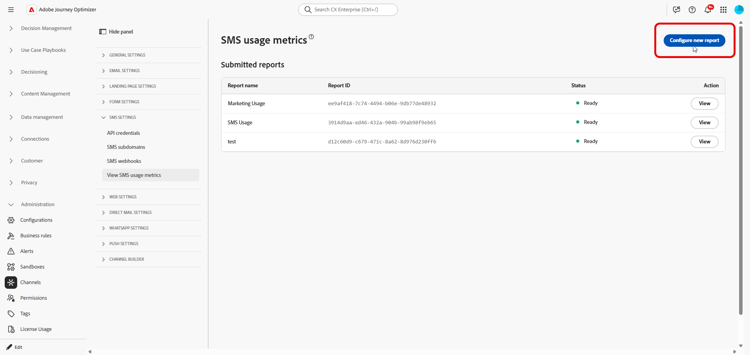
왼쪽 레일에서 관리 > 채널 > SMS 설정으로 이동합니다.
-
SMS 사용 지표 보기 메뉴에 액세스한 다음 새 보고서 구성을 클릭합니다.
-
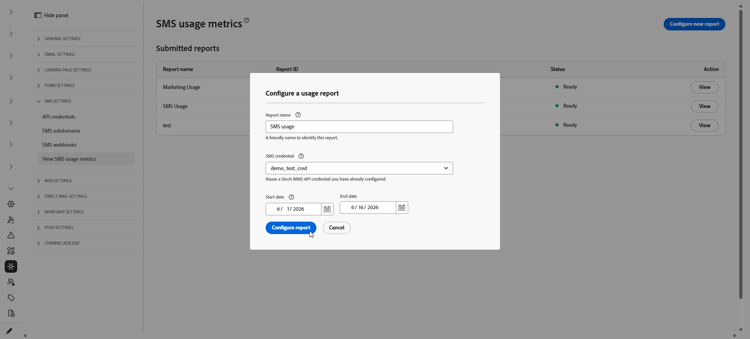
보고서를 구성합니다.
-
보고서 이름: 보고서를 인식하는 데 도움이 되는 레이블을 입력하십시오.
-
SMS 자격 증명: SMS 사용 보고를 위해 이전에 만든 Sinch MMS API 자격 증명을 선택합니다.
-
시작 날짜 및 종료 날짜: 보고서의 날짜 범위를 설정합니다. 사용량 데이터는 최근 90일간의 데이터만 제공됩니다.
-
-
요청을 제출하려면 보고서 구성을 클릭하세요.
-
제출된 보고서 목록에서 구성한 보고서를 찾아 보고서 검색을 클릭합니다.
보고서가 생성되는 동안 상태가 보류 중(으)로 변경됩니다.
-
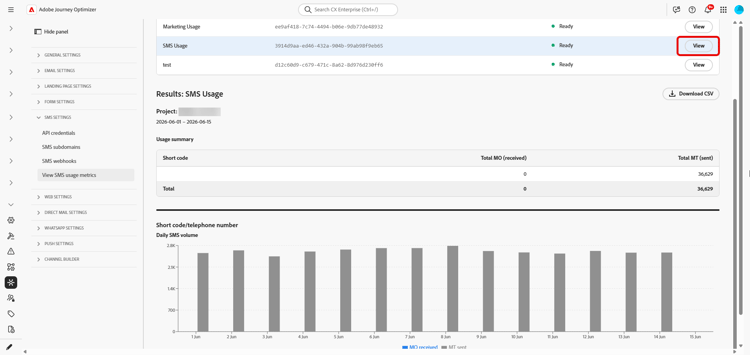
보고서 상태가 준비(으)로 업데이트되면 보기를 클릭하여 보고서를 엽니다. 이 보고서에는 다음이 포함됩니다.
-
사용 요약: 선택한 날짜에 대한 총 모바일 원본(MO) 및 모바일 착신(MT) 메시지를 짧은 코드로 분류했습니다.
-
일별 SMS 볼륨: SMS 볼륨을 짧은 코드로 분류합니다.
-
-
보고서를 내보내려면 CSV 다운로드를 클릭하십시오. Journey Optimizer은 보고 있는 보고서에 대한 CSV 파일을 다운로드합니다.
This section contains structured knowledge intended to support interpretation, retrieval, and question answering related to this topic.
For complete understanding, this information should be combined with the documentation on this page. Neither source is intended to stand alone; the page describes the feature, while this section provides additional context that helps disambiguate terminology, intent, applicability, and constraints.
- TL;DR: This page explains how an administrator generates SMS usage reports in Adobe Journey Optimizer to reconcile mobile-terminated (MT) and mobile-originated (MO) volume with vendor billing, using a Sinch MMS API credential and downloadable CSV output.
Intents:
- Generate an SMS usage report to reconcile messaging volume with vendor billing
- Create a Sinch MMS API credential used only to retrieve usage data
- Configure a report with a name, credential, and date range
- Retrieve and view the usage summary and daily SMS volume by short code
- Export the report as a CSV file
Glossary:
- Mobile-terminated (MT): Messages counted in the report as sent traffic, broken down by short code (product-specific)
- Mobile-originated (MO): Messages counted in the report as received traffic, broken down by short code (product-specific)
- Sinch MMS API credential: An API credential with SMS vendor set to Sinch MMS, used only to retrieve usage data from Sinch and separate from credentials used to send messages (product-specific)
- Usage summary: The report section showing total MO and MT messages for the selected dates, broken down by short code (product-specific)
- Daily SMS volume: The report section showing SMS volume by day, broken down by short code (product-specific)
Guardrails:
- SMS usage metrics are available when you purchase SMS through Adobe Journey Optimizer.
- Usage data is available only for the last 90 days.
- Reports require an API credential with SMS vendor set to Sinch MMS, which is separate from the Sinch credentials used to send SMS or MMS messages, although the field values come from the same Sinch project.
- Generating usage reports requires the Manage SMS settings permission.
- Reports summarize send and receive traffic by short code or phone number, aggregated by day.
Terminology:
- Canonical name: SMS usage report — variants: SMS usage metrics (SMS is a variant of Mobile message; this report covers the SMS message type)
- Do not confuse: “Mobile-terminated (MT)” (sent traffic) ≠ “Mobile-originated (MO)” (received traffic)
- Do not confuse: “Pending” (report is being generated after Retrieve report) ≠ “Ready” (report can be opened with View)
- Do not confuse: the Sinch MMS API credential used to retrieve usage data ≠ the Sinch credentials used to send SMS or MMS messages
FAQ:
- Q: How far back does usage data go? — Usage data is available only for the last 90 days.
- Q: Which credential is required for usage reports? — An API credential with SMS vendor set to Sinch MMS, which is separate from the credentials used to send messages although the field values come from the same Sinch project.
- Q: What permission do I need to generate reports? — The Manage SMS settings permission is required.
- Q: What does a generated report contain? — A Usage summary with total MO and MT messages for the selected dates broken down by short code, and a Daily SMS volume section showing SMS volume by day broken down by short code.
- Q: How do I export the report? — Click Download CSV to download a CSV file for the report you are viewing.