이 페이지에서: 대기 흐름 제어 활동을 사용하여 더 나은 시간 추적을 위해 오케스트레이션된 캠페인에서 두 활동 사이에 시간 지연을 도입하는 방법을 알아봅니다.
대기 활동은 오케스트레이션된 캠페인에서 두 활동 간의 지연을 유도하는 데 사용되는 흐름 제어 구성 요소입니다. 이 활동을 사용하면 후속 활동을 보다 적절한 타이밍에, 사용자 참여와 더 관련 있는 방식으로 제시하는 데 도움이 됩니다.
예를 들어 이메일 게재 후 후속 메시지를 보내기 전에 열기 및 클릭을 추적하기 위해 며칠 동안 기다릴 수 있습니다.
구성 wait-configuration
대기 활동을 구성하려면 다음 단계를 따르십시오.
-
오케스트레이션된 캠페인에 대기 활동을 추가합니다.
-
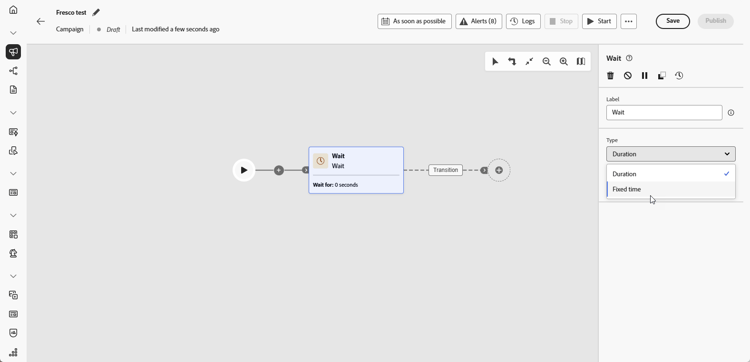
요구 사항에 가장 적합한 대기 유형을 선택합니다.
-
기간: 다음 활동으로 진행하기 전에 설정할 지연 시간을 초, 분, 시간 또는 일 단위로 지정합니다.
-
고정 시간: 다음 활동을 시작할 특정 날짜와 시간을 설정합니다.
-
예 wait-example
다음 예제는 일반적인 사용 사례 속 대기 활동을 보여 줍니다. 생일을 맞은 프로필에 프로모션 코드가 포함된 이메일이 전송됩니다. 2일 후에는 생일 프로모션 코드가 곧 만료된다는 알림과 함께 모바일 메시지가 동일한 그룹에 전송됩니다.

This section contains structured knowledge intended to support interpretation, retrieval, and question answering related to this topic.
For complete understanding, this information should be combined with the documentation on this page. Neither source is intended to stand alone; the page describes the feature, while this section provides additional context that helps disambiguate terminology, intent, applicability, and constraints.
- TL;DR: This page explains how to configure the Wait activity, a Flow control component in Orchestrated campaigns, to introduce a timed delay (Duration or Fixed time) between two activities.
Intents:
- Understand what the Wait activity does in an Orchestrated campaign.
- Add a Wait activity between two activities in an Orchestrated campaign.
- Choose between a Duration wait and a Fixed time wait.
- Configure a Duration wait in seconds, minutes, hours, or days.
- Configure a Fixed time wait using a specific date and time.
Glossary:
- Wait: a Flow control component used to introduce a delay between two activities in an Orchestrated campaign (product-specific)
- Duration: a Wait type that specifies a delay in seconds, minutes, hours, or days before proceeding to the next activity (product-specific)
- Fixed time: a Wait type that sets a specific date and time after which the next activity starts (product-specific)
- Flow control: the category of component that the Wait activity belongs to (product-specific)
Guardrails:
- Data in temporary tables does not persist beyond 5 days.
- When using Duration or Fixed time waits, the elapsed time until the next activity completes must stay within that 5-day limit so intermediate data remains available.
Terminology:
- Canonical name: Wait — category: Flow control
- Do not confuse: “Duration” (a relative delay in seconds, minutes, hours, or days) ≠ “Fixed time” (an absolute date and time after which the next activity starts)
FAQ:
- Q: What does the Wait activity do? — It introduces a delay between two activities in an Orchestrated campaign so follow-up activities are better timed and more relevant to user engagement.
- Q: What are the two Wait types? — Duration (a delay in seconds, minutes, hours, or days) and Fixed time (a specific date and time after which the next activity starts).
- Q: Is there a limit on how long a Wait can run? — Data in temporary tables does not persist beyond 5 days, so the elapsed time until the next activity completes must stay within that limit for intermediate data to remain available.
- Q: What is a typical use case for the Wait activity? — Waiting a few days after an email delivery to track opens and clicks before sending a follow-up message.
Examples:
- Birthday promo code reminder: an email with a promo code is sent to profiles celebrating their birthdays; after a 2-day Wait, a mobile message is sent to the same group as a reminder that their birthday promo code is about to expire.
Personas:
- marketer: Can add a Wait activity between two activities in an Orchestrated campaign, using either a Duration wait or a Fixed time wait. Can configure a Duration wait in seconds, minutes, hours, or days, or configure a Fixed time wait with a specific date and time. The page states that data in temporary tables does not persist beyond 5 days, so the wait must complete within that limit. Where: “Configuration”.
Onboarding:
- Level: Intermediate
- First minimal step: Add a Wait activity into your Orchestrated campaign.