이 페이지에서: 오케스트레이션된 캠페인에서 And-join 흐름 제어 활동을 사용하여 여러 실행 분기를 동기화하여 이전 활동이 모두 완료된 후에만 해당 캠페인을 계속하는 방법에 대해 알아봅니다.
AND-결합 활동은 흐름 제어 활동입니다. 이를 통해 오케스트레이션된 캠페인의 여러 실행 분기를 동기화할 수 있습니다.
이 활동은 모든 인바운드 전환이 활성화되었을 때, 즉 앞선 활동이 모두 완료된 다음에만 아웃바운드 전환을 트리거합니다. 이를 통해 오케스트레이션된 캠페인을 계속 실행하기 전에 특정 활동이 완료되었는지 확인할 수 있습니다.
AND-결합 활동 구성 and-join-configuration
AND-결합 활동을 구성하려면 다음 단계를 따릅니다.
-
채널 활동 등 여러 활동을 추가하여 별개의 실행 분기를 두 개 이상 만듭니다.
-
이 분기 중 하나에 AND 조인 활동을 추가합니다.
-
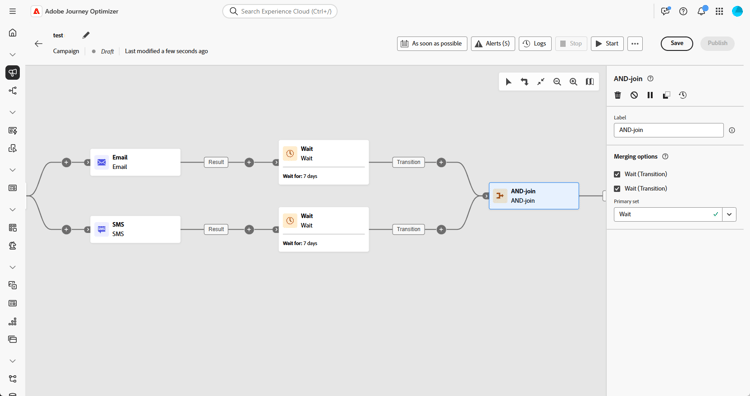
병합 옵션 섹션에서 조인할 이전 활동을 모두 선택합니다.
-
기본 집합 드롭다운에서 유지할 인바운드 전환 집단을 선택합니다.
예 and-join-example
이 예에서는 조정된 캠페인 분기 두 개를 보여줍니다. 하나는 골드 회원, 다른 하나는 실버 회원을 각각 타기팅하는 이메일 게재를 다룹니다. AND 조인은 들어오는 두 전환이 모두 트리거되면 활성화되며, 7일 지연 후 두 이메일 전송이 모두 완료된 후에만 SMS가 전송됩니다.

This section contains structured knowledge intended to support interpretation, retrieval, and question answering related to this topic.
For complete understanding, this information should be combined with the documentation on this page. Neither source is intended to stand alone; the page describes the feature, while this section provides additional context that helps disambiguate terminology, intent, applicability, and constraints.
- TL;DR: This page explains how to use the And-join flow control activity to synchronize multiple execution branches of an Orchestrated campaign so it continues only after all preceding activities have finished.
Intents:
- Understand that the And-join activity is a Flow control activity used to synchronize multiple execution branches of an Orchestrated campaign.
- Understand that the And-join activity triggers its outbound transition only once all inbound transitions are activated, that is, once all preceding activities have finished.
- Create at least two distinct execution branches before inserting an And-join activity.
- Select, under Merging options, which preceding activities to join.
- Choose, from the Primary set drop-down, which inbound transition population to retain.
Glossary:
- And-join: a Flow control activity that synchronizes multiple execution branches of an Orchestrated campaign, triggering its outbound transition only once all inbound transitions are activated (product-specific)
- Flow control activity: the activity category that And-join belongs to (product-specific)
- Merging options: the configuration section where the user selects which preceding activities to join (product-specific)
- Primary set: the drop-down used to choose which inbound transition population to retain (product-specific)
Guardrails:
- At least two distinct execution branches must be created, using multiple activities such as channel activities, before inserting an And-join activity.
Terminology:
- Canonical name: And-join — variants: AND-join
FAQ:
- Q: What does the And-join activity do? — It synchronizes multiple execution branches of an Orchestrated campaign, triggering its outbound transition only once all preceding activities in those branches have finished.
- Q: How do I configure the And-join activity? — Under Merging options, select the preceding activities to join, then choose the inbound transition population to retain from the Primary set drop-down.
- Q: What is the Primary set used for? — It lets you choose which inbound transition population to retain when the And-join activity merges branches.
Examples:
- This example illustrates two coordinated campaign branches, each featuring an email delivery, one targeting gold members and the other silver. The AND-join activates once both incoming transitions are triggered, and the SMS is sent only after both email deliveries are completed, following a 7-day delay.
Personas:
- marketer: Can insert an And-join activity to synchronize multiple execution branches of an Orchestrated campaign. Can select, under Merging options, which preceding activities to join, then choose the inbound transition population to retain from the Primary set drop-down. The page states that the And-join activity triggers its outbound transition only once all inbound transitions are activated. Where: “Configure the And-join activity”.
Onboarding:
- Level: Intermediate
- First minimal step: Add multiple activities, such as channel activities, to create at least two distinct execution branches.
- Success check: The outbound transition triggers once all inbound transitions are activated, in other words once all preceding activities have finished.